Search

Email Advantages
Get your FREE
email updates from
Adorama:
Expert tips
Special offers
New products
First Name
Email
Privacy Policy

HACKER SAFE certified sites prevent over 99.9% of hacker crime.

BBB Logo

BizRate Customer Certified (GOLD) Site

Adobe

Our Price

$198.95

Quantity:

Need Help? Call Our Experts!

1-800-223-2500

Hours of operation

Payments as low as $10/month
  Restrictions Apply

Item Includes Description Features Specifications

Adobe Flash CS4 10.0 Professional Software Upgrade for Macintosh

Mfr. Part: 65018692     SKU: ABFPCS410MU

Free Shipping view details

Product Rating Write a Review

Description

The Adobe Flash CS4 Professional software is the industry-leading authoring environment for creating engaging interactive experiences. Deliver to audiences across platforms and devices. Quickly create animations, easily modify motion paths and enjoy complete control over individual animation attributes with object-based animation.

Create chain-like animation effects with a series of linked objects or quickly distort a single shape using the new Bones tool. Installed on more than 850 million Internet-connected desktops and mobile devices, Flash Player enables you to widely deliver powerful experiences created with Flash.

Features

Design with ease and efficiency: Bring your designs to life with intuitive new animation tools that make your work easier and more efficient. Streamline your workflow with an improved user interface and a powerful coding environment
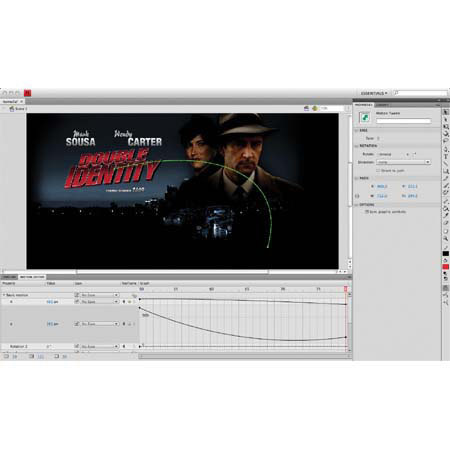
Object-based animation: Gain complete control over individual animation attributes with object-based animation, which applies tweens directly to objects instead of to keyframes. Easily make changes to motion paths with Bezier handles
Motion paths: Experience granular control over object animation paths - Adobe Flash CS4 Professional now automatically generates motion paths that can be easily modified using familiar Bezier handles
Motion presets: Jump-start your project with prebuilt animations that can be applied to any object. Select from dozens of presets or create and save your own. Share presets with others to save animation time
Motion editor: Experience detailed control over keyframe parameters, including rotation, size, scale, position, filters and more, using the new motion editor
Powerful shape drawing: Manipulate vector shapes with powerful shape drawing tools. Easily bend, erase, distort, skew and combine vector shapes in a natural and intuitive way
Shape primitives: Easily create pie wedges, round off rectangle corners, define an inner circle radius and do much more. Visually adjust shape properties on the stage and create custom shapes with the included JavaScript API
Pen tool: Create precise vector illustrations with the Pen tool inspired by Adobe Illustrator software and then manipulate Bezier control points using Illustrator keyboard shortcuts
Shapes as objects: Toggle the object drawing mode to draw shapes as objects for easy visualization, the same way you would in Illustrator
Improved project panel: Work with multifile projects more easily with the new project panel. Apply property changes to multiple files, save symbols to a designated file folder when created and more
Improved library: Work with assets more easily, thanks to an improved library that includes search capability and prioritization
New Adobe Creative Suite interface: Boost your efficiency with intuitive panel docking and spring-loaded behaviors that streamline your interaction with tools throughout the Adobe Creative Suite editions
Vertical Property inspector: Take better advantage of wider displays and gain screen space with the new vertically displayed Property inspector
Customizable workspaces: Easily create and save customized workspaces, including panel and toolbar settings, to work the way you want every time you launch
Adobe Pixel Bender: Easily apply custom filters and effects at runtime for real-time creative expression
Adobe Photoshop and Illustrator import: Import Adobe Photoshop PSD and Illustrator AI files, while preserving layers and structure and then edit them in Flash CS4 Professional
Animation conversion to ActionScript: Instantly convert timeline animations to ActionScript 3.0 code that can be easily edited, reused and leveraged by developers. Even copy animations from one object to another
Animation copy and paste: Copy an animation that is applied to an object and paste it into any other timeline object, dramatically reducing time spent on animation development
Selective layer export: Experiment with different versions of the same file, manage complex layouts and save time by exposing only the layers you want to export and hiding the rest
Undo/redo options: Switch between Object-level Undo and Document-level Undo modes
Metadata (XMP) support: Add metadata to SWF files using the new XMP panel. Quickly assign tags for enhanced collaboration and better mobile experiences
Collaboration with Adobe Flex developers: Edit code in Adobe Flex and then bring it into Flash CS4 Professional for finishing and production. Import code-only ActionScript 3.0 SWC components developed in Adobe Flex Builder software.
Code collapse: Hide code from view by selection or tag so you can focus more easily on the code you are developing
Comment tags: Use easy menu commands to apply comment/uncomment tags to entire lines or any section of code. This Script Editor feature remains consistent across both Adobe Flash CS4 Professional and Dreamweaver CS4 software
Code error navigation: View a list of code errors in a separate panel that is automatically generated when performing tasks such as check syntax, test movie, test project, debug movie, or publish

Specifications

Processor requirement MacPowerPC G5 or multicore Intel processor
Operating system requirement MacMac OS X v10.4.11-10.5.4
Minimum RAM Required1GB of RAM
Hard-disk space Required4GB of available hard-disk space for installation; additional free space required during installation
Display Required1,024x768 display (1,280x800 recommended) with 16-bit video card
Drive RequiredDVD-ROM drive
Software RequiredQuickTime 7.1.2 software required for multimedia features
Internet connection requiredBroadband Internet connection required for online services
Software languages availableBrazilian Portuguese
Czech
Dutch
English
French
German
Italian
Japanese
Polish
Russian
Spanish
Swedish
Turkish
WarrantyAdobe warranty
  
 
Home · Shopping Cart · Account Info · Contact Us · New Products · Specials · Links · FAQ · Site Map · Closeouts · Cameras/Lenses · Flash/Lighting · Filters · Photo Essentials · Digital · Tripods · Binoculars/Scopes · Filing/Storage · Video · Audio Visual · Film · Darkroom · Underwater · Bags/Cases · Digital Prints · Used Equip. · Digital Cameras · Rental Department

Adorama Camera, Inc. 42 West 18th Street New York, NY 10011  Any problems with this site please contact Webmaster