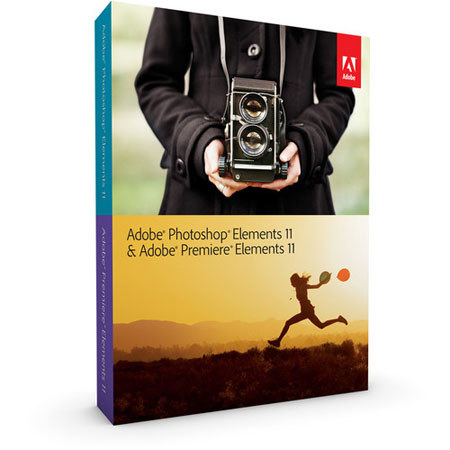
Adobe Photoshop Elements 11 & Premiere Elements 11 Bundle for Mac and Windows
Why Adorama?
Easy Returns, Fast Shipping, Trusted for over 35 years.Need help? Call 800-223-2500 / 212-741-0052
Get the best value shopping our selection of used gear.
Shop UsedWe Pay top dollar for your used photo & video equipment.
Get A Quote
Need help? Call 800-223-2500 / 212-741-0052
The Adobe Photoshop Elements 11 & Premiere Elements 11 for Mac and Windows is a software bundle that combines all the tools you'll need to organize, edit, enhance and share your videos and photos with your closest friends - or the world. Both Premiere Elements and Photoshop Elements are based on Adobe's industry-leading professional software programs for photo and video editing. The Elements versions borrow many of the best features from those programs, while adding automated tools that make it supremely easy to add a professional sheen to any digital photo or movie.
Photoshop Elements features Guided Edits, which walk you step by step through the process of adding advanced effects to your photos, such as depth of field simulation. On the video side, Premiere Elements 11 features advanced color-enhancement tools as well as themes for its InstantMovie tool, which performs an automatic edit of your best footage, complete with titles and music, based on a chosen cinematic theme.
Photoshop Elements & Premiere Elements offers a shared Organizer that serves as the central hub of your two programs. This becomes increasingly important as storage cost-per-gigabyte goes down and the number of photo and video files that you accumulate continues to skyrocket. Photoshop Elements features an intelligent Object Search feature that lets you search based on a specific object in a photo. You can also organize photos and videos based on visual tags and tag photos for Facebook upload using your Friends list.
Photoshop Elements 11 improves upon version 10 in a number of key ways, starting with a brighter, more intuitive user interface. It's easier to navigate and still gives you the flexibility to customize it to your liking. Version 11 also advances the Photoshop Elements program via new Guided Edits and Filter Effects, as well as enhanced object selection. Plus, you can now import third party actions and take advantage of Adobe Revel connectivity.
Premiere Elements has also experienced an overhaul of its user interface in version 11. The interface is now larger, brighter and easier to read and navigate. Easily-accessed pop-up menus prevent the interface from feeling cluttered, while enabling you to utilize every tool with just a few clicks. Video editing is simplified and improved with easy color adjustments, Hollywood FilmLooks and slow- and fast-motion effects, as well as blend modes and 64-bit Mac OS X support.
For both Photoshop and Premiere Elements 11, you can now perform Google maps geo-tagging and share videos to Vimeo. You can also print to CeWe (EMEA).
The Adobe Photoshop Elements 11 is commonly used for Professional quality and more.The Adobe Photoshop Elements 11 is popular because customers like the following qualities of the Adobe Photoshop Elements 11: Accurate colors, Easy to navigate, Versatile to mention just a few.
| Supported Video Formats | AVCHD / Blu-ray Disc (export only) / DV-AVI (import/export on Windows / import only on Mac OS) / DVD / Dolby Digital Stereo / H.264 / HDV / MPEG-1 (import only) / MPEG-2 / MPEG-4 / MP3 / QuickTime / Windows Media (Windows only) and many more Import/export of some formats may require activation via an Internet connection. Activation is fast, easy and free. |
| Windows System Requirements 1 | 2.0 GHz or faster processor with SSE2 support; dual-core processor required for HDV or AVCHD editing and Blu-ray or AVCHD export Microsoft Windows XP with Service Pack 3, Windows Media Center, Windows Vista, Windows 7, or Windows 8 2.0 GB of RAM 7.0 GB of available hard-disk space to install applications; additional 5.0 GB to install content Graphics card with latest updated drivers |
| Windows System Requirements 2 | Color monitor with 16-bit color video card 1024 x 768 display resolution Microsoft DirectX 9- or 10-compatible sound and display driver DVD-ROM drive (compatible DVD burner required to burn DVDs; compatible Blu-ray burner required to burn Blu-ray discs) DV/i.LINK/FireWire/IEEE 1394 interface to connect a Digital 8, DV, or HDV camcorder, or a USB interface to connect a DV-via-USB compatible DV camcorder |
| Windows System Requirements 3 | QuickTime 7 software Windows Media Player (required if importing/exporting Windows Media formats) Internet connection required for Internet-based services |
| Mac System Requirements 1 | 64-bit multicore Intel processor Mac OS X v10.6 through v10.8 2.0 GB of RAM 7.0 GB of available hard-disk space to install applications; additional 5.0 GB to install content Graphics card with latest updated drivers 1024 x 768 display resolution DVD-ROM drive (compatible DVD burner required to burn DVDs; compatible Blu-ray burner required to burn Blu-ray discs) |
| Mac System Requirements 2 | DV/i.LINK/FireWire/IEEE 1394 interface to connect a Digital 8, DV, or HDV camcorder, or a USB interface to connect a DV-via-USB compatible DV camcorder QuickTime 7 software Internet connection required for Internet-based services |