Search

Email Advantages
Get your FREE
email updates from
Adorama:
Expert tips
Special offers
New products
First Name
Email
Privacy Policy

HACKER SAFE certified sites prevent over 99.9% of hacker crime.

BBB Logo

BizRate Customer Certified (GOLD) Site

Adobe

Our Price

$634.95

Quantity:

Need Help? Call Our Experts!

1-800-223-2500

Hours of operation

Item Includes Description Features Specifications

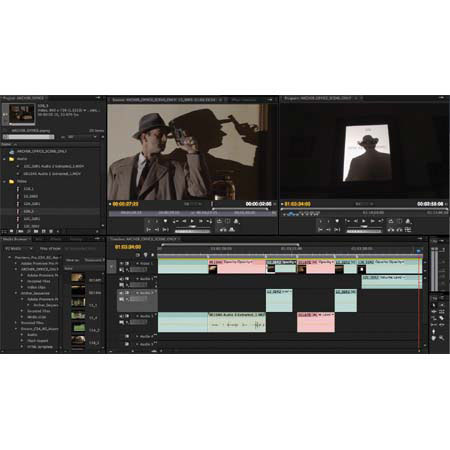
Adobe Premiere Pro 4.0 CS4, Full Version Video Editing Software for Macintosh

Mfr. Part: 65020729     SKU: ABPPCS4M

Product Rating Write a Review

Item Includes

Adobe Premiere Pro CS4 - Adobe OnLocation CS4 - Encore CS4 Software - Adobe Warranty

Description

The Adobe Premiere Pro CS4 Video Editing Software allows to capture, edit and deliver video online, on air, on disc, or on device. Adobe Premiere Pro CS4 ships with Adobe OnLocation CS4 for direct-to-disk capture, as well as Adobe Encore CS4 for high-quality DVD and Blu-ray production.

Edit files from the latest tapeless formats, including AVCHD, P2, XDCAM EX and HD, natively, without transcoding or rewrapping. Find sections of content quickly during editing simply by skimming the text rather than scrubbing through video with Speech Search technology.

Features

Discover new post-production workflows: Push the boundaries of post-production with a comprehensive toolset, interchange with other industry-standard tools and deliver your content to virtually any screen
Comprehensive video format compatibility: Work with virtually any video format thanks to native editing support for DV, HDV, Sony XDCAM, XDCAM EX, Panasonic P2 and AVCHD. Add uncompressed SD and HD acquisition with hardware cards from third-party vendors
Support for mixed formats in the timeline: Combine content from all supported formats in the Adobe Premiere Pro timeline without restrictions. High-quality scaling and flexible footage interpretation rules make it easy to produce exceptional output from mixed-format footage
Native editing in a tapeless workflow: Edit content from the most popular tapeless cameras, without time-consuming transcoding or rewrapping
Support for all major media types: Import and export major video, audio and graphic file formats, including FLV, F4V, MPEG-2, QuickTime, Windows Media, AVI, BWF, AIFF, JPEG, PNG, PSD, TIFF and more
Still-image file support: Import still-image files in major formats, including PSD, BMP, GIF, EPS, JPEG, PCX, PICT, PNG and TIFF. Export in BMP, GIF, TARGA and TIFF formats
Comprehensive VTR support: Control video decks through RS-422 and RS-232 serial protocols or FireWire for precise batch capturing, recapturing and insert editing
ASIO compatibility: Record and play back audio through any multichannel audio card or hardware that supports the industry-standard ASIO protocol (Windows only)
Video hardware support: Choose from a wide range of capture cards and other hardware to build the HD, SD, or DV editing system that meets your needs and budget
AAF project interchange: Interchange project file information with other applications in the production workflow. AAF import and export is available on both Mac OS and Windows. You can also import and export CMX3600 format Edit Decision Lists (EDLs)
4K film production: Import, edit and output image sequences with dimensions up to 4,096x4,096 pixels
Feet + Frames timecode: Display timecode for 16mm and 35mm film in standard Feet + Frames nomenclature
Batch encoding in the background: Save time by automating the process of creating multiple encoded versions of your content using the new batch encoder
FLV/F4V cue points with name/value pairs: Create FLV/F4V cue points with name/value pairs using markers directly in the Adobe Premiere Pro timeline. Cue points flow directly into Adobe Media Encoder, which offers a comprehensive interface for creating, checking and adjusting cue point information
Unified marker dialog box: Easily control marker attributes. Set Adobe Encore CS4 chapter markers, URL web links and FLV cue points using a single dialog box that combines all information in one place
Optimized settings workflow for mobile device output: With Adobe Device Central CS4, get regularly updated information about mobile device capabilities to help you create high-quality video output for playback just about anywhere
DVD authoring: Create high-quality DVD titles using Adobe Encore CS4 software, included with Adobe Premiere Pro CS4. Create a compelling viewer experience with interactive menus and slide shows and help ensure disc quality with integrated transcoding of your content
Industry-leading Blu-ray Disc authoring: Maintain the pristine quality of your HD video all the way to distribution
Delivery to multiple formats from a single project file: With one click, easily create SWF versions of your DVD and Blu-ray Disc projects for the web
Video delivery for interactive viewing: Easily incorporate video into Flash CS4 Professional projects as you create immersive experiences for the web
Interactive authoring to multiple formats: Reach more audiences quickly. Use Encore CS4 to author interactive titles and then publish them to multiple delivery formats - Blu-ray Disc, DVD and SWF for playback through Adobe Flash Player - with a single click
Mobile device output: Optimize your video for viewing on the latest delivery platforms. Use Device Central CS4 to find the best settings for encoding as well as information about device capabilities
Web video delivery: Make your project web ready. In addition to delivering in FLV format, choose from comprehensive compression tools for Internet-friendly file formats including Real, Windows Media and QuickTime
Sequence editing for film out: Support for frame sizes up to 4,096x4,096 pixels and for major image and sequence file formats (including AI, PSD, TGA, TIFF and BMP), makes Adobe Premiere Pro CS4 the ideal tool for editing and preparing sequences for output to 35mm and other film formats
Sleek new application appearance: Work with a new user interface that is easier on the eyes. Adobe Premiere Pro has an updated look that can be made darker and is designed to be easier to work with for longer periods

Specifications

Processor requirement MacMulticore Intel processor
Operating system requirement MacMac OS X v10.4.11-10.5.4
Minimum RAM Required2GB of RAM
Hard-disk space Required10GB of available hard-disk space for installation; additional hard-disk space required during installation
Display Required1,280x900 display with OpenGL 2.0-compatible graphics card
Drive RequiredDVD-ROM drive (SuperDrive for DVD burning)
Dedicated 7200 RPM hard drive for DV and HDV editing; striped disk array storage (RAID 0) for HD; SCSI disk subsystem preferred
Blu-ray burner required for Blu-ray disc creation
Sound cardCore Audio-compatible sound card
Software RequiredQuickTime 7.4.5 software required to use QuickTime features
Internet connection requiredBroadband Internet connection required for online services
Software languages availableEnglish
French
German
Italian
Japanese
Spanish
WarrantyAdobe warranty
  
 
Home · Shopping Cart · Account Info · Contact Us · New Products · Specials · Links · FAQ · Site Map · Closeouts · Cameras/Lenses · Flash/Lighting · Filters · Photo Essentials · Digital · Tripods · Binoculars/Scopes · Filing/Storage · Video · Audio Visual · Film · Darkroom · Underwater · Bags/Cases · Digital Prints · Used Equip. · Digital Cameras · Rental Department

Adorama Camera, Inc. 42 West 18th Street New York, NY 10011  Any problems with this site please contact Webmaster