


+2
more
more
This item is no longer available.
Review Summary
2013-07-09T21:00:00
First off I'd like to say that I purchased (x-mas gift to me) this item in early December 2012 from Adorama via Amazon and could not have been more pleased with the rapid delivery and adequate packaging. Nutshell version: Really like the tablet but after 6 months I'm running into multiple issues with it – skim to the end of this review for details. I typically reserve my review-writing until after I've made a pretty full assessment so here goes... Win8 was tough to get used to but after using it for a while, I found myself liking it more and more. I got so used to the touchscreen that I found myself tapping and swiping at my non-touchscreen PCs ?. * Tablet itself appears sturdy and well-made, screen is very nice, good resolution, crisp, clear presentation of text documents, video and photos alike, colors are vivid and blacks are sufficiently black. Screen size is such that it's an easy transition from a 15" laptop to this. Screen rotation is smooth, delay is a bit extended, but not annoyingly. *Physical buttons/etc. (Full disclosure: I'm a 50-ish year old guy whose hands and fingers are a tad on the rough and callused side and my nails are close-cropped so I'm sure that not everybody will have these issues.) Buttons are low profile and a little tough to locate by feel, but they work as they're supposed to and required finger pressure is sufficient that accidental presses are extremely rare but not so much that they're hard to press. The "Door" to the micro HDMI Out port is really NOT easy to open the first few times but gets easier with use and so far it stays closed pretty well without falling open and dangling. Micro SD card slot is well positioned and cards are easy-in, easy-out (even with my close-cropped nails ?). * Sensors are plentiful and work well, no issues there. * Interface options Bluetooth and WiFi work well and are painless to Pair and set up. I've not had opportunity to try the NFC - it's still a brand-new technology in my location and I couldn't find any place to try it! * Battery life is nothing short of amazing, it's easy to get 8 – 12 hours from a charge, add the docking keyboard and you're on your way to a day and a half or so per charge …depending on use, of course. * Cameras are very good, exactly what you'd expect given their resolutions; one is crystal clear the other a little grainy, but not so much that anyone would consider it awful – it's great for Skype-ing – you can swap from camera to camera with ease during a call so your party can see you or what you're seeing. * Computing – It's a tablet. Not a screaming fast gaming desktop. If you're looking for a high-speed gaming device, go buy one. If you're looking for a good, solid, fast internet and computing device that you can hold in your hand and walk around the house, read in bed, stream movies on the back deck, check auto repair manuals while lying under the car in your garage, then buy a tablet. All and all, I like the product. NOW THE ISSUES… * Wake from sleep – occasionally the sound device would be disabled and would require a restart to get back. Gradually it got worse. This occasional issue became more frequent, and finally the rule – audio device completely disabled, all the time. Shortly thereafter I would get an occasional BSOD "Device_Power_State_Failure". This, too, got worse – and rapidly; at one point I would get a BSOD, the machine would restart, run for a few minutes or so then BSOD, repeat – bad cycle. ASUS support "thinks" this is software related and so had me, first, "Refresh" the PC – no improvement. Then "Reset" the PC – no improvement. An internet search shows that this is a common problem with these tablets and, from most accounts, it's thought to be driver-related and/or that Win8 was corrupted when ASUS installed their bloatware. I've tried some of the suggested fixes but with no luck. Some fixes recommend a clean install but I'm not about to by another Windows 8 package for a brand new machine. * Touch – I now, for some unknown reason, have a mouse cursor permanently affixed to a spot on my screen – the tablet thinks there's either a mouse or a touch going on already so it interprets every actual single-touch as a two-finger touch, so multi-touch gestures aren't working as they should. Swiping no longer works as it should. Thankfully I have the keyboard dock so I can still use the tablet to communicate with ASUS support. * Asus support – is very supportive, but not very helpful in resolving or troubleshooting these issues. So far their responses are "Refresh", "Reset", and "RMA". As I've said, internet-based fixes didn't help, ASUS Support didn't fix things, so I may bite the bullet and send it back on an RMA – hopefully they've realized the problem and are fixing things when folks return them – we'll see. Given its current state, I would not recommend this. If ASUS comes out with a fix, I would definitely recommend this.
EgolEd
2013-05-08T21:00:00
I really wanted to like this tablet, and bought it with the keyboard. It has a great screen (although the auto-brightness in some conditions swings the brightness wildly which is headache-inducing), is super responsive, very sturdily constructed and light enough to carry around. However, it just feels severely underpowered. Either the Atom CPU is weaker than the nVidia Tegras I am used to, or Windows 8 just is not well optimized, or both. The only thing that is 'smooth' is the start menu, and most Metro apps. Unfortunately, the Windows App Store shelves are not ready for prime time -- apps either don't exist, cost money where an equivalent Android app would be fee, or are buggy as heck (e.g. Evernote Metro app would crash on launch). I found just about any desktop app painfully sluggish to use (especially Chrome or Firefox - open more than 1 or 2 tabs (I like to have 10+ open) and you get barely any response out of the UI. There is a frustrating bug in both firefox and chrome where your first interaction with a newly opened tab flips you back to the previous tab you were looking at. Lack of a Gmail app is also a dealbreaker. (I know this is Google's fault, but still). I thought I could get away with Gmail via Chrome, but... see previous paragraph. The tablet should shine with Media -- and it does with apps like Netflix. However, Windows 8 Store fails again to provide anything as usable as Google's YouTube app for Android (the only free apps I found made it hard to browse subscribed channels, their playlists, etc). Browsing in Chrome or Firefox is, as noted before, less than ideal, and is compounded by the fact that putting a flash window in full screen and then touching the screen puts flash somewhere in the background so you are staring at a blank web page and there is no way to get it back short of closing the browser. It does run desktop apps (like my Quicken, Dropbox, etc) without problems. I thought I might be able to get away with playing some old games, but some have problems with the touchscreen (mouse behaves erratically)/trackpad. And it is underpowered for anything modern, even something that is not particularitly demanding, like FTL. I will be selling this and replacing it with an Android tablet. I'd rather have a richer app ecosystem and smooth browsing than the ability to run Windows software.
DancingSamurai
2013-01-16T19:00:00
Love this tablet! Recommend the keyboard dock.
BBC
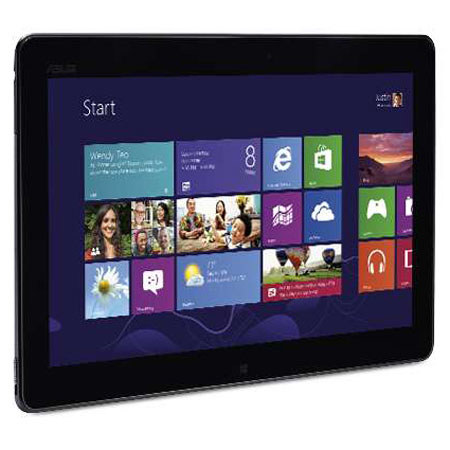
Equipped with an Intel Atom Z2760 Processor and 2GB of DDR2 memory, the Asus TF810C-C1-GR Tablet Computer enables you to accomplish tasks while on the go. With its 64GB flash memory, it gives you ample memory for your storing your important media files. Thanks to its 11.6" HD (1366 x 768) Super IPS+ OGS Touch Panel, it brings out high-quality visuals and ensures smooth navigation for your media contents. Plus, you can enjoy ultra-fast network connection with its 802.11b/g/n Wi-Fi capabilities.