2015-03-19T20:00:00
Rated 5 out of 5
Best MFC Printer!!!
I Purchased this Brother MFC 9460CDN as an Upgrade from previously using an Epson Inject All in one. I absolutely love this Brother Printer. We use it for both Personal and Business use, it is fast, and the quality is great. It has saved us tons of $$$ due to no longer needing to go to a copy and print facility to get mass amounts of color copies.
Vicera121
Originally posted at

2015-03-05T19:00:00
Rated 4 out of 5
MFC-9460CDN
Excellent product for printing, & scaning & fax from my iMac. I wish I could print via wirelessly. I hope they have another product that would include printing, scaning & all-in-one with Wireless printing that would work with my I-mac!
Tunaboy
Originally posted at
2014-06-29T20:00:00
Rated 5 out of 5
Excellent Quality
I am currently pursuing a doctorate and have to do a lot of research, along with that comes a lot of printing, scanning and faxing. I have found that this copier provides high quality no matter what function I am using.
Tangie
Originally posted at
2013-08-08T20:00:00
Rated 5 out of 5
Should have purchased it sooner
The printer is quiet, efficient and easy to use. It is quick on large files. I am sorry I waited so long to get it. The document feeder doesn't jam or take 2 pages at a time like my other other printer did. I would definitely recommend it.
Roxanne
Originally posted at
2013-07-16T20:00:00
Rated 1 out of 5
GOOD FOR CERTAIN FUNCTIONS
The machine works beautifully using standard paper for anything, but when I try to use tri-fold brochure paper, it jams with every attempt.
HARPO
Originally posted at
2013-04-15T20:00:00
Rated 5 out of 5
Excellent Machine
The MFC-9460CDN is all that I wanted in a multi-functional printer. The machine is user friendly, the print quality is excellent, the fax capabilities work very well, the duplex printing capability saves on paper, and we have it installed on our network making printing from the machine convenient for each one on the network.
DoctorMax
Originally posted at
2013-02-28T19:00:00
Rated 5 out of 5
Best Machine ever
This is my first laser printer and we loved it so much we purchased a second one for our son. He is a Travel Agent and uses it instead of going to Staples or Office Depot for his printing needs. It is fast. Expensive but worth every penny if you do a lot of printing. We love the product! 110% satisfied. I had a couple of glitches but it was because I did not know how to use it. Great custoner service.
Momatwork
Originally posted at
2013-02-15T19:00:00
Rated 5 out of 5
LOVE this printer, but....
because it can't handle duplex copying, I've kept my old DCP8065DN offline - just in case I find myself with a need for that function. I like the idea of having fax back (we essentially bought our retirement house with it on a prior multi-function but don't know how much we'll use it now that we actually are retired.
I didn't realize how much difference color would make for home use; I gather electronic coupons and print off a list of the currently available ones and it really helps find the product in the store.
RuthK
Originally posted at
2013-02-04T19:00:00
Rated 5 out of 5
Excellent
Great machine for all its purposes. I like the ability to change out individually the toner cartridges.
Brent
Originally posted at
2013-01-04T19:00:00
This printer is good for a small business, I wish it had a better way to print envelopes and smaller paper. Color quality is good.
knoh
Originally posted at
2012-12-19T19:00:00
Rated 5 out of 5
great printer
This is the first laser printer we've owned, and we will never go back to inkjets. Our printers usually see very light duty, printing emails or forms a few times a week. We just got tired of inaccurate color representation and unreliable ink cartridges. Not to mention having to change cartridges quite often. Our intention was to buy a higher end printer and keep it for awhile rather than replacing our cheap inkjet every year or two. This printer is fitting very nicely. Easy to use, easy to service, prints are high quality and very consistent. The cost was quite a bit more than any of the inkjets I previously owned, but absolutely worth it.
yosh
Originally posted at
2012-12-05T19:00:00
Rated 4 out of 5
Great Buy
This printer runs circles around old one and uses a lot less money in printing costs. Best money I spent so far on a printer.
kmanley57
Originally posted at
2012-12-03T19:00:00
This printer is my first Brother printer and has been very reliable and easy to use.
PROS: quick, no streaks, clean prints, decent paper storage, not diffcult to use.
CONS: No direct visual for remaining cartridge life, constant reminder (pop-up) when cartridge is getting low.
LandNKid
Originally posted at
2012-12-03T19:00:00
Rated 3 out of 5
Good printer for smaller organization
My church purchased this printer to replace a full-sized copier that was donated to us when it finally wore out. Since we didn't have a large scale coping situation we thought this would be sufficient for our purposes and with the color capability would let us do some creative printing.
It has turned out to be quite sufficient for our needs. It handles the printing quantity we use for our weekly tasks and has a high quality finish that makes our printed items look professional.
In reality there are only a couple of items that I am less than satisfied with. First, I don't feel we get maximum pages with our toner. We print mainly letters and bulletins that use black toner only and have large white spaces. Second, when the toner is empty we cannot shake it like other manufacturers and replace to maximize toner. One additional item is that it seems that when the black toner is empty the color toners are not far behind in needing to be replaced even if we don't use the color option very much.
The scanning feature is great but we have not used the fax feature at all so I can't speak to that. The software is a bit cumbersome to use to make changes to it's default features.
Overall, with my concerns, I have liked the printer and would recommend it to others in my similar situation. My real rating would be 3 1/2 stars.
PastorMike
Originally posted at
2012-12-03T19:00:00
Rated 5 out of 5
Go get one!
I have been using the Brother MFC-9460DN as a printer, copier, scanner & fax for about 6 months now. It is very fast, good color & crisp text, scanning is a breeze, faxing & set up is easy. Envelopes & labels printed through the front pull-out tray are perfect as well. Haven't had a single paper jam or issue to date.
Highly recommend for small to medium office!
Markanoonda
Originally posted at
2012-12-03T19:00:00
Rated 5 out of 5
I love this machine
I have had alot of printers in my life But nothing like this it is the best money can buy Had about 1 year now and not a lick of problems!
tom0749
Originally posted at
2012-12-03T19:00:00
Rated 5 out of 5
Satisfied
This printer has the features we needed for our small business, it was easy to set up, works well, so we are pleased with this purchase. I would add the seond tray if I had it to do again.
manager
Originally posted at
2012-12-02T19:00:00
THE ONLY THING I DON'T LIKE ABOUT THIS PRINTER IS THE WAY THAT THE PAPER COMES OUT CURVED. I FIND IT HARD TO BELIEVE THAT BOTHER WOULD RELEASE A PRODUCT THAT COMES OUT OF THE PRINTER CURVED LIKE IT DOES. OTHER THAN THAT I LOVE THE PRINTER. PRINT IS EXCELLENT AS IS COLOR. BEST PRIINT I HAVE GOTTEN FROM A PRINTER.
GREAT
Originally posted at
2012-12-02T19:00:00
Rated 5 out of 5
Best All in-one I've ever owned
Hands down best printer not to mention an all in one I have ever owned. Fast, reliable, simple to use, and simply the best you can ask for. If you are on the fence - don't be, this all in one will meet your needs and will be there when you need it functioning as it should at all times.
gtadams67
Originally posted at
2012-12-02T19:00:00
Rated 5 out of 5
My Tenth MFC
I have been uising Brother MFC printers for the past ten years. The MFC-9460CDN is the best ever. I have two; one at home, the other at work. I love the all-in-one capability, and color printing. I recommend this printer to anyone who needs a convenient and high quality machine for their personal or small group printing.
MartinR
Originally posted at
2012-12-02T19:00:00
Rated 5 out of 5
Better than other Brands
I have had other all in one color printers for quite a while but always had trouble with them after the first few months of use. My Brother all in one color has not been a problem and has given me more pleasure with it's ease of use. Because of this I have two. Color is great, Fax is simple to use, I can even use the scanning which I couldn't use in the other brands.
JLMS
Originally posted at
2012-12-02T19:00:00
Rated 4 out of 5
Where is the printed output?
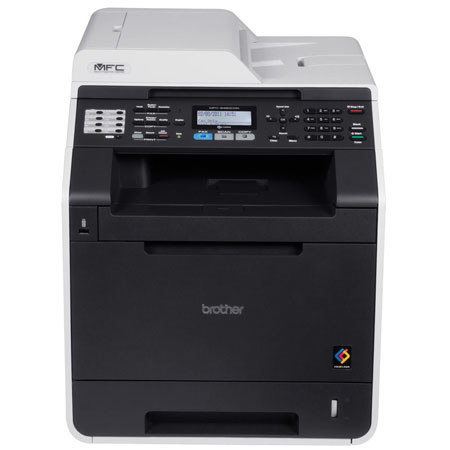
This printer has one major deficiency: In order to retrieve letter size printed output, it is necessary to either 1) carefully reach into the discharge opening, taking care not to knock the output back into the machine where it is almost impossible to find or 2) lift up the hinged scanner assembly in order to have improved access. Note: The misleading photo of the printer indicates that the output is readily accessible which is certainly not the case with letter size or smaller output.
wesfergy
Originally posted at
2012-12-02T19:00:00
Rated 4 out of 5
My MFC 9460 CDN
This is an outstanding machine. It is capable of producing sharp documents, provides all the capabilities a small business required while at the same time is not as expensive as others.
I would not hesitate in purchasing a second one once this one has given all the service it is capable of providing.
noresly
Originally posted at
2012-11-27T19:00:00
Rated 4 out of 5
Good Value
I purchased this for our church office which was changing inkjet cartridges on a bi-weekly basis. Now, with the high capacity toner, we get about 4 months from black and more from the color cartridges. Print speed is good even on duplexed material with graphics. The unit is solidly built except for the support guide on the ADF which should be left folded when not in use. I had some connectivity issues at first which were resolved by the first firmware upgrade. If it performs over time like other Brother printers I have, it should provide many years of service at a reasonable cost.
CKRick
Originally posted at
2012-11-25T19:00:00
Rated 4 out of 5
Toner Alert comes on too soon
I love the printer, but it took us 2 rounds of toner months to realize the low tower light comes on when the toner is 1/2 empty. The low toner message came on for 2 months before we actually had to change toner cartridges.
gnyland
Originally posted at
2012-11-25T19:00:00
Rated 5 out of 5
Best purchase I ever made.
The MFC-9460CDN was the best purchase I ever made. The performance is outstanding and the ease of operation is great. Brother Support has been helpful. Initial install was made simple. The MFC-9460CDN is just what I needed for my business.
DiscDoctor
Originally posted at
2012-11-24T19:00:00
Rated 5 out of 5
Color Laser Printer
This printer was the easiest to set up in networking. The other major brand I have is a headache to set up with setting the address, etc., the Brother was a breeze as it set the address itself with no conflict. Speed and quality are much better.
old44
Originally posted at
2012-11-24T19:00:00
Rated 5 out of 5
Great all-around office machine
I have enjoyed using the Brothers MFC-9460DN Printer combination unit. I especially like sending faxes from word or any other document direectly to fax without scanning. The scanner is easy to use and does a fantastic job. I would buy this unit again (o: Hope this review doesn't bring me bad luck and my Unit catches fire LOL
Dimitri
Originally posted at
2012-11-24T19:00:00
Rated 5 out of 5
MFC-9460CDN very good machine
I really like this machine. Color and scanning are very good. My only complaint is that it causes an occasional audio warning, "MFC-9460CDN off-line" and shortly an, "MFC-9460CDN sleep" warning and I can't figure a way to get rid of it. Nor can I determine why Windows 7 finds it off-line.
halex
Originally posted at
2012-11-24T19:00:00
Rated 5 out of 5
MFC-9460CDN
I am very please with my printer. It is fast, I love the duplex feature along with the ability to copy and fax quickly, one sheet at a time or several sheets. I have had my printer for about four months and still on the cartriages that came with it.
ManofWar
Originally posted at