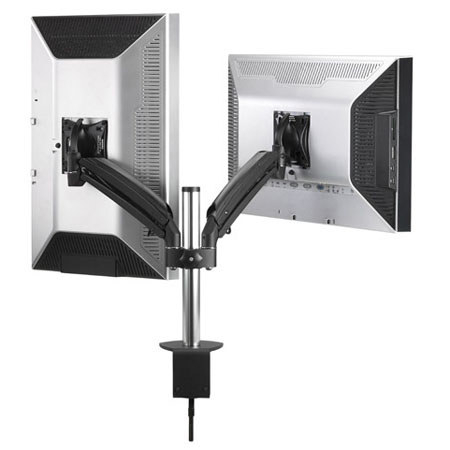

Chief K1C250 KONTOUR Dynamic Column Clamp Single Arm Mount, Dual Monitor, Black

SKU: CHK1C250B

This item is no longer available.

Overview
Compare
Specs
Protection

Reviews about this item

Review Summary

Chief K1C250 Specifications

  • Desktop Thickness Range

    0.5 - 3.25" (12.7 - 82.55 mm)

  • Dynamic Height Adjustment

    13" (330.2 mm)

  • Equipment Width Range

    Up to 22.5" (571.5 mm)

  • Manual Height Adjustment

    10.75" (273.05 mm)

  • Maximum Extension

    8.9" (226.06 mm)

  • Minimum Depth

    2.13" (54.10 mm)

  • Mounting Pattern Compatibility

    75 x 75mm, 100 x 100mm (Universal Versions)

  • Number of Monitors

    2

  • Orientation

    Landscape, Portrait

  • Post-Installation Leveling (Roll)

    Yes

  • Solution Type

    Universal

  • Tilt

    +75 degrees, -10degrees

  • Typical Screen Sizes

    10 - 30" (254 - 762 mm)

  • Load Capacity

    5 - 25 lbs (2.3 - 11.3 kg)

  • Dimensions (H x W x D)

    15 x 27.04 x 2.13" (381 x 686.8 x 54.1 mm)

About Chief K1C250

The Chief K1C250 KONTOUR Dual Display Column Mount (Black) uses gas-spring technology that allows you to easily adjust the height of the mount along the column, making it suitable for sitting or standing applications. Designed to hold 2 monitors, the Column Mount is can be installed next to a cubical wall or adjacent to a desk offering you a low profile mounting solution for your displays.

The Column Mount is easy to install and features a quick-release interface for hassle-free setup. Once installed, the Centris mechanism allows for quick and easy fingertip tilt adjustments of the mount. Tool-free cable management covers allow you to hide cables for a clean, clutter-free look. Made of forged aluminum, the mount's body is built to stand the test of time.

Chief K1C250 Features

  • Sleek, solidly-constructed forged aluminum arms
  • Independently position monitors for optimal viewing comfort (sitting and/or standing)
  • Dynamic height adjustment using gas-spring technology with additional adjustment along the column. Ideal for sit-stand applications
  • Simple 3-step installation and integrated quick-release interface for easy mounting and maintenance
  • Tool-free cable management covers for a clean, professional look
  • Patented Centris Extreme Tilt. Tilts -75/+10 for an ultimate ergonomic solution
  • Easily clamps to edge of desk (grommet and bolt through accessory available, separately)
  • Provides a low profile mounting solution for two monitors while installed next to a cubical wall or adjacent desk