
This item is no longer available.
Review Summary
2016-02-22T19:00:00
It worked pretty well for a year or so until El Capitan came out. now its a BRICK. DYMO has been sating since November 2015 "currently does not work with El Cqpitan". IT NEVER WILL! Bummer. DO NOT BUY if you are connecting to a Mac!
NYC U.

2016-01-25T19:00:00
since the latest Mac OS update this scanner has been a paperweight on my desk. Teck support says they are aware of the situation and working on a solution.... it has been 6 months with no update.... hate to throw away a $350 scanner but it is useless to any Mac users. Get your act together DYMO.... SUPPORT YOUR PRODUCTS!!!!
Quijibo69
2016-01-21T19:00:00
It worked ok for a while, but does not work with El Capitan on the Mac. It's been several months with no update from Dymo. The canner is now a paperweight.
wcaswell
2016-01-17T19:00:00
DYMO should warn users of CardScan that if they upgrade to the current Apple Mac OS X software, their CardScan will no longer work. There is still no upgrade path for Mac users, reference to compatibility with Mac should be removed until this is fixed.
PhonoJack
2015-12-22T19:00:00
Even though I has lots of problems with a earlier CardScan product, I bought another: CardScan Executive. Unfortunately, the software is still lousy and there seems to be almost no support online.
kiddo
2015-09-21T20:00:00
I owned Card Scan and its software before it was acquired by Dymo. The old software was much more user friendly and useful that the current version. Now you cannot visualize the back of a card; easily add notes or view the image and the text simultaneously. It's so bad, I am looking at how to export my data and transfer it to another vendor product.
qyxis
2014-08-07T20:00:00
I bought the cardscan less than a month ago and I miss the previous version. I was told this works better with Windows 7 so I bought a new one. The previous cardscan could scan several cards quickly, edit and synchronize updating the current card without duplicating it. 1 When you work for more than one person, being able to scan directly into the person's address book is a nice feature. 2) New version does one card at a time and seems to take longer. 3) Outlook Address Book interferes with my searching quickly for a name. It can be very irritating as an assistant if I need to transfer a call or a call with a few people on line and my search takes a few minutes to look up the person I need to transfer to or conference in. Sometimes it freezes or if you type one or two letters in, it goes to an entirely different letter in the alphabet. 5) I don't like how Outlook previews the card whenever the Outlook address book is open. 6) Every card I scan duplicates the business phone under other; the email under other and sometimes the fax number. I have to go in and delete duplicate number and check behind each pull down.
EA14
2014-05-22T20:00:00
I have been with cardscan since 1995, left last year to try a new product and it was a piece of garbage. Threw it away and came right back to my card scan executive, simple easy to use and works like a gem!
afjpirate
2014-05-15T20:00:00
They don't update the driver, so the scanner no longer works.
PeterScanner
2014-02-12T19:00:00
You wont see it mentioned in the ads or product literature but this scanner will not work with Microsoft Outlook 64 bit versions. Only after installing software and scanning will you see the error messages. They actually suggest you downgrade to 32 bit versions ( why dont they fix their software?). Suggested work around is to scan to their software, export to vcard then import into Outlook. That's a lengthy process and you loose the actual card image. Apparently this will be a soon discontinued product line or they would have a software fix.
JDRble
2014-01-27T19:00:00
If you are running outlook software newer than 2010, this product will not work nor is it supported.
cwb1
2014-01-08T19:00:00
The current software 9.1.0 is incompatible with OSX 10.9.1. Don't buy until they fix this.
CardscanUser1
2014-01-07T19:00:00
I am shocked with the lack of support for 64 bit outlook. I do need to run 64 bit excel and my IT group will not load 32 bit office and 64 bit excel. Creates too many problems. Dymo needs to step up their developement and support. 64 bit has been around for long enough that they are now behind the technology wave. Exporting and importing is a time waster and for the money spent on the product the productivity gain is just not there without the 64 bit outlook connector.
caseyp
2013-06-05T20:00:00
This use to be a great product, but since being purchased by Dymo it has steadily fallen behind. iOS, Android syncing are not available without buying 3rd party apps. Dymo probably should just kill the product line. Watching it die a slow death is painful
mbwelchutes
2013-04-22T21:00:00
This is still the best business card scanner and address book---bar none. I hope that Dymo, the new owner of Cardscan, recognizes this and continues to support and improve this product. I have been using Cardscan for over a decade and it has faithfully been my primary address book all that time. I export my address to Gmail using Cardscan's filters. I don't trust any other address book.
Ronald S.
2013-02-11T19:00:00
I have owned CardScan for years and was generally very happy. So much so, I upgraded to the Executive verson. But the software has not been kept up to date and does not interface to Act 2013. There are no announced plans for a software update to address the problem. Which I read as NEVER. Therefore this is an OBSOLETE product.
JimH1817
2012-06-28T20:00:00
I've used this product for over 8 years and wouldn't be without it. Works great for getting information into Outlook.
Lisa1816
2012-04-03T20:00:00
Scan my boss's business cards for his outlook contacts.
Gina1815
2012-02-20T19:00:00
Great time saver!
chris1814
2012-01-06T19:00:00
The ability to store card information in an easy-to-use database is very valuable to me because I bring home so many cards. I also like the ability to sync to a server and was disappointed that that is going away.
G1813
2011-11-09T19:00:00
CardScan is great at figuring out which parts of varied business cards belong in which contact fields. Synch catches changes/adds/deletes on either CardScan or Outlook side and can either sync quickly or give you detailed options about what values to keep/propagate. Hardware and software quality and ease of use excellent. Last I heard, though, CardScan At Your Service, Plaxo-like site for contact updates/access, is going away. CardScan hardware and software will be less without it, but still worth using.
Jim1812
2011-10-25T20:00:00
I used to manualy edit the contact information from business cards into outlook. I thought the investment into such a small cheasy gadget wouldn't be worth it. How wrong I was! I wouldn't part with my CardScan gadget ever again! You save heaps of time and the CardScan Excecutive just works. Hassle-free business card management at its' best.
John1811
2011-09-26T20:00:00
good
nick1810
2011-09-04T20:00:00
First time I've used one of these type of card scanners where I haven't had to make huge corrections after scanning.
Jenn1809
2011-07-04T20:00:00
I use to scan all Business cards. Ease of use and finding contacts when needed. I think the scanner is about 1-1/2" to wide.
Darrell3896
2011-05-17T20:00:00
Everything was going well until but now the user have received an email saying that they are stopping At your service. Now is there any other option cardscan is providing to cater to this issue
Jiim
2011-04-28T20:00:00
I love the fact that I can find my cards easily on my laptop computer. However, it would be great to have an iphone application that could synchronize with the computer application
calou
2011-04-14T20:00:00
We are a Farmers' Market and have hundreds upon hundreds of business cards laying around. And it was almost impossible to find the one we wanted when we needed it. No more! Tremendous benefit to us. Search feature makes everything a snap!!
Nana3895
2011-03-22T20:00:00
It organized my outlook, all my cards are now in outlook. the amount of time it saves me looking for a contact is unbelievebale
Oil G.
2011-02-05T19:00:00
I travel frequently to conferences/trade shows and gather 100's of business cards which can be readily organized daily with the CardScan. No more sorting and guessing after returning from each trip. I only wish it can also recoginze Chinese and other Asian languages, as so many trade shows are international. I hope later my CardScan can have free software updates with such capabilities.
Trade-Show J.
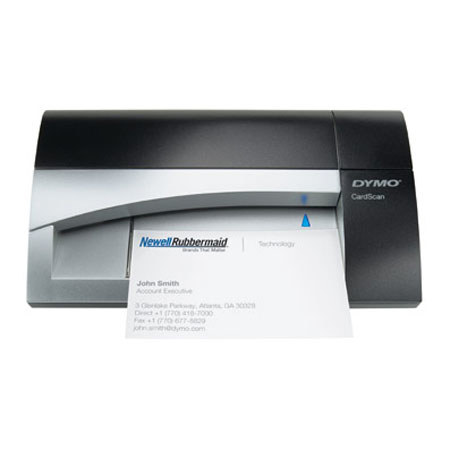
CardScan Executive combines fast and accurate color-capable business card scanner with the latest version of award-winning CardScan contact management software. Just scan any business card, or drag-and-drop contact data from any email signature or web page - CardScan software automatically enters the data into the appropriate fields to create an indispensible digital address book. New CardScan v9 software includes a redesigned interface and great new features that make managing your contacts easier than ever.
Scan business cards directly into Microsoft Outlook with the new Outlook Add-in (Windows only). Verify and correct US addresses and ZIP+4 codes with the new Address Fixer functionality (Windows only; requires Internet connection). Edit, categorize, sort, search and de-duplicate contacts in seconds. Get a map to any contact's address - or print DYMO mailing labels for your contacts(1) - with a single click. Sync contact data seamlessly with Outlook, Palm, Windows Mobile, Act! Standard and Premium for Workgroups and Lotus Notes (Windows) or Mac Address Book (Mac). And now save CardScan files in .csv (spreadsheet) or .vcf (vCard) format, too.