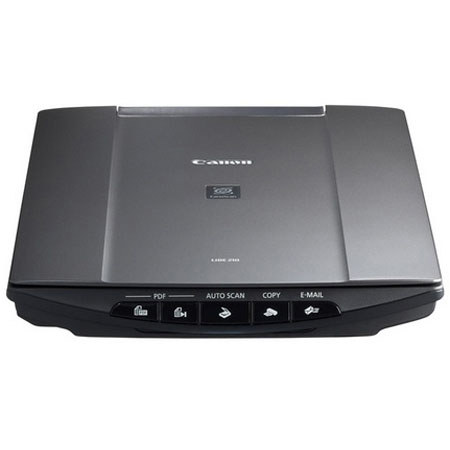
Canon CanoScan LiDE 210 Flatbed Color Image Scanner, 8.5x11.7", 4800x4800 Color dpi with USB 2.0 Interface, for Mac & Windows
SKU: ICACSL210
This item is no longer available.
Recommended Alternatives
Share:
Overview
Compare
Learn
Specs
Protection
Reviews about this item
Review Summary
2021-04-02T20:00:00
Rated 5 out of 5
MP Navigator EX 4.07 is amazing
I have owned my LIDE 210 for several years. It's an excellent scanner for my purposes, which is scanning receipts and various documents. I love the way the genius software engineers compress pdf images extremely small, far smaller than other scanning software I have tried - and I use 400 dpi and get absolutely excellent small files! I just wish Canon would sell the MP Navigator EX program and maintain it -- will not be able to continue using it on macOS 11 Big Sur, which means I'll have to use a virtual machine to run an older version of macOS in order to continue to use my scanner. :-(
dbadoug
Originally posted at
2019-12-19T19:00:00
Rated 3 out of 5
Many problems with Windows 10
I have had this scanner for a few years. But it has many problems with Windows 10.
JJKing
Originally posted at
2019-08-02T20:00:00
Rated 5 out of 5
Great Features and very quick.
Just got this from a friend. It's out standing. I had it up and running in about 15mins. I had to down load some things. It took me no time at all. Great, I love it so far. I cant wait to get to work with it. Oh yes I'm using Win-10 with a Hp Z400. Keep up the great work guys.
roaddog4405
Originally posted at
2018-10-26T20:00:00
Rated 2 out of 5
Mac OS upgrades a problem
I have had this scanner for several years and like it. But every new MacOS upgrade brings a problem!! I finally got it to work with High Sierra (OSX 10.13, but now have upgraded to Mojave (OSX 10.14). Even after downloading new drivers, and Navigator package that is supposed to work with Mojave, I can't get it to work. Very frustrating-- about to throw this item in the dumpster.
tedban
Originally posted at
2018-05-27T20:00:00
Rated 1 out of 5
basic and buttons don't work
I don't know if it's a bad driver or bad hardware, but the buttons don't work. I've seen a few forums with suggestions, and apparently the only one that works is to edit your registry. Don't get me wrong, it does scan but it's not as good as expected.
p4mc4k3
Originally posted at
2018-03-15T20:00:00
Rated 3 out of 5
If nothing else is available
Using couple of years. Excellent results. The only gross defficiency is terrible user on screen guide. I could not believe how confusing it is when compared to old products I used before: AGFA and Canon 100 series.I will recommend with warnings.
Presporak
Originally posted at
2017-10-19T20:00:00
Rated 5 out of 5
Really easy to use and good capabilities
I've had this scanner for over a year, and I like the fact that it operates off the USB alone - no power cord! The MP Navigator EX utility is also very flexible and useful. I especially like being able to create a multi-page PDF from several scanned pages.
Fred2179
Originally posted at
2015-12-31T19:00:00
Rated 5 out of 5
Love this scanner
I've had this scanner for a couple of years and it is GREAT!
No n.
Originally posted at
2015-11-14T19:00:00
Rated 5 out of 5
Couldn't have asked for a better product
Life savor, so convenient, portable, durable, easy to use... Ideal for anyone who has to scan docs, receipts etc.. while on the go
King I.
Originally posted at
2015-08-06T20:00:00
Rated 1 out of 5
The software update is terrible
Updating the software is impossible. I've installed and uninstalled several times to no avail. Can only scan thru my Apple device and not with the Canon Software. Will never buy Canon again.
reversaldoctor
Originally posted at
2015-05-30T20:00:00
Rated 5 out of 5
Good value
I just bought my 2nd model, this time to replace a Lide 220 that died after 5 months. My first 210 lasted 4 years used in portable and desktop applications. For my needs this is a very good product. I liked the original software much better then the current variety. Highly recommended.
Ken
Originally posted at
2014-11-06T19:00:00
Rated 5 out of 5
Exceeded expectations
Better than expected! Installation was a breeze and operating it was so simple and intuitive. The accompanying editing software was easy to use and effective. Canon has done a fine job with this product. Highly recommended.
Sonny
Originally posted at
2014-10-25T20:00:00
Rated 5 out of 5
Great with Windows 8.1
Works GREAT! Using with Microsoft Windows 8.1 . Also works GREAT with Nuance PaperPort V14.5 scanning software. I bought one for at home, and one for the office.
Boatman
Originally posted at
2014-08-08T20:00:00
Rated 5 out of 5
Great Value
I scan a lot of photos and other documents for genealogy purposes and this scanner is the real deal. It is small enough to fit in my laptop case and still leave room for the computer. It does not require a clunky separate power supply allowing me to set up and scan anywhere: libraries, family homes, etc., so it goes with me on all family and vacation trips. The CanoScan model 200 I purchased in 2010 quit communicating with my computer so when I went looking for a replacement, a new Canon was my first choice so I bought the CanoScan model 210.
Super C.
Originally posted at
2014-08-04T20:00:00
Rated 2 out of 5
Be a techie to use
Better be a techie to install and use this in Windows 8. Installation can't find Windows 8 as OS (doesn't offer Win 7 either. Has addendum for running on Windows 8. Installation does not build a icon, so you have to create shortcut yourself, by finding a file name not used in the documentation. Box stated 4800 dpi, but I have not found a setting greater than 1200. Box states runs in Win 8, but documentation is terrible. Box states 10 second scans, but best I did was 30 seconds.
MD 6.
Originally posted at
2014-04-20T20:00:00
Rated 5 out of 5
BEST job, little scanner!
I had no idea I would use this scanner so much nor did I realize how nice it is to scan directly into a PDF no more GIF or JPEG - scanning of documents.. This scanner is light, easy to plug in and out if you don't want to keep it around it is light weight, VERY efficient and SUPER easy to use as easy as "push this button that says PDF" or "scan and email" no worries.. need to print from scan? Go ahead push "print" and it will send the scan to your printer... need I say more? Go ahead spend on the best investment out there.. I had another one I gave away to a friend, that's how much I love this scanner... I bought this one and had it for over 3 years!
The i.
Originally posted at
2014-03-07T19:00:00
Rated 1 out of 5
Unusable
Installation was easy and was looking forward to organizing the paperwork until I tried to scan the first document. Every document had a 1/2 inch of unscanned material. A solid black area was in it's place. Will return.
kathy
Originally posted at
2014-02-25T19:00:00
Rated 3 out of 5
Not for advanced users
Pros - Easy to use for average users. Single cord - no need for a power cord or power supply brick. This is a major plus if you're traveling with this scanner, or occasionally need to place it in the middle of a large table to scan large items. Neutral - Not any faster than the 12+ year-old scanner it was replacing. Cons - The simplified driver software is too simple - you have to go through multiple screens to find the settings you want, and even then, there isn't much control over the settings. (what if I need to disable auto-color balance?) Overall, this makes it slower and harder for me to use. Recommendation: Best for normal users, not for advanced users.
Tom
Originally posted at
2014-01-08T19:00:00
Rated 2 out of 5
LiDE 210 Software Incompatible with Win 7
I purchased this scanner for its "easy set up and satisfactory scanning," which was touted by an online retailer. Reviews seemed favorable at that site, and the price was right. Unfortunately, the software that accompanied the scanner is apparently not compatible with Win 7 Home Edition,on a 64 bit laptop computer. The hard drive on this machine is empty, and this software was the second installed, after the security software. I get a continuous "Navigator has stopped working" error message, when I try to use the scanner with its factory software. Many attempts to restore or remove the software, updates via the Canon wevsite, and consultation with Canon service reps have not solved this problem. So I'm going with a laborius work-around, which is unsatisfactory for scanning multiple photos or documents in one "session". Not satisfactory, since this is not fast,and my time is money. Overall, the scanner is compact, is lightweight, and has features I wish I could use. So I give this scanner a "2" for its overall lack of usability.
Mohabee
Originally posted at
2013-10-21T21:00:00
Rated 4 out of 5
Great affordable scanner
Great affordable scanner. I predominantly use it to scan books, whether from the library or at my own collection. Its super easy to use (I use a Mac) and its nice and lightweight, so I can carry it anywhere. I also like that its powered by USB, so I dont need to carry a special power adaptor. Works great to scan stuff like photos or documents, and really nicely converts text in PDFs so you can use the highlight tool when viewing the PDF later.
OzJono
2013-10-02T20:00:00
Rated 2 out of 5
Great scanner, lousy software
Horrible software packages. Finding the right way through complicated, over-sophisticated menus to find a simple way to scan a document and save it is a big hassle. After reinstalling my PC I thought it would be a shortcut to download the software, but I still had to download, try, delete a couple of packages. Why does it have to be so time consuming to get going with this scanner??? I don't want any of the sophisticated geek features, I just want to scan a document and save it as a jpeg - simple and easy!!!
Tom
Originally posted at
2013-09-16T20:00:00
Rated 5 out of 5
easy works great
I love this scanner, simple and works great. This is the second one we owned, both were cannon's. we couldn't get new drivers for the last one but it never did wear out. I like that there isn't a separate power cord. I use it with my laptop. windows 7.
loveit
Originally posted at
2013-04-19T20:00:00
Rated 4 out of 5
Ideal for Travelers
As a snowbird traveling in an RV, I bought this LiDE 210 scanner because it is light, compact, and USB powered (no power brick}. The excellent quality of scans surprised me. I use it for scanning documents, photos, and checks for electronic bank deposits. Altho the GUI interface appears clunky to a Mac OS X user, it gets the job done - that is the only "con" I have noticed.
Tomah C.
Originally posted at
2013-02-26T19:00:00
Rated 4 out of 5
Does what I need it to
I bought the 210 for it's compact design, not knowing that it feels a little fragile. I suppose if I wanted sturdy there were other bulkier models available.... and hand scanners - no way, I shake too much. When I took the scan for the first time it seemed to be of poor quality until I enlarged it where I could see that this was exceptional imagery. 4800 dpi means nothing when the pdf's can only be 300 or 600 but for pictures you'll get your money's worth.
Bushman
Originally posted at
2013-02-09T19:00:00
Rated 1 out of 5
Not Satisfied
Never would scan @ 4800 dpi as claimed 1200 dpi was max and then only a few times. Downloaded driver and software from Canon but 300 dpi is best it will do. It is out of warranty and I am either going to throw it away or give it to someone who needs another problem in his/her life. My next scanner will not be a Canon.
Tom G.
Originally posted at
2012-10-24T20:00:00
Rated 5 out of 5
Great Scanner
I've used these little scanners since the Lide10, have upgraded a few times. I am able to take this with me on trips as it fits right in my briefcase with my laptop and allows me to copy photos or book pages at the library, able to scan multiple photos and keep as seperate files without having to cut, paste and save. No need for a seperate power cord. I just pack and go.
Mom50
Originally posted at
2012-09-06T20:00:00
Rated 4 out of 5
It's Windows 7 compatible!
Received the product OK and installed easily. It worked immediately after the CD was finished (and the system was rebooted). It will default install on drive C. If you want another location, go for the custome installation. Worked as expected just using the Microsoft Scanner Software (Document Imaging)...however, they include a lot of different applications should you want custom scanning. Registration asks for the user O/S but does NOT include Windows 7 in the list. Product is somewhat noisy compared to previous models. Good Function for cost.
larrym3711
Originally posted at
2012-08-29T20:00:00
Rated 5 out of 5
REPLACEMENT SCANNER
Scanner purchased to replace an exvellent, working LiDE 30 scanner that was not compatable with a software upgrade. This is an excellent scanner but there was no good reason that my LiDE scanner should not work with an upgrade to my operating system.
PASAPPER
Originally posted at
2012-07-13T20:00:00
Rated 5 out of 5
Can't beat it fir the price.
Except for the rather "clunky" repetitive on-line manual, I have no complaints so far. The software is pretty straight-forward and the scans are great. I think the built in OCR is a great feature, as is the direct to e-mail function. I haven't used this unit to it's full extent yet, but if it lasts as long as my last Canon, a 620B, I'll be quite happy with it. I'm running Win 7 and had no trouble with installation.
wolfgang53
Originally posted at
2012-07-08T20:00:00
Rated 1 out of 5
Bulb out after a month
This scanner was great while it was working. Problem is it doesn't work anymore. I had it for about a month, used it very rarely, and now the bulb is burnt out. The scanner basically sits in one spot on my desk so not sure why this would happen - it's not from being jarred or anything. I saw someone else had the same issue so I assume they just have poor quality bulbs in them.
Matt
Originally posted at
Canon LiDE 210 Specifications
Related Articles & Videos
About Canon LiDE 210
What's in the box:
- USB Cable
- Scanner Stand
- Setup Software & User's Guide CD-ROM: MP Navigator EX
- Solution Menu
- Quick Start Sheet
- Canon 1 Year Warranty with InstantExchange Program