2016-12-18T19:00:00
Rated 5 out of 5
LOVE THIS WORKHORSE~!!
I have had this printer for several years now....it is fabulous. Yes, black and white, but great quality, never jams or breaks, and the toner goes forever - AND you can get off brands of toner online that are very reasonable. (Lg cartridge of powdered toner - no mess, no liquids
SueH
Originally posted at

2016-09-03T20:00:00
Rated 5 out of 5
Wonderful Printer Value
I bought this printer 4 years ago. It has saved me a LOT of money over an ink jet printer and a lot of frustration. Replacement toner cartridges are very reasonable, easy to replace, and the per page printing cost is way less than ink jet. I print mostly on "toner saver" and the quality still works for my classroom, printing several thousand copies over those years.
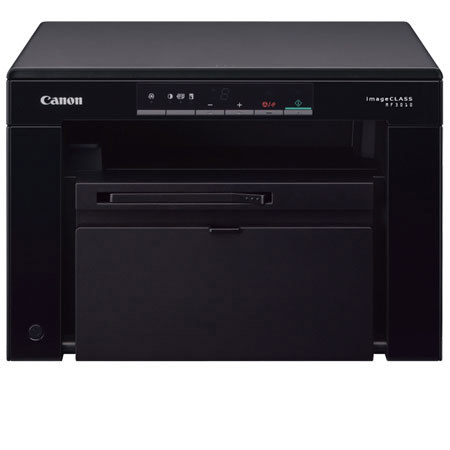
The MF3010 connected flawlessly to my MacBook Pro. I was printing in minutes with never a problem since.... other than maybe 2 jams due to my loading the paper badly.
I have not used the scanner.
This is an EXCELLENT value.
JeffyS
Originally posted at
2016-02-19T19:00:00
NOT RECOGNIZED BY USB ! DRIVERS WILL NOT FIX IT. AVOID THIS MODEL AS MUCH AS YOU CAN. PROBABLY IS HARD TO BUY IT NOW ANYWAY.
usedtobefanofcanon
Originally posted at
2015-12-28T19:00:00
Very happy with printer have had it for 5 years and it works great. Love that it copies and prints so fast.
Nan
Originally posted at
2015-09-11T20:00:00
Rated 5 out of 5
Great for intended purpose
This is one of the best I've used for the price as a home office printer/ scanner. And it uses toner not ink! Big range of options in scan quality and easy to use once installed properly. Another reviewer said computer won't recognize with updated drivers, but I just installed both printer and scanner drivers and works perfectly. PC or windows users need to be more proactive I guess while for Mac users it's basically plug and play. It can get a little buggy but then what peripheral device doesn't! When in doubt reboot.
Jaskat
Originally posted at
2015-08-06T20:00:00
Rated 1 out of 5
terrible software
Scanner software was always flaky under Win7-8, but totally dead under Win 10. Even the new Toolbox installer won't work under Win 10.
kgb1234
Originally posted at
2015-04-02T20:00:00
Worked for a while now MF3010 is not recognized. Drivers from Cannon website will not fix the problem.
Marty
Originally posted at
2015-03-11T20:00:00
Rated 5 out of 5
GREAT PRINTER!!!
This is actually the second MF3010 I've purchased...one for each location where I use them....for personal and home office use. This has turned out to be an extremely good-quality 'workhorse' printer, which does a great job of black/white printing of all kinds of documents, and does it very economically. After experiencing all the inkjet costs and hassles for years, this economical laser is a dream come true! The additional features of scanning and copying make this everything I need, and I haven't missed the color at all (espec the COST!
Particular
Originally posted at
2014-07-13T20:00:00
Printer functions work well. But scanner function is very very poor.
ken009
Originally posted at
2013-10-28T20:00:00
Rated 5 out of 5
Best purchase ever
Very easy setup and makes great print. Design for the printer is very compact for the use of college students. This printer was a best decision I ever made.
Patel07
Originally posted at
2013-02-07T19:00:00
Rated 5 out of 5
Thrilled with my new Laser Printer
I was able to install this new printer, scan, print, and copy QUICKLY. This is amazing for me because I am NOT computer savvy. The CD included with this printer made the installation super easy and was definitely user friendly. The print output is super fast compared to the ink jet printer I used to use. I will NEVER buy another ink jet printer again after using a laser.
MCOX
Originally posted at
2013-01-27T19:00:00
Rated 3 out of 5
Printer is nice, just hard to set up on a Mac
Nice printer and prints out quality pages. I had a hard time setting this up on my Mac and keep getting an error when I print some things. When it does print, the pages are good.
chewie_julie
Originally posted at
2013-01-16T19:00:00
Rated 5 out of 5
For Mac user
Just like to say that for Mac user, you can download the
Windows .exe file for the e-document and unzip it to a folder. The document is simply html files.
DH
Originally posted at
2013-01-04T19:00:00
Rated 4 out of 5
Good printer for price
Seems to be built well, prints good, toner easy to replace Just a tip, be careful when you pull out the main sheet inside the printer,, there is supposed to be an orange protection gasket attached to it. The sheet pulled out without the gasket and I spent an hour trying to figure out why I had a paper jam indicator. Oh well it was my fault for not looking at the diagrams, but also canons fault for not attaching this gasket more securely to the sheet you pull out . Printer is definately worth the money, for small bidness or personal. Final proof will be how long it lasts , I only print 10 or 20 sheets a week, so it should last 2 or 3 years
wolfman51
Originally posted at
2012-11-07T19:00:00
Rated 2 out of 5
where are toner cartriges?
bought product at local big box, purchase, performance, ease of use great for price,
BUT can't find retailer in Minneapolis MN Metro that stocks the toner cartrige
bob
Originally posted at
2012-10-23T20:00:00
We cannot find the toner for this machine nowhere.
what is going on?
I have search and all I can find is the chep stuff.
eloisa
Originally posted at
2012-07-30T20:00:00
Rated 4 out of 5
Excellent Product but Mac is treated poorly
This is a perfect home office product. Small, inexpensive, but very reliable and effective. Only complaint I have so far is that there is no manual available (either physical / PDF or electronic) for Mac users. While this product seems pretty self explanatory, it would be nice to have a reference document available for Mac users.
t
Originally posted at
2012-05-25T20:00:00
Overall, I am very pleased with this printer. It is perfect for home use. It has a relatively small footprint, is much faster than I expected, and has very good print quality.
Mac users should be prepared for a few glitches. There is no online manual available unless you have Word installed. The drivers and software have to be downloaded from the Canon website. Canon phone tech support was helpful in guiding me through the installation process.
My satisfaction with the product made it worth these minor inconveniences.
asegra
Originally posted at
2012-01-21T19:00:00
Rated 5 out of 5
Great All-In-One for Mac
Attention Mac users... this Canon printer is a great addition to your Mac OSX system. While the box doesn't have the Mac symbol on it, the drivers are easy to download on the Canon website, and setup is a breeze. The print quality is fast and super sharp. The scanning utility is equally easy to use and provides extra clear and crisp color scans, that you can save in a variety of formats (PDF, JPEG, TIFF, BMP, etc.) For the money, this is the best quality All-In-One you can find that works well with Mac. Give it a try!
Deke
Originally posted at