2020-09-16T20:00:00
Rated 5 out of 5
Reliable.
I don't remember when we bought the printer, but must be al least 10 years ago. Still working.
W K.
Originally posted at

2016-12-02T19:00:00
Rated 5 out of 5
WONDERFUL
I got this printer over FIVE ( 5 YES five years ago. Not a blimp, still works like new.
The T.
Originally posted at
2015-11-03T19:00:00
Rated 1 out of 5
DOESN`T WORK WITH MAC OR 32/64 OS windows
Useless! No updates, no drivers for Mac or for 32 / 64 bit Windows 7 ... Actually i have to go back to un old OS. If you don`t update software, why you still keep selling it?
I have a cheaper printer wich had no problem with Mac or Windows 7. Sorry but is last time i buy Canon!
ELENA
Originally posted at
2015-01-22T19:00:00
Rated 1 out of 5
cumbersome interface
This printer was recommended by our tech person as a compatible printer for MAC. After paying for 3 hours of her time for set-up, I found the interface cumbersome. Switching from one task to another is time consuming. I gave up and stored it in the garage, where it stared at me for several months. I felt guilty because of its cost and reinstalled it again only to find that I don't really have the time to figure out its quirks. It's now back in the garage. I throw up my hands.
rkr727
Originally posted at
2015-01-20T19:00:00
Rated 2 out of 5
Frustrating machine
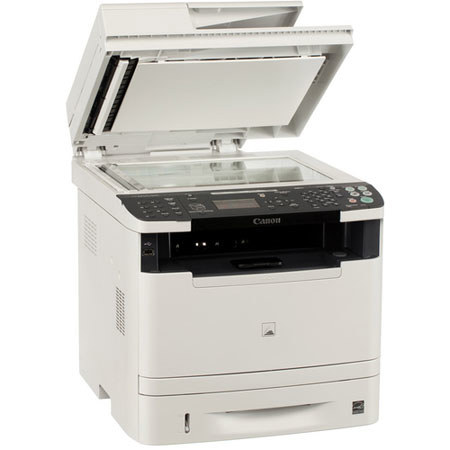
Very convenient for multiple users. Canon always provides excellent service and support. My regret about this machine is that it is extremely durable, thus discouraging me from purchasing a new printer. For my next Canon printer I am searching for a machine with a 500 page input tray and faster scanning. Caution! If you do not feet originals straight into the ImageWriter 5950dw for copying or scanning, this machine can mangle them or chop up the edges. Sometimes sheets of paper disappear into the lid. With a pencil or tool to remove a sheet which has slid into the lid can cause tearing of the paper sheet. An optional 500 page imput tray costs as much as $200 extra, making it more economical at the outset to find a machine with a 500 page input tray.
Crito
Originally posted at
2014-06-11T20:00:00
Rated 2 out of 5
Not recommended
We use this printer all the time in the office. The setup was easy enough and it has all of the basic requirements. For the last 2 years this copier has worked just well enough to stay out of the scrap heap. The printer is needy, in that for every action that could normally be conducted just from the computer, it requires you to confirm settings on the unit itself. The feeder will often grab multiple sheets and although it does not jam, it does result in the need to confirm the copies were all made. It seems that the printer/copier has finally given up on us in that it is registering a paper jam although no paper is present, which is too cliche for my liking. I've been quite happy with Canon products in the past, this one has been a hassle from day 1.
Quality M.
Originally posted at
2014-03-15T20:00:00
Rated 4 out of 5
good value multipuropse machine
Great features exactly what I wanted but using features can be cumbersome, too many choices per button on control panel, can be confusing. Tech set up well worth the money. Set up is not designed for novice, can be confusing for even a seasoned user. This is the only reason I gave it 4 stars. Worst part is setup for the multi-use Tray, and on demand duplex copying. Duplex printing can be controlled in print settings. Multi-use Tray is not automatic and paper size has to be set for each print job. You can set a default paper size but the default has to be turned off if you need to change paper size ( print envelopes) then you have to reset default paper size.
Wanted a 500 sheet paper tray was told there was an optional 2nd 250 sheet tray, I'm still looking for it.
BCHOA
Originally posted at
2014-02-01T19:00:00
Rated 3 out of 5
Burdensome software
i have used two Canon multi function devices over many years. The latest, this model, repeat previous experiences by adding a complex and un-intuitive set of software and drivers to support completely mundane and expected tasks like scanning, printing and faxing. In both LAN and USB setups the printer setup is lengthy, burdensome and problematic. For technical folks like me I can eventually figure it out, but I can't imaging a novice or less technical person trying to figure out the setup. More recently, upon updating from Windows 8 to 8.1 the entire functionality for scanning and printing over LAN was lost.
Canon, if you are listening, these are pointless obstacles in this day and age. Fix and simplify the software that drives your otherwise well functioning and properly priced products.
phxg35
Originally posted at
2013-12-12T19:00:00
Rated 4 out of 5
Great product, complicated setup
The functionality and quality of the printer is excellent 4-5 stars for sure. The setup process, having to download multiple software programs to use, and heavy drivers, etc., makes this a complicated setup. This is not an plug and play system. But if you can follow instructions, and have some tech intuition, then you will enjoy the product.
Maluco
Originally posted at
2013-12-05T19:00:00
Rated 5 out of 5
The best printer on the market
I have some other printer brands, but nothing compared with this brand,
I had different models, but I found this one
very affordable in the price, vary easy to setups is a breeze ,only if you are a pinhead then you have problems.
The print quality is excellent.
I love this printer.
Peter
Originally posted at
2013-08-26T20:00:00
Rated 2 out of 5
For programmers only
The setup has not gone well. I have to turn the machine off and on before it prints. I still cannot get the multifunction tray to work.
Aaron
Originally posted at
2013-04-23T21:00:00
Rated 4 out of 5
works fine and fast
It works as advertised.
JD
2013-03-18T21:00:00
Rated 4 out of 5
Great Deal, Great Printer
This was a real deal. The machine is very powerful in terms of features. I read several reviews that complain that this is not 'intuitive' or 'simple,' and that is true -- but with the many, many features, there is just no way that this could be a simple machine to set up every feature. Mind you, for copying, faxing scanning and printing, once set up, it is pretty simple. It was not super easy, but I set it up for wireless use quickly and it is great. The duplex and setup for one or two sided originals and copies and two sided printing is easy and useful. I did't expect to use duplex that much, but it will, on reflection, save a ton of paper. The paper handling/feeder seems very good -- no multi-page pickups or jams yet. At least one reviewer complained that it is hard to format envelopes. For me, I just selected envelope in my word processor and sent it to print. It won't even print unless you put an envelope into the special sheet feeder (which is what I use to feed envelopes anyways), and then if you feed it centered with the guides it prints fine. In all, I am really impressed with the printer and with Adorama, which got it to me fast and for a great price. Thanks!
Jeff
2013-02-11T19:00:00
Rated 4 out of 5
Great Printer
Great Multifunction Printer. Prints, copies, & scans faster than most machines in this price range. High resolution copies & scans with small file size (Hi-Compression PDF capability). I took off one star because the printer is more complicated to setup and use than similar machines (due to the number of different settings). If you don't mind spending some additional time setting up and learning to use the machine, add the 5th Star to the Rating.
MARK M.
2013-01-21T19:00:00
Rated 4 out of 5
Excellent multi-function
I have had this printer for about two weeks and really love it. It is quiet and I like the fax feature. I have a PC with windows XP and I was able to install within 30 minutes
ADVANCED L.
2012-09-09T20:00:00
Rated 4 out of 5
great machine
Very easy set up
Easy to use
All functions work, Unlike some others I have taken back.
Noisy when it prints.
BP
Originally posted at