


+2
more
more
This item is no longer available.
Review Summary
2022-06-06T20:00:00
Cannot get driver to install on new Windows 10 computer. Therefore, the printer I was using for 5+ years no appears to be useless.
Driver i.

2021-08-04T20:00:00
This is a good scanner and that is about all the good I can say about it.
Rivers
2021-03-03T19:00:00
I've had this for at least seven years... and it continues to chug along! I bought a new printer from a different brand and was sorely disappointed that it could not print out legal size pages (11"x14". But this Canon Pixma MX-452 has no such problem, and prints faster, and still works after seven years! And it scans all sizes of documents up to 11" x 14" through the ADF. I would have given it five stars IF it could AUTOMATICALLY print duplex and if the ink didn't run out so quickly. Sigh! Otherwise, I'm really happy with its performance.
Agu
2020-04-30T20:00:00
I have owned this printer for about four years and it still works great. The wireless printing function is excellent, especially from my iPhone via Air Print. I also appreciate the scanning and photocopying capability. Sometimes paper can jam, but doesn't that happen to all printers?
whitneychamp
2020-03-28T20:00:00
I've had this printer for more than 7 years. It has worked well, when everything is clicking. But lately, I've had to uninstall the drivers and re-install them. I've had to shut it down, unplug the power cable, and plug it in again. I've had to unplug the data cable and plug it in again. The wireless component stopped working 4 years ago. Now, every time I attempt to print, it requires unplugging and re-plugging cables, uninstalling and installing drivers. I will replace this printer with a different Canon product, because, as I said, when it works, it's fine, and this printer has generally served me well for almost a decade.
rob10820
2018-11-08T19:00:00
I had this printer for a while now. I have used the WiFi option and the USB option. Both have worked great. The best part of this printer for me is the multi paper feeder used to scan documents to the PC. No more opening the top and inserting a single document at a time. Great print and scan quality.
M109RdR
2018-08-06T20:00:00
This is a fragile little printer that maybe works 25% of the way it's supposed to. I have to hand-feed every paper as it's ability to do this itself stopped shortly after purchasing. I just moved and I can't for the life of me get it to print now. It would be great if the links on the website for reinstalling the printer were actually helpful.
Noneee
2018-07-15T20:00:00
Had this for awhile and scanning continues to be an issue
cmatt
2018-01-09T19:00:00
The paper wouldn't load. The repair cost is so high, is better to buy another printer.
Cesar02
2017-12-01T19:00:00
I’ve had this model for several years. It has never worked right. Every few times I use it, it has to be uninstalled and reinstalled. The wireless works one or two times and then no longer works. The scan does not work from the device; you have to pull up scan on my computer and push the button. It’s a strange printer. I just never had the motivation to repack it.
Ernest I.
2017-11-19T19:00:00
If you want a printer that stops working just when you need it most this one is for you! I have been up all night packing items to ship and then trying to get this to print. This is not the first time or the second or even the third, more like fifty and you would think I’d know how to fix it with eyes closed by now but no, no,no it doesn’t respond the same every time it is like it has a mind of it own and when it gets tired of seeing your frustration it starts again. 24 help is something I thought I saw but they endorsed some quacks ....just don’t do it. Never ever ever never again will I buy a cannon printer. They would have to give it to me and then I’d have a backup handy. I thought it was just me till I read the other reviews, serves me right for trusting in a brand. I would give minus stars if I could. I grow old and weary waiting for this thing to work!!!
PepperKate
2017-11-14T19:00:00
So happy replaced old printer at work this Canon is perfect
Smitty120
2017-06-04T20:00:00
I have had this for about two years , works great on my wireless system .
James 2.
2017-04-30T20:00:00
Have to re-install drivers for every use. Gets so annoying that it won't stay on wifi network, and doesn't respond to my laptop the next day after re-installing everything...again. I've probably installed and uninstalled the programs for this printer about 30 times in the past 6 months.
badprinter
2017-03-30T20:00:00
Not compatible with the Asus Chromebook, but a good printer for any other device.
Sherry75
2017-01-28T19:00:00
If you are jn the market for a printer that will test your network and problem solving skills this is the printer for you. If you plan on just hitting print and boom your pages start Think again. It prints fine but can litterally take 30 min to get it to print. If you have to print multiple things forget it.
Igiveup
2017-01-04T19:00:00
I bought this printer three years ago, and have never had a problem. It does all the printing I need to do, which is less & less these days. When this one does eventually die, I will buy another Canon product.
BudgieLover59
2017-01-03T19:00:00
I bought PIXMA 452 in 2015 after going thru Printers like EPSON, BROTHER and 3 other Manufacturers. I am not a very Technical as it comes to printer but this Printer is so good it is unbelievable. In less than 1 hour, I was able to set it up for Printing, Faxing, Scanning and photocopying. The information that came with the Printer is so clear and concise that I did not have to read it twice,,,I have tried all the features and was very pleased how they work. If you are buying any printer, I recommend you try this...and great customer service from Cannon.
Snakecharmer
2016-12-11T19:00:00
Buy this printer. I have stared at a spinning wheel half of the day. In order to make this printer work, I need to reinstall the driver, reset my modem and restart every 5 print jobs. What a waste of time and money. I'll never buy another Canon printer (or camera again.
sakimoto
2016-09-16T20:00:00
I would not buy another one. The alignment for the PIXMA MX 452 is off and I don't even see a manual to adjust it. I have already tried the options on the printer menu.
crooked p.
2016-09-12T20:00:00
I bought this as a quick solution to a growing problem with another printer. It was cheap and easy to set up and has become my go to printer. Very very happy with my purchase!
Bob59
2016-07-11T20:00:00
I've had two Pixma printers, an MP600 and MP610 and they're mediocre at best. Have also used an MG5220 at a relative's home with the same results. Set up IS a pain, you can't print black and white if ANY of the ink trays, colored or not, are empty and every one of these printers goes through a 3-5 minute "processing" phase before it will print. No such thing as plug and play here. There are often hesitations during the printing for God knows what. I've never had this issue w/ HP. The finished product is nice, but I can make breakfast in the amount of time it takes to actually do the job. Will never buy another Canon printer. All the guys I know who use desktop printers for business do not own a Canon - not one.
jlaurence
2016-06-03T20:00:00
The print quality is good. But if you try to print on both sides of the paper from a Mac, you'll slit your wrists. It can be done, but only after three trial and errors. I think it's a ploy to sell more ink. If you're attempting to print both sides of a 50 page document, you'll throw away 100 failed pages. First, you'll have page 1 next to page 50, then the odd pages will be upside down, "Normal Print" does not seem to be normal, etc. Just when you think you have all the choices figured out, it prints the even pages upside down (or other insanity) It does not like "preview" shows. I don't expect a solution, certainly not one from Cannon.
Allens
2016-04-25T20:00:00
the exiting paper tray isn't long enough when extended so everything falls on the floor. And whose idea was it to display "please wait a while" when an error occurs or it needs to think about things. And the command buttons for copy, scan, aren't clear enough. You could have used words. Speakanyenglish
Barry
2016-03-14T20:00:00
Connectivity is a joke. Windows 10 has made this very bad. I can't get anything done when I need to. Trying to reinstall has not been successful.
mww
2016-02-19T19:00:00
I have had Canon PixmaMX452 for just over a year. It has been a really good work horse for the price and quality. The part that turns the paper over to print has completely stopped working. It seems most products for home use that have a small footprint are made of plastic; to expect more than a year with heavy use is not realistic; unfortunately. I had just purchased ink cartridges(multiple) and I wanted to be able to use them. Changing the ink cartridge is a simple, painless, no mess process. I looked for another Canon that would take the same ink cartridge. I purchased the Pixma MX532. I'll review new product after some use. Every website that I went to shows PixmaMX452 discontinued. Hopefully the newer version will be as good or better than.
CaliGurlLisa
2016-02-01T19:00:00
I bought this printer 2 years ago and have had zero issues locating ink or anything like that. It just never wants to stay connected to the wifi. I have been printing multiple word documents, and it will literally print one fine then fail on the second... It just hangs and never prints.
Britt
2016-01-24T19:00:00
Too high priced, too far away. Hard to find MY ink. Just tried to find WHERE to input on "Shop" page that pops up when printer demands more ink, and cannot find where to tap or to fill in my needed product. Next printer will have GENERIC ink I can buy locally AND order by email. ALSO the L-shaped icon set is WAY too complicated. I want EASY ACCESS to hit PRINT, SCAN, or FAX. I want a second level for when I need more complicated access. ALSO - HOW do I turn off the intrusive box running all my photos?! No delete in view! I don't want to read the whole MANUAL for this that should be easy.
LYDIA
2015-10-14T20:00:00
Works well for the price. Scans clearly, prints quickly... goes through ink a little fast, but it's not expensive ink either. Easy to set up with my router, looks nice.
Clara
2015-09-02T20:00:00
Canon should discontinue this printer or not sell it as wireless. I have had to reinstall the print driver so many times it's stupid. Wireless printing works when it wants to. Even after reinstalling the software it doesn't work, then magically days later it will. Bought it at Walmart because it was inexpensive and supposedly should have fit my needs. Next printer purchase will be from a store with tech help that can guide me to a smart choice.
rockinrnb
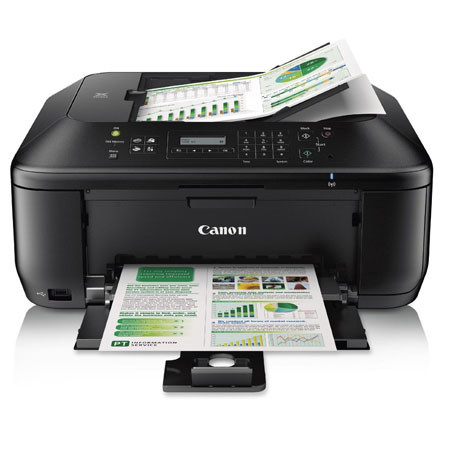
The PIXMA Mx452 Wireless Inkjet Photo All-in-One delivers superior quality, versatility and ease to your home office. This begins with built-in Wi-Fi for printing and scanning anywhere in your home from computers and compatible mobile devices. It also includes AirPrint, which lets you wirelessly print from your iPad, iPhone or iPod touch devices. An integrated 30-sheet Auto Document Feeder speeds up copying and faxing capabilities, while the FastFront system makes changing ink and paper easy and convenient. With Easy WebPrint Ex you can easily collect and combine, multiple web pages to create and print your own layout.
4800 x 1200 maximum color resolution and the FINE Cartridge System means superb business document printing and efficiency while built-in imaging technology insures the integrity of originals are preserved with each copy and scan.
The PIXMA Mx452 also allows you to turn your office into a photo lab. Print beautiful, borderless photo lab quality photos up to 8.5" x 11" in size. My Image Garden software makes organizing and printing your photos fun and easy with great facial recognition, Fun Filters, Calendar Organization, Automatic Layout Suggestions and more.
The PIXMA Mx452 delivers the business imaging quality and versatile solutions that can assist you in bringing your business to the next level.