


This item is no longer available.
Review Summary
2017-05-27T20:00:00
When I initially got this printer I thought it was great, BUT after only owning it under 2 years and barely using it during that time I turned it on and it had the B200 error code. When I called Canon I was told that it was most likely a hardware issue which could have been caused by not using it enough. I was given the number for the only local authorized repair place. I was also offered a Canon loyalty discount toward purchasing a new one (no thanks!. When I called the repair place I was told they charge $80/hour with a minimum 1 hour fee just to diagnose the problem. Very disappointing! Time to shop for another brand!!
catelynnw3

2016-12-12T19:00:00
This thing is a pain in the butt to operate. It has problems communicating with my PC (offline), and is cumbersome to operate and slow to power up. It got worse under Windows 10. Updating the software is next to impossible. Nothing seems to match up online with what appears to be installed. I am surprised my wife hasn't thrown it out the window. Never again, Canon. At least I did not get the B200 error.
Canon b.
2016-04-24T20:00:00
Received the death warrant U052 error message-incorrect print head - install correct print head- this PIXMA MX 712 AIO is just a little over a year old- so needless to say headed over to Staples to get an Epson...
iceclimber42
2016-04-03T20:00:00
I bought this printer 2-3 years ago, and it has served me fairly well. - I really like the isolated ink units (separate from the print head, colors packaged individually), but i think ink capacity still seems artificially low to inflate profit margins. - Really like the duplex printing and scanning! - The scanner document feeder seems to have issues with papers that have even the slightest folds... that's annoying. - The printer interface could be improved... seems buggy at times, but trial and error seems to prevail - Sometimes, the wireless scanning doesn't work. Errors pop up on the selected computer. Again, trial and error works... not ideal. - I hate the document explorer window that always pops up after scanning and saving a document. I've never once used it.
mike923845098
2015-10-28T20:00:00
I have had this printer for two years. When I returned from an extended vacation and plugged it in I got an error message. B200. I called support and they said that was a general message and I would have to take it in to have it diagnosed. The result is the Power Board needed to be replaced, and the cost of labor and parts was more than it would be to replace the machine. This printer was used less than 300 pages of printing. I am really disappointed that a major part would fail so quickly. I have many Cannon products and an older non wireless model that is still providing wonderful results. To bad for my Pixma 712.
barpow
2015-07-09T20:00:00
I have owned Canon printers since the days of the BJC600 and even was a Canon demonstrator at local electronics stores for a while. I purchased this unit because Canon quit making the dual path machines such as the MX922 I really appreciate the speed of this printer. When I send it a print job, it starts right up and prints quickly. I love the size of the new cartridges, if those really are "all ink" then they should last quite a while. I don't like that you must "play" with the machine to insert or remove a specific one,. I look forward to getting my hands on a Black XL! I like the dual cassettes with their 250 sheet capacity. However, I wish Canon had incorporated a way to electronically name the cassette, such as Change "Cassette 1" to Envelopes, and Cassette 2 to "Letterhead" I wish that I could figure out how the "Auto Select" decides which Cassette to print from. I have looked through the User's Manual and I must have overlooked what causes it to decide which one to use.
Teenangel
2015-03-07T19:00:00
The machine is far too complex and the instructions both printed and on line are woefully inadequate to solve even the most basic connection problems. generally a great wast of money to buy this machine; cannot work on compute at all so basic use is to copy photos. Not much else works, from fax to scan.
Rik
2015-03-01T19:00:00
I've always used a competitor's printer in the past and they've lasted so long, I usually end up buying a new one only to upgrade to new features. This time I tried a Canon because of the individual ink cartridges. BIG mistake!! After less then two years, I got the dreaded B200 error that seems to be a common issue with this printer. I tried all the 'fixes' that I could find online and nothing works. This is just the last straw in a whole list of issues I've had with this printer. I'm off to buy a new (NOT Canon) printer when I get out from work this afternoon.
KenniB
2015-02-10T19:00:00
yea, so i really dislike this printer it rarely works as its supposed to and its so un-userfriendly its ridiculous.
not s.
2014-12-29T19:00:00
The printer worked fine and I was happy with it for about 6 months. Then the dreaded B200 error kept popping up. I use this machine sparingly. Mostly to scan documents (which never uses the print head but on average I was probably printing mostly black and white documents about 20 sheets per week - more or less. Considering other online user reviews, it's obvious I'm not the only one with a print head problem. I decided to clean the print head myself as the cartridges are all relatively new and I only use genuine Canon products/ink. Power won't turn on at the moment and print head is drying. If it powers up tomorrow, I guess this review will be updated but if it doesn't, I'll change this from 2 stars to 1!
RemaxMom
2014-10-20T20:00:00
I have a small business. I use the copy and print functions mainly. I have not had any issues. Copies are of good quality as are the printed pages, which of course, depends on the paper quality. I have never experienced jams or poor feeding. I use aftermarket ink tanks at a fraction of the cost of the Canon brand and have had great results. I have a legal size flatbed so I can't comment too much on the built-in scanner and fax is extinct technology as far as I'm concerned. I don't know why the other users gave such poor ratings. My daughter has one of these for college and is very happy with it.
Briand36
2014-09-03T20:00:00
If you want a multi-function printer, scanner and fax that is easily controllable from your PC, this is not it. If you want multi-function printer, scanner and fax that even works properly from the device itself, this is not it. The mechanical parts are great, and the price is right. Ease of use is horrible. Manuals and Menus are misleading. When you download their quick tool, there is no scanner function. The manual's steps to scan assume software that does not exist, even after completely reloading from the website multiple times. What a disappointment
M
2014-04-06T20:00:00
Has too many bugs in system. Let's you down I when you are in crunch time.
Sick p.
2014-03-22T20:00:00
great printer but run out of any ink cartridge out of 5 cartridges and you cannot print, not even black only if you run out of yellow. bad flaw.
p
2014-02-23T19:00:00
Light user - print once a week - printer broke after 18 mos.
jorge
2014-02-19T19:00:00
I have never had so many problems with a piece of office equipment as this. Loses connection constantly, and it is hard to get it reconnected. Worked fine for the first two months, and a dud ever since. Some jobs I have printed don't print until two or three days later. Lame.
fragma
2013-12-16T19:00:00
I run out of ink, and this peace of junk will not even allow me to scan an important document for an early project. I've had other printers that allowed me to at least scan a document even if there's no ink cartridge. Take this junk from the market.
ed
2013-12-07T19:00:00
If this printer worked consistently it would be a great printer. However, several times in the last six months that I have owned it, the printer just plain stops working. Sometimes the LCD screen just freezes and you have to unplug it to get it to unfreeze, but most of the time, out of the blue, the printer no longer communicates with the wireless network and it is useless. It's not a problem with the network because all of our other devices work, but unless you connect a USB cable to the computer you can not print. I bought the printer because of its wireless capabilities, and it has turned out to be useless for this purpose. If you want a wireless printer that works consistently, you need to buy something else, this does not work.
Dr.Scotty
2013-06-06T20:00:00
Having come from an older Canon printer that was costing more in monthly ink cartridges than the cost of a new printer, I am very surprised at 1) ease of setup wireless connectivity, 2) ease of use, 3) reduced demand of new ink cartridges. The only feature I do not use is the FAX, since I don't have a land line. Otherwise, this was a great purchase. Printing is fast, copying is multi-function and I really like the DUPLEX feature. I use it with 2 MACs and 2 Android tablets.
mrthink
2013-02-11T19:00:00
I purchased this printer about 2 months ago and I'm amazed at the quality and features it offers for the price. The output is quick and high quality. I particularly enjoy the combined duplex scanning/printing capabilities. As a professional writer, I'm not terribly concerned with photo printing, but it does an excellent job on photos and graphics for my needs. I highly recommend this printer.
dunsmuirwill
2013-01-24T19:00:00
Printer spools over and over again, if there is any type of problem (which so far is 90%) the only solution is to ask you to power down the printer. At which point it needs to go through the 45 seconds of whizzes and bangs to power back on- only to give you the same result. 3 power ups later your doc is gone (not waiting in tray) and printer is acting like it didnt just get amnesia. I have never seen such a thing! To add, there is no ACTIVE feeder tray - meaning - it has a PHOTO tray in the rear - which it turns out is only active when trying to print a photo - but the great part is that the printer decides which tray to pull from - NOT YOU. The undercarriage tray does NOT hold 4x6. Which means I can't print envelopes, note cards, custom anything...Also when you AIRPRINT a photo it does not feed from the photo tray. So what does one do when they bought the printer for AIRPRINT photo functionality? Throw it out? I decided to leave it next to my pc but that wont even last, I print next to nothing, have had this printer less than a month and have wanted to open the door and throw it in the street on at least 3 occasions. Its worth $100 to watch this printer smashed to pieces. I dont get how all the printers on here have good reviews....chances are my review will never see the light of day.
Kaye
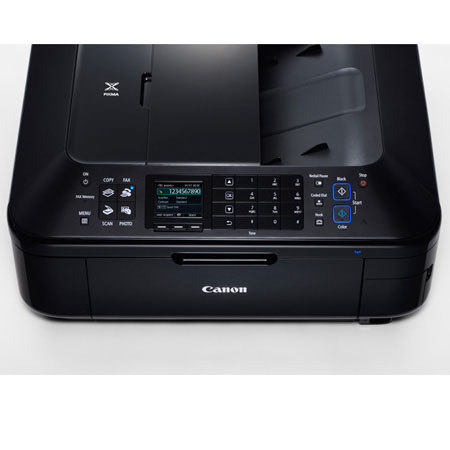
The Canon PIxMA Mx712 Wireless Inkjet Office-All-in-One Printer features built-in Wi-Fi for printing and scanning virtually anywhere in your home from computers and compatible mobile devices. This also includes AirPrint, which lets you wirelessly print photos, e-mails, web pages, documents and more from compatible iPad, iPhone or iPod touch devices to a compatible Canon PIxMA Wireless All-in-One. Integrated 35-sheet Duplex Auto Document Feeder, built-in Auto Duplex Printing and a Dual Function Panel are just some of the features that can allow you to easily multi-task. This can bring office efficiency to all-new levels and reduce cost at the same time.
Superior 9600 x 2400 maximum color resolution and 5 Individual Ink Tanks means incredible business document printing and efficiency while built-in imaging technology ensures the integrity of originals are preserved with each copy and scan. Maintain security standards by utilizing features to prevent misdialed fax transmissions and keep scanned files password protected.
The Mx712 also allows you to turn your office into a photo lab and print beautiful, borderless photo lab quality photos up to 8.5" x 11" in size. Your photo printing options now also include full HD video while you also enjoy computer-less printing through compatible direct print options.
The Mx712 delivers the tremendous business imaging quality and versatile solutions that will assist in bringing your business to the next level, so you can print business documents when you need to and photos when you want to.