


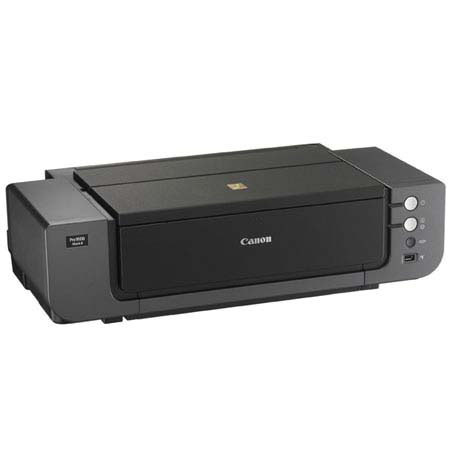
This item is no longer available.
Review Summary
2017-12-30T19:00:00
Had this several years now but from the very beginning, it never worked good. Tried numerous times with support but still didn't give good quality images and half the time didn't work right. I've had it sitting around here like an albatross so today decided to see if it is worth anything or if I should throw it away. :(
okiekaren

2013-07-29T20:00:00
If you started in photography with a dark room, like i did, a print size of 11x14 is standard. There is no support for this in the paper profile. This is not acceptable. I will get rid of this printer as soon as i can. I have been a fan of Canon for about 20 years but no longer. Yes you can make a custom size 11x14 but not borderless. That would be ok only the borders are not equal and the bottom is about twice the size of the rest. Changing the numbers in the dialog box does nothing. I expected more from Canon. I am completely disgusted with this product.
Mat
2013-07-27T20:00:00
Purchased the Pro9500 Mark II to enable me to print large pictures after vacation trips. I have owned it for about 2 years now. First impression, excellent. Pictures come out with amazing clarity. After printer was left unused for a couple months, the paper feed for large prints quit working. Called Canon and got it repaired. Now here it is about a year later and minimal usage in that time, same exact problem. It is broken again. Do not waste your money on this printer. It is completely unreliable.
ticked
2012-09-07T20:00:00
I had been lookingfor a photo printer that gave me a quality picture plus a size larger than 8X10. I reviewed printers for a long time and finally decided on the Pixma pro 9500 MK ll. Quality is the key word, The images on photo paper have exceeded my expectations and I am very happy to have purchased this Canon product.
granpa b.
2012-07-15T21:00:00
I am an amateur photographer and work mostly in black and white. I initially purchased the 900 MkII. Color was fine, but B&W prints had a greenish caste that grew worse with time and grey scale prints were just flat. The 9500 Mk II B&W prints have great depth and no color caste that I can see. If I had unlimited funds, I might make a different choice, but dollar for dollar you just can't buy a better printer for fine art B&W.
Kaphead
2012-07-01T20:00:00
I've owned my printer for about a year. I've had no problems with it. Each and every picture looks just like the exposure. I could not be more satisfied with my purchase!
Toe M.
2012-06-27T20:00:00
I purchased this printer at the end of March 2010. It printed perfectly for the first 7 months. With the exception of going through large amounts of ink, it printed high quality images. I was going through a set of ink cartridges about every 12-15 4"x6" and 5"x7" photos on Platinum Pro paper. Cost per photo is a lot higher than I expected. It would be cheaper to have someone else print them. In October 2010, I noticed that the yellow stopped printing, so I tried cleaning and then deep cleaning of the nozzles. When that failed, I contacted Canon and they ended up sending me a new cartridge tray since it was still under warranty. Everything worked fine again for about a year. With the exception of high ink usage. Now the yellow and the magenta has stopped printing. I have cleaned and deep cleaned to no avail. And of course the warranty has run out. Now this is nothing but an expensive doorstop. I would highly suggest purchasing something other than the Canon Pixma Pro9500 MKII.
JayhawkMAH
2012-06-17T21:00:00
This is a great higher-medium end photo printer. It can produce amazing art prints and isn't that difficult to set up or use. As with most (all?) printers though, keep in mind that the main source of income for the printer company usually comes later in the form of the user buying continuing ink refills. This is just the nature of the beast. However, it's still an important factor to keep in mind when deciding how much your new printer will really cost.
Amscram
2012-05-22T20:00:00
Excellent print productions. Foot print is large but still very compact for the output size.
Bear
2012-05-01T20:00:00
There is no issue with the quality of the images produced by the PIXMA PRO 9500 II. For me it is an issue with ink. The ink cartridges are small and the printer cleans regularly which wastes the ink. The 'ink low' feature is not very accurate and it is difficult to tell how much ink there is left to go. So, once the 'refill ink' light comes on and you change the cartridge the printer goes through a clean process again which often puts another cartridge out of ink. So off you go again. It's great if you have a batch of photographs to print, but very costly if you're only printing one or two at a time
photo16
2012-04-15T21:00:00
Every print looks exactly like the image on my monitor. I had an expensive, ink guzzling Epson printer and the prints were never like the images on my computer's monitor. This Canon 9500 MK II gives my exact copies of the images on my monitor every time; black and white or color.
MIKE D.
2012-04-03T21:00:00
I am printing primarily nature photos of various sizes. I was pleasantly surprised to find out how simple it was to get started, thanks to clear, easy-to-follow instructions. The colors are brilliant. The printing is not fast, but I don't care. The quality is exceptional!
Photo G.
2012-04-01T21:00:00
IF AND ONLY IF YOU PRINT TONS OF PICTURES GET THE NEW PIXMA PRO 1 PRINTER. IF NOT THEN GET THIS ONE! SIMPLE AS THAT1
MIKE S.
2012-03-12T21:00:00
Excellent printer easy to setup with outstanding Canon software, well integrated into MacosX. The right paper selection is key though to achieve the printout you want. A lot of testing required, with some papers I couldn't get any decent results (dull colors). Get a whole bunch of cartridges for the different grays, they run out very fast.
HANS R.
2012-01-08T19:00:00
Much more user-friendly than other photo printers I have had. The printing speed is slow and you had better keep a complete set of extra ink cartridges. However, the results are worth it.
JONATHAN C.
2011-12-26T19:00:00
While Canon"s new pro printer is getting raves you can get the pro9500 mkii at huge discounts. It is a great printer with just the right size ink cartridges for most isers, which makes it economical and practical w,hile delivering fantastic prints.
Oldcamera
2011-12-10T19:00:00
I'm not going to say much apart from the fact that this is the best quality printer I have ever owned. I do not seem to have any issue with ink usage and find it no worse that other makes. Print quality is second to none.
robbo
2011-12-06T19:00:00
I use this printer for all my color and B&W prints up to 13x19 inches. My primary uses are for photo sales, competition photos, and gallery prints. Make sure you use your paper profiles correctly for optimum performance. Print quaility is excellent on good paper, but they is a considerable amount of ink necessary if you use this printer often buy ink buy the 10 pack.
MIKE D.
2011-11-26T19:00:00
This is the best printer I have ever had. It is easy to use, prints are beautiful and clear. I have never had an issue with it that I could not take care of myself. I only use the canon inks, I tried others and did not get the quality. I print all my photos with it and for the price it was a very good purchase. I am VERY happy!
JTH
2011-10-13T20:00:00
This is my first canon printer, I have had it for about 2 years and the quality is second to none. If the only thing you want to do is think about printing awesome quality photos this printer is for you. A truly problem free printer. The richness of the colors, the quality of the print, and the ease of use. An awesome investment for the very good amateur photographer or the professional. Thank you Canon!
discow
2011-10-11T20:00:00
Ink is wow... but love the printer. It prints awesome but very expensive to run I printed 4 11x14 and need new ink. I wish the ink would last longer
meli
2011-09-03T21:00:00
I use this mostly for printing high-quality, custom greeting cards. I moth-balled my Epson printer because it would not feed the heavy card-stock reliably. This printer never fails to feed and I can put in a stack of 20 cards and go away. Print quality is excellent.
David
2011-09-03T21:00:00
This printer started producing stunning 13x19 prints right out of the box. The colors are deep and true, the detail and sharpness amazing. I recently had a month-long exhibit of my work, consisting of 23 framed 13x19 prints made on this printer. I like the fact that it uses pigment-based inks rather than dye-based, and also the fact that it is optimized for black and white as well as color (it does great B/W on Canon's Fine Art Museum Etching paper). Yes, it goes through a fair amount of ink, but that's to be expected. The results are worth it.
WILLIAM T.
2011-09-03T21:00:00
My budget is tight, so I could not go with the Epson printers. This one is very good anyways. It is a little cumbersome working with the ICC profiles, they are somewhat confusing. Be aware of black and white printing some people have been complaining about casts (brownsing) I guess is the term. I don't do much of b&w, so it is not a problem for me. It takes a lot of real estate, especially when using the front feeder for thick art papers. Ink consumption is pretty heavy. It'll add to costs.
JULIO S.
2011-09-03T21:00:00
I purchase this printer on the recommendations of Will Crockett and the Canon rebate/sale. With the rebate and Adorama pricing I figured it would be a great addition to the Epson R2880 printer I have. It is easy to set up and use. My only question is how does one turn off printer color management while calibrating printer to monitor? I have looked on the internet for this solution, but have not yet found an answer. This is very easy to do on the Epson printer. When comparing the color calibration prints from one printer to the next there is quite a difference...which one is correct? I am still working on that answer.
NANCY K.
2011-07-18T21:00:00
After nine months of use, it hasn't disappointed yet. One thing I have learned. If you purchase this printer, buy two extra PGI-9GY cartridges and one PGI-9PM. Those two seem to be used the most. Having them handy will let you better evaluate overall ink usage for later order.
M S.
2011-03-09T19:00:00
Quality of prints are just WOW. I will be using this printer for my fine art prints as well as commercial photography. Yes, inks cost more but when you want to sell the best, than expect to pay more. My clients love the quality and are willing to pay a little more for it. This printer will set me apart from the cheap guy's.
MacDaddy
2011-03-06T19:00:00
The pictures are great and the paper for printing with borders makes us look like pros. Our daughter was the test and she gave us outstanding ratings! Although the printer is large, we will still take it with us when we travel. We have an Airstream travel trailer and will be traveling all over the U.S. So we should have quite selection of photo opportunities.
freedombird
2011-03-04T19:00:00
I have had the PIXMA pro 9500 Mark II for about four months now. It produces the best photo reproduction on standard off the shelf photo paper of any of the five printers I have worked with over the years. Good points: Very nice rich colors, nine individual ink tanks use only the precise color inks required for printing, crisp and precise image edges, moderate print times at the highest quality settings, printing to the edges of paper, takes large format papers, accepts textured papers very well, closes up to a somewhat smaller footprint that also keeps dust off all working components. Points of concern: tough to create custom size photos (ex. 4.25 X 5.5, quite a healthy consumer of ink, inks not available in local office supply stores yet, large footprint. Overall I give it an excellent rating. It is producing the best quality photos (they rival professional shops) in sizes that include large formats.
Amateur P.
2011-01-13T19:00:00
My primary use for this printer is for creating my fine art images on archival papers. The Pro 9500 Mark II surpassed my expectations in both color and black and white reproduction. It provides the quality that I would expect from a professional printer.
Tony
The Canon Pixma Pro 9500 Mark II Inkjet Photo Printer prints your works of art up to 13" x 19". The revered 10-full color pigment LUCIA Ink system includes gray, black and matte black inks that collectively produce monochrome photographs of unrivaled quality when using the professional finish and texture of Canon Fine Art Photo Papers. These genuine Canon papers combined with LUCIA Inks provide phenomenal photo vividness and longevity. This power is fully utilized with the all-new Ambient Light Correction feature, improved functionality within Easy-PhotoPrint Pro plug-in software and two separate paper paths, including a front feeder for heavyweight paper types.
Join VIP PRO
Earn 2X Points + Exclusive Perks!
Request a Callback
Chat one-on-one with an expert
Sell or Trade your Gear
Get started in 3 easy steps