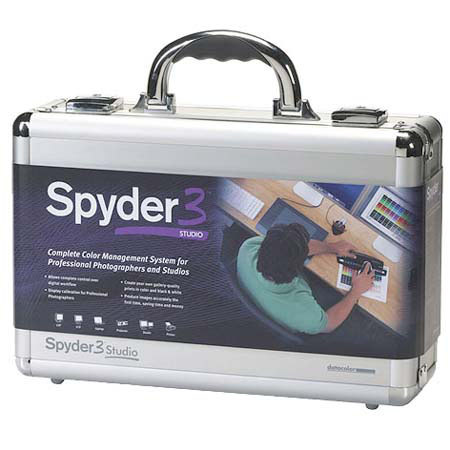
Datacolor Spyder 3 Studio Color Management System Incorporates Spyder3Elite and Spyder3Print for Professional Photographers and Studios
SKU: ICVS3S100
This item is no longer available.
Share:
Overview
Compare
Learn
Specs
Protection
Reviews about this item
Review Summary
2009-11-02T19:00:00
Rated 4 out of 5
A Must Have - But Read the Instructions
I bought the Spyder 3 Studio because I am interested in getting into doing some fine art work and wanted to be able to do my own profiling for the high end papers. The install was a snap, the screen calibration was as painless as it can get. Printer profiling instructions need some work. They mix MAC and PC instructions together making the instructions a bit muddy. Plus I for one am not a big fan of on-disk instructions, too much bouncing back and forth. But if you really read the instructions, take your time, you won't be sorry. The equipment does exactly what it claims to do, the results are stunning profiling different papers takes just a few minutes. Why did I wait so long? I gave this item 4 stars as I said the instructions could use a little work and I would prefer seeing them in print. Quality product - I got what I paid for and a little more.
Tintype
2009-10-25T21:00:00
Rated 4 out of 5
Exceptional
I ordered from Adorama since they had the best price around. [...] The equipment performs precisely as advertised and the difference is stunning. I was particularly interested in doing my own printer profiling with different papers. The instructions can be a bit muddy but if you really read them carefully it functions as described. Will probably be doing business with Adorama again.
Tintype
2009-07-01T21:00:00
Rated 4 out of 5
It works
This is a product that does what they claim and does it quite well! There are a few places in the step by step instructions that are a little vague.[...]
ROGER V.
2009-05-20T21:00:00
Rated 5 out of 5
Great tool, Best I've used
Was able to create profiles for dual monitor setup and get good agreement between them. Profile loading was handled automatically and correctly. Also has ability to match dual monitors on same computer if desired, finding profile balance between them. Running on XP home edition. Printer profiles worked well on first pass. Profiler has ability to tweak using imported curves from photoshop, or onscreen tweak tools. Also has extended gray capabilty for B&W work. Interface for printer profile was a bit clunky, but once figured out is OK. Had used Monaco before, and this i MUCH better. Reading the patches takes time, but interface is helpful to be sure you get a good reading. User should print patches as large as possible to make reading easier. Another tip, be sure to allow the reader head to complete the read before moving to the next patch. Takes ~ 2 seconds per read. If you move head to soon, color will not be read correctly.
Winny
2009-05-12T21:00:00
Rated 4 out of 5
Great tool, lacking support
The adjustment tool itself is great, works flawlessly. The software seems to work fine, but has a steep learning curve and absolutely no documentation. The help files are a start, but still lacking. Be sure to use the latest version of the Spyder 3 Elite software, as the earlier version shipped with the tool doesn't support multiple monitor systems. While the end result was fine, I only rated this a 4 because of the lacking docs and steep learning curve. For the top-end price, I expected better support and/or a more user-friendly software package. In advanced mode there is full control, but for someone still learning the basics I'd wish for a mode that gives a simpler interface and/or wizard option.
ksellstr
2009-05-03T21:00:00
Rated 5 out of 5
Does Exactly What It's Expected To Do.
It does a real nice job of calibrating either a single monitor or multiple monitors so they look the same. It also does a great job matching your printer(s) to your monitor(s) so what you see is what you get. I've found that by building my own ICC profiles for each paper on each printer is better than using the recommended profiles by the paper manufacturers. So If you do fine art or just really want your prints to look like they do on your monitor, then this product is for you. I've tried other products to calibrate my monitors but nothing I've tried has given me the control over my output and the results that this package has given me.
Cool B.
2009-03-27T21:00:00
Rated 5 out of 5
Excellent printer and monitor profiling
Regarding the negative review on printer profiling: my experience is the opposite. No, it doesn't take an hour to read a 729 patch target; nor is a 729 patch target set even needed for most printers. With the latest version of Spyder3Print software (a free download from Datacolor's web site), the measuring time of the hardware is faster per-patch, which not only speeds up measurements but cuts down on the potential for mistakes. I routinely measure the 225 patch target, which I use for most of my prints, easily in around 5 minutes. (Another comment: it's often faster to press the Return key on the keyboard to take a measurement, instead of pressing on the spectro's nose button). For some difficult-to-profile papers, I measure the 729 patch target in no more than 15 minutes, and that's with taking short breaks between each of the 3 pages in the targets. Not even close to an hour. These hints might help the other reviewer. Also, as far as profile quality, I've had excellent results on 3 different printers with this (Epson 4800, Canon 9500, HPB9180) on a variety of papers from both manufacturers and 3rd parties. I've had no problem with the gamut mapping of any of the rendering intents.
Hawkeye
2009-02-28T19:00:00
Rated 1 out of 5
Does not work well
The monitor profiling portion of this package works well. Unfortunately, the printer profiling portion is pretty terrible. 1) First, measuring the targets is really tedious and error-prone, since you need to accurately place the spectro right in the center of each small target. (It took me about an hour to measure the 729-patch target - I'll never do that again!) 2) Worse, the printer profiles are not good. The profiles are for some reason set up to use the Saturation rendering intent. The Perceptual and Relative intents in the profiles do not handle out of gamut colors well at all. 3) Because of 2) above, the produced profiles don't work well with Adobe Lightroom, since it does not support Saturation rendering intent. Overall, a dud of a product.
DAVID T.
2009-02-27T19:00:00
Rated 4 out of 5
Necessary for Color Managed Workflow
For accurate color prints, a properly calibrated monitor and printer ICC profiles are necessary. The Spyder3 Studio easily creates the proper profiles allowing you to produce prints identical to what you see on screen. The included documentation does not adequately describe use of the software and all the features, but this information is available on the datacolor website.
jcjacob
2008-12-28T19:00:00
Rated 4 out of 5
Real photographers need color management
I'm really into fine art digital photography. To get the kind of result I want, I need a complete color management solution, and the Spyder3 Studio does that for me. It takes a little while to become familiar with it, but it is worth it. The on-line videos are considerable help.
Joe P.
2008-12-28T19:00:00
Rated 5 out of 5
Works well
I use it to keep a Samsung SyncMaster widescreen monitor, HP 8750 printer, and multiple paper types all working together, with several photo editing programs. No problems with install or continued use of the software, although documentation is sparse and help files are not always crystal clear. Hardware appears well built and works as promised. Printer profiling works best with test prints that have dried at least 24 hours. Monitor and printer profiles are accurate and repeatable.
CURTIS T.
Datacolor Spyder 3 Studio Color Management System Specifications
Related Articles & Videos
About Datacolor Spyder 3 Studio Color Management System
Spyder 3 Studio redefines color management, offering you new levels of accuracy and control for the best performance across all of your digital imaging tools. It's the cornerstone of any digital darkroom allowing you real-world colors you can rely on. Solutions from color management on-screen to complete studio solutions that let you create custom color or black & white ICC profiles geared for your printer and media selections. From start to finish, you'll get results professional studios rely on and the ease of use serious photographer's demand. Specially designed for Professional Photographers, Photography Studios, Production Studios and Professional users of all kinds.
Join VIP PRO
Earn 2X Points + Exclusive Perks!
Request a Callback
Chat one-on-one with an expert
Sell or Trade your Gear
Get started in 3 easy steps
What's in the box:
- Datacolor Spyder 3 Studio Color Management System
- Datacolor 1005 Spectrocolorimeter
- Spectrocolorimeter Base
- 6' mini USB Cable
- Spyder3Print Software CD
- New SpyderGuide
- Spyder3Print Quick Start Guide
- Datacolor Spyder3 Colorimeter
- Spyder3 Desktop Cradle/Tripod mount
- Spyder3Elite Software CD
- Spyder3Elite Quick Start Guide
- Screen Cleaning Packets
- Datacolor 1 Year Hardware Warranty on Spectrocolorimeter & 1 Year Hardware Warranty on Spyder3