2012-08-21T20:00:00
Rated 5 out of 5
Easy to set up and use
I was worried after I ordered this online because of the bad reviews it gets, but I found it to be very quick to set up and easy to use. Microphone works well, picture quality is average and the auto focus is very useful. I works well with Facebook facechat and Skype. And it fits on my computer monitor really well! All round just what I wanted.
nlk111
Originally posted at

2012-08-09T20:00:00
Could not get it to work at all.
Goldmaker
Originally posted at
2012-07-21T20:00:00
have never owned a webcam before so have nothing to compare to but when my wife and I used the webcam to talk to our son the picture and sound were good. We had a little problem getting the lens focused on us instead of the bookcase in the background but overall was fine. Setting our voice was a little problematic; had to pick the right sound driver or setting for our son to hear us. Happy with it.
belair
Originally posted at
2012-07-18T20:00:00
Rated 5 out of 5
This is the Best
We are enjoying the HP HD-3110 Webcam. We have not worked with one except on the cell phone. This is just what I was looking for, because it has the widder viewing angle and auto focus. I've noticed it is much better than others I see. Couldn't be happier. Have also enjoyed the HP Wireless comfort mouse, too.
Joe44
Originally posted at
2012-06-12T20:00:00
Rated 4 out of 5
Want a good web cam, this is the one for you.
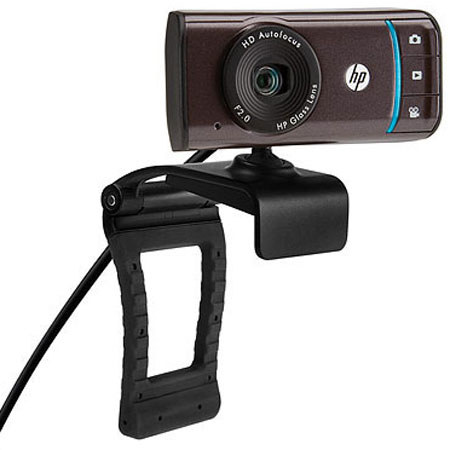
Simiple to use and great quality video and audio pickup. I was disappointed in the way the Web Cam mount was constructed, could not attach it to my Monitor and found it works best as a stand mount. Two out of three is OK!
Arcalark
Originally posted at
2012-05-03T20:00:00
Seems to be OK the few times I've used it.
Image tends to look a little green, but I'm using it in pretty low light. It comes with a bunch of add on software with some pretty cool features, but it's difficult to control when the software does certain things.
One thing that has never worked are the 3 buttons on the side. They're supposed to launch applications, but they don't on mine. I don't use it much though, so whatever.
It has the abaility to automatically adjust to wide screen mode, which I like because there's usually more that just me in the picture. However, it does this automatically and it is impossible to control when it goes wide and when it goes tight. That's a bit of a downer.
Overall an OK camera. The image quality seems to be great on the receiving end.
bisquick
Originally posted at
2012-05-02T20:00:00
Rated 5 out of 5
Excellent All-around Webcam
Fast and easy setup; Automatic interfacing with Skype, MS Lync, GoToMeeting; great picture quality
gotomeetingpro77
Originally posted at
2012-04-29T20:00:00
Rated 5 out of 5
Great Web Cam
Picture from cam is very clear. Outstanding color.
Arlo
Originally posted at
2012-04-29T20:00:00
Rated 5 out of 5
Waranty replacement
The webcam I received was defective and through a couple of emails service sent out a replacement which arrived today and works perfectly, I really appreciate the prompt replacement and I will continnue to purchase HP products with confidance. I have a desktop, a laptop and recently sent a notebook to my son, I have had excellent reliability and performance from all of them.
Johnboy2
Originally posted at
2012-04-19T20:00:00
Rated 4 out of 5
HP Webcam HD-3110
Seems to work like a champ. Gets great video response. HOWEVER, for the life of me, I cannot figure out how to make it pick up sound! The 3110 does have a mike in it, right? Can someone please help?
DonCarr
Originally posted at
2012-04-17T20:00:00
Rated 3 out of 5
not easy to attach to monitor
The way this device is designed, it's impossible for me to attach it to my monitor, I've had to come up with some other way to hold this cam steady while transmitting. That is why I only rated it 3 stars overall
moley
Originally posted at
2012-03-23T20:00:00
Rated 5 out of 5
Amazing for the price
Very inexpensive yet delivers an amazing quality picture. A bit clumsy attachment to the moniter though. However, it has not fallen off yet. Use it frequently as grandkids leave far away, picture is smooth and clear, almost 'movie' like.
CindyLou
Originally posted at
2012-03-14T20:00:00
Rated 3 out of 5
Questionable Purchase
This webcam functions well through skype but if you simply want to use it to take a picture, it insists that it is being used by another program or is not functioning properly and then works perfectly seconds later with the fun frames, etc. Also, you cannot use the webcam without installing a whole ton of extra software that slows down the webcam's performance and stops it from being able to do something as simple as taking a picture. Believe me, I've tried uninstalling and reinstalling, shutting down skype and the extra software to just take a picture but it still says that it is being used by another program or something is wrong with it. Overall, it did not exceed expectations when it came to video abilities. And the extra software (fun frames, i-effects, etc.) would all be great if the camera was able to do something as simple as take a plain picture without an added frame, background, or effect.
uhmmallison
Originally posted at
2012-03-08T19:00:00
Rated 4 out of 5
should have done this sooner
called and talked to cust service told him what i was looking for and how they worked answered all questions i had works for me and my sisters as i bought 2
peapicker
Originally posted at
2012-03-05T19:00:00
Rated 4 out of 5
Webcam Review
This webcam is great. My only complaint is that the part that attaches the webcam to the monitor doesn't work too efficiently. It makes it hard to move the webcam to a certain spot and have it stay that way.
Aardvark2001
Originally posted at
2012-02-22T19:00:00
Rated 3 out of 5
Just doesn't mount well on the monitor
I enjoy everything about the webcam except the mounting on the monitor where it sooner than later slips off or tilts al the way forward.
LouLou
Originally posted at
2012-01-08T19:00:00
Webcam does not fit the monitor to my satisfaction. It sits on top and falls off when I make adjustments.
newhp
Originally posted at
2011-12-31T19:00:00
Rated 5 out of 5
SMART BUY
I have only had two web cams and this one by far out performs the other brand that I have !!
STUMPY
Originally posted at
2011-12-25T19:00:00
Rated 5 out of 5
great product
Had it for only a month and used it only once to test it out in different lighting.
Picture quality was good
theway
Originally posted at
2011-12-22T19:00:00
Rated 5 out of 5
Web Cam HD 3110 by HP is excellent
The HD 3110 Webcam has many great features. I recommend this webcam for anyone who is thinking of obtaining one
WayneSuiJuris
Originally posted at
2011-12-07T19:00:00
Rated 5 out of 5
Excellent Product!
I had to add video to my PC so that I could do WebEx video teleconferences, so I saw this webcam. The set-up was easy and the picture quality is great. The software has several features that I might use in the future, but the video teleconferencing is totally using the WebEx interface. Once I told WebEx where to source video and audio (I didn't want to use the audio feed from the camera) , I was totally integrated and streaming for a two hour, 15 person video teleconference. It's very portable, and I'm also taking also it with me to London, so that I can Skype video chat to the USA.
BigTip
Originally posted at
2011-09-20T20:00:00
Rated 4 out of 5
Good performance
The picture quality is good.
It hardly fixes to thin monitors. (negative point)
The accompanying software is really cool.
Misagh
Originally posted at
2011-03-23T20:00:00
Rated 5 out of 5
Awesomeness!
I bought this for my new computer a while ago to replace my standard definition webcam. It works well with all of my programs including Skye and Messenger.
ProfessorCWI
Originally posted at
2010-12-25T19:00:00
Rated 1 out of 5
Worst purchase ever
I could not make it work with Skype - the reason I bought it. My son, while here from Chile (the reason I needed Skype), who is starting his own web based business was unable to make it work after following all suggestions and attempting his own approach. It is going back and I would strongly discourage you from purchasing this item, especially if you have Windows Vista and want to use this webcam for Skype.
obgirl
Originally posted at
2010-12-04T19:00:00
Rated 5 out of 5
Perfect webcam!
I am soooo happy with this webcam! My ex-wife and I chatted on Yahoo Messenger and she said I sounded like I was in Georgia but I was in Kansas. All who video chat with me are excited too. My HP Pro was sweet too but the HD 3100 is a TRUE PRO!
I want to maybe try to get a cam that broadcasts, not just records, in 1080p but it'll be hard-pressed to beat this.
RoyBoy1966
Originally posted at