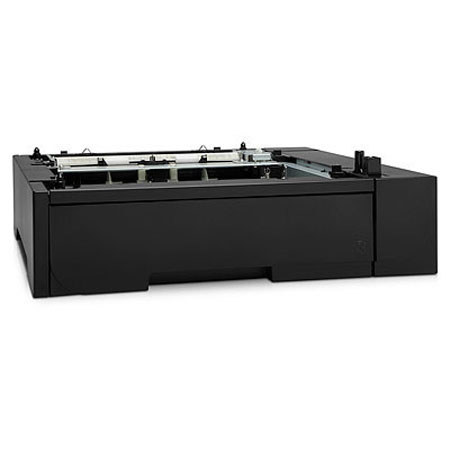

This item is no longer available.
Review Summary
2017-04-17T20:00:00
Tray works well with our printer. We are overall happy with our HP color laser for our office.
DEHT

2015-08-28T20:00:00
Hp has always made very good products. The only thing that is needed is a cover for the portion that sticks out the front half of the entire paper tray. The cover over the part that sticks out would make it look more professional. Product still works great!
fran910
2014-08-26T20:00:00
Adds a 2nd paper tray so you don't have to load paper as much
JayN49
2014-08-21T20:00:00
Don't know who the engineer who put this idea together , but this is a horrible idea. aesthetically It looks down right stupid. When you set it up for legal the tray cannot close completely. So overall it's a bad design. It hangs off your desk and can easily be nudged or stumbled upon if your are walking by it . The printer needs a sensor for mixed originals for the top feeder tray, so as an all in one it lacks features . Why have multiple size paper trays if the machine can't sort mixed originals. This leaves the operator to have to change the settings every time he needs to use a different size. Thats a big waste of time leaving you to baby sit the job you are doing. Even though the printer copies well , The design at best is FAIR. So don't bother buying this for your home or work place if you need the above mentioned features because you will be very frustrated.
legalmissfit
2014-04-14T20:00:00
My experience with this paper feeder was perfect. Technically, you pull it out of the box, put it where you want the printer to be, put the printer (carefully) on top of the sheet feeder, turn on the printer & had the printer properties do an auto update. DONE! Simple as that. The only danger I saw was that my printer weights about 50#, so it might be easy to misalign the relatively delicate USB connection and damage it. But this is NOT a product you need professional installation for. Just a strong person or better two average people. And about 10 minutes total time. In addition, I got a great deal on the tray, paying only $101. That was because I called for more info rather than use the web site.
FineGames
2014-04-01T20:00:00
The tray does what it says it does. Only downside is really the design of the printer. The tray was purchased to add legal sized paper as a printing option, which it does, but the existing tray now protrudes by 2.5 inches from the printer body.
btk1255
2013-10-17T20:00:00
This tray is great and work as intended to be. Blends perfectly with the printer color and design. Worthy addition.
JacobsLive
2013-07-28T20:00:00
In the past HP's optional paper tray stuck out in the back when using Legal paper. This current design keeps the tray door open in the front when using legal paper. This is a very poor design decision, as it leaves the printer looking unfinished when using legal paper. Hopefully, someone will correct this design decision, while producing a finished product looking printer.
BadLegalDesign
2013-07-10T20:00:00
Perfect fit perfect operation all-around great product.
NJCHAOS
2013-06-24T20:00:00
The paper feeded works just like it should. The biggest drawback is for legal size paper. The paper feeder drawer has to stay open or extended when using legal size paper. This looks horible and takes up valuable space. HP should take a look at the design and at least have the paper feeder drawer extend out the back.
Kent1234
2013-01-21T19:00:00
Purchased letter tray to use 3 hole paper. Works exactly as intended. Easy to follow instructions regarding set-up. Default tray is now tray 3, so I had to place plain paper on bottom. Tray 3 is now the default tray and 3-hole paper is in tray 2. Using 3 PC's and one mac with no jams or other problems.
athomenow
2012-11-01T20:00:00
Setup was easy. If you want have legal paper in the extra tray the tray does not close completely which creates the need bigger footprint for the printer.
NACO87
2012-09-27T20:00:00
As noted by others, tray sticks out when using legal paper - looks terrible.
legal
2012-09-08T20:00:00
the additional paper capacity is very worthwhile to anyone who prints a lot of material
donu812
2012-06-04T20:00:00
We use this printer for legal sized documents and was unaware the paper tray would stick out in the front. Not very happy that the paper tray sticks out in the front and the paper is exposed. Scared someone is going to think the paper drawer is not closed correctly and will break the paper tray by forcing the paper tray in the printer. Much better design when the paper tray sticks out in the back.
Bartm
2012-05-09T20:00:00
I was happy to pay for the extra paper tray to keep legal paper loaded. But when I received and installed the tray, I found out that when legal paper is loaded, the tray sticks out in front of the printer rather than to the rear like in previous designs. This looks ugly and unfinished. At first I thought I did not install this correctly but turns out this is the new design. This was not shown or explained on the HP website. Fortunately, returning the product was easy and I now simply use the manual feed tray to load legal paper. However, I would have prefered to have the extra tray with legal paper loaded all the time and sticking out the back of the printer out of sight.
ghellmold
With an added input capacity of 250 sheets and media flexibility, the HP CF106A supports greater productivity and less printer management. Have different print media ready in the printer when you need it and print up to 550 pages without reloading.