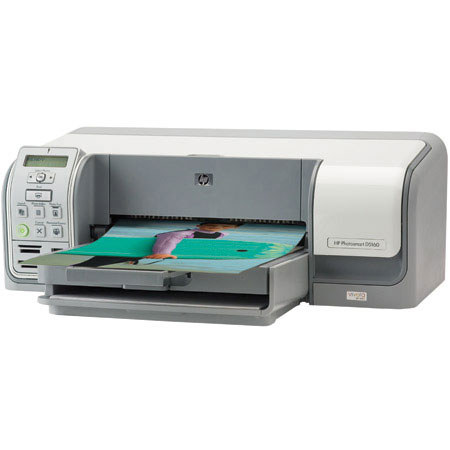
HP Photosmart D5160, Photo Inkjet Printer with USB Interface
SKU: IHPD5160
This item is no longer available.
Share:
Overview
Compare
Learn
Specs
Protection
Reviews about this item
Review Summary
2007-12-19T19:00:00
Rated 4 out of 5
Great Photo Printer
I purchased this printer for the sole purpose of printing CDs and DVDs because the commercial cd printers were so expensive (over $600.00) I get to print about 130 to 150 dics from one color cartridge and I can use up 3 to 4 color cartridges before I have to replace the black one. So I have to say it's great on ink usage. I had another cd printer with individual inks but this HP is a far better miser when it comes to inks. The only negative thing I can say is that I can't get the discs to line up right. They end up with a very slight white off-set edge on one end and full coverage on the other. If they ever improve on that, HP will probably surpass the commercial printers.
Danel
Originally posted at
2007-11-06T19:00:00
Rated 3 out of 5
would not recommend
I got this printer after the one that was purchased for me was a defect, since HP customer service didn't have the product I received they replaced it with this one (customer service was great). Since I've had this printer, the paper has jammed several times, I'm only able to put no more than 3, 4x6 photo sheets in at a time, or it jams. When I'm able to print photos it works great. I used it to print my wedding invites, along with my programs. Not putting no more than 10 sheets in at a time, the printer always grabbed more than one sheet and ended up wasting program paper. If you purchase this product, buyer beware.
notsatisfied
Originally posted at
2007-11-02T20:00:00
Rated 5 out of 5
Photosmart D5160 - Unbeatable Value!
We purchased the D5160 to replace a nearly new competitor's CD/DVD capable printer and have found it to be a much better printer. It is quieter, faster, more reliable and far more economical on Ink while maintaining similar Print Quality. It also did not need any adjustments to print well from Photoshop CS2. The Pros: Fast, Quiet, Very economical on Ink, Reliable, Great print quality, Separate Tray for Photo Paper. The Cons: The included Photosmart Premier software is not very good for printing on CDs, The CD Tray has a tendency to scratch disks and has to cleaned very carefully before each use to prevent scratching. The Vista Drivers would not read Ink Levels. My conclusion: The D5160 is a nearly perfect all-around Printer bundled with mediocre Software. I would only ask for an improved CD/DVD tray and a better dedicated CD printing application. Definitely a MUST-BUY if you intend to print directly on CDs or DVDs.
KeriJane
Originally posted at
2007-10-09T20:00:00
Rated 4 out of 5
printer
i bought this printer last week. i think it is a very good printer. i learn it a lot and fun, too.
annabell
Originally posted at
2007-09-19T20:00:00
Rated 5 out of 5
owner
Excellent operation and long life, high quality, on line repair is excellent, Control Panel can clear back up printing jobs That a Plus. ken
prince
Originally posted at
2007-08-29T20:00:00
Rated 5 out of 5
My first CD Printer
Obviously I am impressed with my first CD printer. It is clearly a newbie's printer, but I love being able to prtnt directly to the face of a CD. It is fast and a great printer for images, too. The changes I would make have mlore to do with how it handles papers, but I have no basic complaints. Good job, HP.
SpinnerBill
Originally posted at
2007-07-31T20:00:00
Rated 3 out of 5
feed problems
Ha a problem with which tray to feed. Keeps insisting on using photo tray when you are using main tray. Other than that it is excellent.
Albert11
Originally posted at
2007-07-17T20:00:00
Rated 5 out of 5
Focus on the product's features
I love all the HP products and this product is no different. HP is a name that I trust and would not use any other printers, etc. I have an HP office jet all in one printer, I have had it for a few years now and never had any trouble with, I am now ready to upgrade to a newer printer.
DeeVee
Originally posted at
2007-06-20T20:00:00
Rated 5 out of 5
D5160 Review
We have had great fun personalizing discs with the print-to-the center feature. It's quick and the quality is remarkable. A great printer at a small price.
Chuck
Originally posted at
2007-06-16T20:00:00
Rated 3 out of 5
The problems I have with the HP D5160 printerr
I do photography on a commercial level, I operate a small business. I find the prints to be reasonable ok, though I think it could be better, I can see the grains. Whenever I use unperforated paper to print border less 4 x 6 photos the image usually shifts about 2 degrees at one end. Passport 2 x 2 prints usually spoil because the images are not squared, so I have to use the perforated paper. But the other paper is what I am used to using with a previous printer I had and the paper is cheaper. The guide for the paper is too easily shifted which seem to me to throw out the alignment thus the print is off. I like the features. Adding a display LCD screen would make it complete feature wise. I use perforated HP photo paper and regular (Mitsubishi) photo paper. I am not sure I would recommend this to a friend unless those issues I pointed out can be fixed. what sense would it make if its' performance is not up to par? I am, Lance3
lance3
Originally posted at
2007-06-11T20:00:00
Rated 4 out of 5
hpD5160
Great Little Machine. It does a good copy, and prints on cd's or dvd's. Prints a good picture on good paper.
Preacher
Originally posted at
2007-06-07T20:00:00
Rated 5 out of 5
Fantastic Printer!!!
I recently printed 3 - 8" X 10" pictures with this printer and they were hung in a local gallery. I have received so many compliments on the quality of this printer. I must advise anyone who purchases this printer to also use the photo ink cartridge. Don't bother getting the grey cartridge though. The only drawback is that it doesn't have a preview screen for printing right off of a memory card. 5 stars!!!
AlBe
Originally posted at
2007-04-28T20:00:00
Rated 4 out of 5
HP Photosmart 5160 -Logical Choice
It was prom weekend, and I was in a spot...my printer was toast and I needed a new desktop photo printer. I have been reading good things about the new generation of HP Printers w/Vivera inks, so decided to take the plunge. It was an easy decision on price, as the comptetitors were at least $20 more expensive, and the HP offers B&W printing capability (not found on compeitiors units unless you purchase aftermarket inks, which may void your warranty) Set-up went smoothly, and I was up and running in about 30 minutes. First Prints....were surprisingly good. I printed some portraits shot earlier in the day on HP Advanced Photo Paper, and....we have a winner! The kids and parents were all impressed. I'm not a pro, but I shoot with a D-SLR and post-process RAW images to maximize quality...this printer/paper combo did a fine job. I can't wait to try B&W printing & the Premium Plus papers! Overall, the only negative thing I can say is that I would like more speed with the same quality....there is a significant processing speed penalty going from 600 to 1200 dpi, but it's faster than my old printer, and I paid less than 1/2 of what did 4 years ago.
Quenchfire
Originally posted at
2007-04-25T20:00:00
Rated 2 out of 5
Not Reliable
I would not recommend this printer. I purchased it and it broke down within a few months. It was replaced by the manufacturer but that printer only lasted 3 months before it broke down. The printer has some nice qualities but it is expensive to purchase the printheads and the ink.
Sami
Originally posted at
2007-04-14T20:00:00
Rated 1 out of 5
HP Photosmart D5160 Printer
I only wanted to use this printer for printable DVDs. I found the software to create the image to be very elementary - was only able to put text in specific areas and could not move it around. Also I could not adjust position of photo. The print resolution is not good for DVD. I did not try photos. Would not recommend.
Megy
Originally posted at
2007-04-10T20:00:00
Rated 4 out of 5
The D5160 and Vista
The printer was great on XP..... doesn't work with Vista... yet, hopefully some drivers will show up to let me use it again. I especially like the printing on CDs (if you have printable cds) feature... the program it comes with isn't very versatile, but it gets the job done. I just use paint with a CD sized template to get what I want out of it.
jason
Originally posted at
2007-03-19T20:00:00
Rated 3 out of 5
photosmart D5160
This priinter can do many things-read multi storage card types,photo layouts,greeting cards etc. but as a CD printer I cannot reccommend it. It seems that you can only print a simple text block one time on the CD face.This is a major flaw in ther software.I tried using 3rd party CD printing software but it doesnt work properly.I was excited about this printer because HP's ink cartridges do not dry out as fast as the others I have hadI believe this is do their docking proceedure of the cartridge
boris
Originally posted at
2007-02-28T19:00:00
Rated 4 out of 5
Only CD/DVD printer they have and it's limited !
Product prints well enough and it's very cost effective BUT the main feature I wanted was the ability to direct print on CD/DVD's. That feature works but the software provided is graphically very limited. HP gives you several background choices but then limited where on the disc you can add text. In that ONE location, it must be on a white background box that blocks out a good portion of your background photo. If you don't want to use it you don't have to but the white box will still be there - it's not moveable or removeable so even if you first build your picture and text with another photo program your stuck with the HP white text box if you let the HP software do the printing. I know they could have done much better without added cost by just giving the user the abitiy to move and/or delete that box.
BobbyD
Originally posted at
2007-02-23T19:00:00
Rated 4 out of 5
Excellent printer
We had an older all in one and they have both been easy to use and the prints are nice and clear. I really like this printer.
RANDE20216
Originally posted at
2007-02-07T19:00:00
Rated 4 out of 5
Just purchased today
Will reserved comments for later. I was frustrated after having a previous Hewlett Packard printer,3280 where installing the print cartridges were soo simple, to spend much time trying to figure out how to install on this one.
praised
Originally posted at
2007-01-14T19:00:00
Rated 5 out of 5
Great Printer
this is a great little printer for the price it is well within my budget and can't wait to print on some dvd.
Rickrock
Originally posted at
2006-12-13T19:00:00
Rated 5 out of 5
Excellent value
I recently switched from a HP 910c to this printer. The function to print on DVD/CD's is superb. Also the photo quality on photo paper was surprisingly good, even though I only used the standard Vivera inks and not yet the photo quality tri-color inks. I also own a sublimation printer, which in my mind still gives slightly better quality prints. But this printer handles bigger size prints and borderless too ! I tested the Bluetooth link and it works perfectly, but sadly Bluetooth does not work very well through walls. Direct printing from memory cards is also a plus. No need to start the PC. I keep putting plusses up but the auto-paper recognition seems to work very well too. To mark one negative item, when printing on CD one should be aware that the printer has to bee a distance from a wall, because the tray travels through the back. As far as I know this is not mentioned in the manual. So take care.
tripled
Originally posted at
Specification about this item
Related Articles & Videos
About HP Photosmart D5160, Photo Inkjet Printer with USB Interface
The HP Photosmart D5160 Photo Printer delivers amazingly easy and convenient photo printing experience. It features memory card slots for camera, automated photo tray that supports both 4 x 6-inch and 5 x 7-inch paper and the capability to print directly on to CD/DVD media. Its four-ink printing using HP Vivera Inks enables high-volume printing with efficient speed. It is capable of printing photographs and color graphic documents in as fast as 26 seconds. It prints black and white documents with a speed of up to 31 ppm and color documents with up to 24 ppm. This printer is ideal for laser quality printing and is a quick and easy solution for home photo and document printing.
Join VIP PRO
Earn 2X Points + Exclusive Perks!
Request a Callback
Chat one-on-one with an expert
Sell or Trade your Gear
Get started in 3 easy steps
What's in the box:
- HP Photosmart D5160 Printer
- HP 98 Black Inkjet Print Cartridge (11 ml)
- HP 95 Tri-color
- Inkjet Print Cartridge (7 ml)
- HP Photosmart Premier software on CD-ROM
- Quick Start Guide
- User's Guide
- Power supply
- Power cord
- HP 1-year limited hardware warranty backed by HP Customer Care
- service and support
- 1-year technical phone support
- plus a toll-free number