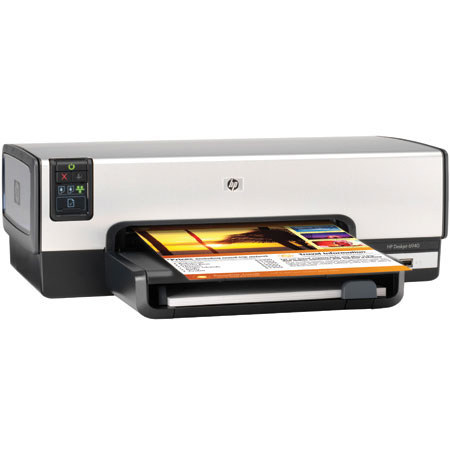
HP Deskjet 6940 Color Inkjet Printer with Wired Ethernet & USB Interface, 4 Color 8.5x14".
SKU: IHPDJ6940
This item is no longer available.
Share:
Overview
Compare
Learn
Specs
Protection
Reviews about this item
Review Summary
2009-07-05T20:00:00
Rated 1 out of 5
terrible printer
this is the worst printer ever. It pulls many pages at a time and therefore wastes paper and ink. If you are looking for a printer, avoid this one.
stacy1
Originally posted at
2009-06-29T20:00:00
Rated 4 out of 5
Printer Review
The printer performed well. I would like another like it. Only that the cartridges are expensive.
rocmbiti
Originally posted at
2009-06-27T20:00:00
Rated 4 out of 5
hiccups at times
I have used HP printers for almost 20 years. I have used this 6940 for over a year. Most of the time it is a great printer except the times it prints a partial page on one sheet, then continues the print on another sheet causing me to reprint the job. There is no way to predict when this is going to happen. When I want to print more than one envelope, I sometimes print 50 at a time, all the same. The printer will only print one at a time so I have to feed the envelopes one at a time (I finally have started printing multiple envelopes on my HP 7310. It gives me no problem at all.. Overall, other than that, the 6940 is a very good printer that I use every day.
RGH73
Originally posted at
2009-05-14T20:00:00
Rated 4 out of 5
Deskjet 6940
A fine little printer. Inexpensive, high quality print. I use fast draft quite a bit of the time and it produces good quality and extends cartridge life. I have one criticism which is a problem inserting envelopes for printing -
DickUrban
Originally posted at
2009-04-11T20:00:00
Rated 5 out of 5
Very Nice Printer
Like it well enough to purchase a second, because I was afraid they are being phased out. Only two problems you may have with it, but there are workarounds. First, it can be slow in double-sided print mode. Go into Print Preferences and click on advanced tab. There you can adjust "dry time" (for ink) and ink spray volume. This will speed it up considerably. The second is printing envelopes. If you are using MS Word, this can cause jams. To stop that, go into Tools, then Labels & Envelopes tab, then click Options and uncheck the clockwise rotation box. After fixing those two things, I can't think of a thing that isn't good abou this printer.
Mara
Originally posted at
2009-03-01T19:00:00
Rated 5 out of 5
HP deskjet 6940
Best printer so far. Have used HP equipment for years. Keep up the excellent work.
Teddo
Originally posted at
2009-02-24T19:00:00
Rated 1 out of 5
Bad quolity Cartridge carriage
After evaluating HP 6943 printer Features with other printers in the same range we purchased 30 of them, as it stands high among others. But sadly the cartridge carriage that holds color and black cartridges comes with a small thin plastic piece. This thin plastic piece holds a metal part that keeps the cartridges in it's correct place. Out of 30 units we purchased in 4 of them this plastic piece is broken. HP DJ5943, 6543 and 6943 all have this issue except the photosmart series. Nevertheless This is a printer with good print quality, performance & features that sadly lacks of reliability.
Nilushan
Originally posted at
2009-02-10T19:00:00
Rated 5 out of 5
Best Printer on the Market
Extremely pleased with this printer after several years now. Its unique envelope slot is quite valuable. You can insert and print one envelope without removing any of the paper. Other printers would require you to remove the paper and adjust the guides, print the envelope, then adjust the guides again and put the paper back. This printer saves so many steps. The reliability and print quality have been excellent. At first there was some difficulty with labels, but after adjusting a setting or two, this has worked out very well. I install printers for friends and wouldn't consider any other printer.
DetroitDude
Originally posted at
2009-02-09T19:00:00
Rated 5 out of 5
Great Printer!
I've used this printer for over a year and even bought a second to attach to my laptop situated on another desk at home. I've even recommended it for individual teacher use at my middle school. The printer adapts well to all weird sizes of envelopes, arguing by blinking that the envelope is an unusual size, but the user has the ability to force the printer to print anyhow by just pressing the flashing button! NICE! I especially like the fact that the ink goes on and on even though the ink services software shows that the ink is "out"--I have continued to produce up to 100 additional certificates for kiddos even when the ink status is negative. Quality of photos is excellent too, as well as just pictures used for fun or classroom display.
ElPasoTeacher
Originally posted at
2009-01-28T19:00:00
Rated 5 out of 5
Great Printer!
I purchased this printer approx 9 months ago and have been very satisfied with it. It is very durable and great for heavy duty printing for a home office. The extra capacity ink cartridges are a great time and money saver. It also prints photos well. The stainless steel like exterior is a great idea and I would love to see more of this on this type of printer and also on some of the laser office printers. Keep up the good work HP!
Mommasue
Originally posted at
2008-11-17T19:00:00
Rated 5 out of 5
Ubuntu 8.10
I have not been a HP printer user for a long time. I found this printer at a good price and the reviews said it would work with Linux. When I connected it to the USB port Ubantu 8.10 detected it immediately. I then went to the HP website and downloaded hplip and installed it using the instructions from the website, connected the printer to my network and again it was detected immediately. Thanks HP for the support of Linux. Over all the printer has worked and preformed without any problems. I am very pleased with it.
GADawg
Originally posted at
2008-10-16T20:00:00
Rated 5 out of 5
HP Deskjet 6940
What a printer it has turned out to be. Not one that right not one single paper envelope jam or miss take. I use this printer to print addresed and print the stamped on the emvelope and there has not been one error in 5000 mailing thus far. And it only 90day old. Great great and great. Thank HP
OkaloosaGregory
Originally posted at
2008-09-19T20:00:00
Rated 2 out of 5
Deskjet 6940
Easy set up and fine print quality on full size paper. Will not handle envelope/card/small size paper feed, which is very annoying to say the least. Trying to print envelopes or small size sheets from main tray doesn't seem to work either. Replaced a ten year old HP 842c which finally gave out, but which did a much better job than this one.
Kfus
Originally posted at
2008-08-29T20:00:00
Rated 5 out of 5
Super Printer
Had to purchase this printer when my last HP bit the dust finally during a big personal project. Loaded the software, it went quite smoothly!!! Printer has worked great since. I have had for about 3 months with no problems. Print quality is excellent. I especially like the "paper release" design. This printer prints super fast and the paper "shoots" out and drops nicely into the tray without that problem. I can set a project to print and walk away without any worries!!! It has a great paper release feature that is "worry free" and doesn't cause paper jams like other printers do. This is my 4th HP product in 10 years (heavy household user)including an old hand-me-down, I consider it my favorite overall. I probably wouldn't recommend it for a business with heavy printing needs or multiple peole using it but it would be great for a home business owner or for personal use!!!
DCSTITCHER
Originally posted at
2008-07-29T20:00:00
Rated 2 out of 5
Just don't break the cartridge holder
My office purchased a couple of the HPDeskjet 6940 printers. The print quality was very. However, after just 3 months of daily use all of the printers suffered the same fate. The plastic cartridge holder broke. Now, none of the printers are working of of any use to this company. I would not recommend this model whatever the price.
junkcollector
Originally posted at
2008-07-27T20:00:00
Rated 5 out of 5
The best printer and economic
It is fastes, good quality on color, economic when you have to print a lot as I have to, the ink is forever in I really love this printer and I have it for mor than a year
Janessa
Originally posted at
2008-05-07T20:00:00
Rated 3 out of 5
What Happened to the Quality
I have had this printer for 8 months and now I can't even send out the sheets I am printing. The printed sheets are coming out with ink stains and the individual typed letters are inconsistant either being to light or to dark or smeared. I have tried all of the suggested maintenance and nothing helps. Now I need to get a new printer.
Davidlr1
Originally posted at
2008-04-27T20:00:00
Rated 1 out of 5
Nice printer until cartridge change breaks it
This is a very nice printer in terms of print quality and features. Unfortunately the ink cartridge housing has a metal clip that depends on a fragile piece of plastice which breaks after a couple of cartridge changes. The printer is unusable after this happens. This has happened on 3 out of 3 of the 6940 printers I've used. Other reviewers at Amazon and CNET also report similar problems. While I love HP printers, I cannot recommend this model and hope HP will not use this poor design on their other products.
Nonnymom
Originally posted at
2008-04-12T20:00:00
Rated 1 out of 5
Brittle Ink Cartidge Holders
The ink cartridge holders are very fragile. There is a tiny plastic stub that holds a giant spring that senses that a cartridge is in place or not. The stub on the black ink cartridge holder broke, so the printer would sometimes not sense that it had a cartridge in it. More importantly, the loose spring soon poked a hole in the printed circuitry that connects to the cartridge, so it broke completely. This seems like a poor engineering idea, to have cheap printed circuitry (like metallic ink on heavy paper) next to a sharp spring. I have read reviews of the HP Deskjet 6940 (the new version of this printer), and it seems that it has the same exact problem. While the printer was working, it printed with good quality. However, the printer would stall often. It would start a print job, and then get confused or something and would just stop. Sometimes, it restarted the job and finished properly, but sometimes I had to manually end the job and just reprint.
stimmy88
Originally posted at
2008-01-22T19:00:00
Rated 2 out of 5
Did not last long enough
The printer worked great at the beginning, After at best 2 years, it would not accept print jobs anymore. Called out a repairman and he said the main board that controls the printing was bad. To replace the board is about as much as a new printer. Because of this, I did not rate the machine well do to the reliability issue.
Debb
Originally posted at
2007-12-28T19:00:00
Rated 5 out of 5
Deskjet 6940 using Windows Vista
The 6940 printer came with CDs for both the older Windows as well as for Vista. I requested that my Toshiba Satellite Laptop with Vista add the new printer and I didn't even have to use the Vista CD since the driver was included in the list within Vista Home Premium. It loaded with out incident and it came up running.
BudRolley
Originally posted at
2007-11-25T19:00:00
Rated 1 out of 5
Design Flaw
These printers have a design flaw where the plastic in the ink cartridge holder breaks and the spring (bent metal paper clip looking thing) goes through the thin plastic circuit board type membrane behind the ink cartridges. This of course kills the printer as it cannot print if there's a hole in the circuitry. We've had 3 of these break in the exact same fashion just after the warranty period ended. To my knowledge HP has not addressed this issue in their newer deskjet printers either.
BDSMike
Originally posted at
2007-11-14T19:00:00
Rated 5 out of 5
Great Printer
Great shipping.. Only two days with standard shipping. Set-up went fine (using Vista) until "fatal error" notice. Set-up had to work around that and it seems to all work just fine. Takes about 15 minutes total. Printer looks great and is super fast. Thanks HP.
posoul
Originally posted at
2007-09-23T20:00:00
Rated 3 out of 5
$100
$100 I believe this machine would be a good one for home (fairly busy) use. We have a HP Deskjet 6940 which we have had for seveal years. Print quality is very good when cartridge is in good shape. Print speed is very good all the time. Prints black and color equally well.
JamesT
Originally posted at
2007-08-10T20:00:00
Rated 5 out of 5
Flawless w/ Mac & PC
Really saves ink, too. It seems like the cartridges have lasted forever even with lots of heavy color printing. I use it on a wirless hub with 3 Macs and wired on an XP PC.
iPAQDave
Originally posted at
2007-06-04T20:00:00
Rated 4 out of 5
Absolutely the best printer for the Cost
The only reason it didn't get 5 stars across the board from me? Because the one I used was borrowed from my Grandparents, and I didn't have it long enough to try out all the features!! However, I can be reasonably sure that this baby was top shelf. All the way. One would be hard pressed to find a better value for its cost. I mean this one has Cat 5, USB, and 802.11 (wireless) connectivity. A built-in, auto configuring print server with wireless protocol and its own IP address! Also has a Multi-format card slot on the front for when you don't have a network or a computer handy! The optional two-tiered paper tray is balanced by the blazing speeds at which it can pump out copy. And I almost forgot. The print quality is SUPERB!
JF73
Originally posted at
2007-03-18T20:00:00
Rated 1 out of 5
deskjet 6940
This printer wil;l handel full size sheet only. Putting anything in the special holder for narrow paper or Avery Lable mini-sheets will start to load, then the arrow by to on button blinks and loadingt stops. Pushing the arrow button will either start the printing, feed the paper straight thru with no printing, or let it be caught by the print heads and be torn. Your Deskjet 820cxi would handle all these forms with no trouble. Unfortunately that printer does not have a USB plug, so will not connect to my new computer.
Almil
Originally posted at
2006-10-25T20:00:00
Rated 4 out of 5
Good Quality, Good Price
I bought the 6940 printer to replace an older HP printer that was connected to a print server. I had a little trouble getting the printer to hook up with my router. After a few tries and a reboot or two, everything synced up. I had no trouble getting the rest of the PC's on my network connected after that. Print speed and quality is quite good for the cost. It will be mostly used by the kids for their school reports.
CKimS
Originally posted at
2006-10-24T20:00:00
Rated 4 out of 5
Great Performance, Software Disappointing
This printer is a workhorse for our house, and we very happy with the quality of the output. Documents printed on the 6940 look great. We've used semi-gloss and glossy photo paper for some pictures, and they came out beautifully as well. The software that comes packaged with the printer, however, has caused us a few problems. Errors will pop up randomly, even when we're not using any of the HP software or the printer. Occasionally, this has required me to reboot my PC, which is somewhat inconvenient. I would recommend installing only the bare necessities to connect the printer, and avoid the other components of the software package.
Woody
Originally posted at
2006-10-23T20:00:00
Rated 2 out of 5
Previous HP Fan
I used to be a big fan of HP printers. I do a lot of printing and usually wear out a printer in two years. The previous version of this printer lasted two years before it started making this horrible sound like the gears were all meshing backwards and it was going to die any minute. This "newest" version (6940) of that printer did that to me within three days of bringing it home. Naturally I returned it to the store for another. Silly me I thought only one could be defective--wrong!!! The second one did the same thing but took about a week or so. Then this other trick it has is to sporatically print half of the sheet on one page and finish on a second page. This really messes things up when you are printing double sided! Steer clear is my recommendation!!!
FormerHPFan
Originally posted at
HP Deskjet 6940 Inkjet Printer with Wired Ethernet Specifications
Related Articles & Videos
About HP Deskjet 6940 Inkjet Printer with Wired Ethernet
• HP's affordable performance print solution for professional printing at office and home. Work the way you want want to with wired Ethernet printing and print sharing with up to five computers.
• Work more productively with breakthrough breakthrough speeds up to 36 ppm black, up to 27 ppm color in Fast Draft mode.
• Print professional-quality color color up to 4800 optimized dpi dpi or optional 6-ink color. Convenient, direct photo printing without a PC from PictBridge-enabled cameras using printer's front USB port.
• Create Create standard and custom size photos up to 8.5 x 24 in, with or without borders. Save time and use up to 50% 50% less paper with optional auto two-sided printing.(auto two-sided printing accessory included with Deskjet 6940dt)6940dt)
• Automatic paper type sensor and optional 250-sheet plain paper tray (HP 250-sheet Paper Tray included included with Deskjet 6940dt) are other convenient paper handling features. Enhance and fix photos automatically automatically with HP Photosmart Premier software.
Join VIP PRO
Earn 2X Points + Exclusive Perks!
Request a Callback
Chat one-on-one with an expert
Sell or Trade your Gear
Get started in 3 easy steps
What's in the box:
- HP Deskjet 6940 Printer
- HP 96 Black Inkjet Print Cartridge (21 ml)
- HP 97 Tri-Color Inkjet Print Cartridge (14 ml)
- HP Photosmart Premier Software
- Printer Drivers
- User's Guide on CD-ROM
- Setup Poster
- Reference Guide
- Ethernet Cable
- Power Supply
- Power Cord
- Hewlett Packard Warranty