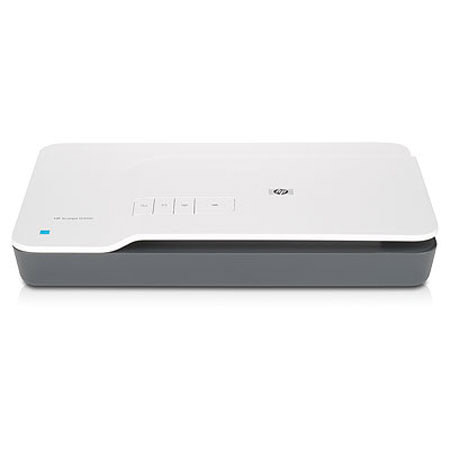
HP Scanjet G3110 Flatbed Scanner, Linear CCD Sensor, 4800x9600dpi Resolution, USB 2.0 Connectivity
SKU: IHPL2698A
This item is no longer available.
Recommended Alternatives
Share:
Overview
Compare
Learn
Specs
Protection
Reviews about this item
Review Summary
2016-04-24T20:00:00
Rated 4 out of 5
Works also with Windows 10
Robust and sturdy, it's been working for more than five years. The installer, as well as the scanning software, also works on Windows 10.
openminded
Originally posted at
2015-12-21T19:00:00
Rated 3 out of 5
Bad for Windows 10
Since I upgraded to Windows 10 the G3110 scanner no longer functions and according to HP no additional support or updates will be provided . I generally like HP products but their software is frustrating as they do not provide an option to "REPAIR" damages. So you are left to uninstall and re-install and then the installer crashes.
NormallyAnHPUser00
Originally posted at
2014-04-25T20:00:00
Rated 5 out of 5
just what I needed
I needed a basic scanner to replace my HP4400 with the change from XP to Win7. Mainly I scan and email photos. I also have other business papers thatI scan and email.
ceilidh
Originally posted at
2014-02-06T19:00:00
Rated 3 out of 5
Good Value; So-So Features
Product is reasonably priced, easy to set up and recommended for those reasons. Scanning software features not as easy to use as those of my previous Scanjet 4400c, which is not supported by Windows 7. User Guide is inaccurate for adjusting settings, as it references HP Control Center, which is not installed by the 3110 setup CD. Is fairly simple to use, but requires quite a bit of searching to figure out settings. User guide is no help for that and neither is HP's online support.
w7340
Originally posted at
2014-01-11T19:00:00
Rated 4 out of 5
my scanner
well first of all -it setup great and it wouldn't scan at the first try,until i plugged in the little white plug that was already attached and then, it worked fine and it scans beautifully ,then and ever since,thanks HP for a wonderful product.
teessa
Originally posted at
2013-12-04T19:00:00
Rated 3 out of 5
Best thing for preserving 35mm Kodakchrom slides
I have hundreds of old 35mm Kodakchrome slides that capture precious family moments for decades going back to the 1960s. This is the best device I found to save them electronically. It is a little awkward to use, and the process isn't quick. It can scan four slides at a time, and the slides must be fed manually. But it does work, and I can send the images to Snapfish for easy sharing.
35mmslide
Originally posted at
2013-11-29T19:00:00
Rated 4 out of 5
Good Scaner
Scans good, easy to use, would recommend this product. Plug kept coming loose on back.
YLABDAD
Originally posted at
2013-07-08T20:00:00
Rated 5 out of 5
Love HP Scanners
The scanner is perfect as they always are..I like that its not to technical to operate and I would own no other..I'm on my third one..Thank you for a great product.
Neomonee
Originally posted at
2013-06-13T20:00:00
Rated 5 out of 5
Great scanner
I cannot really write a review on this product, since I have not had a change to put it to work, so far I only installed it and ran a couple of tests, which were fine. But I have owned a previous similar model for over 15 years and it was a true work horse, I used it for scanning well over 10,000 pictures, slides and negatives, without a glitch. The only reason I had to buy the G3110 is because my previous scanner could not work with 64 bits. I expect the G3110 to perform equally well.
SnowLeopard
Originally posted at
2013-06-05T20:00:00
Rated 4 out of 5
nice big pic's
full big colorful; pictures' I recommend this scanner to anybody!
elsachimo34
Originally posted at
2013-05-22T20:00:00
Rated 3 out of 5
Fair
difficult. Cannot access 4x6 photo tray or scan to printer.
Pear
Originally posted at
2013-04-24T20:00:00
Rated 5 out of 5
Best value for excellent printer
We always look very carefully before making purchases, and this one was exactly right for us. We're extremely pleased with the ease of use and quality of scans. Only docked a notch for poor included software support. It is really necessary to purchase additional software to make best use of this unit.
redguru
Originally posted at
2012-12-27T19:00:00
Rated 1 out of 5
CAN NOT install Scanner !!!!
CAN Not Insall Scanner!!!!! Put in disc and followed instructions. At end the 2-icons that were to showup on Desktop Never showed. Soon after my computer locked up. Same problems that I had with G4010 Scanner. By now there should have bee a fix. When I removed the Disc It looks like it has a scratch on it. HP JUNK
ted321
Originally posted at
2012-11-01T20:00:00
Rated 5 out of 5
Very good value
This is very good to own.
mtptesting
Originally posted at
2012-03-19T20:00:00
Rated 5 out of 5
Great Purchase
My scanner is working fine. I will continue to purchase HP products in the future.
eilcal
Originally posted at
2012-01-20T19:00:00
Rated 2 out of 5
slow and frustration to use
it take a minute or 2 to scan a photo. It store the image into a temporary memory , users can't see it. I have to click done or finish in order to get the image store onto my hard drive. But that means I have to start up the scanning process:set up file name, image setting. To save all the hassle doing all resetting, i click scan next, after I scanned about 20 images, the power went out, all the works were gone completely. I'm thinking to purchase a cannon to replace it
miky77057
Originally posted at
2011-10-11T20:00:00
Rated 1 out of 5
Bad Performance
The light source for transparent slides seems to be much to weak. It would not recognize some slides at all - it showed a black square with no "cropping" frame. It would recognize these slides only by moving an adjacent "cropping" frame over the black square and increasing the brightness, but the result was very grainy. I sent it back for a refund. Tech support was unable to help or correct the problem. Another brand scanner, in the same price range, I subsequently purchased does a great job on these same slides even though it is slower. Digitizing slides and photos is why I purchased the scanner.
Sweetoldbob
Originally posted at
2011-07-07T20:00:00
Rated 4 out of 5
Owned for two years
I had nothing but problems the first year. Could not get any customer service. After I purchased a new HP PC with windows 7 all the features started working. I paid 79 for mine two years ago. Can't believe HP trying to get 99 as a sale item. It does a good job of scanning my slides and pictures. Don't know why the software would not work from the beginning.
texascat2
Originally posted at
2011-06-16T20:00:00
Rated 1 out of 5
Bad purchase
The Scanjet G3110 worked great for about 9 months, Now it won't save the photo I scanned and HP doesn't support it. But they still have the same scanner for sale. I wouldn't buy it again. They should send me a replacement for free! I spent half of yesterday and half of today trying to uninstall and reinstall from the disc. I tried to get the live chat but they don't know how to help me.
nogood2
Originally posted at
2011-04-23T20:00:00
Rated 3 out of 5
Lots of steps
I purchased this scanner last week. Picture reproduction is excellent, but the software is very tedious. I'm scanning is lots of pictures, and every time I have to set the settings the way I want it. There's no way to change the defaults. It should be that once I set the locations where I want to picture to go, no I don't want a sub folder, etc, they it should either give me option to leave it that way or if I close the controls, then revert back to HP default. If you're doing hundreds of scans, it's very time consuming and a real pain.
firchief
Originally posted at
2011-01-30T19:00:00
Rated 1 out of 5
it's cheap bad quality
It's a cheap scanner,you get what you pay for. Pictures won't look like the original when scanning . Scanning documents the scanner leaves the paper with a dark tint. Waste a lot of ink. Buy a better scanner When you lighten the adjustment so the dark background goes away what you scanned is very light.
stickman
Originally posted at
2010-12-07T19:00:00
Rated 2 out of 5
Features Rich, Not Intuitive and Disappointing
MY (old!) 6200C died after more than 15 years of service. I immediately bought another HP scanner, the G3110 anxious to benefit from the newer technology devise as well as higher advertised resolution, speed, etc. Setup was simple. I quickly realized, that the machine has many more features than my old scanner. Cool! I like and expected that. But the problem is you cannot establish permanent defaults for the scanner since I do basically the same type of scan every time. So every time I do a scan, I have to (if I remember!) enter my parameters prior to the scan. What a pain! Also, I am inclined to agree with other reviewers that the quality is lacking. In my opinion, it is at best the same as my old scanner. Ironically, the G3110 is touted as providing higher quality scans, but it doesn't in my opinion. Too bad me. I have worked with large and small systems for 30+ years and am more than willing to explore problems and (attempt) to resolve them. I've checked the copious number of features and settings, and could not improve the scan. Compared to my old scanner, the G3110 does indeed provide much larger .jpeg file sizes for scanned items, but I do not believe these images are much better in high quality. To the G3110's credit, I like the fact that to save an image, you do not have to rescan it -- it simply saves the portion of the image you have selected. This saves half the wear and tear on the scanner More good news, I checked recently and I learned that the scanner is indeed supported by Windows 7. At least that issue has been fixed. Lastly, as mentioned before, I was surprised at the grunting/grinding noise the scanner makes when initializing for a scan. The first time I heard this, I thought my something inside the scanner was broken/jammed! The noise is much louder (and very annoying!) than my old scanner which made a mid-tone humming sound.
Danushie
Originally posted at
2010-10-03T20:00:00
Rated 1 out of 5
Disappointed
I purchased from Office Depot. I spent 1 hour intalling software (twice) with the same result. I can use the scanner with MSscan wizard, but not with the scanner software. Nowhere in the help could I find the error code. Will return tomorrow and try an epson.
scotsailor
Originally posted at
2010-09-24T20:00:00
Rated 5 out of 5
Best Yet
i bought this to replace my last scanner which was an all in one type. Best move i ever made and the fact that is scans negatives is fantastic
QandQ
Originally posted at
2010-09-14T20:00:00
Rated 2 out of 5
A bitter sweet relationship
I bought my G3110 6 weeks ago. I was very keen to get going as I have years of family photos / negatives and slides to convert onto my hard drive. What fun I had to start with, reliving all those memories, trying to remember when they happened. It was a S--L--O--W process but the end result was so worthwhile that I was very happy to spend my evenings converting the negatives. Then randomly I began to get a 'final scan' image with a thin blue line through it - not across all 4 images of the same neg strip but just one image on the strip. I deleted it and re-scanned the flawed image, 2nd scan was fine. Gradually this 'blue line' began to appear more frequently and sometimes 3 times on the same image, my frustration rose. I have been on to HP help desk in India several times over this, their response has been equaly SLOW and frustrating. They told me it was the lid, so I eventualy received a replacement lid 3 weeks ago. The problem persisted, I insisted that I have a new scanner replacement, instead I received a replacement base yesterday (I wondered if the base was a 'reconditioned' model as there were fingerprints and dust all over the scanbed). My problem still exists, the line appears more regularly than before but I now also get this rather lurid blue colour appearing on shadows or darker images in the photo. I have also uninstalled and installed the software 3 times. Everything was going so well to start with. Now, I am at the point of asking for my money back and getting something quite different. Its a shame really as the finished product is wonderful, its the getting there that I could do without. Anyone any suggestions about the blue line / tinge ?
ErniesMum
Originally posted at
2010-09-05T20:00:00
Rated 1 out of 5
Poor performance
I have been working with this scanner for three months now. In that period, I have had to struggle so many times to connect to the scanner because my computer does not recognize it. I would scan a document one minute and the next minute The computer cannot connect to it. And I would waste the whole day installing and uninstalling drivers without much luck. Anyone has the solution this this please help!!!
missk
Originally posted at
2010-08-26T20:00:00
Rated 3 out of 5
Features not included
I like my 3110 overall, but for something that is supposed to have OCR I sure can't find it. This is very frustrating, and it keeps me from giving this product as high a score as I would like.
BillWa1
Originally posted at
2010-07-29T20:00:00
Rated 1 out of 5
Get's dust inside very easily
I purchased this one at a local store. It looked good, had good features for the price and I have a lot of respect for HP printers. Initially scans were good. But within two weeks there was dust inside the scanner on the inside of the scan glass and I had to take it back for an exchange. Looking it over it has way too many openings on the underside that allow dust into it. I sealed those up with tape and so far so good. I don't understand why build a device that interior dust can so quickly ruin and not seal the inside. If venting is needed to avoid pressure/vacuum from temp and altitude changes, then put a 5 cent filter in a single vent opening. It isn't like the thing runs hot and needs ventilation. Even sealed up it runs cool and besides, the placement of the openings wouldn't provide meaningful cooling ventilation anyway.
BusMikeS
Originally posted at
2010-07-04T20:00:00
Rated 1 out of 5
I regret purchasing the HP Scanjet G3110
I would have liked to have a printed instruction manual from HP. I am very disappointed after purchasing it and find out that it was not compatible with window 7; I called Hp for support, now the computer does not recognize it. The HP solutions center will not load on my computer. I've tried to get help from HP but no luck so far. HP said that the driver was not yet out for window 7. As a result the purpose for buy is defeated. I have trouble keeping the lid plugged in. The wire from the lid is very stiff, and after two or three openings of the lid, the plug works its way out. I would also like to see a scanner (simple one such as this) that would have wireless capabilities....... I am so turned off I will not buy another scanner
freeme
Originally posted at
2010-06-18T20:00:00
Rated 2 out of 5
Disappointed in output
Although the technical specs of this flat bed scanner are higher than my Officejet 6500 (4-in1 MFD), the output was not. The Officejet normally uses just 200 x 200 dpi and produces a clearer image than the Scanjet G3110 at 300 x 300. Additionally the file size of the Scanjet output is significantly larger than the Officejet (as you would expect with the higher dpi). The image quality issue is rather puzzling, since these are both HP devices and they appear to use the same software (although not all the same settings are available for each device). Some people might be satisfied with the output, but I want my output to look just as good as the original photos. FYI - I did download the Windows 7 version of the software.
MikeinPA
Originally posted at
HP G3110 Specifications
Related Articles & Videos
About HP G3110
The Hewlett-Packard Scanjet G3110 Flatbed Scanner allows users to produce high quality scans of documents, photos and even 35mm slides & negatives with an incredible resolution of 4800 x 9600dpi and superb color rendering thanks to 48-bit color. It even scans 3-D items, capturing detail and depth - ideal for on-line auctions.
The built-in transparency adapter can scan up to 4 slides or 5 negatives, or you can scan three 4 x 6" photos all at one time with the scanners batch processing capability. The included image software lets users quickly & easily remove red eye from scanned photos, bring out the detail in dark photos, restore faded colors, or correct most flaws and scratches from damaged photos. The scanner also includes OCR software so users can scan important documents and create editable text documents.
Key Features
- Easy To Use with Fast Results
- Great for Document Management
- Quick, Easy Photo Restoration
- Scan, Edit and Manage Photos
- True-to-life Scan Quality
- Versatile Scanning
What's in the box:
- HP Scanjet G3110 Flatbed Scanner
- Power Supply Adapter
- Power Cord
- USB Cable
- CD-ROMs with Software
- User's Guide
- Setup Poster
- Warranty Statement
- HP 1 Year Limited Warranty