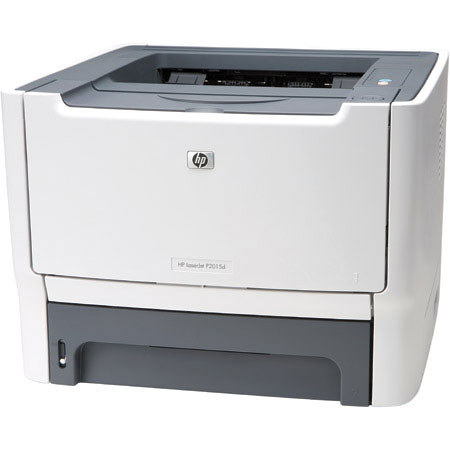
HP Monochrome LaserJet P2015d Duplex Printer with USB Interface
SKU: IHPLJP2015D
This item is no longer available.
Share:
Overview
Compare
Accessories
Specs
Protection










About HP Monochrome LaserJet P2015d Duplex Printer with USB Interface
HP LaserJet P2015d Base model, plus Automatic two-sided printing.
Do more, wait less...Improve workteam productivity.
The small but powerful HP LaserJet P2015 Printer series features print speeds of up to 27 pages per minute (ppm). Instant-on Technology delivers a quick first page in less than 8.5 seconds from Sleep mode, so you can expect the printer to work efficiently and keep costs down.
Integrated networking technology makes it easy to share the printer among work teams without compromising printer performance or document security. The printer also supports Hi-Speed USB 2.0 connectivity, which provides data transmission speeds of up to 480 mbps for fast printing and easy expansion.
Share great performance.
The HP LaserJet P2015 Printer series features a 400 MHz processor and 32 MB standard memory, expandable to 288 MB. Now you can handle large, graphics-intensive files and get a quick return to the print job's application, as well as increased uptime.
Work with less interruption.
Professional-quality printing is easy with tried-and-true Original HP LaserJet print cartridges. HP Smart printing technology achieves consistent and outstanding print quality, enhances reliability, and makes the system easy to use and maintain.
Make a great impression.
The printer delivers true 1200 dpi output for professional-quality documents, including high-visibility reports with complex charts and graphics.
Save space. < br> Sleek and attractive, this compact printer is designed for minimal tray protrusion and fits easily on crowded desktops.
Rely on the HP printing system.
HP toner, printers, and papers work together. The toner transfer and fusing processes of the printer are designed around HP toner to optimize print quality and deliver high-speed performance. Uniform toner particles enable precise placement and control for crisp and consistent print quality.
Easy to set up, use, and manage
Spend less time reloading. The 250-sheet input tray lets you enjoy long periods of continuous printing, while a 50-sheet multipurpose tray supports a broad spectrum of special paper in addition to traditional paper sizes. An optional 250-sheet tray 3 and two-sided printing can increase your printing power even more.
Get instant access to printer status, documentation, and more. HP's simple, browser-based management tools allow you to check and alter printer settings and set up automatic alerts to meet your changing needs.
HP Toolbox offers a user-friendly interface that provides one location for all printer information, including documentation and self-help. The HP Embedded Web Server enables one-to-one network printer management via any standard web browser. HP Web Jetadmin lets you easily manage and proactively maintain a fleet of network peripherals.
HP Monochrome LaserJet P2015d Duplex Printer with USB Interface Features
- Save paper and simplify printing with automatic double-sided printing. The LaserJet P2015d comes with a built-in duplexer along with its other efficient features.
- Just set up this fast, dependable, compact printer and you're in business.
- Reliable and fast
- Print double sided and save paper with the built-in automatic duplexer
- Boost team productivity with print speeds of up to 27 pages per minute
- Get the first page immediately in less than 8.5 seconds from Sleep mode with HP's instantly on technology
- Quickly process text, images, and graphics with the 400MHz processor and 32MB memory (expandable to 288MB)
- Exceptional quality
- Make a great impression printing high-visibility reports with complex charts andgraphics; the true 1200 dpi output ensures excellent quality
- Automatically adjust for the best quality with HP's Smart printing technology
- Enjoy easy print connectivity via Hi-Speed USB 2.0
- Convenient features
- Save space: this compact, sleek printer is designed for minimal tray protrusion and fits easily in work areas
- Spend less time reloading: along with a 250-sheet input tray, you get a 50-sheetmultipurpose tray that accepts a broad spectrum of special papers
- Stay on top of toner replacement with HP SureSupply1: receive alerts when a cartridge is low, monitor its remaining life, and order online or check stock and prices at stores
- Save big on ink, toner, and paper: sign up for My Print Rewards for exclusive offers and special savings, plus easy ordering on HP printing supplies
- Award-winning support
- Get peace of mind with the one-year limited warranty plus HP's Total Care service and support, which J.D. Power and Associates has recognized as consistently providing "An Outstanding Customer Service Experience"
- Rely on printing excellence: PC Magazine has designated HP a "Reader's Choice" for 15 years in a row
- Get answers to your product questions toll-free, 24 x 7, or via e-mail in as little time as an hour at www.HP.com/go/totalcare