
This item is no longer available.
Review Summary
2013-12-01T19:00:00
very little info on setup. they do not tell you that you need an ethernet cable to make the eprint work. No info on eprint in the written info. Not a WiFi enabled product!
Wifi

2013-11-27T19:00:00
It is just what I need. No fancy bells and whistles, but it does exactly what I want it to do and is easy to use. The only thing that holds back the 5th star-of-excellence is that it doesn't do well printing sheets of labels. If you use a small sheet of file folder labels, chances are that one of those labels will come off and stick inside the machine, The printing instructions do state that you should not use a partial sheet of labels or a sheet that has spaces between the labels. I learned that the hard way and I won't do it again, but I definitely would recommend this printer for home use.
LRRiverdale26
2013-11-25T19:00:00
The printer is fast with many more features than anticipated. Set up disk did not include Windows XP confifurations, I needed to download set up from the HP web site which was a simple process.
JHLPueblo
2013-10-16T20:00:00
I love this printer. It prints cleanly; the scanner scans very clearly and the copier part is crisp and clean as well. I would definitely recommend this printer.
WAGGLEPUFF
2013-07-24T20:00:00
I have own several HP printers starting in the early 1990's. This is the best one yet. Do you really need a color printer? Really? Not me, I hated constant ink jet running low and I was only doing black. I say that's where they make the money is selling replacements. Not any more with this printer. It is just like the business office's use a black power cartridge. Some have said it uses a lot of power. Then go to the settings and adjust the level of printing you need. I did that and it still print great copy's. I can believe you need it any better. Bottom line here for a home office or just pain home use it great copy's with fax, scanning, any copy machine included. This covers 99% of my needs. If I should want a color copy, photo I will put it on a thumb drive and take it to Costco or any photo place. Buy this one!
Ahso
2013-07-07T20:00:00
Works fine, was easy to set up. Prints good quality quickly enough for me. Pleasant surprise is that the scanning is so quiet. The scanner controlling software is pretty simple. Have used for about one month, we'll see how it holds up and how efficient it is with cartridge refills. It's so hard to figure out the perfect purchase, but I'm pretty sure this one is close to as good as it gets for affordability and quality for light office use for black and white printing, copying, and scanning. I don't need a fax, because I have an on-line fax service or I just e-mail a scanned attachment. One quirk: it took me forever to figure out which button to push to make a copy. It's the button below the red 'x'. haven't figured out how to make the scanned filed type default to pdf Wish it: had a separate feed for envelopes (have to swap out the regular size paper to print envelopes) came in a color other than heavy black
lawpracticeuser
2013-05-28T20:00:00
The manual envelope feed requires too many steps. I didn't have to push an ok button on my last 3 in 1 in order to print an envelope. The numeric pad is too small, and the pad folds down if pushed too hard when punching the numbers. The toolbox is only on the console and not on the computer as well, making it difficult to fax easily or to move through all of the options. The window to read the toolbox options is not lit up, the writing is small, and it is extremely difficult to use it or to read it without a magnifying glass.
Mega1
2013-01-24T19:00:00
The fax and printer function are great. The scanner is not compatible with Windows 7 and I had to do some searching to figure out a way to scan from this machine so I did not have to send it back. I found a round about way to be able to scan to save in a j.peg file and scan to "paint". It is a pain and many extra steps need to be taken to scan than should be necessary. Keep this in mind when thinking about purchasing this product. If I am having difficulty with Windows 7, I am quite sure I will not be able to use this if I wanted to upgrade to Windows 10.
Meyooow
2013-01-16T19:00:00
This unit works well, and performs fairly well, works well with Mac if you a Mac's built in programs or scanning into Acrobat. However, the motor of the ADF (document feeder) is very loud and cheap in comparison to my previous HP AIO unt. Trying to find a different model with a much quieter motor.
rjhjph
2013-01-08T19:00:00
This printer looks like a nearly perfect solution for home business, except for one thing. It does not support the native Mac OSX scanning features, instead providing a barbarous HP scanning software relic from the mid 1990s. If you want a scanning experience that Steve Jobs played a hand in, you may wish to look elsewhere. It is surprising since HP scanning software is well integrated on OSX for the cheaper inkjet machines.
masterleep
2012-12-22T19:00:00
Good quality print but have had problems with the copy feature whenever using the automatic document feeder (ADF). The ADF worked great for both copying and for faxing for approximately thirteen months. Then, it started producing a vertical black line, about 2” in from the right margin, on all copies and faxes. Scanning directly from the glass, without using the ADF, however, produces clean copies and faxes. Because of this, it appears that the problem is internal to the ADF unit. Unfortunately this particular printer is now out of warranty and there is no helpful information or suggestions forthcoming from HP. My suggestion is that you either consider this printer a short-term investment or look elsewhere for a better product.
EddieN
2012-12-22T19:00:00
Works well with Windows 7
BenM
2012-12-22T19:00:00
I replaced an old Laserjet 1022 that was still working great. But I had trouble with the drivers and so on--also wanted copy, fax, scan. So far I'm very happy with the new model.
Artemis
2012-12-18T19:00:00
This is a great MFP and has done every task without a single problem.
LadyonaMission
2012-12-11T19:00:00
For a laser multifunction printer, it does the job. Compact and fast. Easy to setup, especially the ePrint/Airprint feature. My wife was printing from her IPhone 5 in a matter of minutes.
SR99
2012-12-11T19:00:00
The product is good. but the keypad for dialing is very small and its on the side. Very difficult to see the numbers and dial a number.
Mat12345678910
2012-12-07T19:00:00
Prints great with Mac and the airport express. So much better than an inkjet. Only issue is scanning with a Mac. Mac software will not support the scan function, only option to scan is to use the HP scan software that can be quite temperamental. I had to spend an hour on the phone with technical support to make it work.
pfasta
2012-09-15T20:00:00
We have only had this copier for two weeks but so far it is great for everything we need. The only problem I can see so far is the name and model number sticker on the front of the copier are upside down.
cveyecare
2012-09-04T20:00:00
Very poor instructions, no tech support. This is a very basic model printer for school age kids, otherwise I would not recommend this product.
johnson1
2012-08-28T20:00:00
Quality is great, excellent speed and my first cartridge lasted over 6 months - we have moderate/heavy usage for scouts, church, home school so it gets well used. I don't know if it is just because it is a laserjet but it is so much far superior to my last ink jet I think I will only buy laser jets from now on. I love it and when I finally need to upgrade I will definitely get a color one.
Daripas
2012-07-29T20:00:00
Great product but instructions were lacking.
rd21
2012-07-16T20:00:00
Good quality print but have had problems with the copy feature. My guess is the cover needs to be completely down when you copy which effectively prevents one from copying a page from a book. This is only a guess since the HP website offers very little in support and help. When I try to find the interpretation of the error message, it directs me to another model of printer with a different set of error messages. Quality of printing and features are only part of the story, you need support as well.
MikeWR
2012-07-05T20:00:00
Great product. What else can I say...but it's excellent!
Nancy68
2012-06-24T20:00:00
I love this printer. However, there wasn't a manual which made it difficult to operate. I am still trying to figure out all of the features. I hope I can get one on-line.
10snut
2012-06-14T20:00:00
Set up was very easy. My only obstacle was the little paper output tray - installation directions use only pictures to describe set up. But I eventually got it. Copying and printing functions are obvious. Print and copy quality are really good and the speed is very fast. The scanner process is a bit clunky...you need to open software to activate, and it requires several clicks to complete. But it is very similar to the process of my old stand- alone scanner, so I don't think this is a reason not to buy. I am not using the fax function. I am not a heavy user, so I cannot comment on frequency of ink replacement. Overall, a good printer - so much better than an inkjet.
ChiMary
2012-06-12T20:00:00
it was easy to set up, just the homegroup link to other computers gave me some headaches. You might want to provide some instructions there. The graphics in the quick install menu are not too clear, took some trial and error
Jurgen
2012-06-11T20:00:00
This "all in one" printer has been difficult to use. It shipped without an owners manual. Essentially you have to guess how to use the fax and print features. The IRIS software to scan is very cumbersome to use, this is version 12, IRIS 6 was much easier. Frankly, I should have just repaired my Laserjet 3015, it was much easier to use and more reliable. I don't think I'm going to buy another HP.
deltaleadr
2012-06-10T20:00:00
Bought this to replace my AIO 3030. Product far surpasses the 3030. Total satisfaction so far, although I haven't had enough time to put it through all its paces yet.
Raoul1
2012-05-27T20:00:00
This multifunction printer does everthing I expected, and at a great price. Thanks, HP, for an excellent product!
Brian60
2012-05-24T20:00:00
Worked right away out of the box..
Viejo

Accidents happen where life happens. Protect your favorite Adorama products and purchase a protection plan to stay covered from accidental damage, mechanical or electrical failure, and more.

If we can’t fix it, we’ll replace it at no additional cost.

Protect your product from drops, spills, and more.

Enjoy your gear without fear. We have you covered!

When regular use of your product over time results in mechanical or electrical failure.

We will never charge you a deductible after the purchase of a plan.

Our claims process is simple & easy and our customer service team is happy to help.
Adorama Protect powered by Extend is available for purchase to customers in the United States. Not available for purchase Internationally or in U.S. Territories.
Browse our FAQ
Host-based
Black (Best): Up to 600 x 600 dpi (1200 dpi effective);
Black (Normal): Up to 600 x 400 dpi
FastRes 600; FastRes 1200
Apple AirPrint
Laser
Black (Letter): Up to 19 ppm; Black (A4): Up to 18 ppm; First Page Out Black: As fast as 8.5 sec
1 (black)
Smart Install, Simplified control panel, Auto-On/Auto-Off, Compact design
250 to 2,000
Up to 8,000 pages
Version 1.9
Yes
Flatbed, ADF
Enhanced: Up to 19,200 dpi; Hardware: Up to 1200 x 1200 dpi;
Optical: Up to 1200 dpi
4 x 6 in (10 x 15 cm) color photo to file: less than 7 sec for single;
Black (Normal): Up to 6 ppm;
Color (Normal): Up to 3 ppm;
ADF: Up to 7.4 ppm black and white), Up to 3 ppm (color)
256/24-bit
JPEG, TIF (compressed and uncompressed), PDF, GIF, BMP
Scanning via HP LaserJet scan application or TWAIN-or WIA-compliant application software
ADF: 8.5 x 14 in (216 x 356 mm); Flatbed: 8.5 x 11.7 in (216 x 297 mm)
Black (Text and Graphics): Up to 600 x 400 dpi;
Color (Text and Graphics): Up to 600 x 400 dpi
Black (Letter): Up to 19 cpm; Black (A4): Up to 18 cpm
Up to 99 copies
25 to 400%
Black and White, Best Mode: Up to 300 x 300 dpi;
Black and White, Standard Mode: 203 x 98 dpi
33.6 kbps; Letter: 3 sec per page
33.6 kbps
Hi-Speed USB 2.0 port, 10/100Base-T Ethernet network port, RJ-11 Telephone port
Via built-in 10/100Base-T TCP/IP networking;
Network Ready: Standard (built-in Ethernet)
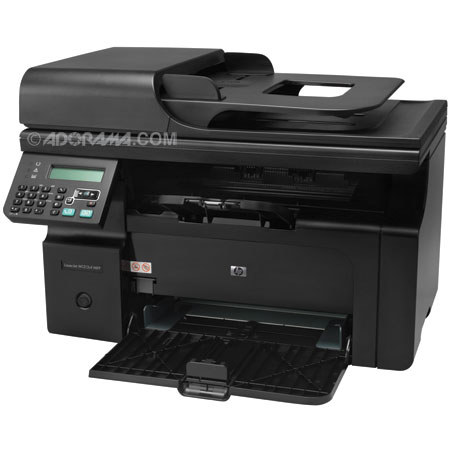
2-line, 16-character display, menu and navigation buttons (Setup/Enter, Left, Right, Cancel), copy control buttons (Number buttons, Lighter/Darker, More copy settings, Start Copy), Fax control buttons (Redial, Start Fax), 3 LED indicator lights (Attention, Ready, Toner low)
PDF, TIF, BMP, GIF, JPG
Scan to E-mail, scan to application, scan to file
2-line LCD
64 MB
Marvell processor/400 MHz
Manual (driver support provided)
ADF: Up to 35 sheets; Tray 1: Sheets: 150, Envelopes: 10
Paper (plain, laser), envelopes, transparencies, labels, cardstock, postcards
ADF: 60 to 90 g/m (16 to 24 lb) bond; Tray 1: 16 to 43 lb
3 x 5 to 8.5 x 14in / 76 x 127 to 216 x 356 mm
Standard, 35 sheets
150-sheet input tray, 100-sheet face-down bin
Input Capacity: Up to 150 sheets, Up to 10 envelopes;
Output Capacity: Up to 100 sheets, Up to 10 envelopes, Up to 75 sheets
transparencies
Power Supply Type: Built-in power supply;
Power Requirements: Input voltage 110 to 127 VAC (+/- 10%), 60 Hz (+/- 2 Hz);
220 to 240 VAC (+/- 10%), 50/60 Hz (+/- 2 Hz);
Power Consumption: 375 watts active, 0.3 watts off, 2 watts powersave, 4.7 Watts
standby;
Typical Electricity Consumption (TEC) Number: 0.771 kWh/Week;
Host-based print drivers, TWAIN, WIA, Scan to application, XPS driver, Mac driver, Send Fax, Toolbox
Microsoft Windows 7, Windows Vista, Windows XP, Windows Server 2003; Mac OS X v 10.4, v 10.5, v 10.6; Linux
PC: Microsoft Windows 7, Windows Vista, Windows XP, Windows Server 2003, Windows Server 2008: 1 GHz processor, 1 GB RAM, 700 MB free hard disk space, SVGA 800 x 600 with 16-bit color display, Internet Explorer 5.5 or higher, USB or Ethernet port
Mac: Mac OS X v 10.4, v 10.5, v 10.6; PowerPC G3, G4, G5, or Intel processors; 1 GB RAM; 200 MB available hard disk space; CD-ROM drive; USB or network port
Acoustic Power Emissions: 6.3 B(A);
Acoustic Power Emissions (Ready): Inaudible;
Acoustic Pressure Emissions: 50 dB(A)
Operating Temperature Range: 10 to 32.5° C;
Recommended Operating Temperature: 50 to 91° F (10 to 32.5° C);
Maximum Operating Temperature: 50 to 91° F;
Storage Temperature Range: 32 to 95° F (0 to 35° C);
Non-Operating Humidity Range: 10 to 80% RH;
Operating Humidity Range: 10 to 80% RH;
Recommended Humidity Operating Range: 10 to 80% RH
17.1 x 10.4 x 12 in / 435 x 265 x 306 mm
Maximum: 17.1 x 14.4 x 12 in / 435 x 365.76 x 306 mm
18.3 lb / 8.3 kg


Get more done with an affordable, full-featured MFP. Handle everyday office tasks; Print, Copy, Scan and Fax high-quality documents with one compact machine. Built-in Ethernet networking and a 35-page ADF make you even more efficient. Keep your office work moving with quick installation, a simplified control panel and easy connectivity.
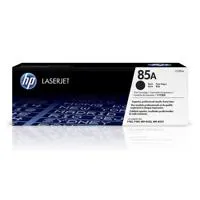
Easily purchase replacement HP Original print cartridges with HP SureSupply, when it's time. Meet your environmental goals, while protecting your bottom line. HP LaserJet technology helps you reduce your office's energy and paper usage. And this MFP's compact size is designed to use less space and create less packaging waste.