2015-04-27T20:00:00
Rated 5 out of 5
Home Office Champion
Best part, for me, is that I can have connections that are BOTH cabled and wireless at the same time (unlike my HP Laserjet CP1525nw). Did I say it is fast.
Danny2068973522
Originally posted at

2015-04-27T20:00:00
Rated 5 out of 5
Very nice!
I bought this printer to replace a 14-year old HP Laserjet which finally gave up the ghost. I am very happy with this printer. Text prints very crisply and the grayscale is also excellent. I am a graphic designer who needs to print reams of test pages and I am very impressed by the speed and precision of this printer. Now i just have to hope it lasts as long as the old one!
Note: before purchasing this I followed someone else's advice and bought a printer made by the competition. The type was nowhere near as crisp and the grayscale was muddy. The HP is more expensive but absolutely worth it in my opnion.
Gopa
Originally posted at
2015-04-27T20:00:00
Rated 4 out of 5
Good Printer. Bypass Paper Feed/Exit Needs Work
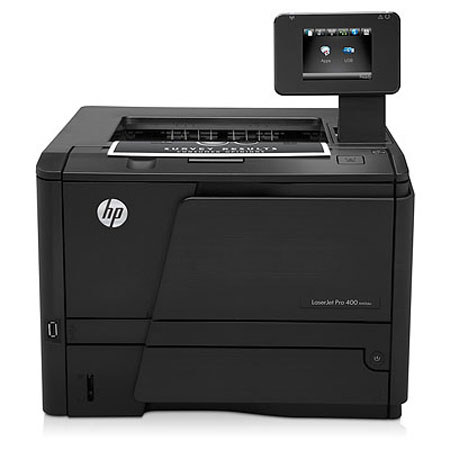
Coming from a solidly built HP 6MP printer that lasted many, many years, I find this Laserjet Pro 400 Printer M401dw to give good quality copies & handle the different paper requirements (envelopes, labels, etc.) in the way I've come to expect from HP. My only caveat is the bypass paper feed rollers often have trouble picking up the paper & I have to "hand adjust" the angle to get the paper to feed. Also the bypass exit at the back of the machine does not appear to have a large enough fold out so the copies fall to the floor unless I catch them.
Jud3
Originally posted at
2014-09-21T20:00:00
Rated 4 out of 5
good, but fix "out of paper" bug
It was easy to set up once I realized I had to disable my firewall. (Not mentioned in set-up material)
It is fast and has a small footprint. But HP toner is expensive and so is HP paper.
Worse thing is that it doesn't print and signals that it is "out of paper" , even though the paper tray has paper. Re-boot the printer and it works again. I have Windows 7 pro, and had the same problem with my old LaserJet6P and would have to re-boot computer to get it fixed. This has to be a software problem and HP should be able to create an update "fix". I am not alone in my frustration on this matter. I can't believe HP can't fix this, unless they just don't care.
blanchard
Originally posted at
2014-01-10T19:00:00
Rated 5 out of 5
Fast and efficient.
The unpacking and setup went as easy as could be expected. Love the footprint and size of the unit, hard to beat the speed of the printer, the long lasting toner makes it a perfect home office printer and price per copy is great. No color, fax, copy or scanning but we have other printers for that so if you need an all-in-one color it is not the unit for you. We are replacing a HP6P with this printer and the 6P is still going strong after MANY years and copies - just decided to put it to pasture and gave it to one of the kids who will put many more pages through it. If the 400 is as strong as the 6P we should have it for a long time as well.
FredTheVillages
Originally posted at
2013-10-27T20:00:00
Rated 5 out of 5
Top value for the money!
My company now maintains five of these printers. They are used for everything from high-volume warehouse functions as well as in our administrative offices. We just added two of these last week. The three printers that we have used for the last fifteen months have been true workhorses. I believe we have had only 1-2 malfunctions ever. One printer runs approximately 4,500 pages per month through it.
My church's K-12 school also now has 4 of these (ethernet only version). There have been no issues with them as well.
Output quality is top-notch with true laser-black text quality. We have never had any issues with the printers producing toner streak. When we updated our IT systems last year, I required all printers to incorporate a full duplexer. The duplexer in this printer is well-designed and very efficient. So far, we have never had an issue with any of the duplexers.
The only con is the small output tray. On the flip side, HP offers higher-end enterprise models for those purposes. We do have the optional 500-sheet high capacity paper tray #3 on all five of our printers. While on the subject of cons, I noticed one reviewer stated that they had experienced multiple malfunctions of the printer. My guess is that they had unfortunately received a defective unit. This is based off of the high-volume that our company runs through these with no issues.
I would recommend for high-volume users utilizing the twin-pack HP 80X cartridge. We purchase from a major office supply company and can usually get significant discounts on the genuine HP cartridge. Yes, the toner cartridges are expensive, but with our coupons and discounts, we average a cost of 1.7 cents per printed page. Often people get "bent out of shape" at the cost of a toner cartridge. When compared to a basic inkjet black cartridge for the low-end printers that yield 190 pages per cartridge, the twin-pack 80X (each cartridge rated at 6,900 pages) on sale for sometimes as low as $226 isn't so bad!
JeffLittleton
Originally posted at
2013-08-17T20:00:00
Rated 5 out of 5
Home Office workhorse
This is now the primary printer for both home office and personal home use. Set up was quick and easy. Printout is clean and sharp, as well as fast. Wireless printing was a requirement and works perfectly. Very pleased with this purchase.
MnO13
Originally posted at
2013-01-10T19:00:00
Rated 5 out of 5
Fast, quiet, and efficient
I have owned and used numerous HP printers over the years, and this printer is extremely quiet, and very fast, prints double-sided very efficiently, plus it has the added feature of connecting by wifi to my home office network. It also handles printing direct from my Ipad or Iphone which is very sweet.
bigdigger
Originally posted at
2012-12-09T19:00:00
Rated 4 out of 5
Mostly Great
Pros:
I got this printer because I need to print letter and legal paper documents from one file. I need the printer to automatically select the proper paper size based on PDF and it does that perfectly. It's also fast which saves me a lot of time.
This printer can automatically print double-sided. This is a big paper-saver if I'm printing non-work things like a lengthy phone bill or bank statement.
Cons:
The paper output tray is small so I need to pull documents from it at least once while printing a large set (I print loan document packages of about 120-150 pages) I would rather "set it and forget it"
Tray #1 is a fold down tray that holds less paper than the bottom pull out tray. I may need to get the optional 3rd tray to hold the amount of paper I need so I don't need to add paper in the middle of a job. I also don't like having it sticking out of the front of the printer.
There is a feature that allows you to print remotely through a dedicated email address. This would be useful for me except for a few issues: it wont automatically select the proper paper size and prints everything on letter sized paper, which doesn't work for me. Also, since the output and #1 paper tray are small, it would not work well for large documents. But for a few pages here or there it might be useful.
It will print from the iphone, but only selects letter sized paper, so again I couldn't print loan documents. I'll still have to do that through my laptop. But if you're just printing on letter, it works well. It even lets you select which pages from the document you'd like to print.
The toner cartridges are expensive, but that will likely be a problem with any laser printer.
All in all, this is a good printer for the price. I wasn't willing to make the investment in the much higher end printer but I am happy with my choice.
emteen99
Originally posted at
2012-12-08T19:00:00
Rated 5 out of 5
what an improvement!
I bought this M401dw printer to replace a sixteen-year-old HP6 laser printer that had served faithfully since new without any problems during its lifetime except for its limited amount of memory. I bought the wireless version of the M401 just for future flexibility but actually installed it as a wired Ethernet printer on my small LAN. The software installations from the CD, on Windows 7 and Vista, went efforlessly. Printing is way, way faster than the old HP6 - it's amazing what sixteen years of technological progress can accomplish.
The only problem during installation was that the port assignment for my wirelessly-attached color ink-jet printer got somehow reassigned to the port that was created for the M401, leading to some confusion when I tried to print to the ink-jet. A quick look at the ink-jet's printer properties showed what was wrong and it was easily corrected but shouldn't have been necessary.
This purchase has been a resounding success.
tdacon
Originally posted at
2012-10-30T20:00:00
Rated 2 out of 5
the printer has some good qualities
I have always been a HP fan. I went from an 1120 laser printer to HP LaserJet Pro 400 Printer M401dw. The quality is not in the new printer. It has paper hang ups and you have to stop pull the cartridge out pull the paper out from the back. Not worth the price.
Dixieann
Originally posted at