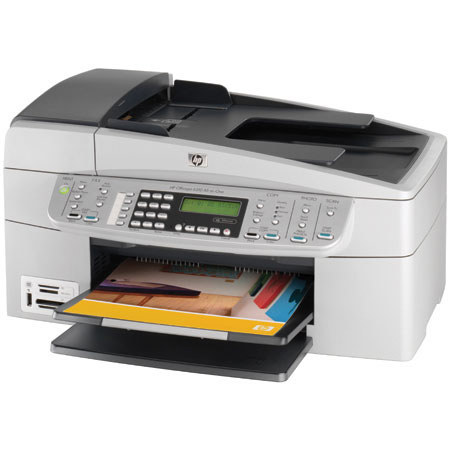
HP OfficeJet 6310 All-in-One Color Inkjet 8.5x14" Unit, Print, Scan, Copy & Fax
SKU: IHPOJ6310
This item is no longer available.
Share:
Overview
Compare
Specs
Protection
Reviews about this item
Review Summary
2009-05-18T20:00:00
Rated 5 out of 5
5 STAR PRINTER
Have used a HP 952C Printer for the last10 years with no problems, wife bought me the HP 6310 All-In-One for Christmas. WHAT! a great printer all around, could not ask for more, it does it all. Would recommend to everyone, easy set up.
BWILLETT
Originally posted at
2009-05-16T20:00:00
Rated 3 out of 5
Officejet 6310 defective
Last week I purchased a branch new Officejet 6310 All-in-One. Unfortunately from the first moment of operation the scanner was defective and produced a black 1/2" vertical stripe on all output documents from scanner or copier (I cleaned the scanner several times). This is not expected from HP products but now it happened to me !
SteveP2009
Originally posted at
2009-04-19T20:00:00
Rated 4 out of 5
No Problems So Far
Unlike many reviews that claim to have had major problems installing the 6310, I just completed installation on two machines in my home network, one running XP and the other Vista home Basic. Both intallations went smoothly and without excessive delay. I did not have to uninstall and reinstall anything. On each computer I tested all functions using the HP Solution Center shortcut on the desktp. All worked fine including the scan to file, and the copy and print. I have not tried the fax but expect no problem there. Since I was replacing an older 2610 printer that broke mechanically, I started out with the original install disk and followed the "uninstall" functions, after first disabling my Virus program as instructed. After the uninstall finished, I went to the HP site and downloaded the latest Full Function software for the 6310 to my desktop, being sure to get the appropriate version for XP or Vista. I then ran the install from each download and the job was done! I do not know why some seem to report such problems, but I suspect they did not carefully follow the instructions provided. I did, and mine went smoothly. What else can I say? I cannot vouch for the long term durability of the 6310. I do hope it does not break the way my old 2610 did, but I now know to be very careful when installing the ink cartridges, not to dislodge the wire springs and cause damage the way the 2610 did. The 6310 seems to have a slightly improved design for these springs but still warrants care be taken.
JohnNC
Originally posted at
2009-04-05T20:00:00
Rated 1 out of 5
Do not buy a 6310
This printer is very slow (maybe 3 or 4 pages per minute) and noisy. The fax and copy function (using the feeding mechanism) puts a line down the center of the page. The print function does not do that. It uses far too much ink compared with previous products I have owned. This product doesn't come close to meeting the qualities described under product description. It is by far the worse printer I have ever owned.
JROP
Originally posted at
2009-03-29T20:00:00
Rated 3 out of 5
Too much Ink
The only problem with this printer is that it goes through ink cartridges like I can't believe. My last printer was a HPOfficejet 7100 and it was very good on ink. I ususally changed my black ink cartridge once every 35 or so days. On this I'm on my fourth cartridge in 40 days!! We can't afford this!
kristysgodmother
Originally posted at
2009-03-08T20:00:00
Rated 5 out of 5
hp officejet 6310 all in one
this by far is one of the best printers i have owned the speed is perfect and quality of prints photo and normal is excellent if you are looking to buy a printer pay the extra and buy the 6310 you wont be dissapointed trust me and it takes alot to please me and i am extreamly pleased with this one and that is why i have bought two of them one i am using and the other for a back up
fisherman245
Originally posted at
2009-03-07T19:00:00
Rated 4 out of 5
GOOD PRODUCT
I found the HP OFFICEJET ALL-IN-ONE 6310 easy to use. I had it for about 3 Years - however, it was stolen. I'm planning on buying another one. I think it is a great product..........
TENPIN
Originally posted at
2009-02-28T19:00:00
Rated 5 out of 5
Recommend the 6310
We have had an HP printer 940c for the last several years until it finally stopped working. We then bought an HP J4540 which we returned to the store for a refund. The 4540 only had a foldout sheet for instructions, NO instruction booklet of any kind. (etc.) Our new 6310 has a 158 page booklet of detailed instructions plus a foldout sheet. We like all of the extra panel control buttons that make it independent of the computer for many uses. It makes very clear copies ,easy to use , fast and quiet. We don't have the fax connected since we don't have much use for it right now. We highly recommend the HP6310.
meema1
Originally posted at
2009-02-28T19:00:00
Rated 5 out of 5
The best all in one made.
I love the Officeject 6310. It prints out very fast, there is no waiting for the machine to print. I have been using it to print labels for my Cds, and I have noticed that it uses less ink but the print quality is better than the previous printer I owned. This machine makes my life much easier, and I would recommend it to anyone needing a copier, fax machine, printer and scanner or to anyone who would like to just own an all in one.
Chelle2009
Originally posted at
2009-02-28T19:00:00
Rated 1 out of 5
Disappointing
I have owned an Officejet 6110 for three years and it has been extremely reliable.I recently purchased the 6310 for my new office. and am very disapponted. The quality of the construction is flimsy, the paper constantly jams and the copy quality is muddy. I cannot even use it. I have followed all the troubleshooting measures to no avail. I am at a loss.
CaroleB
Originally posted at
2009-02-24T19:00:00
Rated 5 out of 5
Great HP product
Love it! Love it! Love it! This all in one is perfect and so friendly to use! I am buying another one for my son!
debbiehtravels
Originally posted at
2009-02-20T19:00:00
Rated 5 out of 5
Great Printer
I just received this printer tonight and put it through its paces. I would say that this is a very good printer, fax and scanner. I use Linux computers (Fedora 10) and the HP OfficeJet 6310 is an excellent all-around device. I do lots of scanning and it works like a charm. One thing, though - for those using Linux like myself, I would use the most updated hplip software with this printer because when I tried to test print, the print would stop half way through the printed page. Once I updated the software on my computer with the software from the HP site, everything worked like a charm. I would highly recommend this printer to anyone, especially to Linux users.
jeffy5
Originally posted at
2009-02-14T19:00:00
Rated 5 out of 5
Evcellent All-In-One
We bought this about a month ago we 2 computers in our home office. My wife runs Windows XP and I run Ubuntu Linux , The XP machine took quite awhile to install and update all the software but once it was done it worked flawlessly. My Ubuntu machine loaded HP's Linux scan,fax and print utility quickly and it works flawlessly in open office and other linux open source programs. Thank you HP for making excellent software for linux users!!! I would recommend this unit to anyone using Windows XP or Linux. It has Excellent output, and is reasonably quick. It replaced a Brother 5860 All-In-One that caused us pain through poor output paper feed issues and incompatibility with linux, it was junk from day 1. Hp has done an excellent job with this printer. If you run Windows Vista, well this just say Good luck, not a very usable operating system.
GrumpyRod48
Originally posted at
2009-02-12T19:00:00
Rated 5 out of 5
Excellent Printer
I have had this printer for two months now and it is the best printer I have owned. I would buy another today if this one stop working!!!!!!!!!!
drm1957
Originally posted at
2009-02-06T19:00:00
Rated 4 out of 5
wireless connectivity
printer does not support.use of wireless connectivity kit sold as accessory
bud1448
Originally posted at
2009-01-24T19:00:00
Rated 5 out of 5
exceptional
I received this as a gift and love it. It's very easy to make copies which I often need since we have a home office. Pictures are clear. Faxing is so easy to send and receive. I love the automatic feeder. I do wish it was wireless but with an adapter of some sort it can be. Also wished it would automatically scan both sides but those things are minor. You will love it. Easily installs if you go step by step with CD. Can't say enough about it.
jollybear
Originally posted at
2008-12-27T19:00:00
Rated 1 out of 5
Awful!!!
For some reason I bought two of these printers for my business. They are awful: neither of them can pass photo paper through without jamming. Why do they bother offering this as a product that can print photos when it can't do this simple function? I'd understnd if one of them had a problem, but both of them do the same thing!! This means it is a system wide error. Extremely frustrating.. and a waste of money DO NOT BUY THIS PRODUCT!!!!!!!
jhbrodribb
Originally posted at
2008-12-24T19:00:00
Rated 5 out of 5
Wow!
I was was shocked when I first got this All-in-One for my computer. The Only thing was the first and second prints were really fast. But, once I printed my tenth print, it was getting slower but still really fast. I really like my all in one. I think it is for home offices and small business. I Really love my all in one. BUY IT NOW!
firewire
Originally posted at
2008-11-29T19:00:00
Rated 1 out of 5
Terrible
Brand new machine telling me wrong printer cartridge. Print quality when you get it to print is awful. Scanner doesn't scan complete paper. tried everything next step is towards the trash.
Franco
Originally posted at
2008-11-25T19:00:00
Rated 4 out of 5
Printer problems
I have had HP all-in-one printers before this one,both have had same problem repeating printing that won't stop.Prints very clearand faxes well.
defbarb
Originally posted at
2008-11-04T19:00:00
Rated 5 out of 5
Can't beat it for the money!
I have been using the 6310 for about 7 mo's. Over all, it has done what I would expect for a machine in it's price range. The main reason for this review is to warm people not to download SP1 for Vista. If the Vista addition you have did not already come loaded with SP1, DO NOT DOWNLOAD IT. There is a serious conflict between the 6310 and SP1. Call the HP Tech Department first.
Roofpro
Originally posted at
2008-11-01T20:00:00
Rated 5 out of 5
HP Officejet 6310 All-in-One
I have had my Officejet 6310 over a year now and it still works perfect. This is a great deal on this machine! I have never used my fax because I don't fax anything but it's there if needed. The only problem I have is that I have to go into the Paint program to start my scanning. I have tried to download drivers to fix this problem but nothing seems to help ,so the controls on the printer that I should be able to use are not working for me with this system. The old HP PhotoSmart Printer/Scanner worked just fine. I have a Hp AMD 64 Windows Vista computer. Any help from you pros out there would be appreciated.
Bonnie
Originally posted at
2008-10-14T20:00:00
Rated 5 out of 5
Could Not Be Happier
I think the HP Officejet 6310 All-in-One Printer, Fax, Scanner, Copier is one of the nicest looking and performing machines I have had. I am a long time hp Officejet user and am very happy with this one. The printing is very clean and professional looking. It also did a wonderful job scanning and the copies are very clear, if it is as good with the pictures it will get a 100% in my book. I would without any hesitation recommend it for any small home business or privet use!!!
VeryHappy
Originally posted at
2008-10-08T20:00:00
Rated 5 out of 5
Great Printer
The only thing I wished is that it held more paper.
WichitaStateStudent
Originally posted at
2008-10-08T20:00:00
Rated 1 out of 5
Bad Quality
Worst HP product ever. And this comes from someone who likes HP products in general. Software takes over 30 minutes to install and is very buggy. Software uninstalls itself for no reason, I have to re-install on a regular basis. I am on my 3rd replacement unit, Unit #1, modem burned out. Unit #2, network adapter was DOA. Unit #3 can't feed paper straight. HP replaced the units after each problem, but the time I wasted on this awful product can never be recovered.
jqbecker
Originally posted at
2008-08-26T20:00:00
Rated 5 out of 5
Look no further...
BEST PRINTER I EVER HAD, THIS REPLACED ANOTHER HP 3 in 1 PRINTER, IT RUN LIKE A BREEZE. EXTREMELY HAPPY WITH ITS. FEATURES WHICH ARE UNSURPASABLE. PRICE/QUALITY IS A WINNER. LOW MILAGE OF INK!!!
Iggy
Originally posted at
2008-08-19T20:00:00
Rated 3 out of 5
Go for the upgrade version
The machine is functional, but I would invest a little more money for an upgraded model. Of course, I can't speak to whether the more expensive models are any better. I started with the 5780 which had problems and then traded up to the 6310. I have had to also send my 6310 back due to a manufacturers defect.
Rags
Originally posted at
2008-08-18T20:00:00
Rated 1 out of 5
Not a good printer
This is my 3rd HP printer. It doesn't print to the edge of the page when I print from the glass or feeder, so my forms come out distorted. I never was able to get the scanner to work.
Moosette
Originally posted at
2008-07-17T20:00:00
Rated 1 out of 5
HP OFFICEJET 6310 ALL-IN-ONE
COMPARED TO OTHER HP PRINTERS I'VE OWNED THIS ONE IS FAR INFERIOR. LOADING PAPER IS DIFFICULT, IT FREQUENTLY JAMS AND THE COVER OFTEN COMES UNHINGED. THE PLASTIC COMPONENTS ARE FLIMSY.
BOB1
Originally posted at
2008-07-15T20:00:00
Rated 2 out of 5
Nice printer, but will not SCAN to Win Vista
HP all-in-one 6310 will not scan for Win Vista. I have tried everything.
Bluebonnetgirl
Originally posted at
Specification about this item
About HP OfficeJet 6310 All-in-One Color Inkjet 8.5x14" Unit, Print, Scan, Copy & Fax
Versatile All-in-One with breakthrough speed and built-in networking plus laser-quality text and professional-quality color. Copy, scan and color fax withauto document feeder and junk fax barrier, plus card slots to print photos without a PC.
Join VIP PRO
Earn 2X Points + Exclusive Perks!
Request a Callback
Chat one-on-one with an expert
Sell or Trade your Gear
Get started in 3 easy steps
What's in the box:
- HP Officejet 6310 All-in-One
- HP 98 Black Inkjet Print Cartridge (11 ml)
- HP 95 Tri-Color Inkjet Print Cartridge (7 ml)
- HP Photosmart Essential and Premiere Software
- Setup Guide
- Reference Guide
- Power Supply
- Power Cord
- Phone Cord
- Hewlett Packard Warranty