


This item is no longer available.
Review Summary
2012-01-01T19:00:00
I have all positive thoughts about this printer. I use it at home for personal use. It is attractive, dependable and well engineered.
JOHN J.
2011-10-23T21:00:00
I do a lot of scanning of pictures and documents for family books that I am working on. I'm having some difficulty getting the results that I want. I am working on learning the machine better and hope to resolve these problems. There are features to this machine that I am going to enjoy. Low cost operation and high yield prints. I will know how I like it more as I use it.
Busy b.
2011-02-25T19:00:00
OfficeJet J6480 Printer performed very well until the left rear hinge broke. I've been very gentle with this printer. I'm not hard on electronic products. I replaced an ink cartirdge and when closing the lid I heard a pop. Plastic hinge had broken. HP can't be proud of this design. They need to use a more robust design on the hinges. I won't buy another HP and recommend everyone that buys a printer look closely at the lid hinges. Try to determine if they are reasonably robust before purchasing the printer.
LarryinIndy

2011-01-11T19:00:00
Excellent print quality Easy wireless set-up
ELLEN J.
2010-12-06T19:00:00
when we bought a new computer (had to) we were offered this printer (didn't really need) at a great price. it does fax, which we only do occasionally, but were using an old actual fax machine since my photosmart did not have that function. so, i thought, i can get rid of two machines & replace with one. i wish i'd shopped a bit. well, i still have my old photosmart, which i like my photo prints off of better &, i think, uses less ink. but it doesn't fax & it isn't wireless. so i got rid of the fax, but now have 2 printers. like most hp printers, it tells you you are running out of ink waaaay before you are actually out. but then i never know how much longer it will last, so i'm nervous, sometimes for months, about that. or, i buy early & hold. also. i frequently find it "offline" after i've sent something & there is no way to put it back "online" from the printer software. i had to re-install it once due to other hardware upgrades & that produces a duplicate set of "printers" in my computer. i deleted the extras once, but then had to install again & now, sometimes (if printing from e-mail for instance) one printer works & if from a different application (internet site) it prints to the "other" printer. of course, there IS only one! i find this very confusing. also, it's a bit too big for home use. and, as i said before, i think the print quality and ink usage were better with my older photosmart, as regards photos. also, i don't seem to be able to operate any of the features from the printer. i have to go thru the hp software on the computer to make things work. not sure why i have the buttons. but it faxes......
techdummy
2010-12-03T19:00:00
Works very well. Installation went fairly smooth. Only problem. I had to connect printer to router manually. I needed the router WEP number. Took a few minutes online to find out what a WEP was then a trip to router support online to get WEP code. Once that was entered everything hooked up on my windows 7 machine. then went to Vista machine and loaded right away.
brucej82
2010-12-02T19:00:00
works very well, installation was easy... just wish I could print from my phone
JeffatWP
2010-12-02T19:00:00
I have used HP printers about 20 years. I am realy pleased with the 6500 wireless I have 3 computers I hooked all three up wireless very easy. The printer is very good printer. It is very fast and I like printing on both sides to save paper. I am very pleased with this printer. The price is very good too.
kmcgee
2010-12-02T19:00:00
The printer is working well with both my desktop and laptop computers. The only thing I don't understand is that it goes through a "procedure" where is clangs and bangs after each printing.
ralwool
2010-12-01T19:00:00
After purchasing my HP 6500 Wireless Printer over a year ago, I finally took it out the box and connected it. I am very impressed with the ease of the connection. This is my 3rd or 4th HP Printer and I haven't had any problems. I like all the features of this printer and it's truly worth the investment.
JRoque
2010-12-01T19:00:00
Purchased this unit as an upgrade to my old HP 3847 and Canon 2100 printers and HP Scanjet 4400c scanner. I thought it would be nice to add Fax and Scan abilities while conserving space. This unit has fallen far short of my expectations. When it functions correctly it's great but, all to often it locks up, freezes, and frustrates me to the point of wanting to pitch it out the window. Try to change setting to use double sided printing - it locks up. Had to unplug it (re-boot) to get it to work again. Try to use it after it's been in "sleep/power saving mode" - no response. Again, had to unplug it (re-boot) to get it to respond. At support's recomendation, changed setting to where it doesn't go into "power saving" mode. That worked to where it's not out in la-la land anymore but, now it stays on all the time unless I turn it off which uses more power and lights up the room at night from the LCD display staying lite up. This morning it ran out of paper while I was trying to print two jobs. "Out of Paper" message comes up. I put in paper but, could not clear the "out of paper" mesage. Tried a couple different things that eventually changed the status to "Printer disconnected" error message. Still again, the only solution even after consulting documentation was a re-boot. Grrrrrrrr!!!!! I'd like to boot this unit right out the window!! HP, I'm not happy! I think I'll go back to using my 3847 printer. It worked every time.
pschep
2010-11-30T19:00:00
I bought this printer at Costco about 1 year ago and it has never worked properly. First, it makes a tremendous amount of noise when it is getting ready to print. It clicks and clacks like a train. I hate that. But my primary complaint is that the wireless print NEVER works! I can use my laptop wirelessly daily but to get the printer to print, I have to download the drivers from your web site everytime.
Bleu
2010-11-22T19:00:00
As soon as warranty wore out experienced problem that was I was unable to resolve, even with quality help from HP live help center and performance of all tests related to the problem. Error message "out of paper" was repeated even when tray was fully loaded and though it seemed simple to resolve, it never was. Hate to believe that this simple problem couldn't have been resolved and that a malfunction so minor would've occurred with a relatively new piece of equipment which forces me to question reliability of parts and service.
patfc
2010-11-21T19:00:00
This was my replacement printer and love this printer. Setup was not hard the printer found my networth now it is work great, tried the scanner it works. I give it five stars.
rere
2010-11-08T19:00:00
i got mine the first day they were delivered to the store so i got a great sale LOW . I MEAN LOW , LESS THAN $90.00 best 90 i ever spent , this thing does everything but sing to ya , i love it
cozybuck
2010-11-08T19:00:00
This multi-function machine worked great . . . until 3-months after the warranty expired. The ability to use the device as a copy machine was among the top reasons I purchased it. After 15 months of moderate use, the "copy" function on the device's instrument panel simply stopped working. The machine partially feeds a new sheet of copy paper, stops, and generates and "out of paper" error. I have no issues printing from the PC, however. After 30+ minutes online with HP tech support, I was basically told that I was stuck . . . warranty expired, sorry. Given the cost of this machine and the fact that it only lasted 15-months, I would be hard-pressed to recommend any HP inkjet printer.
Scooter56
2010-11-05T20:00:00
I've had the 6500 wireless for over a year now and have had nothing but great print outs. Love the automatic two sided copies and high definition output.
prjwk
2010-11-04T20:00:00
This is an excellent choice for home office use. Does very well on ink and the output is great. Good all around choice.
Ice2Ice
2010-11-04T20:00:00
I bought this printer at an on line store a couple of months ago for my home use. I am not a heavy user, however, I have used all the features except the fax(a cable company problem, not a printer problem). Everything has performed exactly as it should. I would recommend this printer.
fishingdad
2010-11-04T20:00:00
I find all the features on the printer excellent, except for the Fax. It seems to be missing something in its operation. It works very slow through the Solution Center and I don't get any report that the fax was sent. I guess I will have to try reloading the software to see if it woks any better.
4Seasons
2010-11-04T20:00:00
This printer worked the first time I set it up. I had some issues with other wireless printers - especially the drivers for them. I use this printer in wireless mode from three different computers - two that run XP and one running windows 7. Has worked like a charm.
Pendlm
2010-11-04T20:00:00
I have bought all my printers from HP. However, this is the first time that I been a bit disappointed with any of HP's product. The hardware broke down one month after purchase. However it was instantly replaced by HP. But I find the replacement generally very slow in printing especially when automatically printing on both side of the page. My printer before that (C7280 all-in-one) also exhibited that characteristic. Is this a trait of all HP's All-In-one printers?
Rolly
2010-11-04T20:00:00
Setup was easy for Windows 7 but had to download software. The printer is fast. The features are great. Not hooked up wireless at this time but shouldn't be hard. Only problem is that it seems to use too much ink especially the cyan. Would give it 5 stars if not for that.
Blizzard
2010-11-04T20:00:00
I love this printer...but I'm wondering why it always sounds like its aligning it self each time I print...wondering if others notice this, other than that the printer is great.
prov356
2010-11-04T20:00:00
Scanning does not work with vista, print cartridges don't go very far and are expensive. If you economize and don't use the color very often, they dry up and are worthless. The wireless connection needs some bugs worked out. It takes forever to communicate with itself. It seems like there is a 30 sec delay before any function performs. Wireless is the reason I purchased this.
bcwain
2010-11-04T20:00:00
This machine CONSTANTLY cleans itself. Can't get it to work with Windows 7 because when we try to download "new" drivers, 7 won't allow it. It's enough to make you insane. All these printers and computers get "better and better", but you will find when you have one...that's simply not the case. And the ink cartridges are OUTRAGEOUS. We got this printer in a package at Best Buy and it was an "upgrade" from what they offered. The ONLY thing it will do will print because of not being able to make it work with Windows 7. Windows 7 has been out for almost 4 years and we can't get the download to work. We loved our last HP...won't buy another. It won't scan, it won't download my camera pictures, it won't duplex...NOTHING it's supposed to do. and when you get a printer like this one...two years and you can't get anything for it except cartridges...throw it away...it's useless. We've had an HP LaserJet 1200 for about 5 YEARS and it works liks it's supposed to every time. Don't bother with this printer...if you CAN finally make it work (and I emphasize that we couldn't) all it does is CLEAN, CLEAN, CLEAN...sucking out the expensive ink as it goes...sad.
Vala
2010-11-03T20:00:00
Horrible printer. It's noisy. It takes forever to wake up. If printing wirelessly, it won't wake up from power save mode. I have to unplug it in order for it to work again. It jams constantly. Impossible to print more than one page during a print job. It tears up the subsequent pages and then jams. Ink life is really short even with the XL cartridges.
Anonymous579
2010-11-02T20:00:00
Printer always malfunctions. Very poor Quality
Ride
2010-11-02T20:00:00
Wireless printing does not work every time. Print job goes into que and stays there. Troubleshooting program indicates printer is turned off when it is not.
SLG1
2010-10-31T20:00:00
Installed easily, and connected very well to my wireless network. However, I have noticed that my paper jams all the time. During printing the printer will generally tear a small portion of the top edge as well. Doesn't happen all the time, but when it does it is a pain to get the paper jam out. It also uses a lot of ink, more than my previous HP printers.
Pampered
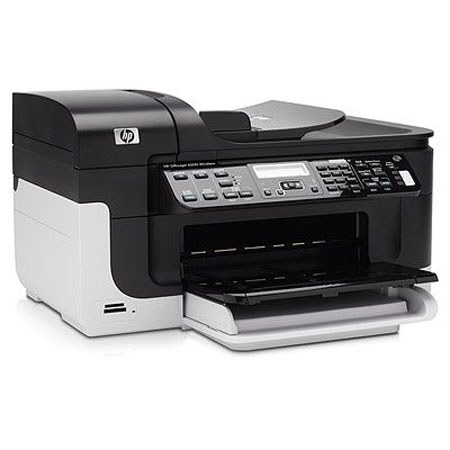
The Hewlett Packard - HP OfficeJet 6500 Color Wireless All-in-One Inkjet Printer provides incredible print speeds of 32 ppm black, 31 ppm color and you can easily share the HP Officejet 6500 All-in-One Printer and efficiently use resources with the wireless networking. The HP Officejet 6500 All-in-One Printer features easy-to-use workflow tools and lets you scan to PC or directly to memory cards. With the HP Officejet 6500 All-in-One Printer you get professional-quality black text and vivid color graphics and photos.
Join VIP PRO
Earn 2X Points + Exclusive Perks!
Request a Callback
Chat one-on-one with an expert
Sell or Trade your Gear
Get started in 3 easy steps