
This item is no longer available.
Review Summary
2017-04-12T20:00:00
the adf stops working and has to be rebooted on occasion. Other times just refuses to work when scanning, copying or faxing
alan557

2017-04-12T20:00:00
worked ok for a while, but never printed photos decently. started leaking ink on printed pages. i gave up and bought a new printer. junked the 8600.
john74
2014-09-14T20:00:00
I bought this printer a second time for my son because it worked so well for my daughter. His MacBook is however newer and I have not been able to get SCAN to work at all. The network connection also dies.
dad53
2014-09-13T20:00:00
this printer does more than our office printer at work. It was very easy to set up,even the wireless part. I print to it easily from smartphone and it makes double sided copies without a glitch and no big list of settings you have to go thru to set up. Got it for my daughter since she is starting college. So she can send items to it while she is there in class and when she comes home it will be here waiting for her. Excellent job HP, you outdid yourself on this one.
lumpylee
2014-09-02T20:00:00
My daughter recommended the HP 8600 all in one printer to me and I am so glad I purchased it. I have always been a Dell person but, have decided I will stick with HP. The printer speed is great and you can't beat the print quality. I really like the amount of copies you get with the cartridges. My previous experience with purchasing cartridges was a nightmare. My daughter also told me that you will always carry the cartridges for your printers that you sell which is a very, very big winner for me.
southern
2014-08-29T20:00:00
It was simple to set up, prints very fast and clear. It has so many features that makes my last printer look like a toy. Thanks for have such a good product for us.
BigFry
2014-08-19T20:00:00
Love my Officejet8600 Plus! Super easy to install, compact size for all that it can do. Love the screen, it tells you what function is working, home screen easy to manipulate. I was able to fax a 48 page immediately, (states that it can fax a 100 page document) and I color, double quick sided printing, copier was great and fast .Printing try can hold about half a ream of paper. eprinting and web printing wow. This printer is a must have for home office. I am a teacher and use it quite daily. I have two HP desktops and 2 HP laptops, 2 Mac Book Pros all use this fantastic printer daily. I ordered XL ink cartridges with my order with a 20% off discount. Colors are vibrant. A true must have for quality, efficient, economical printing.
MsAquarius
2014-08-17T20:00:00
Replaced my by black and white laser all-in-one, and my photo printer with this replacement. Love the two-sided page printing, the easy touch-screen set-up, and the easy individual four print cartridge installation. Hard to believe I can get Color Copies, Photo prints, 4800 DPI scanning, Faxing, Document Feeding, Two-Sided printed pages, and wireless networking,all for a very reasonable price.
Albie37
2014-08-15T20:00:00
Hi, I've had this printer for about 3 years now. With the introduction of Windows 8.1, NONE of the features on the printer work anymore. Examples: 1 scanning from the Printer to the PC (you can't set it up anymore). 2) Faxing from the PC to the Scanner 3) Accessing the PC from the scanner. Basically all you can do with this printer and Windows 8.1 is print and scan via the pc interface. Hope this helps someone!
Dootchie
2014-08-13T20:00:00
Having just got this printer, I have found it good and have encountered no problems. It seems to work fine. One feature I find annoying is that there is a paper drawer and my old printer had open access. I frequently print a couple of Sudoku puzzles from different sources and want to use both sides of the paper, so I have to open the drawer to reload the paper. If I am researching something and want to print from different sources, i have the same problem.
nikname41
2014-08-10T20:00:00
Everying is great except for printing photos. this was one of the thing is am interested in. The 8600plus has issues with slow printing of photos and also whit picking up photo paper. The other functions work very well and more than meet expectations I will keep my photo printer however.
lmssr
2014-08-10T20:00:00
this is the printer ive ben looking for it does so many fuctions if you buy it you wont be sorry
mark1959
2014-08-09T20:00:00
This one is in the category of getting one star only because I can't give it no stars. Pure and simple, this is the WORST HP printer I've ever purchased, and I've used HP printers since the LaserJet III. First, the color rendition is absolutely horrible. Muddy, poor resolution. I have no such problems with the same files printed on HP and Xerox color printers at my office. Second, the duplexer jams more often than not. Third, it has a very maddening tendency to put a crease in the paper about 2.5" from the leading edge. The first one was so bad I got it replaced. The second one was no better, but I'd been out of town and very busy during the month after the exchange and the vendor refused to take the unit back. No idea what this printer is good for. Not heavy enough for a boat anchor. Landfill?
Mojoman
2014-08-08T20:00:00
Priter will not take photopaper even after spending over 2 hours on the phone with an HP teck. I was told they were sending a new one what I got was a new paper tray which also does not work. Will be back on the phone with them on monday meanwhile, I have been without a printer for 3 weeks.
Koop
2014-08-06T20:00:00
I have had HP printers for approximately the past 15 years. My last printer, the 6500, lasted for three years and the one before that for nine years. I received my 8600 OfficeJet Pro and had it up and running within a very short period of time. It is, by far, the best HP Printer that I have owned. It is easy to operate, does exactly what it is supposed to do and produces clear, crisp copies. I have used all of the features; print, scan, fax, copy and they all work perfectly. A really neat feature is the ability to make a two-sided copy in all the modes. I absolutely love this machine.
BrooklynDodgersFan1
2014-08-05T20:00:00
Upgraded from 8500, lot smoother when printing...haven't had long enough to know about ink usage.
Larry74
2014-08-03T20:00:00
My son needed a printer for college, so I used the opportunity to update my current OJ Pro 8600 to the 8600 Plus. Simple installation- was up and printing in 14 minutes. Great features that are really simple to use. The larger display (than the earlier 8600) makes choosing options a snap. Very intuitive. If you need a copy machine, a scanner, a fax, and a terrific printer, this machine is what you want. It's well-built and dependable. And if you use one of the available coupon codes for August, it's even cheaper here than at Staples!
DavefromCT
2014-08-03T20:00:00
This is my second multi use printer/fax/scan/. The set up was very easy and quick. No problems at this point. My concern would be if this model is discontinued in the future and no parts are available for any needed repair that may come along. Also the Ink jet printers should all use the same ink, you would get a lot more loyal customers with this one step.
Pacificbear
2014-07-30T20:00:00
one thing in copy setting i hope that hp upgrade the copy setting in two sided with 2 sided original and 2 sided copy same setting in Photosmart c309a if posible. but in all this printer is great i love it
Mhel77
2014-07-26T20:00:00
I received my HP Officejet Pro 8600 Plus with no problems and was able to set it up easy. I had it printing wireless in hardly no time at all. I was afraid that I would have to download the software since I had Windows 8.1 but I inserted the accompanying disk and the software was installed without having to download. At least, the printer prints fine. I am impressed with the speed at which it prints photos and also in two-sided printing. My HP OJ 8500 takes a lot longer to print those items. The only item I am still having trouble with is the so-called e-print feature.
Len80
2014-07-23T20:00:00
I've had this printer for over a year. In the last several months, I find trouble top feeding . I have had to uninstall and reinstall 2 different times because it could no longer find my Wi-Fi and the most recent of this has been this week. The Wi-Fi left me again, but the USB works great. I am a work at home accountant and rely on the top feed for documents. Would I recommend this product to someone else? Yes, I think for the price it is a good product. I will most likely purchase another one in the near future.
denise9895
2014-07-21T20:00:00
GREAT PRINTER, HOWEVER CANNOT SHUT IT OFF - HAVE TRIED FOR DAYS - JUST WONT SHUT OFF.
MANHATTANMISS
2014-07-10T20:00:00
I've been using the 8600 pro for two months now & I am thrilled with it. Compared to my previous 6500 model, this runs circles around that. Have used ADF, scan from pc, print from pc, hpeprint, airprint, copying & all works well. Boots up quickly, prints quickly & quality is excellent. Ink doesn't smudge when highlighted & is pleasant to the eye. Very easy to set up (HP tech spt very helpful), quiet operation & I recommend this model very highly. I did get a refurbished one & it's just like new. Yippee for HP.
Bobbie999
2014-07-09T20:00:00
This is my second purchase of the Officejet Pro 8600 Plus e-All-in-One Printer - N911g. It is very easy to set up & use. It has all the features a small business needs & it is cost efficient too. I would highly recommend this product.
WaylaB
2014-07-08T20:00:00
I am satisfied with my HP Officejet Pro 8600 Plus. The only thing I don't like is there is no separate tray for printing 4 x 6 pictures but that is not a problem. It does everything I want to do with a printer
nitrograd
2014-07-04T20:00:00
The HP office jet pro 8600 was highly rated on all the comparison sites I checked. It does a super job in color and black and white. The HP online store was the least expensive to order from, and had the fastest shipping. Excellent experience overall.
JoDab
2014-07-04T20:00:00
First purchase: I bought one for my son to help him finish his thesis. The 8600 worked like a champ. Fast, clean print, no jams, easy setup, built and ran like a champ. Second purchase: During setup the first test pages had drips of black ink. I printed one email message as a test and it had black drips on it. It then gave a message that there was a problem with the print head and to remove it. Followed the on screen animated instructions and pulled out the ink cartridges and printer head (very easy to do). My hand was underneath the print head to support it when withdrawing it from the 8600 and it was drizzling ink out (continuous stream). Before I could do anything it overflowed my hand onto my shirt, pants, leg, onto ceramic tile and the grout between the tiles. What a mess. Good news is the ink cleaned up pretty easy (a little scrubbing). I had the 3 year extended warranty and HP immediately shipped a new print head and another pack of starter ink cartridges. So a bimodal experience and in my book, the low score is the one that sticks for my grading. Unacceptable experience even if the new print head solves the problem. This is an Officejet Pro series printer yet this was far from a "Pro" experience.
thebestcpu
2014-07-01T20:00:00
The fax did not work, but it was past the 30 days to get a knew one! The sales person did not say there were 2 other options were available, such as a Premium version. The sales person was probably not allowed to say this printer would be obsolete. It is also too big. Plus there are NOT abilities for sizes when copying.
Leese
2014-07-01T20:00:00
Replaced my old Office Jet 6310ix All-in-One with this new Office Jet PRO 8600. We are still working though all the features, but so far we love it and the number of pages it prints is like three times of my old printer. The eprint is a great addition but we are still working out the bugs and have had three difference email address assigned. This is because of a problem with my Home Net, and the printer not being seen and when we re-connect HP Connect assigns a new address. You need to think of it as being connected on two networks, one is the Home Net and the second is a internet (HP Direct Print) with the printers build in server. Just a bump in the road of setting things up.
Retired297
2014-06-30T20:00:00
Just okay for the 8600 because the feeder did not last long at all, but ad for online printer/server set up it gets 5 stars. I LOVE my 7500 and any printer made prior to that, as the ink lasts a super long time. I have had over 25 printers in my lifetime, and that said, I do think HP is the "best-of-the-best" overall. As for small home office type settings you cannot go wrong with HP. So, pick up an HP but grab a warranty, so you can trade in if needed. Technology is evolving daily. I do love the older HP series, so I hope HP will go retro when designing in the future. As for 7500 series- my employees tend to make fun of the ol' workhouse, HP printer... until the have to print several documents @ flyers per cost-. After the employees use my 7500 for 1 day they ask how much I want to sell the "big" ol' machine for? I pass every time. ink is cheaper with older series so don't trade them in- if you can store one for just photos etc.
kjhomefinderHP
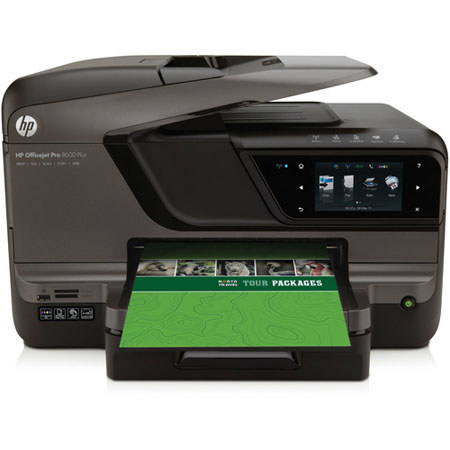
The HP Officejet Pro 8600 Plus e-All-in-One is a complete All-in-One solution for your home or office with print speeds of 20 ppm in black and 16 ppm in color. The printer features full duplexing capabilities, allowing you to print, scan, copy and fax both sides of a page with only one pass-through. The full-size legal scan glass provides greater flexibility for quick one-page scans of legal documents, there's no need to feed it through the ADF.
The scanner features Direct Digital Filing, allowing you to easily minimize your paper clutter by scanning two-sided documents directly to an email address, fax recipient, or network folder. The 8600 Plus e-All-in-One is an upgraded version of the 8600 e-All-in-One with a bigger legal-size scan glass, a larger 50-sheet ADF, faster print speed, the ability to scan, copy and fax two-sided documents and a larger 4.3" touchscreen.