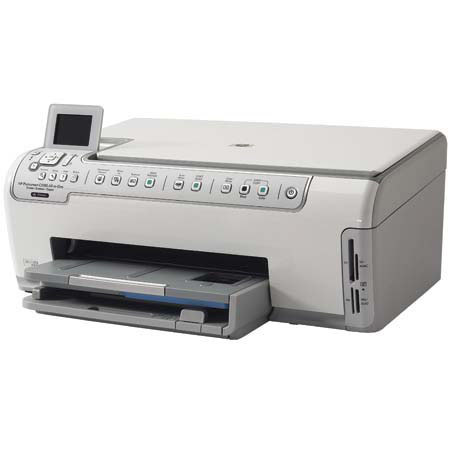
HP PS-C5180 Color All-in-One Inkjet Printer Scanner & Copier, 8.5x11", 1200-dpi, USB Interface, for Windows & Mac.
SKU: IHPPSC5180
This item is no longer available.
Share:
Overview
Compare
Specs
Protection
Reviews about this item
Review Summary
2007-12-04T19:00:00
Rated 5 out of 5
Amazing Machine for the Money
At first, I was a bit hesitant to buy the HP 5180 Photosmart AIO because I bought my parents a HP 7000-series AIO last summer and they are ecstatic with THAT machine. However, my concerns with little brother 5180 were very quickly put to rest. This puppy is fast, efficient and accurate. I cannot believe how quickly and accurately it prints pictures. At 32ppm, this inkjet is jaw-droppinly quick with 8.5" x 11" and legal-size printed paper output. After printing my first 50 photos and 20 pages of text, the ink tanks still show 100% full... that's obviously not possible, unless HP filled them to over 100% capacity. Still, I am encouraged to know that I won't have to spend my milk money to feed this printer. It really is an amazing thing. HP has taken inkjet printing to a whole new level with this Photosmart printer. I would recommend the HP 5180 Photosmart AIO to EVERYONE I know. Fast, efficient and accurate printing for $150... Wow, who woulda thunk it? I've been installing and using HP printers since BEFORE HP invented the first Laserjet Model I, way before their inkjets, so I've seen HP printers from the very beginning. The HP 5180 Photosmart AIO is absolutely UNREAL. I can easily imagine that HP's entire lineup of Photosmart AIO's are equally, if not more amazing... IMHO, HP continues to set the standard for printing... GOOD JOB, HP !!!
StevesRadios
Originally posted at
2007-12-04T19:00:00
Rated 5 out of 5
WONDERFUL
Wonderful Printer all-in-one...replaced my older model of hp. Information booklet is great. Great to install. Love the buttons across the front. A great improvement.
Door
Originally posted at
2007-12-04T19:00:00
Rated 2 out of 5
Changing cartridges frequently
I have kept track of the cartrige changes on our printer, at times we are changing certain cartriges every 2 weeks. Way too expensive and time consuming to have around!!!
HOCNAF
Originally posted at
2007-11-30T19:00:00
Rated 3 out of 5
Good but with some issues
This is a great printer for everyday use and pictures. THe bottom tray however makes it cumbersome to change paper out and it does not hold much paper at once. For someone who uses multiple types of paper, I would not recommend this printer. You must push in the top tray, pull out the bottom tray and the lip to pull out is in a small space. If you are doing general printing on one type of paper, theh this is a good printer.
cb447
Originally posted at
2007-11-25T19:00:00
Rated 5 out of 5
ONE YEAR OLD TODAY
My printer is now one year old and I have already got my money's worth out of it. I used it last year durign the holidays and a early vacation this year and printed over 200 pictures this spring and for my summer vaction with my grand ki ds printed over 400 pictures. Just keep feeding it and it just keeps printing. I just wish it had a fax feature on it.
HALLLERTT
Originally posted at
2007-11-20T19:00:00
Rated 5 out of 5
I love it!
Ive had this printer for almost a year and i love it! its easy to use, ive never had any issues with it. it prints great!
Angala
Originally posted at
2007-11-03T20:00:00
Rated 5 out of 5
Terrific all-in-one!!!!!
After I purchased this all-in-one, but before I set it up for use, I read several reviews, particularly the ones giving poor ratings, and then I was concerned that I might have similar problems. It was easy to set up, it came with a specific installation CD for Windows Vista, and so far it works beautifully. Terrific machine at a great price!
Sidd
Originally posted at
2007-10-31T20:00:00
Rated 3 out of 5
Compatibility issues in Vista
I had been happy with this printer/scanner until I upgraded to Vista and found a compatibility issue which is causing scanner problems. I understand a fix is process, but until that happens it is annoying to work around. Photo quality is excellent on HP Premium Plus paper. Color rendition is good with the screen calibrated. Scanning is very good when set at 48 bit, less so but faster at 24 bit. Text printing is fine on most paper, very good on high end papers. Have been having a problem setting custom paper sizes, but that may be my fault. I'd rate this a 4.9 and would recomment it to others if it were not for compatibility issues which hopefully will be resolved.
FMack
Originally posted at
2007-10-25T20:00:00
Rated 5 out of 5
Absolutely the best yet.
I have owned many many printers and this HP C5180 takes the cake! My pictures come out clear and the colors are great! Copies and scans are just as nice. I love the fact that I can pop the camera memory card in the slot and I have pictures on my computer or just on the copier. The HP C5180 is so simple to use all the buttons are right on the front in perfect sizes. I would highly recomend this to anyone that needs a printer.
paris
Originally posted at
2007-09-29T20:00:00
Rated 5 out of 5
i like it
i like the printer because it is in my class and prints amazing.
chompy
Originally posted at
2007-09-25T20:00:00
Rated 2 out of 5
Try another HP printer
While HP has a good reputation for printers, I feel this printer underperforms. Yes, it's a "bargain" printer. I expected bargain trade-offs to be in the form of print quality and features/capabilities, not basic functioning. Frequent issues are paper jams, constant ink cartridge warnings and replacements, and lots of wasted pages where a single line of character garble is printed (even on basic Word documents). The printer needs quite a while to recover from a print error. Unfortunately, we're surprised when a document actually prints without any issues. Too often it seems like my kids can re-write their papers by hand (gasp) in the time needed to print the document.
Mike567
Originally posted at
2007-08-03T20:00:00
Rated 4 out of 5
Excellent Products, few Operational Complaints
5 months: This printer does do a nice job on photos. So far as I can tell, the output is photo lab quality and FAST. Ganeral printing is HP Status Quo, in other words, excellent. Duplex mode workaround is built-in and thoughtful. It prevents the scenarios that used to occur when I would accidentally print the back sides upside down compared to the front sides. Not much to say about the scanner at this point, as I haven't used it much to this point. I love the 6 inks. This makes printing much more economical as running out of one color does not necessitate the replacement of all. Complaints: Long Start Up: a lot of self-cleaning/diagnostics or whatever is going on. Somewhat flimsy output tray. I'd like to see a more substantial tray that had tabs on either side to lock it in the elevated position. Momentum: Speedy prints = rapid printhead movement = momentum. Mount this printer on a steady desktop where it won't shake your monitor while it is printing. This is especially an issue during draft quality printing when the printhead is really flying.
midd79
Originally posted at
2007-07-31T20:00:00
Rated 5 out of 5
HP PHOTOSMART C5180
COLOR IS DEAD ON ! ! ! VIVID COLOR TOO ! LUV IT ! ABOUT 30 SECONDS TO PRINT OR LESS. WORTH THE WAIT. I WAS SO AMAIZED. YOU WILLBE TO IF YOU GET ONE.
GRANNY
Originally posted at
2007-07-04T20:00:00
Rated 3 out of 5
But what about...?
But what about the al-mighty fax? Everyone knows that one of the greatest features of the "ALL-IN-ONE" is that it also contains the options of the fax machine. Not everyone is completely up to date. I still know of businesses that enter all their data into their ledger by hand. Other then that I would recommend this product wholeheartedly!!!!!
wickedenuf
Originally posted at
2007-07-04T20:00:00
Rated 1 out of 5
Internet pictures, resize
Had a much less expense HP model 2575 printer that had the feature of enlarge or reduce photos on the internet. The model C5180 software does not have this feature. This makes the C5180 a very poor choise for purchase!
dkerby
Originally posted at
2007-07-02T20:00:00
Rated 5 out of 5
HP Photosmart C5180
I have used this printer since January 2007 (7 months now). I love it. The cartridges are easy to work with. It can be used independently of a laptop for photos. It's lightweight, doesn't take up a lot of room. My cats love watching the paper come through the printer!! The scanning capabilities have been good. I love being able to have a copier in my home now using my All-In-One. No regrets.
Duryee
Originally posted at
2007-06-08T20:00:00
Rated 2 out of 5
Vista Home Premium
Scanning and faxing components can not be used with Vista Home Premium Operating System. So it defeats the purpose of an All-in-One
Ellen
Originally posted at
2007-05-22T20:00:00
Rated 5 out of 5
Great Printer
I have had this printer now for 4 months. I love it and so does my wife , she loves it because its so easy to scan and print photos. The print quality is remarkable. I recommend this printer to anyone ! Thanks!
eeells13
Originally posted at
2007-04-15T20:00:00
Rated 5 out of 5
Very Very Happy
I received this as a gift from my hubby and I LOVE it! Prints quickly and looks amazing. I only buy HP products and will continue to do so if they keep making such good quality products.
GothykRedd
Originally posted at
2007-04-12T20:00:00
Rated 5 out of 5
i sell these machines!!!!!!!
this is by far the best machine you could ever own in your home. its not expensive and the combo pack is VERY affordable. i have had mine for 5 months and im still on the ink that came in the box. quality is perfect, speed is perfect, and cost is far bellow any competitor. i highly recommend this machine to all my customers as well as anyone reading this. this is by far the best machine on the market.
mrcorvette28
Originally posted at
2007-04-03T20:00:00
Rated 1 out of 5
Hate It
Every time you turn it one it goes through a calibration shaking process. Once that stops it takes me 5 sheets of paper to print one copy since it jams up all the time. In between each jam it has to calibrate again. Waste of my time. Not worth the frustration.
Kathy
Originally posted at
2007-03-27T20:00:00
Rated 5 out of 5
Great All in One
I love this printer! The main reason I bought this one was the built in Jet Direct card so I could put it directly on my network without any additional supplies. What a great treat it has been. It prints fantastic prints and I just love the seperate 4X6 tray for my photos.
Becky
Originally posted at
2007-03-22T20:00:00
Rated 5 out of 5
Great Printer
I can't say enough about this printer. The output is superb on both photo paper and regular. I use it occasionaly to print out decals on Frisket film. Highly recommended.
Frank
Originally posted at
2007-03-07T19:00:00
Rated 2 out of 5
C5180 AIO
While the machine looks great and isn't difficult to use, I find it disappointing overall. I had to replace my much loved HP 750 AIO which I had for five wonderful years. The C5180 was the suggested replacement. The small ink pots are annoying and the color output isn't nearly as sharp as my old machine. Admittedly, I haven't used every feature available on it, but I've had it for a couple of months now and it's just not what I expected. I would have expected the quality to be at least as good as the 750. So much for improving technology. Have I lost confidence in HP? No, but they bombed on this machine.
Margo372
Originally posted at
2007-03-05T19:00:00
Rated 2 out of 5
Problems with C5180 sheet feed
Reading all the reviews, I must be the only person in the world who's had problems with the C5180. I purchased it in Oct 2006. Until the last month or so it worked perfectly. Now I can barely print anything because of problems with the sheet feeder. I get messages about being out of paper (not!) or loading the paper face down (done). I've followed all the instructions for troubleshooting (pushing in the paper tray, unplugging the printer/waiting 30 seconds/plugging back in, and finally cleaing the rollers). With all the efforts, I could still only get it to print probably 1 out of 5-6 attempts and then it only printed one or two pages before stopping again. Last night I was trying to print an 8 page document. I could never get more than 2 pages to print. Finally in frustration I unplugged the C5180 and reinstalled my old HP deskjet 932 to be able to print the document.
HPuser
Originally posted at
2007-01-16T19:00:00
Rated 1 out of 5
I would not recommend this printer/scanner/copier
This multi purpose machine isn't very good. It uses to much ink all the time. I have to buy all cartaiges often. Replaced each cartaighe 4 times already. But haven't even used on package of paper (5oo sheets size) no photos at all . Really disappointed with this fact due to cost too. Printed out stuff doesn't really have the quality it should. Yes I've tried different setting and still doesn't look like screen. Was a Christmas gift so not a opition returning it. Sorry Hp you need to work on your product.
wanda
Originally posted at
2007-01-07T19:00:00
Rated 2 out of 5
Be Careful
There is a known problem with this machine. Ink System failure. HP does not a fix for it yet as of Jan 2, 07. If you encounter this error you cannot operate machine, I am setting up a return and will most likely pick another printer.
Get D.
Originally posted at
2007-01-04T19:00:00
Rated 4 out of 5
A Great Printer but.......
I just loved this printer when I first received it. It is my first HP printer as the archival ink value has always been a central concern when I've selected a printer. The prints came out so clear and bright---I thought everything was perfect until I discovered while making my Christmas presents that the Vivera inks do smear when exposed to moisture unlike lab prints. This is an issue for scrapbookers so I hope the HP scientists will keeping working on the inks to make them waterfast as well as light fast.
Joellyn
Originally posted at
2007-01-02T19:00:00
Rated 5 out of 5
HP Photosmart C5180 All-In-One---Awesome!
Have been using the all-in-one for about a week now and I am amazed and the great photo print quality. I've printed from the computer and from a scan, and both are very clear, quick, true to original. The printer is very intuitive and easy to use. The ink cartridges are very inexpensive comparatively, when bought with the 4 x 6 paper deal through hp. The fact that I can replace only the one that ran out has already come in handy, as I printed a host of lowlight prints that used much yellow ink. I had opportunity to use the phone support to see why my low light pictures were printing so much yellower than what showed on my laptop monitor. The support person was very patient, friendly and helpful. We confirmed that the laptop and printer were working fine. We eventually realized it was a problem with the white balance on my new camera causing the original to be so yellow, so I used the white balance feature on some software I already owned and got good results with my computer correction. Some day I'll read the directions and see if there were options on the HP software that I didn't see during this rushed print job I was doing. Speaking of software, the photo software that came with the printer is also very intuitive and works great. The ability to use the printer for photos without the computer is a great boon. The little LED display is clear, the menu options are easy to use. The double trays allow switching from one size paper to the other, or from photo to regular paper without having to stop to change anything. The printer even senses whether their is photo paper or not in the tray, and senses the size automatically. I purchased the printer as a result of a call to HP about a different printer I had purchased that didn't fit my needs as well. The customer service rep was very friendly, helpful, listened well to what I wanted to do with my printer and made this very appropriate recommendation, helped me get the maximum rebates and made appropriate add-on recommendations. I usually don't consider going straight to the manufacturer to purchase equipment, but rather look for deals locally or through shopping websites. This experience has changed my mind. HP seems to be doing what it takes to serve the customer. I am very pleased with the whole experience and the product and would recommend both HP.com and the Photosmart C5180 highly.
Cmom5
Originally posted at
2007-01-01T19:00:00
Rated 4 out of 5
Color Problemms When Using Adobe
I too had color issues with the printer. I used the Adobe Elements software to review and adjust colors and the prints submitted from Adobe came out with too much yellow (not a clear white) or red and darker than the original. When I was doing research I tried opening the same picture with the HP software. The color scheme was the same as the Adobe picture, but the colors were sent and printed properly. Appears that HP and Adobe have some issues since the HP software cannot do all that I can do with Adobe software.
vwm999
Originally posted at
Specification about this item
About HP PS-C5180 Color All-in-One Inkjet Printer Scanner & Copier, 8.5x11", 1200-dpi, USB Interface, for Windows & Mac.
The Photosmart C5180 is world's fastest photo All-in-One printer, which also features six individual inks and built-in networking. HP's Photosmart C5180 is ready to produce lab-quality photos-which you can send straight from the camera and view on the roomy 2.4" color display-plus excellent-looking documents and precision scans.
Remove red eye and enhance detail with the touch of a button using HP's convenient Photo Fix feature. Do precision scans of photos and documents with the 2400 x 4800 dpi optical resolution. Easily print, e-mail, and save photos using the HP Photosmart Express software.
Join VIP PRO
Earn 2X Points + Exclusive Perks!
Request a Callback
Chat one-on-one with an expert
Sell or Trade your Gear
Get started in 3 easy steps
What's in the box:
- HP Photosmart C5180 Printer
- HP 02 Black Ink Cartridge
- HP 02 Cyan Ink Cartridge
- HP 02 Magenta Ink Cartridge
- HP 02 Yellow Ink Cartridge
- HP 02 Light Cyan Ink Cartridge
- HP 02 Light Magenta Ink Cartridge
- HP Photosmart Premier software on CD-ROM
- Setup Guide
- Basics Guide
- Power Supply
- Power Cord
- HP 1 Year Warranty