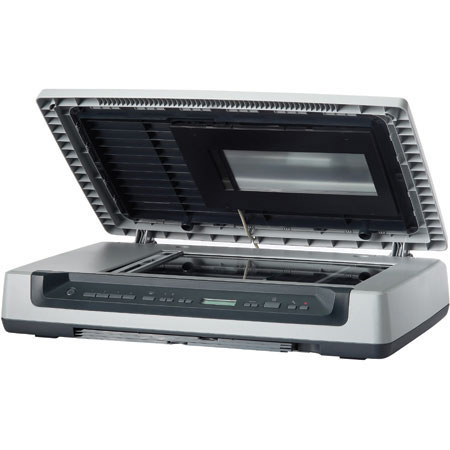
HP Scanjet 8300 Flatbed Professional Image Scanner, 8.5x14", 4800 x 4800 dpi, USB Interface, for Mac & Windows.
SKU: IHPS8300
This item is no longer available.
Share:
Overview
Compare
Learn
Specs
Protection
Reviews about this item
Review Summary
2012-05-24T20:00:00
Rated 1 out of 5
This product does not scan film
The quality is acceptable when scanning documents and photos. I tried film and the scanner would not work. No help, except HP said it was out of warranty and suggested that I buy a new scanner. I'm sure this scanner would not scan film from the beginning.
nothappy123
Originally posted at
2011-05-12T20:00:00
Rated 1 out of 5
Complete and utter lemon!!!
This scanner worked fine for one year, then started acting up by created one enormous file instead of separate smaller sized scans. Contacted HP about the problem and they said after much going over it exhaustively that they couldn't help me further, because the warranty had just expired, unless I wanted to pay another 50 bucks for some further help. I talked to my IT department then and they said that the scanning software had been badly written by HP and that that was what was creating the problem, and the only way around it was to use an older version of Solution Center. I went with that, but found it clunky because we could only do one scan at a time rather than in batches, but oh well. Then I tried more recently to use the negative film strip scanning function. The scanner could not seem to sense that the white cover on the scanner had been taken off and that film was there to be scanned. Looked it up online and found that there had been a bad batch of lids made for this scanner and that I would have to go through some sort of ordering process to get it replaced (and since it was not under warranty it seems unlikely that HP would replace it anyhow). Finally, yesterday the scanner stopped scanning and said that the ROM code failed and that I need to download the Firmware for it immediately. However, when I go out on the web, HP says that it no longer has the Firmware or drivers available for this model. However, when I look for it, I can find the Firmware on the HP site, but when I try to run it, the install seizes up and fails. So basically I want to drag this thing out to the dumpster and perform a ritual sacrifice. Oh, and because of the initial problem with scanning described above, this scanner blew away a new La Cie external drive with a lot of data on it due to the fact that it was trying to write such a large file onto the drive. I have to say that the HP 4800 scanner we also have has been just fine and seems to be a workhorse, but I will not be shopping at HP again until they provide a better product and better software and especially, support. They have really fallen off in my estimation as a company.
JLA27
Originally posted at
2011-02-20T19:00:00
Rated 1 out of 5
Scanjet 8300
The Scanjet 8300 does not seem to be supported well by the HP software package. Device driver installed and the hardware was "functional", but use of the transparent media adapter (backlight in the cover for scanning slides and negatives) requires support from the HP software package, which returned communication error codes EVERY time. Spent 3 hrs of my own time troubleshooting, then 2.5 hrs two different times with (very helpful) tech support, but to no avail. Complete software install, deinstall, and reinstall 4x, but no luck. Decided it was not worth the effort and sent it back... In summary, I believe the 8300 hardware to be a very good device, but HP has not upgraded their supporting software to work well with Windows 7.
Av8nFish
Originally posted at
2010-12-10T19:00:00
Rated 5 out of 5
Good Replacement Scanner
This Scanjet 8300 was purchased as a replacement for a Scanjet 6350Cse, to do low-volume, single-page copying and/or scanning of documents and photographic positives and negatives. (Having had experience with an Automatic Document Feeder on the 6350Cse, I specifically chose the 8300 rather than the 8350 or 8390. The ADF was simply not needed in my environment and would have been more trouble that it was worth.) In the 1 week of use so far, the 8300 has performed flawlessly. The legal-sized scanning bed is a definite plus, although the overall size of the unit requires some forethought in planning where to place it in your environment. The photo scanning masks, included with the unit, work very well and were one of the main reasons this unit was chosen, along with its 4800 dpi resolution. I have been able to scan a 40+ year old, black-and-white negative and obtain an excellent reproduction using the included HP software. The Adobe Photoshop Elements software is another bonus. The only downside I have found is that the older Windows XP laptop, to which the scanner is connected, doesn't appear to have the needed horsepower to execute quickly enough the post-scan processing that the HP software performs. Thus, the overall speed of copying documents is just slightly slower than with the previous scanner, although the actual scanning time for each page is a lot quicker. All in all, however, an excellent choice for the criteria for which it was purchased and I am pleased with the unit.
Anonymous337
Originally posted at
2010-03-03T19:00:00
Rated 4 out of 5
Good Scanner for Docs or Book pages
Now that the latest firmware is available, the 8300 is a good scanner. With the new firmware 1.45 the scanner does not go into sleep mode anymore. Previously, I had to turn it off and back on after sitting awhile but now it works fine. I use it for scanning doc's and Books that I like into Acrobat. I also scanned all of my family pictures and 35mm slides. Some of them were very aged and had to be color corrrected. It is best to scan pic's and slides at the highest resolution possible to get the best results (10mb/pic). Every time you do a new scan (even if it is the same page) you have to re-draw the dotted line around the scan area. I wish they allowed the dotted line to remain until a new page is scanned. Also, I tried to install the sw downloaded from the hp website for my old Windows 2000 desktop. When installing it a message came up that the sw does not work with windows 2000. Why do they have sw to download for win 2000 if it does not work? Overall it is a good scanner especially the large scan size.
BobbyS
Originally posted at
2009-12-03T19:00:00
Rated 1 out of 5
Big disappointment
I am using a Macintosh Power PC with 10.4 OS and a HP 4300 all-in-one printer. In my retirement, I decided to digitize all the family photos. I saw all the five star ratings on this scanner so i bought one. It was new in the box. It took me two days to get it to work. There was a conflict between my HP printer software and the 8300 software. The instructions are worthless. No instructions on how to deal with the software loading problem. No operating instructions. I was able to scan all my negatives but when I started on the printed photos, it kept locking up on me while transferring photo to iPhoto. Reloaded the software five times. I finally figured out I needed to adjust the preference on my computer. HP would not help me because they said my printer warranty expired over a year ago, even thought it was purchased from Circuit City in August. Box had never been opened. Nothing in the instructions about being able to select multiple photos and the automatic multiple photo selection did not work well. I would put four photos on the scanner and it would only select one of them or select all four as one.I finally figured out I could do it manually. Poor instructions. Poor software interface. I have it working now after hours of setup and I guess the image quality is good but it does not seem to be much better than my $79.00 HP all-in-one. I had to have the 8300 for large negative scanning. I have been a HP printer fan for over 25 years but found the instructions and software of this product to be very frustrating.
tdsd
Originally posted at
2007-04-18T20:00:00
Rated 5 out of 5
HP 8300 Scanner
OUTSTANDING! PHENOMENAL! FLAWLESS! SUPERB QUALITY IMAGES!
Dave4775
Originally posted at
2007-04-04T20:00:00
Rated 5 out of 5
Sharp image
This is perhaps the nicest machine I have ever seen. It is easy to operate and performs miracles.
sparky
Originally posted at
Specification about this item
Related Articles & Videos
About HP Scanjet 8300 Flatbed Professional Image Scanner, 8.5x14", 4800 x 4800 dpi, USB Interface, for Mac & Windows.
Scan documents, photos, film and other materials with a versatile versatile scanner. Perform common tasks scan, create PDFs and and even make copies by sending a scan to the default printer with printer with one-touch buttons. Adjust resolution to fit scanning scanning needs.
Join VIP PRO
Earn 2X Points + Exclusive Perks!
Request a Callback
Chat one-on-one with an expert
Sell or Trade your Gear
Get started in 3 easy steps
What's in the box:
- HP Scanjet 8300
- Built-in 4x9" transparent media adapter & film templates for scanning slides & negs
- Hi-Speed USB cable Power cord
- Setup & Support Guide
- Customizable button labels
- CD-ROM(s) w/software f/Microsoft Windows includes: HP Photosmart Essential & Premier
- ScanSoft PaperPort
- Adobe Photoshop Elements
- I.R.I.S. Readiris Pro OCR
- CD-ROM(s) w/software for Macintosh includes: HP Photosmart Studio
- NewSoft Presto! PageManager