2013-01-12T19:00:00
Rated 4 out of 5
Better , Faster & Cheaper
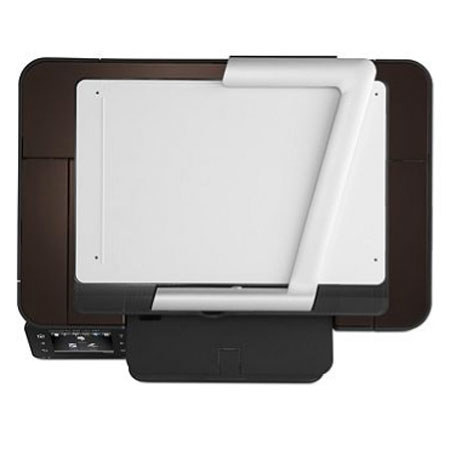
Machine is well opisitioned to give you the capabilities of a laser at the price of an inkjet. it is better, faster and cheaper than any otyher printer in this category. This printer would be ideal if the scanning facility was better then then the flimsy camera. A document feeder like the one on Officejst 670 would have been ideal. This printer could have a good market place if it had a document feeer in the healthcare space
funtoosh
Originally posted at

2012-12-23T19:00:00
Rated 2 out of 5
Very disappointed
I have had HP printers for many years but the quality of this one leaves alot to be desired. Was very unhappy with tech support in trying to resolve my issues. Gave up and sent it back twice..
DJ50
Originally posted at
2012-12-19T19:00:00
Rated 2 out of 5
Slow, expensive to operate
I got this printer a month ago to replace a Dell laser printer that jammed occasionally. I am very unhappy. It prints very slowly in black and white. It also keeps telling me my cyan cartridge is low on toner which makes me think it is using the color toners to print in black and white. That makes this a very expensive printer to own.
In trying to correct this problem, HP sent me a replacement refurbished printer that doesn't perform any better than the one I had originally. On top of that, the replacement printer was made in 2011 and doesn't appear to have some of the features that the one I bought in November, 2012 had. It is a real chore to get someone who knows what they are talking about in a chat or on the phone. This problem is not covered in the FAQ or the forums and the operating instructions are not clear about how to set the printer to print in black and white.
Robert48
Originally posted at
2012-11-17T19:00:00
Rated 4 out of 5
A good printer if you aren't in a hurry
Printer is slow but gives good quality copies and print jobs. The color is good and does an acceptable job of photo printing but it is exceedingly slow with large color pictures. The scanning function is very good and is the fastest aspect of the printer. Overall, I am pleased with the printer for the prices I paid. If I wanted faster, I would have to pay more for that so if you want fast then this is possibly not the printer for you. The ink cartridges seem reasonably priced compared to the Brother color laser I had previously, which was a good printer but the very expensive ink led me to go to HP.
rickprn
Originally posted at
2012-10-22T20:00:00
Rated 2 out of 5
Pretty but Sloooow
was a little difficult to set up, but eventually did. there is no instruction sheet/booklet that you can follow that has any detail. The printer will be sent back because it is really slow when you ask it to print, copy or scan. Almost fell asleep waiting for a one page paper to print, although when it did start to print it was not that slow.... just took forever for it to initialize to print.
copdoc
Originally posted at
2012-09-06T20:00:00
Rated 3 out of 5
Some good features
This does not include a flatbed scanner. I thought it did. It would be excellent for those who use ebay or Amazon to sell stuff. But for pictures, not so good.
mthomas929
Originally posted at
2012-07-03T20:00:00
Rated 5 out of 5
An amazing scanner
This is one amazing machine. It has completely replaced my use of a digital camera to capture images of small items for internet sales. No more taking 5 camera shots to get 1 good image. The .jpg images are easily customized with Irfanview for a time-saving session. The unit is easy to use and requires almost no adjustment for great "scans". Installation was a breeze. The only drawback is that it is so much fun to use that I've got more images to process than I can get to!
albjr48
Originally posted at
2012-05-07T20:00:00
Rated 5 out of 5
Amazing machine!
Saw the scanner advertised on the Martha Stewart show. Decided to order and try it out. It works wonderfully. It takes better photos of my jewelry than a camera and in just seconds. It exceeds my expectations. it was shipped very quickly, too.
Cassandre
Originally posted at
2012-04-21T20:00:00
Rated 4 out of 5
Very cool printer
Hardcopy is excellent. Overhead 3D scanner is not for everybody, but a very cool toy to have, especially if you do a lot of small-item eBay selling.
If you need an ADF, this isn't for you. But if you mostly scan single docs, it's actually a bit easier. I read the review of the person who couldn't get it to work, but mine works perfectly and I'm pretty impressed. I can't stop scanning junk just to scan it.
Downside is the document has to be perfectly flat, but when you see the design it's obvious why. They should have included something to keep the paper flat, but I guess a couple rubberbands will have to do. Otherwise, for the price it is way nicer than the Lexmark inkjet MFP it replaced and should be alot cheaper in the long run. I'm going to experiment with putting a piece of clear plexiglass on top of the paper.
MaximGatling
Originally posted at
2012-03-12T20:00:00
Rated 1 out of 5
Will not scan
When I try to get support and put in the model number, only the 300 and 100 show up; not the 200. The scan to computer feature will not work even though I have installed the software and done all the updates. Continues to give a message that the scanner is busy, even though there is nothing there.
Also, when making a copy, the laser lights seem to be extreme.
kfitzgib
Originally posted at
2012-02-12T19:00:00
Rated 4 out of 5
Good affordable laser printer
Easy setup, great printer quality. Not completely sold on the camera scanner...would have preferred the regular flatbed scanner w/ optional document feeder. Also, automatic duplexing and an secondary tray would make this the best affordable color laser for all purposes.
BAudiKirk
Originally posted at
2012-01-24T19:00:00
Rated 5 out of 5
Good purchase as usual
the 3D imaging feature is good. There are certain items whose color does not come out like it should - like orange scans as a yellow final product.
I think you should work on a higher capacity (e.g. XL) toner cartridge and you should work on price reducction.
The hard copy is excellent.
PogoLawyer
Originally posted at
2011-12-17T19:00:00
Rated 5 out of 5
HP TopShot LaserJet Pro M275 Printer
Always worry about a new product, especially with a photo type scanner. Printer was easy to setup, add to the network, and to link to other computers on the home network. If it would have come with a paper tray, it would have been perfect.
BobCinUtah
Originally posted at
2011-12-15T19:00:00
Rated 4 out of 5
3D scanner works well if that's what you need
The printer is compact, slick looking, setup is intuitive and simple. The instruction booklet is concise and clear. Printing is fast. The 3D scanner works like a camera and can capture images of a 3D object well. It can also scan a regular document very well, but the catch is the paper has to be perfectly flat. If it has folds and bends, the scanned document will show curved lines rather than straight lines as on the original document. There's nothing to hold the paper flat like in other flat bed scanners.
The 3D scanner on this printer works well but is very use specific: scanning 3D objects. If you mostly scan documents, a regular 2D scanner might be a better choice.
Andy1
Originally posted at
2011-12-05T19:00:00
Rated 2 out of 5
Wish I hadn't purchased
While reviewing the website and choosing the options I wanted, HP's website gave me this printer as the cheapest option (all other printers were $800+). Since I'm a school teacher on a limited budget I chose it. However, it doesn't have an ADF, even thought I had selected that option in my list of options that I wanted. In all, the printer does what it is supposed to do, however, I could have gotten a much better bang for my buck by purchasing the HP LaserJet Pro CM1415fnw Color MFP. Same price, but I would have gotten an ADF and Fax machine to boot. Plus the CM1415 has much better specs. The only thing this printer gives me is the 3D scanning capability, that works, but honestly, I'll NEVER use...I only scan documents and an ADF would have worked better. So, unless you have this huge need to scan items in 3D, don't waste your money.
germtrol
Originally posted at
2011-12-01T19:00:00
Rated 2 out of 5
Early adoption....
Wireless printing was very slow with waits up to 5 minutes for printout. WIreless network setup was easy first time and then stopped working. Topshot scanning was cool feature and 3D appears to work good, but scanning photographs showed very poor color rendering. So hopeful at first arrival and yet so disappointing after use.
AvidHPuser
Originally posted at