 |
16 bits per color channel |
 |
New GPS support - unique worldwide |
 |
Great companion to Adobe Photoshop |
 |
Includes the programs: Panorama Maker, 3D Photo Maker, Web Galleries |
 |
Latest tools: DVD slideshows, PDF slideshows, special effect filters |
 |
Acquire images from; camera, phone, PDA, scanner, CD/DVD, web, IPOD etc |
 |
Enhance, design, repair, organize & print: including latest easy to use functionalities |
 |
PhotoAlbums, Calenders, Invitations, posters etc. |
 |
Extremely large list of functionalities for batch processing |
 |
New Program Core: Redesigned program core - now supports processing of photos in 16 bit/channel color depth. Photo operations are performed at this color depth based on completely reworked algorithms, which means your pictures will suffer less loss of quality |
 |
16-bit processing: It is not just limited to a few operations; instead, it affects the vast majority of image edits and import/output filters |
 |
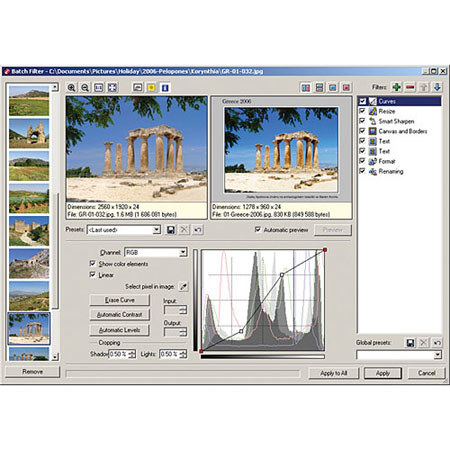
Easier Batch Photo Editing: It has always been easy to process many photos at once in Shortcut Photo Studio. But the latest version takes this even further. The old "batch operations window" has been replaced with a new Batch Filter that is more flexible and easier to use |
 |
DVD Slideshows: Tabletop DVD players have by now become an almost guaranteed part of homes and DVD recorders are pushing out old VHS video |
 |
Add many transition effects |
 |
Use text captions based on pictures' descriptions and more, or ones entered by hand while using the dvd wizard |
 |
Set a music file or files as a soundtrack |
 |
Customize the slideshow background |
 |
Create both classical 4:3 and wide-screen 16:9 slideshows |
 |
GPS Support: GPS navigation devices have also become a common part of everyday life. That is why Shortcut Photo Studio now lets you assign and make use of GPS coordinates for photos. You can assign GPS data automatically from a GPS device's track log if you wish |
 |
Assigning of geographic coordinates, including automated assignment based on a GPS device's track log |
 |
Display of photo locations using GPS data in the photos' picture information (EXIF) on on-line maps like Google Maps |
 |
Better Work with Picture Information: Work with digital photos' "picture information" - things like descriptions and keywords - is important for efficient photo management |
 |
New Descriptions Panel in the Browser so you can describe photos more easily |
 |
Search and Replace function for picture information |
 |
New variants for "variable text" (text that the program can fill in automatically for you) in version 9 related to this versions' new functions |
 |
Faster work with picture information that's stored in XMP format |
 |
Batch assignment of location (city and state) |
 |
Easier, More Precise Editing: Shortcut Photo Studio has long progressed past being "just a browser with basic editing tools." The latest version provides more than ever to experienced users who demand precise settings to achieve the perfect look for the photos they are editing |
 |
You can copy parts of pictures among files and change their size, transparency and border blurring in the process |
 |
Editor selection tools now support antialiasing Improved Curves filter now lets you enter input/output values and use an eyedropper to fill in values |
 |
The Editor now supports Adobe Photoshop plug-in filters (.8bf) |
 |
New Resharpen filter |
 |
New Custom filter |
 |
You can now write text on your picture in the Editor directly |
 |
Improved Publishing Tools: The broad scope of Shortcut Photo Studio's publishing tools makes it unique among all tools on the market |
 |
Calendars |
 |
Marking of holidays and other special days in calendars |
 |
Customizable display of state and other holidays as free days |
 |
Generation of "mini-previews" for previous and next month |
 |
Direct assembly of vertical panoramas |
 |
New Seasite PHP and Compact PHP templates, with comment support and spam protection |
 |
New Find points automatically option in the 3D photography wizard |
 |
Easier to Use: The program's interface has seen some significant changes that make work with pictures and picture information easier and better organized |
 |
New Tutorials window for beginning users |
 |
Preview/Information window now divisible into two separate windows |
 |
A new look for the Information window, including a better look for histograms |
 |
Structured display in the Information window, with commands to show and hide all items in a group |
 |
Customizable keyboard shortcuts for menu items |
 |
Showable/Hideable menu items in Browser and Editor |
 |
Advanced file renaming in Browser |
 |
Previews for video files in the browser. |
 |
Preview of outputted name during batch renaming. |
 |
You can change the case for photos' extensions during downloading |
 |
Media archive now stores thumbnails outside the archive database (now easier to avoid hitting size limit) |
 |
You can now turn off the mouse wheel's ability to move among pictures in the Editor |
 |
You can choose the edge background color when using precise rotation |
 |
Help panel in the browser for the Media Archive and Search Results |
 |
Newly broadened settings for the image in Image Function |
 |
Text in image: Support for multi-line text, including justification and line spacing preview for the font you've selected |
 |
To Clipboard option for Send by E-mail function, to make it easier for you to prepare pictures for sending within an existing e-mail |
 |
New options for displaying blowout and underexposed areas: You can turn de-saturation and element indicators on/off |
 |
You can now use variable text to help name output folders when downloading photos |
 |
Better support for display of the Nikon NEF RAW format |
 |
Non-proportional perceptual resizing |
 |
Panorama Wizard - helps you make panoramas easily. The program finds the shared points in the individual shots and joins them automatically and if possible perfectly. You can also manually edit the joining. It also includes automatic exposure correction |
 |
3D Image Wizard - this wizard helps you create pseudo-3D images (anaglyphs) which appear in simulated 3D when viewed through special glasses with one red and one blue lens |
 |
Web Galleries - automatically create web photo galleries using pre-designed templates - no HTML experience required |
 |
PDF Slideshows - publish to PDF and share with family and friends |
 |
Photo Editing and Enhancement Tools - everything you need for enhancing photos and removing image defects |
 |
Image Magic - effects like conversion to grayscale, color manipulation, explosions, oil painting, antique photo, add grain and waves. Plus frames, envelopes, soft shadows and more |
 |
Managing Your Digital Archive - descriptions, text and audio notes, keywords and cataloging of external media (CDs and DVDs). Searching, filtering and sorting; file operations; batch renaming and conversion |
 |
Unlimited possibilities for printing and presenting photos |
 |
Support for all types of digital cameras (both USB Mass Storage and Canon), scanning over the TWAIN interface, web image spidering, extended screen shots and acquisition of data from the Clipboard |
| Supported file formats | BMI, BMP, CR2, CRW, DIB, GIF, ICO, JPE, JPEG, JPG, MAC, MDM, MRW, NEF, ORF, PCD, PCX, PNG, PSD, PSP, RAW, RLE, TGA, THM, TIF, WPF, EMF, WMF, ZBR, ZCL, ZMF, ZMP |
| Supported multimedia formats | ASF, AVI, M1V, MOV, MPE, MPEG, MPG, QT, WMV, AIF, AIFF, AU, MID, MIDI, MP3, MPA, RMI, SND, WAV and WMA |
| System Requirements | OS: Windows 98/ME/2000/XP/Vista Processor: Pentium 300 MHz or higher Memory: 128 MB RAM HDD: 90+ MB of free disk space Resolution: 800 x 600 High Color Microsoft Internet Explorer 5 or higher must be installed for certain features to work correctly |
| Warranty | Shortcut warranty |
| | |