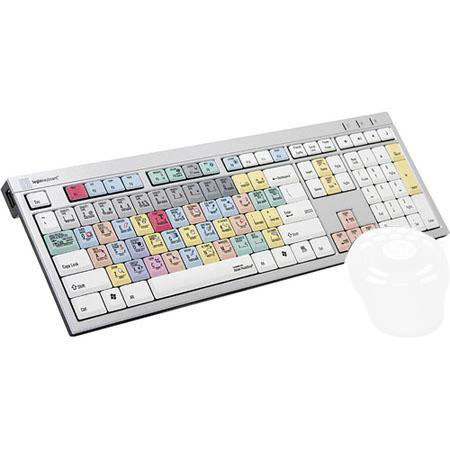
LogicKeyboard Adobe Photoshop CS Slim Line PC Keyboard, Dual USB 2.0 Ports

SKU: LGKAPHCS45PC

This item is no longer available.

Overview
Compare
Specs
Protection

Reviews about this item

Review Summary

Select a plan in the Add Protection section above and purchase with this product by clicking “Add to Cart”.

image-protection

TRUSTED PROTECTION PLANS, EXCEPTIONAL SERVICE.

Invest In Your Gear and Peace Of Mind!

Accidents happen where life happens. Protect your favorite Adorama products and purchase a protection plan to stay covered from accidental damage, mechanical or electrical failure, and more.

Repair or Replacement

Repair or Replacement

If we can’t fix it, we’ll replace it at no additional cost.

Accidental Damage

Accidental Damage

Protect your product from drops, spills, and more.

Peace of Mind

Peace of Mind

Enjoy your gear without fear. We have you covered!

Malfunction Protection

Malfunction Protection

When regular use of your product over time results in mechanical or electrical failure.

Zero Deductible

Zero Deductible

We will never charge you a deductible after the purchase of a plan.

Customer-Focused Support

Customer-Focused Support

Our claims process is simple & easy and our customer service team is happy to help.

Adorama Protect powered by Extend is available for purchase to customers in the United States. Not available for purchase Internationally or in U.S. Territories.

LogicKeyboard Adobe Photoshop CS Slim Line PC Keyboard Specifications

  • Host Application

    Photoshop CS

  • Connectors

    2x USB 2.0

  • LEDs

    1x Number Lock
    1x Caps Lock
    1x Scroll Lock

  • Cable Length

    5' / 1.5 m

  • System Requirements

    Windows 2000, XP, Vista, 7

  • Dimensions

    17.56 x 5.55 x 0.90" / 44.6 x 14.1 x 2.3 cm

  • Weight

    42.32 oz / 1200 g

About LogicKeyboard Adobe Photoshop CS Slim Line PC Keyboard

The LogicKeyboard shortcut PC keyboard for Adobe Photoshop makes using Photoshop much more efficient than just using it with a mouse. It is ideal for creative professionals as well as casual Photoshop users. Anyone can benefit by using the Photoshop shortcuts that are clearly marked and color-coded on the keyboard.

The quickest way to learn the Photoshop shortcuts and increase your photo enhancement efficiency is to use the Photoshop keyboard. The keyboard itself is a stylish, low profile, with a state-of-the-art key switch mechanism that gives you the ultimate comfort and responsiveness in typing. The keys have large surface for typing with low noise scissor switch underneath for durability. It features two USB ports on the sides of the keyboard and plug-and-play into any USB-equipped Windows PC.


LogicKeyboard Adobe Photoshop CS Slim Line PC Keyboard Features

  • Easy to set up and use. No software required. Soft touch keystroke - Ideal for all day comfort
  • 2 USB Hubs: Built-in 2.0 Full Speed ports for additional desktop expansion
  • Windows Platform: Windows 2000, Windows XP, Windows Vista, Windows 7
  • Connection: Wired USB - cord length 5 feet / 1.5 meter

Key Features

  • Easy to set up & use
  • No software required
  • Soft touch keystroke
  • Ideal for all day comfort
  • 2 USB Hubs: Built-in 2.0 Full Speed ports
  • Windows Platform




