
Studio/Field Editing Equipment
Format Converters
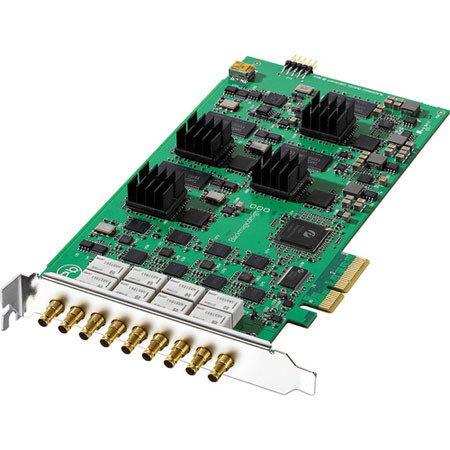
Blackmagic Design DeckLink Quad, 4 SDI Inputs/Outputs
Blackmagic Design

Blackmagic Design DeckLink Quad, Adds 4 SDI Inputs / Outputs, 10Gbps Transfer Rate

SKU: VDBMDLQ MFR: BDLKDVQD
Why Adorama?
Easy Returns, Fast Shipping, Trusted for over 35 years.

Need help? Call 800-223-2500 / 212-741-0052

Our Price

$945.25
Free shipping
Qty:

Add to Wishlist

About this item

The Blackmagic Design DeckLink Quad is used to add 4 SDI inputs and outputs for media play-out servers and real-time processors. Offering broadcast grade multi-channel SDI capture and playback, the DeckLink Quad provides the operation capabilities of 4 completely independent capture cards onto a single PCI express card with bypass relays, watchdog timer, black burst and tri-level common genlock for locking to sources of any frame rate.

Allowing you to create custom software and workflows, the BDLKDVQD DeckLink Quad card provides you power to work without limitations. It also allows you to add titles, resizing, de-interlacing and converting formats on multiple streams, while simultaneously allowing you to capture and output the final result.

Featuring 8/10-bit SD and HD recording and playback in YUV 4:2:2, the DeckLink Quad provides best quality pictures ideal for use in live broadcast and post production works by avoiding any generational or compression loss. Featuring low SDI jitter in long distance transmissions cables and 4 PCIe connections for low latency, it provides output at a transfer rate of 10Gbps and allows instant switch between a SD and HD modes.

Allowing connection of up to 16 independent SDI devices which can be configured in any input/output configuration, the card supports up to 8 channels of uncompressed SDI embedded audio and Dolby digital pass through that provides high quality sound output. The DeckLink Quad offers a wide range of features allowing you to use custom made option to suit your needs and also includes a built-in keyer for live overlay of graphics into production switchers.

It can be used to connect to SDI enabled VTR such as Digital Betacam, HDCAM SR, XDCAM, D5, DVCPRO HD, etc with zero latency for instant response. Offering compatibility with Mac OS X, Windows 7, or 64-bit Linux computers, it includes a media express application which provides timecode accurate capture and play out of uncompressed QuickTime, AVI and DPX files.

Key Features

  • Used to add 4 SDI inputs and outputs for media play-out servers and real-time processors
  • Offers broadcast grade multi-channel SDI capture and playback
  • Provides the operation capabilities of 4 completely independent capture cards onto a single PCI express card
  • Bypass relays, watchdog timer, black burst and tri-level common genlock for locking to sources of any frame rate
  • Create custom software and workflows
  • Allows you to add titles, resizing, de-interlacing and converting formats on multiple streams
  • Simultaneously allowing you to capture and output the final result
  • 8/10-bit SD/HD recording and playback in YUV 4:2:2
  • Provides best quality pictures ideal for use in live broadcast and post production works by avoiding any generational or compression loss
  • Features low SDI jitter in long distance transmissions cables
  • 4 PCIe connections for low latency
  • Output at a transfer rate of 10Gbps
  • Instant switch between a SD and HD modes
  • Allows connection of up to 16 independent SDI devices
  • Supports up to 8 channels of uncompressed SDI embedded audio and Dolby digital pass through that provides high quality sound output
  • Offers a wide range of features allowing you to use custom made option to suit your needs
  • Includes a built-in keyer for live overlay of graphics into production switchers
  • Used to connect to SDI enabled VTR such as Digital Betacam, HDCAM SR, XDCAM, D5, DVCPRO HD, etc
  • Zero latency for instant response
  • Offers compatibility with Mac OS X, Windows 7, or 64-bit Linux computers
  • Includes media express application which provides timecode accurate capture and play out of uncompressed QuickTime, AVI and DPX files

Technical Specs

SDI Video Input/Output 4 x 10-bit SD/HD independently switchable
SDI Audio Input/Output 8 Channels per input embedded in SD and HD
HDMI Audio Input/Output No
Sync Input Blackburst in SD, 720p50, 720p59.94, 1080i50 and 1080i59.94 formats or Tri-Sync in any HD format
Device Control No
Computer Interface PCI Express 4 lane, compatible with 4, 8 and 16 lane PCIe slots
SD Format Support 625/25 PAL, 525/29.97 NTSC, 525/23.98 NTSC
HD Format Support 720p50, 720p59.94, 720p60, 1080PsF23.98, 1080p23.98, 1080PsF24, 1080p24, 1080PsF25, 1080p25, 1080PsF29.97, 1080p29.97, 1080PsF30, 1080p30, 1080i50, 1080i59.94 and 1080i60
2K /4K Format Support No
SDI Compliance SMPTE 259M, SMPTE 292M, SMPTE 296M
SDI Metadata Support VITC read for 3:2 pulldown removal. VANC capture and playback using up to 3 lines of video in file. HD RP188 and closed captioning.
Video Sampling 4:2:2
Audio Sampling Television standard sample rate of 48 kHz and 24 bit
Color Precision 10 bit
Color Space REC 601, REC 709
HDMI Color Precision No
HDMI Resolution No
HDMI Configuration No
Multiple Rate support SDI switches between 270 Mb/s standard definition SDI and 1.5 Gb/s HD-SDI
Colorspace Conversion Hardware based real time
3D Processing No
HD Down Conversion HD to SD on video capture or video playback
HD Up Conversion SD to 720HD or 1080HD on video capture
Cross Conversion 720HD to 1080HD on video capture
Real Time Effects Apple Final Cut Pro internal effects in DV, DVCPRO HD, ProRes and uncompressed on Intel Mac OS X. Adobe Premiere Pro Mercury Playback Engine effects in DV, MJPEG, DVCPRO HD, DSLR, AVCHD, XDCAM, XDCAM HD and uncompressed
Software Included Media Express, Disk Speed Test, LiveKey, Blackmagic System Preferences and Blackmagic driver on Mac OS X. Media Express, Disk Speed Test, LiveKey, Blackmagic Control Panel and Blackmagic driver on Windows 7. Media Express, Blackmagic Control Panel and Blackmagic driver on Linux.
Firmware Upgrade Firmware built into software driver. Loaded at system start or via updater software
Installation PCI Express 4 lane, compatible with 4, 8 and 16 lane PCI Express slots on Mac OS X, Windows 7 and Linux. Mac OS X systems require a Mac Pro computer. Please check the Support pages to see the full system requirements