2013-07-22T21:00:00
Rated 3 out of 5
nice capacity
back up computer and store pictures
pianolady
2013-06-17T21:00:00
Rated 1 out of 5
I need to re-assess my review
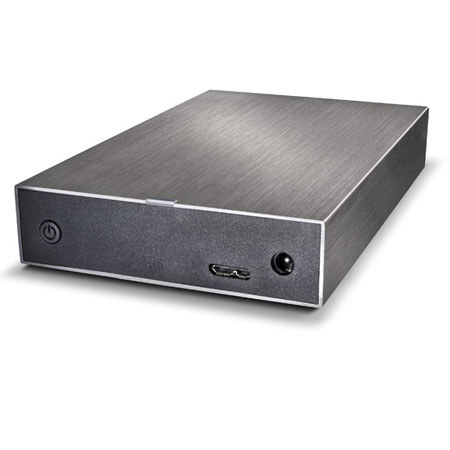
I reviewed this within just a week or so of purchase and at the time thought the power switch felt rather feeble and "non-definative" -- if that is a word -- but didn't give it much thought. It is a soft-button type, not the more solid feeling toggle switch.
Within the first 2-3 weeks, though, my new Mac OS 10.8.2 would frequently, and randomly, eject this drive and give me the error message "You improperly removed a device...". Then, a minute or so later, re-mount it... then a bit later drop it... then... [repeat]. I could watch this happen in Finder.
This drive did this same process on 3 of my iMacs, OS 10.8.3, 10.5.6, and 10.5.8, so I cannot blame it on the computer(s) and can only suspect that the feeble power switch was not maintaining a pass-through of electricity.
I wrote in my previous review that I do like LaCie brand, at that remains true. In fact, I have returned this drive and replaced it with a LaCie d2 Quadra with the same specs -- and a toggle power switch -- and so far [knock my crossed fingers on wood ;-) ] it has functioned perfectly. We'll see...
No, I do NOT recommend the Minimus but DO recommend the d2 Quadra.
KATHY L.
2013-05-20T21:00:00
Rated 5 out of 5
Good. No [visual] Frills. Quiet!
Headline pretty much says it all -- this is, after all, a functional back-up device, not a piece of art. It has a power switch, capacity, ease of use, USB3, no wasted effort/cost on visual frills, is compact, and it is QUIET. I have had other units - including some LaCies - which could be heard as they whirred and spun. Yes, I would buy another and I would recommend it to you.
Chris F.
2013-01-16T19:00:00
Rated 5 out of 5
Lots of Storage for the $$$
Like previous Lacie products I've owned and used, this seems to be a solid product and performer. Setup was easy and large file transfers are very fast with USB 3 connection. I'm very happy with this external drive. A great value for the price.
Totally P.
2012-11-30T19:00:00
Rated 1 out of 5
LaCie Minimus 2TB Ext. hard drive.
Could not setup.
LaCie support wanted me to config. the drive.
JAE13
2011-10-23T21:00:00
Rated 4 out of 5
alot of memory for the money.
A little heavy if you are going to carry it with you. Other then that it is easy to use.
SHARI F.