
 Print This Page
[2 of 2 customers found this review helpful]
 from Evansville, IN on 5/8/2007
Comments about Media Street Media Street eMotion MultiMedia Digital Picture Frame & DVD Player with 7" LCD Screen.:
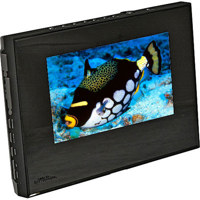
This unit has it all: 3 card slots (MS/SD/MMC) DVD player with wide format of discs played including DVD movies, DVD-Rs etc. CDs incl. reg. CDs, MP3s, CD video and photo CDs. Built-in speakers are marginal but okay for size. Battery life is great, power options include DC car connector as well as AC. Good remote. SPDIF audio out jack, & video out increase versatility. Also audio out for computer-type speakers. Input/output switch, 16:9 / 4:3 switch. First images on screen were overly heavily color saturated but unit is adjustable (not bad for small photos). Unit has very bright screen, haven't tried it in sunlight. Recommend low-res images -JPG only -hi-res takes too long. No internal image storage but who needs it? Overall seems to be a good purchase, especially as a Mother's Day gift! Way more useful than just as a digital frame OR just as a DVD player. The user manual was "clearly make need" of better translation, but seemed to generally have accurate info. Not much in the way of troubleshooting info -the unit froze while displaying an image from a DVD-R, with no indication in the manual about why. Maybe it was me pushing buttons at fault! Turned it off & back on and it was okay. I also found out you have to use the remote to get rid of subtitles -just clicking on "no subtitles" in a DVD menu with the unit's built-in controls won't do it. Bang away all day with your digital camera on low-res JPG, pop the card in (take the DVD out first, George!) and let the slide show begin!!
Anyway, hope the recipient likes it, because now my wife wants one too!