
 Print This Page
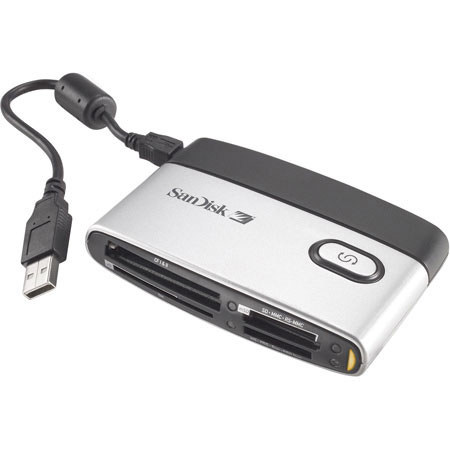
Customers most agreed on the following attributes:
 from Hilton, NY on 3/6/2009
Comments about SanDisk SanDisk Imagemate 12-in-1 Memory Card Reader with Transfer Button, USB 2.0 Interface.:
This is a well made card reader. I shoot camera raw with a 10 megapixel camera with SanDisk Extreme III cards. Down load times are much faster than my old reader. I like that you can plug it in or unplug it while it is powered because I have it plugged into a powered USB hub which keeps the readers led lighted even if the computer is off.
from Pleasant Garden, NC on 2/22/2009
Comments about SanDisk SanDisk Imagemate 12-in-1 Memory Card Reader with Transfer Button, USB 2.0 Interface.:
My wife and I have several digital cameras that use Multimedia, xD, SD, and SDHC cards. I needed a card reader that would meet my current and future needs for transferring images from any camera to our Macs.
The SanDisk Imagemate 12-in-1 handles them all.
SD card insertion is a bit tricky in aligning the card with the slot, but that is a minor quibble.
from Knoxville, TN on 1/16/2009
Comments about SanDisk SanDisk Imagemate 12-in-1 Memory Card Reader with Transfer Button, USB 2.0 Interface.:
Have used this memory card reader with Windows XP for SD and then CF cards for a couple of years with no hitches at all. Like its versatility, size, and speed. But...doesn't work with Vista. So when I ordered one for my Dad, had to send it back. Adertising needs to be upfront with this increasingly severe handicap.
from NASHVILLE, TN. on 12/29/2008
Comments about SanDisk SanDisk Imagemate 12-in-1 Memory Card Reader with Transfer Button, USB 2.0 Interface.:
A great buy.....
from clearwater, fl on 9/4/2008
Comments about SanDisk SanDisk Imagemate 12-in-1 Memory Card Reader with Transfer Button, USB 2.0 Interface.:
very compact, seems to work very good....a little on the light side, but a good product
from New Orleans, LA on 8/24/2008
Comments about SanDisk SanDisk Imagemate 12-in-1 Memory Card Reader with Transfer Button, USB 2.0 Interface.:
Very fast transfer to data... faster than the card reader in the computer.
from Dallas, TX on 8/7/2008
Comments about SanDisk SanDisk Imagemate 12-in-1 Memory Card Reader with Transfer Button, USB 2.0 Interface.:
I own 3 Nikon DSLR's and a Sony P&S. They use 3 different kinds of memory cards. This 1 card reader replaces the 3 I have been using for years. No more plugging and unplugging USB cords on the back of my computer. Plus there are 9 more types of cards it will work with in case I ever need to load friends files. Small size and extra cable make it convenient to take when I travel with my Laptop! Very happy with this purchase.
from Boulder, CO on 7/24/2008
Comments about SanDisk SanDisk Imagemate 12-in-1 Memory Card Reader with Transfer Button, USB 2.0 Interface.:
I needed to add an SD card reader to my previous CF-only setup and decided to go with a multi-slot device. The SanDisk card reader fits nicely on the desk and is also small enough to travel with, though I have to carry the included USB cable along with it. It works.
from michigan on 7/2/2008
Comments about SanDisk SanDisk Imagemate 12-in-1 Memory Card Reader with Transfer Button, USB 2.0 Interface.:
transfer button not needed to transfer data to computer,would prefer dust cover over slots to base
from Wilton, ME on 6/26/2008
Comments about SanDisk SanDisk Imagemate 12-in-1 Memory Card Reader with Transfer Button, USB 2.0 Interface.:
This replaced a similar Sandisk reader that did not recognize SDHC cards
[1 of 1 customers found this review helpful]
from Bountiful, Utah on 5/8/2008
Comments about SanDisk SanDisk Imagemate 12-in-1 Memory Card Reader with Transfer Button, USB 2.0 Interface.:
Reads every memory card I own, including HD SD cards my old reader couldn't handle. It's quick and convenient - no downside that I've found.
from Houston, TX on 2/21/2008
Comments about SanDisk SanDisk Imagemate 12-in-1 Memory Card Reader with Transfer Button, USB 2.0 Interface.:
I purchased product to use the SDHC card. Not very happy with the short cable that was really small. Also, the docking station busted it up and took the cable where it would be longer cable. That item is where i carry it around in my purse for use. My only reason is that they do not give you a long enough cable to plug in
Comments about SanDisk SanDisk Imagemate 12-in-1 Memory Card Reader with Transfer Button, USB 2.0 Interface.:
San disk replaced the reader because the transfer button would not work. The second reader would not work. They have you try differant things over the phone, but nothing makes the transfer button work. The computer software will transfer your pictures, but when you are use to the button feature like their other readers, you would like to have it on the 12 in 1.
[1 of 1 customers found this review helpful]
from Ply. Mi. on 9/26/2007
Comments about SanDisk SanDisk Imagemate 12-in-1 Memory Card Reader with Transfer Button, USB 2.0 Interface.:
I read other reviews about the transfer button on this unit not working. My did'nt work, even after a couple of times of downloading the program. I also called SanDisk and they walked me through some things, still would'nt work. SanDisk did give me a RMA to return it for an even exchange. I have not received the new one yet to see if button works now.
from Seattle on 9/26/2007
Comments about SanDisk SanDisk Imagemate 12-in-1 Memory Card Reader with Transfer Button, USB 2.0 Interface.:
I plug it right away and Windows XP recognize it without installing the sofware. I used windows to transfer my images (it’s faster).
Comments about SanDisk SanDisk Imagemate 12-in-1 Memory Card Reader with Transfer Button, USB 2.0 Interface.:
I spent more time trying to get this unit to work than I would like to admit. I could get it to be recognized with an old Windows 98 Computer but never with my newest Windows XP System. The software disc was useless and their Website wasn't much better. If you buy this product I hope you have better LUCK than I did.
from Columbus, Ohio on 7/14/2007
Comments about SanDisk SanDisk Imagemate 12-in-1 Memory Card Reader with Transfer Button, USB 2.0 Interface.:
It accepts may of the memory cards that are in use today.
from Canton, Ohio on 7/10/2007
Comments about SanDisk SanDisk Imagemate 12-in-1 Memory Card Reader with Transfer Button, USB 2.0 Interface.:
The Transfer Button isn't very useful when copying files to a memory card. Easier to let Windows do the work of transfering files. Each slot is it's own mapped drive in Windows. Can transfer directly from card to card.
from Washington State on 5/9/2007
Comments about SanDisk SanDisk Imagemate 12-in-1 Memory Card Reader with Transfer Button, USB 2.0 Interface.:
I use it all the time. It is how I transfer my pictures to my computer.
from mi on 3/26/2007
Comments about SanDisk SanDisk Imagemate 12-in-1 Memory Card Reader with Transfer Button, USB 2.0 Interface.:
Love the product, easy to use.
from MKE WI on 3/26/2007
Comments about SanDisk SanDisk Imagemate 12-in-1 Memory Card Reader with Transfer Button, USB 2.0 Interface.:
Good product
from Venice, FL on 2/18/2007
Comments about SanDisk SanDisk Imagemate 12-in-1 Memory Card Reader with Transfer Button, USB 2.0 Interface.:
Transfer button not very useful. I use 1GB compact flash and SD cards and download to computer is very fast and reliable.