
This item is no longer available.
Review Summary
2013-10-01T20:00:00
This machine was a replacement for the previous MFC-9325CW that I purchased a few months earlier, but, unfortunately, it has the same problems--very noisy, and uses toner at an unacceptable rate. I have owned many Brother MFC's in the past, but I am very disappointed in this model.
capocpa

2013-08-28T20:00:00
Love love love my color laser printer. Love the customer support also. Best purchase!
Seda
2013-08-01T20:00:00
Love the quality and speed of the printing. Fax is easy to operated and scanning filing program is easy to figure out. Only wish I could turn off the fax on days I only want to do copies.
BrownDog
2013-07-01T20:00:00
I can't say much about the device (it's much more than just a printer, as I haven't stressed it yet -- I'm still on the same cartridges that came with it. But, it has done everything I've asked of it, including wireless printing and scanning, and it also copies and faxes directly and quickly. I had a Brother before, and I would advise you to buy factory replacement cartridges -- the cheaper ones really don't work as well.
TedMD
2013-04-21T20:00:00
It was good that we have call you because we got our 2 units for RMA. The only thing is we keep on calling for follow-up. and I hope you can have an email sending to customers for the status of RMA.
SAIPANCOMPUTER
2013-04-16T20:00:00
The Brother MFC-9325CW has been an excellent All-In-One laser printer. It was easy to setup and functions well with my home wireless network. I print from numerous devices (cell phone, iPad, laptop and desktop computers) without compatibility issues. I highly recommend this Brother printer!
Phillip
2013-03-26T20:00:00
We use our MFC-9325CW in a home-based business environment. Pluses include: relatively low price, easy setup, including adding to our network, speedy printing and scanning, second slot in the front of the machine for nonstandard paper/envelopes (a handy feature which our older machine lacked). Color printing is acceptable, and B&W printing is excellent. The only issue we have had with poor print quality, when the printer began printing a vertical yellow stripe down the side of the page, I traced back to a bad off-brand recycled toner cartridge. Since replacing the bad cartridge with a Brother OEM cartridge, we haven't had any more problems. Recently we had to buy a Win 8 machine and found that we couldn't install the scanning functions. This required a call to tech support, who were very helpful. Turned out the Control Center software was not compatible with Win 8. This was fixed within a couple of weeks, as promised, and we downloaded the new drivers, which work perfectly. Negatives: The Control Center software is takes a bit of time to learn. For anyone who is a bit less tech savvy there are tabs for 'Scan' and 'Custom Scan' that the user can use to scan without having to dig much into the configuration. Changing the scan settings is not as intuitive as it could be, and figuring out the default folder for saving scanned files takes a bit of digging. The toner cartridges, which are a bit pricey, don't print a lot of pages before the utility program will start warning about low toner. With four cartridges total (black, red, yellow, and cyan), it seems as if the printer is constantly warning me to "have a replacement cartridge available." In my experience, you can still get another 50 pages or so before replacing the old cartridge.
BarryW
2013-03-25T20:00:00
I bought this printer to replace an 7 year old HP laser all in one machine that could no longer be upgraded to scan with Windows 7. This is a terrible printer and I regret that I purchased it. The manual feed tray jams every time and then you have to remove each of the four toners before it will reset. Then you have to force the paper or env. in order for it not to jam again. PLUS, you CANNOT PUT MORE THAN ONE PIECE OF PAPER OR ENV IN THE MANUAL FEED TRAY. What good is that. Printing checks means you have to get up for each one to loan the check. Plus, the toner stops working after about 500 pages - if you buy this machine you will absolutely have to go online to learn how to override the low toner alert so you can keep printing.
HCPC
2013-03-15T20:00:00
I selected this printer due to two features that were important to me. One is a disappointment. (1 It was very easy to connect to my wireless network, and it works with a wide range of Mac operating systems, from 10.4 to 10.8. My older computers as well as my new one can use the same printer. This makes me very happy. (2) It has a straight-through paper path. I can use heavier paper or label stock and lessen the risk of labels peeling off the page and getting stuck inside the printer. This feature has been a great disappointment. It's very tricky to feed paper into the manual feed slot and not have the printer tell me BEFORE any paper has entered the printer that there is a paper jam. It instructs me to remove all the toner cartridges and start over again. This isn't necessary. Lifting an access door to the cartridges and closing it again is all that's necessary, but this rigamarole really slows down your print job. Manual feed works correctly less than 20% of the time. When it does actually accept the paper, it often gets pulled through crooked despite my best efforts to feed straight through the adjustable guides. Print is skewed on the page. This makes me very unhappy. I have not tried the fax capabilities, but scanning and photocopying are a breeze. The color output is excellent. The printer is very fast to accept and complete a print job. I haven't used it long enough to know how long the EXPENSIVE toner cartridges will actually last. Brother doesn't supply FULL toner cartridges with the printer; they are "starter" cartridges which limit how many pages you can print before they run out of toner. A set of four toner cartridges costs nearly as much as the printer. I'm a retired educator. The Brother MFC-9325CW gets a grade of B.
flashmem
2013-03-14T20:00:00
Does a good job for a basic light use copier. Toner replacement cost is acceptable. Only draw back is inability to duplex print pages.
Carliv
2013-03-14T20:00:00
Great at printing. Not so good at scanning. Does not work for single pafe feeding. Obnoxiosly loud.
RickH
2013-03-13T20:00:00
Easy to connect to computer. Wireless. All components work well.
ccamp44438
2013-03-10T20:00:00
I had an older version of this, which was a workhorse, for 8+ years, but was only b&w. have gone thru numerous inkjet printers. Hate them. Almost switched brands because of lack of use from iPad, but I found an app, that allows printing from iPad, so I am a very happy camper!
Skarla
2013-03-10T20:00:00
A great Multifunction Wireless Color Laser printer at a great price. This is the fourth Brother wireless color laser printer that I have purchased and all have been wonderful.
Phil123
2013-03-10T20:00:00
I did not purchase the MFC-9325CW to be a FAX Machine. It has an automatic default to that function and to change it appears to be a Technician Software Change. So unless you pay a Maintenance Fee you can not change the default to Copy and it will always revert to FAX when idol. Not everyone wants a Fax machine and the other features are nice. Would like to see the Scan Feature go to PDF instead of picture. WiFi does no work well for wireless printing.
Jagg
2013-03-08T19:00:00
Feeder to scan feeds at an angle so all scans or copies sent thru the feeder come out at an angle never stright. Copies/printer are slow for a Laser Jet and copies come out bent rathe than stright and crisp. I highly question the 1400 page per cartridge claim. In first two months have spent more than half of cost of machine on cartirdges. Brother should give this machine away at the cost of cartiridges
Father
2013-03-07T19:00:00
We are extremely pleased with this purchase. Top quality, very reliable machine. Just two issues... First, setting up the unit to fax...not happy with this. Everything else has been so easy, but this feature is very weak. Second, it eats toner! I read those toner reviews before I purchased, and am surprised how much toner and how fast it is consumed. Overall, outstanding value.
Irish
2013-02-05T19:00:00
You have about a 50/50 chance of getting a single sheet to feed from the front. When it does not feed you have to remove the sheet and reset the printer by opening and closing the cartirdge cover wasting several minutes of time. Print quality is good but nothing fantastic.
pondguy
2013-01-30T19:00:00
Affordable all-in-one color laser for small business requiring quality laser output, BW and color, small footprint, copier and fax capabilities. Manual feed slot only accommodates one sheet at a time and at times doesn't grab the sheet resulting in a paper jam error - seems to happen when I'm in a hurry. Patience is the key with the manual feed slot. Love the that the toner cartridges are individual colors so you only have to purchase the one that is low. Easy to set up. Wireless capabilities is an added benefit. Uses standard paper.
LADVU
2013-01-23T19:00:00
The printer works pretty well overall. The good: the wireless setup was easy and seems to work properly; there are quite a few printer preference options available; it doesn't take long to warm up and start printing; the tray holds a decent amount of paper (for a home, at least) and is easy to refill; haven't had any paper jams; reasonably quiet and sturdy machine. The frustrating quirks are: the menus and settings are confusing and not terribly user friendly; the black printing is clear, but I would prefer it to be a little darker on the darkest setting. At least the toner doesn't dry out like ink in color inkjet printers tend to do if not used on a daily basis.
Luthien
2013-01-23T19:00:00
This is now my second Brother laser printer. The first was not a multi-function, but "tired out" after 5 months. By this, I mean it would no longer feed paper of any sort through the tray, but would jam unless the back door was open. Eventually this died, and produced poor coloring. This model was purchased for office use in August 2012. It is now January 2013, and the printer is useless. Both scan capabilities no longer work, a similar jamming issue is present (1 in 4 sheets jam in the rear), and now coloring is completely off (I only used brother toner, as recommended). Troubleshooting was completely ineffective, and I have waited on hold for over 30 minutes 4 times to try to speak with a human being. Nice to know that after spending 450 dollars on a machine that you then have to spend $280 on toner everytime has such great customer support. Seriously, the frequency with which you must buy over-priced toner for their products is enough to employ half of a call center, but apparently customer satisfaction is not priority for Brother. After all my troubles with Brother, I would never recommend anyone buy one of their machines. Not only does product quality lack, but customer support and pricing is completely horrible.
Gabe
2013-01-05T19:00:00
I bought this to replace a multi-function inkjet, which kept clogging. Since I have had good service from my other Brother printers, buying another one was a no brainer. The print is adequate for my home office, easy to setup with a usb connection and share with my laptop. The print quality is good for reports, both color and b/w, but I would not rely on it for photo quality. I did buy the extra memory to speed up the printing process.
Slicksleeves
2013-01-05T19:00:00
I bought the color laser all-in-one for business. It has met all my expectations except one. It is not compatible with Windows 8 software on my new laptop so I cannot operate wirelessly, which is one reason I upgraded my printer when I upgraded my computer. I still have to use a USB2 cable. I hope Brother will upgrade so that I'll be able to print wirelessly.
RealEstateAgent
2013-01-04T19:00:00
Tired of changing ink every 3 months on our old copier. This ink lasts forever and never dries up. Wireless feature allows us to put it out of site as well. Very nice!
family6
2013-01-03T19:00:00
I usually purchase printers from the competition, but I will never again. This copier has had no issues what so ever and works perfectly every time. The images are as good if not better than ink jet.
Kevihad
2013-01-03T19:00:00
I'm a first-time Brother user, and I am very happy with this purchase. I love the idea of a color laser. I'm looking forward to using the document feeder in multipage scans. I also have found support to be very responsive to my newbie questions with this product.
Stenotraveler
2013-01-02T19:00:00
I Purchased this home/office machine 7/2012, and I have been thrilled about this purchase ever since. The set up was easy; using the dual copying is a joy; it save you paper and time; the faxing and scanning is very easy to use. The clarity of printing including color printing is excellent. The wireless set-up is great. I can print from any room in my home; I no longer have to be next to the copier. The toner lasts forever and you only replace the toner that the copier informs that you need. I am a Net Worker and do a lot of copying; so the 2 - sized paper (8 1/2/11 and 8 1/2/14) is great. This copier has so many features, I can't mention them all, but the features I use are excellent. Customer service is excellent; when ever you call them, you get a complete transcript of your conversation. I am happy that I chose this model; it is great!
glowworm
2013-01-01T19:00:00
Easy to get started and I was able to have one office computer direct to USB and use the laptop wireless. Downside of this unit is ENVELOPE PRINTING!!! I may have not purchased, if I knew how you had to go to back of machine and open back, pull levers down and ONLY FEED ONE AT A TIME! Also didnt need fax, just color & B&W printing. Overall so far a good unit to move up to from personal size printers in a small office.
debm
2012-12-30T19:00:00
Bought as a replacement and found the wi-fi to be really easy. The printer and copier/scanner features work seamlessly with the included program and my computer. Since I don't have a land line, the fax can't be tested at this time.
fj20
2012-12-29T19:00:00
This is our first purchase of a laser printer and we are extremely satisfied with this machine from the quality of print to it's workmanship.
Ronel
Digital Color LED
Toner Cartridge & Drum Unit
19ppm Black
19ppm Color
Up to 600 x 2400 dpi
250 Sheet Paper Capacity
Single-sheet manual bypass slot
802.11b/g Wireless, Ethernet and Hi-Speed USB 2.0
Yes/Yes
64MB
Yes (up to 576MB)
Windows & Mac OS
Brother iPrint&Scan free app download for wireless printing (JPEG, PDF & web page) from and scanning to your Apple android or Windows Phone 7 (JPEG only and scanning not available) mobile device
PCL6 & BR-Script 3
Yes
25,000 pages
300 to 1,500 pages
B/W & Color Faxing
33.6K bps Super G3 Fax Modem
Approx. 2 seconds per page
Yes
Yes
No
Yes
Yes
208 locations
Yes (258 locations)
Approx. 2.5 sec/page
Yes
Yes
Yes
Yes
Yes
256
MH/MR/MMR/JBIG/JPEG
Yes
Up to 600 page fax memory
Yes
B/W & Color Copying
Flatbed
35-Page ADF
19cpm Black
19cpm Color
No PC Required
25% - 400%
Yes
2in1 / 4in1
Yes
Letter / A4
B/W & Color Scanning
19200 x 19200 dpi
1200 x 2400 dpi
48-bit
Windows/Mac OS
Brother iPrint&Scan free app download for wireless printing (JPEG, PDF & web page) from and scanning to your Apple android or Windows Phone 7 (JPEG only and scanning not available) mobile device
Includes Scansoft PaperPort 11SE with OCR for Windows and Presto! PageManager9 for Mac
Includes Scansoft PaperPort 11SE with OCR for Windows and Presto! PageManager9 for Mac
TIFF/BMP/MAX/JPG/PDF
E-mail, Image, OCR, File, FTP, USB, Network Folder (CIFS)
Printing, Scanning, PC Fax Send / Receive
ARP, RARP, BOOTP, DHCP, APIPA(Auto IP), WINS/NetBIOS name resolution, DNS Resolver, mDNS, LLMNR responder, LPR/LPD, Custom Raw Port/Port9100, IPP/IPPS, FTP Client and ServerTELNET Server, HTTP/HTTPS server, TFTP client and server, SMTP Client, APOP, POP before SMTP, SMTP-AUTH, SNMPv1/v2c/v3, ICMP, LLTD responder, WebServicesPrint, CIFS Client, SNTP, SSL/TLS
NDP, RA, DNS resolver, mDNS, LLMNR responder, LPR/LPD, Custom Raw Port/Port9100, IPP/IPPS, FTP Client and Server, TELNET Server, HTTP/HTTPS server, TFTP client and server, SMTP Client, APOP, POP before SMTP, SMTP-AUTH, SNMPv1/v2c/v3, ICMPv6, LLTD responder, WebServicesPrint, CIFS Client, SNTP, SSL/TLS
WEP 64/128bit, WPA-PSK (TKIP/AES), WPA2-PSK (AES), LEAP(CKIP), EAP-FAST(TKIP/AES)
SecureEasySetup, AOSS or Wi-Fi Protected Setup capable routers
Network (Ethernet) and 802.11b/g Wireless I/F
Secure Function Lock, Setting Lock, Secure Print
(1) Starter Toner Cartridges (BK/C/M/Y) (1,000 pgs)
(1) DR210CL Drum Unit Set (15,000 pgs)
User's Guide
Quick Setup Guide
AC Power Cord
Telephone Line Cord
Software CD-ROM for Windows
Software CD-ROM for Mac
Plain Paper, Bond Paper, Recycled Paper, Label, Envelope
Letter, Legal, Executive, A4, A5, B5
Width 3.0" to 8.66"; Length 4.57" to 16"
16-28 lbs. (7.25-12.7 kg)
16-43 lbs. (7.25-19.5 kg)
5.8"/5.8"
8.5"/14"
17-24 lbs. (7.7-10.8 kg)
100 sheets
Yes (Monochrome)
Yes
Yes
AC 120V 50/60Hz
12W/75W/480W
Yes
50-91deg. F
20-80% (w/out condensation)
30 dB/53 dB
16.9" x 19.3" x 15.7" (42.9 x 49 x 39.8 cm)
50.5 lbs (22.9 kg)

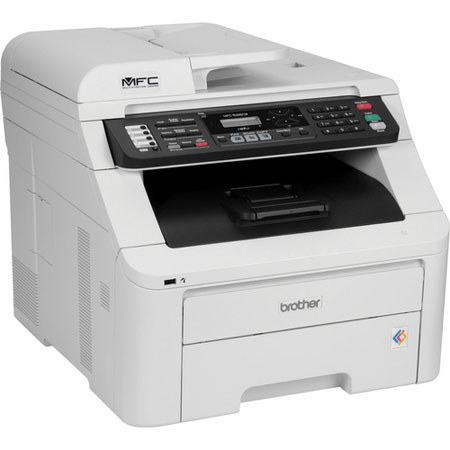
The Brother MFC-9325cw Digital Color Multifunction Printer combines a fast 19 pages/minute print and copy speed with high-quality color scanning and faxing in a compact unit that fits in any environment. The printer uses a 4-cartridge toner system so you can keep print costs low by only replacing the color that runs out. Additionally, the printer has grayscale and black only modes so you don't waste color toner.
The 35-sheet ADF lets you easily scan and copy multipage one-sided documents in 1 easy step. Simply place the document into the feeder for hassle free copying and scanning. Thanks to the printer's Ethernet port, it's easy to share the printer with the other computers on your network. There is need to buy a printer for each computer.
The machine's built-in fax modem lets you send faxes either from the machine itself or from the computer. The 33.6 Kbps modem allows you to send and receive faxes in both black and white as well as in color. The built-in memory can store up to 500 pages, so you won't have to worry about running out of paper. The built-in phonebook makes it easy to send faxes to individuals or groups in 1 easy step.
The MFC-9325cw features multiple connectivity options designed to help you print with ease. Besides the standard USB connection, the printer has both an Ethernet port as well as Wi-Fi connectivity so you can share the printer over your local network.