



This item is no longer available.
Review Summary
2026-02-19T19:00:00
This is an essential item to help keep things organized
THe R.

2014-11-02T19:00:00
Great product, replace a dymo product, that cost less but did less
Dan2457
2014-05-31T20:00:00
It wastes tape by cutting off a piece every time a new label is being printed. That is annoying. But, it is very easy to use and does a good job on the labels that get printed.
Celt
2014-05-25T20:00:00
PT2430pc is an easy to use labeler and compact size makes it portable. cartridge is easy to load. explanation about how to cut down on label tape waste is achieved more efficiently with the firmware update. update was easy to achieve. download for manual was convenient. tapes are available and varied sizes make it convenient when needing to get a project done. adding graphic icon is a plus. would recommend review of FAQs useful info there.
defendtheretired
2014-04-09T20:00:00
The Brother PT-2430PC I the ideal PC connected label printer. Small form factor, ease of use and flexibility when dealing with a wide variety of labeling tasks make this printer a valuable addition to my office environment. The latest software is great. I have found the ability to add graphics and bar codes a definite plus. Make cable labeling a breeze. Working in a high tech manufacturing environment, this printer is a cost effective solution for a multitude of labeling requirements.
Poptopps
2013-09-17T20:00:00
works exactly as advertised, would recommend. have had no problems
boyce
2013-09-17T20:00:00
Ad claimed it would work with iMac. It does not work with a Mac.
Gazda
2013-09-13T20:00:00
I bought 2, one for me, one for my daughter. Her's works well, although she said it took a while to set up. However, I didn't even take mine out of the box, as I read,(unfortunatelythat it wasn't Apple compatible. That should be explained as you are reading the ad.
MaddogThrasher
2013-08-25T20:00:00
The label maker is excellent but the software for the pc need to be worked on I found A workaround for the file saving feature so no error comes up I just save it in the old 4.2 format style and had no problems then. Other than the software works better than the PT-1500 pc unit it replaced
JackZ
2013-08-13T20:00:00
My PT-2430PC works flawlessly and is definitely worth its price.
Ernesto
2013-08-06T20:00:00
Someone said the clip art wasn't good, not clear. I bought a new Canon camera and needed to label something. I went online and got a picture of the camera and inserted it at the beginning of the label and it was fine. The interface is so simple, so easy to use. Of course I'm used to working in word processors and photo editing programs so maybe that's why it is easy for me. Now...if they'd just invent a label with letters in different colors.......
JD99
2013-04-15T20:00:00
I don't waste my time giving reviews, but I am so happy with the printer and the software that I have installed on XP and Windows 8 laptops. The only negative is that you do not offer a travel case for this model.
TheSecurityCam
2013-04-02T20:00:00
I am very impressed with this purchase. I was also pleasantly surprised how well the software worked. I was a great but at the right price.
EddE
2013-03-14T20:00:00
Replaced a QL500 with the PT-2430PC and very happy as i can use plastic labels instead of paper. Labels are a litle expensive.
irpocase
2013-03-09T19:00:00
great looking.nice to wook with computer screen showing me my labels. priced low for the job it does and easy to use.
keystone
2013-02-21T19:00:00
This is a great little bar code printer. We are labeling merchandise in inventory with our SKU. Not only can we include some text on items but our company logo on the tag too. So we can scan the tags for inventory counts and have some advertising on the boxes when we send out merchandise.
CTEadmin
2013-02-15T19:00:00
Simple to use, helps all files to be easily identified. Will be a pleasure in the future to look - not search for a file. Have used in kitchen to label containers in pantry. Love this label maker.
Kittyb
2013-01-28T19:00:00
It's a great product helped me to organize my life. My files are clearly labeled along with other important items. The only thing I don't like is how it will waste a half of a inch of tape before it prints. Otherwise it is the best. BUY IT!!!
Alanturn
2013-01-26T19:00:00
I purchased this printer to replace an older model that isn't Windows 8 compatible. Installation was a snap. Since I upgraded to Windows 8 it was necessary to get a new labeler.. The Windows 8 driver had to be downloaded, and the program as well, but it only took about 5 minutes to have everything running perfectly. For me the biggest feature is being able to use wider tape, and different color tapes as well. The software has plenty of add-ins with cool graphics to keep label making fun!
gearchecker
2013-01-17T19:00:00
I have had nothing but issues with Brother. From disconnects to sales, to spam flooding my email after registering my product. I like the product, but your customer service director should be working for Denny's
george111111
2013-01-09T19:00:00
The labeler works fine. I had no trouble connecting it to my computer. It interface with my computer and worked properly before I downloaded the software. After loading the software the unit still worked properly. I feel it is a well made labeler. Note I also have three Brother printers that work fine.
Waltf
2013-01-08T19:00:00
This is a great product. I use it all the time for my home office. Would recommend.
Flower
2013-01-02T19:00:00
Pros: Small slim footprint Works with wide tape Excellent quality Cons; Tape is expensive Loading is troublesome but tolerable
JBrady
2012-12-29T19:00:00
Easy to use for basic labels. Originally purchased to replace Brother PT2610 since that is NOT supported on Widows 7. Unfortunately the 2430 will NOT print AV labels which was the main use for the 2610. Also, Ptouch 5.0 editor has many fewer predefined labels than the old 4.3 version.
Sedgewick
2012-12-27T19:00:00
We were really impressed with the ease of using this product. The software makes it simple. I only have two complaints.... 1 There is so much waste of tape when we only need to make one or two 2) On occasion the quality of the text looks extremely pixel-y and sometimes so bad that I have to redo the label....which is more waste. I hope the designers can figure out what causes this drop in quality and fix it for future upgrades. Overall a pretty darn nice product....
DawnG
2012-12-27T19:00:00
Have been using the PT-2430pc label printer for some time now to print all labels for a scientific instrument. I can quickly locate my label templates and make quick updates before printing. I use several tapes sizes and colors. Swapping tape cartridges is fast and there is minimal material waste. Very readable and durable labels.
jaskcs
2012-12-25T19:00:00
I use my PT-2430PC to label many kinds of items. I use the flexible labels for labeling wires and cables connected to my computers and other electronics equipment. I use the acid free labels for labeling the envelops that hold my family films archives. I use the extra adhesive labels for labeling parts and hardware bottles. I use the laminated labels for labeling everything else. I am very satisfied with my PT-2430PC and the various types and sizes of labels Brother makes for use with the PT-2430PC.
ImagemakerRob
2012-12-25T19:00:00
Fairly easy to use, not price prohibitive. Great gift item.
Pepo50
2012-12-24T19:00:00
This is a excellent tool to lable small items is a work area or hobby supplies. It is user freindly. It gives the advantage of a full size keyboard.
Cornbread
2012-12-24T19:00:00
Worked extremely well with my old XP computer. Unfortunately incompatabililty issue with Windows 7...could not install. If you have XP it is highly recommendedl.
donaldo22
3.5mm, 6mm, 9mm, 12mm, 18mm, 24mm
26.2' / 8m
Thermal Transfer
Standard Laminated, Flexible ID, Extra Strength Adhesive, Non-Laminated Iron-on Fabric, Acid Free
180 dpi
up to 10 mm / sec
Auto
6 x AA batteries (not included)
AD-24ES (included)
USB
Uses All TrueType Fonts
Uses All TrueType Fonts
Scalable
694
18 mm
Unlimited
Yes
Alpha / Numeric
1-5,000 / A - Z / a - z
Left, Center, Right, Justified
Yes
Yes
Yes
Yes/Yes
up to 200
No
No
Yes
Yes
No
Yes
USB
Windows 2000 / XP / Vista / 7
Housing: 2.6 x 7.4 x 4.4" / 6.60 x 18.79 x 11.17cm
Housing: 1.3 lbs /0.58 kg (without batteries)
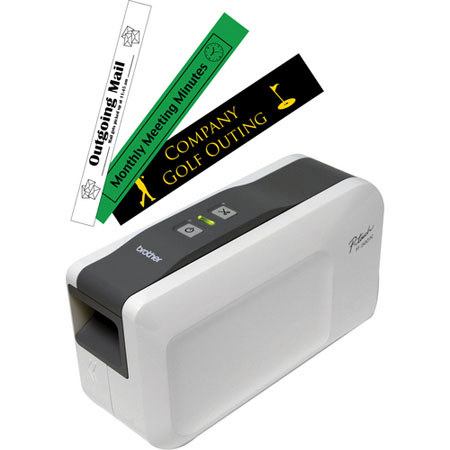
The Brother PC-Connectable Label Maker with Auto Cutter (White/Gray) requires no software installation. Easy to use and share, the PT-2430PC is great for all your professional labeling needs. Design durable, laminated labels up to 24mm wide. Built-in auto cutter cuts labels to desired length. It is perfect for supporting mobile labeling applications.