Canon VK-64 Version 1.1 Network Video Recording Software
SKU: CAVK6411
This item is no longer available.
Share:
Overview
Compare
Learn
Specs
Protection
About Canon VK-64
Records full Motion Video from up to 64 Camera Servers over a Network...
VK-64 Version 1.1 Network Video Recording software now features support for the VB-C50i & VB-C50iR Network Cameras, creating opportunities in both new & established security markets. Unlike tape-based recording, this solution allows video to be stored, managed, & accessed by a computer, for simplified archiving & playback. When used in combination with other Canon Network Video Solutions products, a security administrator has a powerful, comprehensive system for monitoring and recording.
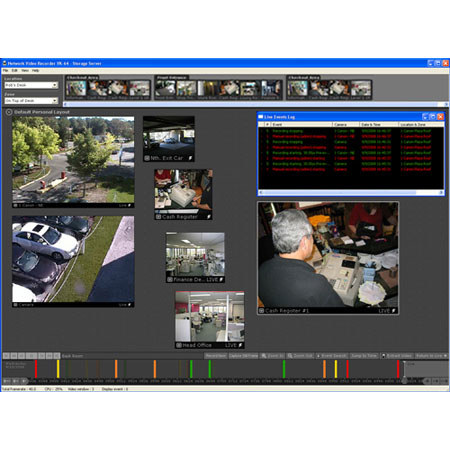
Find/View/Manage your network video with VK-64 vers. 1.1 software, through an interface that makes everything incredibly easy to use. Drop-down menus let you select the location or zone you're looking for. Scroll bars let you find what you need in a flash. You can simply click-&-drag camera thumbnail images into the Viewing Area. Grab & drag the corner of an image to adjust its size. VCR-style video controls let you play, rewind, fast forward, or skip to events. You can also pause, or advance through video frame-by-frame. With the VK-64's well-designed interface, nothing gets in the way of capturing, storing & retrieving the images you need.
You can set up the VK-64's Viewing Area to show exactly what you need to see. Simply select thumbnail video images from a number of cameras & drag them into the Viewing Area to create Video Windows. Then, size & arrange these Video Windows according to your specific requirements. You can fill your Viewing Area with as many Video Windows of equal size as you wish. Or, you can set up your Viewing Area to contain a single, large Video Window & a handful of smaller ones.
You have the added flexibility of Full Screen Function, which lets you enlarge your viewer layout so it is full screen. Plus, you have the option of hiding your timeline & camera selector areas when you need to maximize your viewing area. VK-64 software then lets you save Video Window layouts. Once they are saved, theLayout Sequence Function allows you to program layouts to switch automatically according to a schedule you specify. This function gives an operator great flexibility; for example, you can set up two layouts with 24 cameras windows & switch back & forth between them according to the schedule you set up.
VK-64 software V 1.1, you're in control of the operating schedule of all the cameras on your network. Set cameras to record continuously, or by sensor event or motion detector event for scheduled periods. You can even set up special schedules for holidays & out-of-the-ordinary events that have different requirements. No matter what the calendar throws at you, the VK-64 can handle it.
The VK-64 V 1.1 Network Video Recorder makes finding a shot or an event fast & easy. Getting the shot doesn't mean a thing if the image quality isn't good enough. That's why VK-64 V.1.1 software enables video resolution as high as 640 x 480 pixels, & 30 fps.