
This item is no longer available.
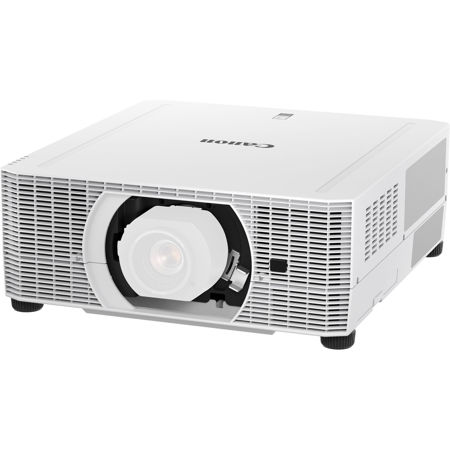
The REALiS WUX7000Z LCOS Projector combines long-lasting performance, high brightness, along with a wide range of interchangeable lens options and advanced features in a compact and innovative design. The REALiS WUX7000Z is ideal for higher education, corporate applications, advertising and marketing, houses of worship, simulation and training, museums and galleries and more. Its compact size makes it the perfect choice in difficult locations where durability is crucial.
Laser Projection with Simplified Maintenance
The laser light source produces an exceptionally long-lasting 20,000 hours of continued projection for virtually maintenance free operation and a lower total cost of ownership. A vertical 360 deg. rotation allows convenient, omnidirectional projection as well as portrait orientation, while a quick start up and shut down feature provides clear and bright images almost instantly.
Exceptional High Image Quality
Native WUXGA (1920 x 1200) resolution enables a highly detailed image in a large, widescreen display with both high brightness of 7000 lumens and a high contrast ratio of 4000:1. The REALiS WUX7000Z features Canon's own, unique LCOS (Liquid Crystal on Silicon) technology with AISYS-enhancement, producing virtually seamless images with outstanding color reproduction and saturation. Advanced color management tools also allow independent color adjustment for highly detailed color control.
Flexible Installation
The REALiS WUX7000Z offers a center lens design and is compatible with six interchangeable Genuine Canon lens options. These lenses provide consistent brightness and superior stability for a variety of applications and can be fitted easily, in seconds, thanks to their convenient spigot design. The six lenses include the Ultra Short Fixed lens RS-SL06UW, which is compatible with Marginal Focus for accurate projection onto a curved surface and features a throw ratio of 0.54:1 with a generous lens shift (-15% - 75% vertical, +/-30% horizontal).
The projector's compact and lightweight design means it's ideal where installation space is restricted or challenging in other ways. A comprehensive range of industry standard interfaces provide all you need for convenient, user-friendly connection. Inputs include HDBaseT, HDMI, DVI-I, DisplayPort, USB Type A, RJ-45, RS-232, audio inputs and Network Multi Projection (NMPJ) over Wi-Fi.
Peace of Mind
Backed by Canon's award-winning Professional Service & Support, the REALiS WUX7000Z includes the Canon 5-Year Laser Projector Limited Warranty, as well as a 3-Year Advanced Warranty Exchange Service Program and a 3-Year Service Loaner Program for further peace of mind.
Up to 7000 Lumens and 4000:1 Contrast Ratio Delivers Bright, Engaging Images
The projector projects bright 7000 lumen images with up to a 4000:1 contrast ratio that helps ensure deep blacks, bright whites and outstanding color. The results are images with crisp depth and dimension and amazing color accuracy, which is critical to those with discerning needs.
Native WUXGA Resolution (1920 x 1200)
Canon's WUXGA resolution brings bright, true widescreen display of highly detailed HD video content and still images with outstanding color richness to large-room installations in high resolution WUXGA (1920 x 1200) at a competitive price. Widescreen graphics, text and other visual content from laptops and desktop computers are shown in accurate proportions from edge to edge with sharp detail.
Laser Light Source Provides Longevity, Versatile Installation and a Wide Color Range
The projector's laser light source provides up to 20,000 hours in standard use of continuous, reliable, high-quality projection. The hours of operation can be nearly doubled when utilizing the Long Duration modes to up to 20 times longer than a conventional lamp's life. Operation is virtually maintenance-free with minimal downtime, as the light source doesn't require routine replacement. This keeps running costs relatively low when looking at the total life of the product - a key consideration for challenging and hard-to-reach installations.
LCOS Technology with AISYS-enhancement
The exceptional imaging performance of the projector starts with Canon's proprietary AISYS (Aspectual Illumination System) Optical Engine. This engine utilizes advanced light management technology to maximize the contrast and brightness benefits of the projector's LCOS (Liquid Crystal on Silicon) display panels, which deliver superior reflectivity and durability while accomplishing high luminance. The result is highly detailed, seamless, ultra-sharp image projection in virtually any environment.
High Dynamic Range (HDR)
The projector supports High Dynamic Range (HDR) exhibiting bright highlights and deep blacks for a wider dynamic range. The wider dynamic range expands the contrast and the color, both extremely important factors when it comes to the image. This provides an incredible viewing experience.
Multiple Image Modes including DICOM Simulation Mode for Optimal Image Quality Reproduction
The projector includes pre-set Image Modes and additional customizable Image Modes to suit a wide range of user preferences and projection environments.
Multiple Image Modes
Image Modes provide different variations of color reproduction characteristics suitable for the image type and projection environment. They include:
• Standard
• Presentation
• Dynamic
• Vivid Photo
• Photo/sRGB
• Video
• Cinema
DICOM Simulation Mode
Ideal for displaying medical images in non-diagnostic settings. Both Blue Base and Clear Base settings are supported.
Image Adjustment and Advanced Adjustment Options for Customizable Image Characteristics
The projector offers extensive image quality adjustments to help users customize the image to meet their specific projection needs.
Image Adjustments
The Image Adjustment settings allow users to customize the image and color characteristics to fulfill their specific imaging needs. These include:
• Brightness
• Contrast
• Sharpness
• Gamma
• Color Adjustments
Advanced Image Adjustments
These adjustments provide greater flexibility to professional users with more options to adjust the image as desired. These settings include:
• Ambient Light
• Random Noise Reduction
• MPEG Noise Reduction
• Mosquito Noise Reduction
• Dynamic Gamma
• Memory Color Correction
• 6-Axis Color Adjust
• Fine-tune Gamma
Motion Blur Reduction
The projector includes Canon's latest Motion Blur Reduction feature for improved visibility when movement is fast. By inserting extra frames to video content, motion blur is reduced and the clarity of graphics and text on fast-moving objects is preserved. Three different modes (Strong, Low and Off) are included for flexibility, with each depending on the level of movement and type of video content.
Network Management including PJLink, Extron XTP, Crestron and AMX Device Discovery
Compatibility with Crestron, Extron XTP and AMX Device Discovery helps ensure seamless integration into many systems or infrastructures and smooth network management. Support for PJLink also makes it possible to control and monitor the projector over a network - this feature is ideal for observing lamp hours, usage and much more.
Built-in Real-time Clock
The built-in Real-time Clock allows scheduling of specific operations such as set startup and shutdown at chosen times. This helps to manage power consumption by creating operating schedules which can result in extended projection life. For convenience, Real-time Clock settings can be accessed via the projector's own user-friendly graphical interface.
800-652-2666