Zoom Photo Cover Album Kit to Make Three 3x3" Covered Photo Albums with Your Cover Photo, for Mac & Windows
SKU: FSZA103K
This item is no longer available.
Share:
Overview
Compare
Learn
Specs
Protection
About Zoom Photo Cover Album
• How many words is a picture really worth? One hundred words? Fifty thousand? More?
• At ZoomAlbum we believe that a picture can say it better than a million words. We use pictures to tell the story of who we are, what we enjoy, where we've been and who we love. Our goal is to help you tell your stories in pictures that are meaningful and memorable.
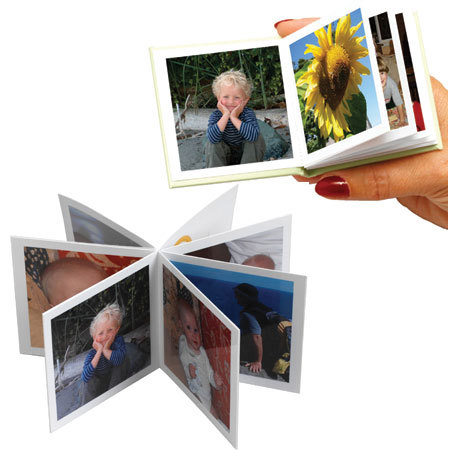
• A ZoomAlbum is a small photo album sold as a kit that allows users to create a handmade gift of memories with a professional look from digital photos, a personal computer and a home inkjet printer.
• Each 3" x 3" album holds 12 photos on glossy, high-quality paper. Covers can be customized with photos or embellishments. ZoomAlbums are charming keepsakes that can be made in just a few minutes.
• It's very easy to make a ZoomAlbum. Creating albums of family activities and special events is a good way to capture and share those memories in a highly personal way. Making albums can be a family project that gets everyone involved, and we want you to enjoy the process.
• First, load the software into your Windows PC. Use the CD-ROM that comes with the Album Kit, or visit the website and download the software. In fact, check the website often, because upgrades will appear there first.
• Organize your photos by following the on-screen instructions for selecting, dragging, dropping, and organizing your digital photos. You can rotate your photos, and you can add captions, too. When you have the twelve photos selected and arranged the way you want them, you're ready for the next step.
• Printing the photo sheet is simple, but you have to follow the instructions. It's important that you understand the features, settings and operation of your Inkjet printer. It's also important to follow the instructions for inserting the ZoomAlbum photo sheets and photo cover sheets into your paper tray. Print a test sheet first to see that everything is set to go. Use blank legal size paper for printing additional test sheets.
• Follow the folding instructions on the back of the photo sheet to fold the printed photo sheet paper. In a few seconds you'll turn that flat sheet into a compact little booklet! Now you have a 12 photo album, properly arranged in a secure and permanent progression of pages. You're actually practicing a little bit of Origami, the ancient Japanese are of paper folding.
• The last thing to do is to insert your completed ZoomAlbum into the hardcover bypeeling off the backing of the photo paper and pressing the folded pages into the spine of the hardcover. Press firmly where indicated, and your album is complete. Congratulations.
• Making a photo cover for your album, the process is similar, but requires another step. To make a photo cover album, you'll select one photograph that will become the front and back cover. Since this one photo will "wrap around" the entire face of the cover, try to pick a photo that will look good as the front & back.