2015-08-28T20:00:00
Rated 5 out of 5
Almost perfect printer
I agree with CBphoto. This printer was great, except it didn't last too long. However I would buy another one if I could find one. I do a lot of photo printing and also printed DVD's. The quality was superb. I think they build in obsolescence. Does anyone know of a printer that prints on DVD's? You know it really throws you off kilter when you find something you love, loose it and cant replace it. What's a body to do?
nanno12
Originally posted at

2015-08-18T20:00:00
Rated 2 out of 5
Great until it breaks
Great printer for printing photos, but like all the Canon printers I have ever bought, lasts less than two years. And I do not use it all that much. I keep buying the Canons because they are cheap and print so beautifully, but I am starting to feel guilty about the landfills filled with my old Canon printers.
Cabin J.
Originally posted at
2013-09-23T20:00:00
Rated 4 out of 5
Great Quality Printer - Bring it Back!
I have owned several of these printers and they have been incredibly reliable and workhorses. The print quality is excellent, and the rear feed provides lots of printing options for custom sizes. It's been an excellent photo printer for both business and personal use. Sadly, canon has discontinued it and the replacement printer does not have a rear feed, making it unusable for my needs. I owned (8 4500s, (4) 4700s, and (4) 4920s and they were all wonderful printers! With the new models and lack of rear feed I am not sure what I will do now.
CBphoto
Originally posted at
2013-01-10T19:00:00
Rated 5 out of 5
Another quality product
This printer replaced an IP4700.
Excluding to the time necessary to adjust the printhead, it took 10 minutes to unpack and have running.
It uses IJ color profiles; therefore, I didn't have to recalibrate my photo or publishing software for this printer to match the monitor. WYSIWYG
I was already familiar with the paper settings and the output is consistent with my other Canon printers.
I own 5 printers, including 2 other brands. I only use the Canons, though. I have found throughout the years that Canons do not guzzle ink the way the other brands do. I 'm hoping the same is true of this printer.
CatFur M.
Originally posted at
2012-09-19T20:00:00
Rated 4 out of 5
Great Printer
I use a color calibrated monitor, and this printer matches the colors perfectly. It's low cost makes it very attractive. The only question I have is the amount of colored ink it used when mostly printing in black text.
Denny
Originally posted at
2012-09-11T20:00:00
Rated 5 out of 5
excellent printer
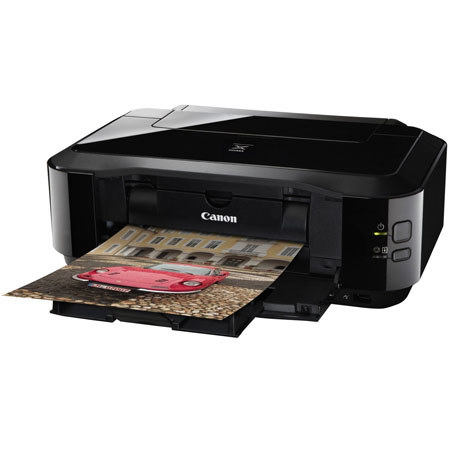
The Canon PIXMA iP4920 is the best printer I have used.
As a retired graphic designer, I do a lot of volunteer work that requires a lot of color printing. This printer always prints beautifully and is very reliable. It is easy to set up and loads the paper without any problems. The ink cartridges are very easy to replace and they light up telling which one needs to be. Ink also last a long time with this printer. I could not be more happy with this printer and would highly recommend it to anyone.
Jerry
Originally posted at
2012-07-22T20:00:00
Rated 2 out of 5
POOR COLOR MATCHING
In 20 years of using Canon printers this iP4920 is the first that I have not been very pleased with. Try as I might I have found no way to get print color any where near to matching screen color. None of the color adjustments in the Canon PhotoPrintEX program will properly do the job.
RAGSAILOR
Originally posted at
2012-07-17T20:00:00
Rated 3 out of 5
Change in features unappreciated
I have had my Canon Pixma iP4500 for about 4 years. It has been an excellent printer, so when the need arose for an additional printer I immediately considered the Pixma iP4920.
Never in that time was there ever a need to use the paper cartridge (front loading device. Yet, when printing the Print Head Alignment for the iP4920, it requires paper be loaded in the front cartridge. This is unacceptable. The cartridge extends too far out from the front of the printer to be useful. If Canon were to have changed the requirement for the Print Head Alignment, it should have given the user AN OPTION.
I can only hope the other features of this fine line of printers have not been compromised as well.
crimsoncrab
Originally posted at
2012-06-05T20:00:00
Rated 5 out of 5
Good Inkjet
So far I have only used this printer to print 4x6 photos, but I couldn't be more pleased with their quality. Colors are very natural.
The printer is a bit noisy and slow to initialize, but thereafter, printing is quite fast. For anyone not needing an all-in-one machine, the iP4920 is a steal at around $75.
Dutch
Originally posted at
2012-06-04T20:00:00
Rated 2 out of 5
Disappointment
I have the ip4920 and couldn't be more disappointed. It's slow and too noisy.
noncom
Originally posted at
2011-10-26T20:00:00
Rated 5 out of 5
Great photo printer
I bougnt this printer to replace an ancient photo printer that I was very satisfied with. This Canon is MUCH faster and provides incredible photos up to 8 1/2 X 11. It works great (as did my old printer) for general purpose printing as well.. Only concern is the ink. I haven't owned the printer long enough to get a feel for the overall cost of ink--not a real issue for me as I'm not a heavy user and my old printer wasn't cheap on inks either. Love the features such as printing on disks, and automatic duplex printing. Very satisfied!!
Bill
Originally posted at