


This item is no longer available.
Review Summary
2021-05-04T20:00:00
I got this as a gift a few years ago. It is constantly a hassle to work with. It honestly is broken or having issues more than it prints. Ink is constantly running out when it does work and costs as much as an arm and a leg. DO NOT BUY!!!!
Jadenmutt

2021-03-27T20:00:00
Have had this for several years and can't even tell you how many hours have been spent trying to just get it to print via wifi..... restarting computer, restarting printing, resetting network... uninstalling printer, restarting printer spooler. Sometimes it is fine, or fine with certain devices, but mostly not and there's never any pattern to its malfunctions. Don't ever need documents in a hurry, because you'll be disappointed! Tonight, it took 2+ hours to print 4 pages. Got one page easily, then the other 3 continued with communication errors, offline errors, frozen queue, etc. and yet there was no actual network issue. Canon used to have a good reputation, but this printer is an irritating piece of junk >50% of the time.
kbob
2020-05-09T20:00:00
I bought this printer 8 years ago at least. Best printer I've ever owned, I use it every day and the quality is amazing. Never had to do a repair and ink is cheap enough now.
Artsyfartsypuddinpie
2018-08-24T20:00:00
Bought this printer several years ago. Print quality is so-so and it uses a HUGE amount of ink. Then it stopped printing unless I constantly unplugged and plugged it back in again. Now it won't print at all. My last Canon printer.
Marie1334
2018-03-03T19:00:00
I got this printer as a gift years ago. I very rarely need to print anything so I've only used it 4 times over the last 5 years. I just set it up again because I need to print something, but all the pages came out blurry and smeared, and now it's telling me that it's out of paper, when there's plenty of paper inside. After looking up the model online I'm horrified to see that Canon is still selling this thing and that it costs so much.
WishIhadagiftreceipt
2018-02-11T19:00:00
I've had this printer for several years and the MP Navigator software that is necessary to run the scanner simply won't install on my Win10 Alienware system. I get an error message saying a compatible printer is not installed. Don't recommend.
Teetop512
2018-01-03T19:00:00
This printer worked very well for 5 years before developing print issues that required frequent regular or deep cleaning. It was really a good quality printer that we liked a lot, but its getting harder to keep working so may attempt to clean the printhead (which isnt recommended by anyone to keep it in service. Ink just takes its toll on the printhead after 5 years I guess? I will keep buying Canon for its quality but printer life is always an unknown, sometimes disappointing.
macinsale
2017-12-14T19:00:00
it worked well for the first year, nothing but head aches since then, need a new printer, the scan never worked, will not buy another canon
papo15
2017-07-07T20:00:00
Wi-Fi was easy to set up tent rent anywhere from cell phone easy to navigate lots of options great printer.
Brugger
2017-06-28T20:00:00
Needed a new printer 4 years ago. We had owned Epson, HP, Lexmark and stayed within that boundry. It just so happened that a Canon rep was in WalMart at the time we started talking and we bought the Canon. Best printer we ever had. We do a lot of printing ran 3 computers off of it with Windows 10. The pictures are so beautiful and colors so true. Today we had a problem and I'm waiting for tech support to help. If I have to buy a new one it will be Canon without a doubt.
Bosan44
2016-12-10T19:00:00
using it for a couple years. like other reviewers, prints when icon it says it's offline, diagnose and repair in manual is a joke, now I have to connect with usb cable, UGH! a bit inconvenient, right? in order to print when 2 computers and this printer have been working on home network - now no connection. not as simple to use as advertised
mary 2.
2016-10-22T20:00:00
I bought this years ago and its still running strong until I attached it to a new computer. Now I cannot get i to print.
byrdie
2016-10-08T20:00:00
Brought this product due to the name Canon...and it worked great while it worked...I dont do alot of printing have not even we thru a whole set of colors...and now the machine is dead...tried all the trouble shooting stuff and still nothing. Very dissapointed!
JanetM
2016-09-07T20:00:00
Bought it six or seven months ago. It started giving B200 error and then U052 error even though it has everything original. Now I can't do anything at all, not even scan.
Amit
2016-07-27T20:00:00
This thing rarely ever works the first time you try and print. It is constantly needing the wifi to be reconnected, or will say its offline but a print out from the printer itself states it online and shows a strong signal. A true piece of garbage.
Larry15
2016-07-26T20:00:00
Have had little over three years, it was my first and last Canon. It worked well for the first year then the warranty ran out and I have to pray each month when I want to print my online bill statements. It just gave me an error code that seems to be VERY common and out of nowhere it just won't print. Tried everything from every "help site" and its dead. Shopping now for new one and it will not be a Canon
BD S.
2016-05-01T20:00:00
It's too bad people say it only lasts 2 years. I've had mine over 5 now and it still prints like a champ! Super easy to use, and prints great pictures! Great for printing photos and artwork! Just stinks that the ink is so expensive!
Smilobar
2016-02-11T19:00:00
Please let me know when this printer is back in stock! Thank you this is the best printer I have ever used! I use this printer for parties and I have put other photographers to shame with those fancier printers!
PARTYMAN
2016-02-08T19:00:00
I had this printer for about 2 years. It worked great and I never really had problems. Then one day it just stopped printing. It would go through the motions like it was printing something but only blank pages would come out. I did multiple cleanings, deep cleanings... nothing. Took it to the repair shop - he said it would cost more to repair than to replace. What a waste! Only 2 years old!!! I shudder to think what our landfills look like.
StinaG
2016-01-24T19:00:00
I'm no stranger with printers. I thought we bought a decent one. I mean, Canon has been around for some time now. I love my Canon camera, so why not? We've had it for about 2-3 years now and it's been nothing but a pain. It turns on, after about 15 minutes of it warming up and getting ready to act like it's going to print, it warms up some more. Then, maybe, if we are lucky, it'll bypass a reoccurring error message and it'll print something. The quality used to be pretty decent, not anymore. I don't what the deal is but avoid this older model if you see it sitting on the shelves. RUN. Save yourself the sanity.
chels468
2015-12-06T19:00:00
This printer was all that I need. Low cost , maybe not so fast, but I,m old and don't need speed. All went well, then three days ago, it just died. A quick check of the power cord, by swapping to another did nothing. Voltage in was OK, then to the dc power adapter. I thought there may be a breaker, but finding none checked for dc voltages at the output and found some, but not knowing what they should be, I went off to service on the Canon site. No longer is service an option for this model....another wait on a phone line....too long again....this is the grand plan...throw it out and get another...there cheap enough......couldn't afford to have it fixed anyway
Nonac
2015-11-25T19:00:00
I bought this printer, but I can't print any documents or photos from my cell phone
tiosanto
2015-11-02T19:00:00
I tried to like the MG5320 but it uses a lot of ink. Paper jams are frequent and now 2 1/2 years it is dead . Error code B200 which I see is common if you google it . Tech support says it was a mechanical failure . Not worth the cost to repair .This is the 2nd Cannon in the Pixma 5300 series I have purchased . Disappointed they last past warranty but that's about it . I guess 2 years is great the last one lasted a year and 1/2 the other one I returned .
Tee
2015-09-10T20:00:00
When I first installed this printer, I loved it, especially the air print feature, and rated it a 5. After using is for over a year, I now rate it much lower. It takes forever to print the first page - when I can get it to print. I get error messages and nothing prints about 9 out of 10 print attempts. I waste a ton of time just trying to get it to print. It sometimes disconnects itself from wifi and then air print won't work. I generally love Canon products (such as my cameras and lenses but highly doubt that I will ever buy another Canon printer. I do not recommend this printer at all.
tdj2591
2015-09-06T20:00:00
THIS IS AWFUL. JUST DON'T DO IT. Ever since I got it, it has been nothing but a pain.A PAIN. It jams, it has difficulty installing, it won't print, EVERYTHING. IT'S BEEN NOTHING BUT A PAIN Oh my gosh, it angers me so much. Just don't buy this. Save the sweat and the screams for something else. This is not worth it.
VN
2015-08-25T20:00:00
I spend more time trying to get this printer to work through wifi. Constant wifi issues. And now with windows 10, same old issues with wifi connection problems. Don't buy this printer unless you just don't have enough stress in your life.
larry
2015-06-04T20:00:00
A great little home printer/scanner/copier. I've had this Pixma MG3520 for almost 4 years. It has not failed me until just now when I had a minor software problem. Tech support walked me through an Uninstall/reinstall and life is wonderful again. I've had a big expensive, fancy Canon machine before and was pretty happy with that also. I love this little guy. It serves our minimal needs very well. Thanks Canon.....you rock !!
Danelon
2015-05-21T20:00:00
Larger ink reservoirs may suit better this greate printer. If any larger reservoirs option in the market, please let us know.
JorAl
2015-05-07T20:00:00
Using this printer is the stuff of nightmares. Errors that have been previously remedied pop up all of the time, half the time it won't print at all, constant wifi issues, high ink consumption, and you may as well forget ever trying to scan anything. Just a horrible, horrible waste of space. Don't bother purchasing, unless you like being frustrated and disappointed constantly.
Cera
2015-04-29T20:00:00
Keeps on working throughout each project. Add some ink and paper and it keeps on working like a fine turned machine. Very happy that I have my Canon Pixma MG 5320. Really enjoy the wireless aspect that I can print from multiple devices and locations.
Blue S.
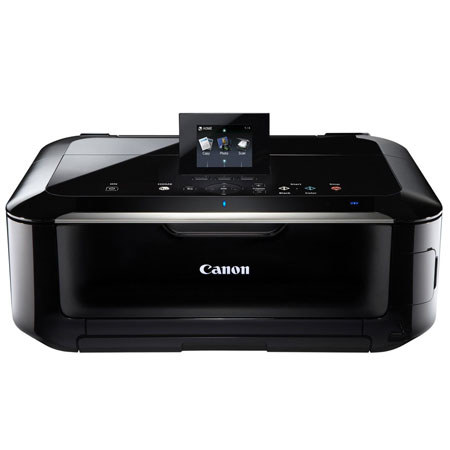
The Beautiful PIxMA MG5320 Wireless Inkjet Photo All-in-One delivers superior quality, versatility and ease of use. Built-in Wi-Fi technology allows you to easily print and scan wirelessly virtually anywhere around your house. Print gorgeous, borderless photos at home up to 8.5" x 11" size with a maximum print color resolution of 9600 x 2400 dpi and five individual ink tanks. Have all new sorts of fun with your images by adding new effects like Fish Eye, Miniature, Toy Camera, Soft Focus and Blur Background before you print.
Enjoy a new sphere of printing options as PIxMA Cloud Link lets you conveniently print pictures from online photo albums Canon Image Gateway and Picasa as well as templates including seasonal stationary and calendars from a compatible Canon PIxMA Wireless All-in-One, all without a computer. Built-in Auto Duplex Printing allows you to automatically print on both sides of the paper and can help reduce paper usage and cost by up to 50%.
The MG5320 also lets you print on your CD, DVD and Blu-ray Discs and you can even turn your HD Movie clips into beautiful photos. View beautiful, easy-to-view scans by advanced image analysis and area-by-area data correction, automatically. Plus, you can print and scan JPEG and PDF files wirelessly from compatible iPad, iPhone, iPod touch and Android devices without a computer. And, enjoy direct printing options from compatible memory cards, USB Flash Drives, PictBridge and optional Bluetooth devices.
AirPrint: Wirelessly print photos, emails, web pages, documents and more from compatible iPad, iPhone or iPod touch devices to a compatible Canon PIxMA Wireless All-in-One. There's no software to download, no drivers to install, and no cables to connect. Just see it, tap it, and print it!