


This item is no longer available.
Review Summary
2020-11-29T19:00:00
Don't buy Canon. Thanks for not even letting me use the scanner due to a malfunctioning/dirty print head, that's a super neat feature guys.
Viejo

2020-05-12T20:00:00
I've never wanted to fight a printer before, but I want to fight this printer. Never buying a Canon again.
Horrible P.
2020-05-11T20:00:00
This MG5540 ran great for years. So many great photos printed. It no longer prints. tried a few things. I even used aftermarket ink tanks. it wont pass ink thru it. I never tried support. A great printer, and I would buy another if found new in the box.
f8alfum
2020-03-31T20:00:00
I have had two Cannon Pixma printers and nothing but trouble with both. And of course I can never speack with anyone to reseolve the issues. I am now going to puchase another printer but of course a different, more reliable brand!.
Lonnie
2020-03-24T20:00:00
I bought this printer 5 years ago and is still going strong, even when I upgraded to HP Windows 10 and downloaded the drivers. The only downside to this now with Windows 10, My Image Garden will not work. So now I have to buy a separate scanner.
Sue61
2020-01-15T19:00:00
The printer/scanner is fine (not great or bad. I recently got a new computer and am having difficulty setting up the printer to it. Come to fiind out, they do not provide any customer support for a customer who bought their product, I'm guessing since it has been over a year? I've been talking to machine that ends up hanging up on me since I apparently do not get customer service. I've never heard of this before, just thought other potential buyers should know this before they pull the trigger on a canon product.
Cbobo
2019-12-25T19:00:00
I fell in love with this printer in the store, as the store printer's results were a beautifully detailed photo - one that I provided it - a close-up of my dog with all the fine details of hair, etc. Yet, when I got the printer home, I could not - with the various settings I tried - duplicate the fantastic results I'd gotten in the store. My results were so-so - the photos all seem a bit washed out and high-contrast. Very disappointed with this printer for high quality photo printing. Otherwise, it's okay.
nickname u.
2019-11-25T19:00:00
Purchased this priner a few years ago and was quite pleased. Price was decent and it did more than I actually needed. However, it takes a unreasonable amount of time to warm up and apparently has to "re-warm up" after sitting idle for more than a few minutes. Ink usage is reasonable but printing discharge arm/support/tray lacks size and usually drops paper if I print more than 4 pages at a time. Received a notice "printer needs repair" after my last print job and after trying to trouble-shoot it now won't even power on. Like I said...it was a reliable unit. Expected better and longer life from it for the price paid and amount of usage.
TTisdale
2019-09-06T20:00:00
I have been a Canon enthusiast for years since buying my Canon A1 camera + all the lenses 45 years ago. Currently, my wife has a PowerShot A640 and I have the EOS SL1 + the current lenses. So this Canon printer was a shoe-in to buy. We have always liked Canon but this printer has tested our resolve. The real problems started a few weeks ago. As an aside, the warm up for it to run through it’s startup logic is nothing short of ludicrous (go do something else while it is warming up. Now it has started giving all kinds of error messages, low ink or empty cartridges when I’ve just put in new ones from Staples; printing blank pages; refusing to print because the ink has run out (new ones just put in!!). The question is do I cut my losses and toss this or do I go and buy yet another set of cartridges (and they’re expensive) and run the risk of continued issues. On balance I think i’ll Toss it!
FR123
2019-08-28T20:00:00
This is sorry excuse of a printer is a piece of JUNK! I could walk to a print shop and back by the time this stupid thing warms up. Now it's got a repair Code B200 and it won't print anything. Don't say you've not been warned there's a ton of 1 star reviews on this site only because they don't offer minus zero reviews.
Greg1949
2019-01-29T19:00:00
I bought this unit new four years ago. Use it occasionally. Have never had any problems. WiFi works. I like the double sided printing feature and really nice color prints. My two concerns which cannot be overcome are the very slow start-up and the fact the unit is very thirsty for ink, even when using the XL cartridges, which are rather expensive. For B&W printing I use my HP LaserJet IIIP (27 yrs old, a battleship! and HP 1012 compact laser printer. When this MG5420 gives up I will look to HP.
rjg
2019-01-21T19:00:00
This printer is awesome. I print documents and photos from iPhone using the AirPrint function. There are separate trays for paper and photo paper so you can switch printing back and forth with zero effort.
Mansion2456
2018-12-14T19:00:00
I have had this printer for well over a year. I wanted a wireless unit to print from my laptops. I could not get the 5400 to see my Lynksys system not attach to it so I am using the USB cable. About a year ago the software became glitchy -- I have to unplug the printed and restart OFTEN. I now have a Comcast WiFi and the softare will not work on the printer. The wizard that allow inputting the password has only boxes for the keyboard -- no letters or numbers. Very slow in starting up after my having to reset the unit.
LJR
2018-10-12T20:00:00
The colour is totally off and never matches my screen. The software for scanning is extremely slow and saves my scans into obscure places on the computer. The tray is so small the documents fall onto the ground when printed. I never would have bought the b*****d, but this is what happens when you let your husband make these decisions. I am going to invest in a higher quality laser printer I think.
tlstrat86
2018-08-18T20:00:00
Have had my MG5420 Since Dec 2014 and it works perfect, from my desk top and my iPhone each and every time. Both my son-in-laws each have one and it works fine. Never had an issue with it's performance. Use my printer daily.
JC7
2018-08-08T20:00:00
I bought this about 3 or 4 years ago and at first it was the perfect printer, scanner and pretty much anything and everything you could ask for. But now it's a piece of junk. We don't damage it, we take care of it and everything but I guess that's not enough because this thing shuts down on us all the time. It doesn't print, it doesn't scan sometimes until it wants to. I spent 6 hours trying to print out 1 document and it said "ink not supported." then it said "Ink is empty" I just bought it. It's difficult to find when I do wireless search for some reason. Like I said, when I first got it, it was a dream now it's a pile of junk.
Alexis4343
2018-04-14T20:00:00
I print very little mostly text/spreadsheets and about once a year some photo stuff. This thing fails badly in the text draft mode on plain paper! Of course works great if you use photo paper setting but then you waste ink and time. I would not recommend this printer to anybody!
bradf64
2018-02-15T19:00:00
Too many error codes on this printer. Worked less than a dozen times because every time I go to use it another error code turns on. We follow the codes and there are no errors. It is just hypersensitive. I have always liked canon printers but this one was a huge waste of money.
parrothead
2018-01-25T19:00:00
Purchased about 3 years ago. Yes, slow to initiate first print, but I usually print wirelessly from another part of house, so when I arrive the print is waiting for me. They could improve this function. Uses ink at same rate as any other inkjet printer I've ever owned. I do not print pictures from home so can't rate that function. Wireless set up (did it myself has been fine and I'm a Senior Citizen, retired, non-techy person!
Grandma
2017-09-29T20:00:00
I purchased my Cannon MG5420 at Walmart a few years ago. The printer is very slow at warming up, but prints good after that. The biggest complaint I have is with the cartridges. They almost always leak when you remove the plastic part that covers the ink port, and ink goes everywhere; including your hands, and the cartridges are not cheap. For the price they charge you would think they would be better quality. Maybe it would be better to buy the cheap after market knock-offs you can find on the internet... can't be no worse.
John 5.
2017-03-22T20:00:00
This printer is *rediculous* in the "warming up" category!! Don't ever be in a hurry and need to print something because this printer will SURELY make you late!!!
OneRob
2017-02-20T19:00:00
I used to love this Printer/ Scaner/etc. But now after few month of use I hate it. It works randon. Sometimes print and some other do not print. It is frustrating. I don't ecommend this product.
Robex
2017-01-04T19:00:00
I would recommend to friends because it has been trouble frss for me.
BigEd
2016-12-13T19:00:00
This is absolutely the worst printer I have ever owned. I can't believe it is still being sold. And the thing is it's not cheap. Takes forever to get to the point where it's ready to print. Eats ink- especially the color cartridges. Buggy wifi interface - I gave up some time ago and just use the cable. Don't ignore the bad reviews - it is as bad as they say. I won't even donate this printer - it wouldn't be fair to anyone else to have to deal with the frustrations it creates. Can you tell how frustrated I am with this thing?
NoMoCanon
2016-10-25T20:00:00
I have owned Canon printers before and none of them were as bad as this one. Takes too long to print, you can hear the ink tray and the rollers moving and adjusting or something like that every time you need to print something and its worse if is the first print of the day! Also I print mostly in black and white occasionally in color and the cyan, yellow and magenta seem to run out of ink quite often.
elham
2016-09-06T20:00:00
If you're looking to print out important college papers before class, look no further. You only have to wait a solid 25 minutes before getting an error. You're better off getting a dysfunctional R2-D2 to print your papers instead of this whirring mess.
annoyedcollegestudent21
2016-09-05T20:00:00
I actually received this printer for free from the purchase of a laptop. I am glad I chose this because I have been using it for over 2 years now with little or no issues whatsoever. Never had a paper jam. Only had a problem for a day with wireless connection otherwise it has worked flawlessly. There are 2 minor complaints I have: 1 Printer sometimes takes quite awhile to start printing; 2) The ink usage seems to be a bit high. Some, if not most, of the issues I see others complain about can be solved by just reading the manual. Some of the setup options are buried inside the printer menu. After 2 years of pretty much flawless home use I DO recommend this printer. Price to performance is pretty much spot on. If you need better performance I suggest you go by the old saying...."You get what you pay for!".
reddog000
2016-08-29T20:00:00
I have owned this printer for a couple of years. It is slow to be ready to print. And even when one ink cartridge is low it will not print. Very frustrating.
debsnest
2016-08-27T20:00:00
I have had this over a year. Don't use a lot, but when I do, it used to be okay. Currently, while connected to WIFI and ON, it will state "Offline" when I print. I have to go "reset" and use the WPS button to get it to finally show back up. I don't like it won't print in just black if you are out of the color inks. I needed a black and white paper quickly and was out of the colored ink. I just hadn't had time to go to the store. It refused to print. Even in "grayscale". Currently, I am having issues with the scanner. I can not get the scanner portion to open on my PC. It keeps telling me I need a WIA driver. I went tho the Canon site, re-uploaded the driver and still...nothing. Very frustrated! I am a 40+ woman and I actually stomped my foot today in extreme frustration. This printer ticks me off. I feel my money has gone down the drain.
Nabo
2016-07-28T20:00:00
dead after 6months :(. turn on then say ned service .turn of byself .never ever turned on again.itried different outlets too
stromy9999
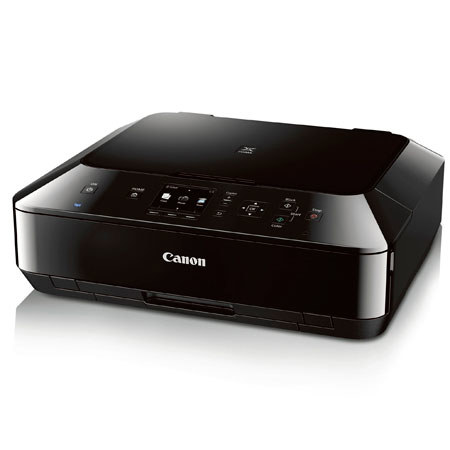
The Canon PIXMA MG5420 Wireless Inkjet Photo All-in-One Printer produces amazing detail in both business documents and photographs with 9600 x 2400 maximum color dpi and a 5-Color Ink System. And replacing those inks is quick and easy with the Snap Edge feature. With its Dual Color Gamut Processing Technology, the remarkable MG5420 faithfully reproduces the colors of your original documents. And thanks to Apple AirPrint, Google Cloud Print and PIXMA Cloud Link, the MG5420 lets you print wirelessly from your compatible smartphone or tablet.
You can also view beautiful, easy-to-view scans by advanced image analysis and area-by-area data correction automatically. Plus, you can print and scan JPEG and PDF files wirelessly from compatible iPad, iPhone, iPod touch and Windows RT and Android devices without a computer, thanks to the free EPP application.
Have all new sorts of fun with your images by adding new effects like Fish Eye, Miniature, Toy Camera, Soft Focus and Blur Background before you print. What's more; its advanced paper handling gives you several printing options: Print on CDs and DVDs, as well as load plain and photo paper at the same time, so you are always ready to print. Plus, its built-in Auto Duplex Printing helps you to be eco-conscious by automatically printing on both sides of the paper.