2015-04-10T20:00:00
Rated 5 out of 5
Great printer
The 392 works great,no complaints.Load the cd and go to the website you can find anything you need to know to use this printer.Scans,copies and prints photos as good as the originals.For the money,it's a great product.
rt440
Originally posted at

2015-03-14T20:00:00
Rated 4 out of 5
not exactly what I was looking for
It is a little to noisy, and not a wireless printer. But I am pleased with the printer.
cookie
Originally posted at
2015-02-27T19:00:00
Rated 5 out of 5
NEEDED IMMEDIATELY-SENT IMMEDIATELY
SINCE RETIRING FROM MY JOB, I FOUND THAT I NEEDED A COPY MACHINE FOR MANY PERSONAL NEEDS. I ORDERED THIS ITEM ON MY IPHONE FROM MY CAR AND GOT IT DELIVERED TO ME THE NEXT DAY AND, SO FAR, IT IS PERFORMING VERY WELL.
pas
Originally posted at
2015-02-16T19:00:00
Rated 3 out of 5
PIXMA MX392
I have yet to figure out how to print photos. We printed about 10 or so, and the first one we printed came over top of the last one as a double print. It was weird. I can't get enough information online. I so wish Canon would have a REAL manual for each item. I am so frustrated!! I looks great if we could only get it to work!!
Faye
Originally posted at
2015-01-29T19:00:00
Rated 4 out of 5
Great Printer
The printer was easy to set up and prints great. Only problem I had was I had a paper jam and was hard to unjam. Not enough doors to open to get paper out of different areas.
Amare
Originally posted at
2015-01-24T19:00:00
Rated 5 out of 5
Excellent!
I am extremely pleased with my Canon MX392!
The copies are perfect, and surprisingly makes gorgeous copies of photos. The copies of photos are good enough to frame.
An earlier reviewer complained of copies flying off the machine because of no arm or apparatus to keep and hold them.
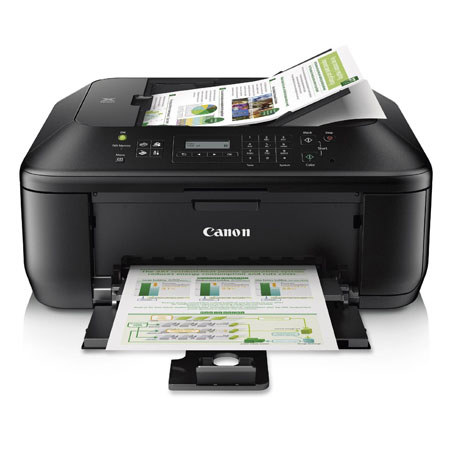
Not so, look closely!! On the bottom tray (the tray that holds the refill paper towards the right of the tray is an extension that you pull out, and then from that a flip up device that keeps and holds all copies in place perfectly. Make sure you read all directions before critiquing.
I've had my printer for over a year now, and it performs as beautifully as the day I bought it.
I also love the convenience of the fax machine, and have used it many times without any problems.
I have only one complaint, and that is that the viewer for the menu is very small. Hard to read, and not very well lit. Other than that, it was a very smart purchase.
I would absolutely recommend this printer/fax combo.
Michele
Originally posted at
2014-11-27T19:00:00
Rated 2 out of 5
cannon 4 in one PIXMA
The printer works ok but I wouldn't purchase another one. One of the reasons, when paper is printed it is shot out the front of printer and even if there are 2 catchers the paper doesn't stay on it. Makes for rather a mess when printing a long document, or even 1 piece of paper. Am I missing something??? Is there a lip to catch the paper?? I would appreciating me if I am missing it. Hope for your advice.
It took me a while to figure out the ins and outs of the machine but I see to have it working fairly well now. Definately not a 5 star machine!
cmschip
Originally posted at
2014-08-19T20:00:00
Rated 3 out of 5
Quite satisfactory
So far, good. Although I hated the multifolded instructions from the box, I managed to get everything done. With the aid of the online manual I easily set up to copy and fax and to fax to computer. I could not get scan and stitch to work to my satisfaction however. I don't care for the online manual that requires so much skipping around to get all the functions. I would like to be able to download a complete PDF document (perhaps that is possible but I couldn't find out where!).
SWEPat
Originally posted at
2014-07-23T20:00:00
Rated 3 out of 5
POOR PERFORMANCE
Despite hiring outside help, my Pixma MX392 is totally unreliable. I repeatedly send items to print, and in most cases receive only blank sheets of paper.
LINDY
Originally posted at
2014-07-11T20:00:00
only had it a few weeks but seems to work great I only have 1 question how do you get a fax conformation from it?
johne2hotty
Originally posted at
2014-06-26T20:00:00
Rated 4 out of 5
Good Value for the price
Low Price, User Friendly, Good Quality in Printed Documents
susiecute
Originally posted at
2014-05-11T20:00:00
3 replacements and none work for more than a day.JUNK
VETTE
Originally posted at
2014-04-04T20:00:00
Rated 4 out of 5
still learning
This printer is does quite a bit for the price,the features seem overwhelming at first and I doubt I'll use all of them.Setting up was fairly easy and intuitive,although I will complain about the lack of an included usb cable,I'd think no more than a cable costs one could come in the box,I'll also take this opportunity to say for some reason I thought the printer was wireless,so the lack of a cable was definitely frustrating.Print quality for photo's is super so far,I've got a selphy I've been using and the pixma's pictures look pretty good and print speed is fast.The machine makes more noises than I expected.A way to test receive and send a fax would be helpful.The scanning seems fairly easy,but I've only figured out how to scan using the computer.All in all,it's a good machine,
I'll be looking at one for gifts later on probably.
a&b
Originally posted at
2014-03-17T20:00:00
Rated 5 out of 5
great buy
Easy start up( You must install enclosed disc for on screen instructions All function work fine.
jaydie
Originally posted at
2014-02-03T19:00:00
Rated 1 out of 5
No instructions
This printer/scanner/fax is totally useless without instructions. There are no instructions, except for basic set up, included in the box. I figured out how to use the printer function, but can't use any other functions (i.e. scanner) without the instructions. I tried going online to download the instructions but could not do it. First, it is very difficult to figure out which manual goes with this printer. Then, I tried downloading the manual 5 times, but it would not work. So now I have a printer/scanner/fax in which I can only use the printer.
Mitch
Originally posted at
2013-10-17T20:00:00
Rated 5 out of 5
What a buy
Fantastic buy, easy to use , so many features. Glad I found such a great All-In -One.
cisco
Originally posted at
2013-10-13T20:00:00
So this item is sold as a home use printer. however when trying to set up the home printer. there is no cable to attach to my computer.. only a power cable. so basically its a copy machine and fax machine(if anyone still uses a fax at home).
I cant scan to my computer nor can i print. They should not call it a printer if it leaves out the option of printing since there is no cable!!!!!!!!
frustrating. and good luck trying to figure out which cable i should have and where to get it.
jnav1242
Originally posted at