


This item is no longer available.
Review Summary
2021-04-11T20:00:00
My Pixma 512 worked amazingly when I got it in 2013 but after a few years it started having issues with the fax /scan feature. The pages I tried to process would produce images with an ugly streak going down the entire document. The wifi would disconnect often and had to be re-entered every time (so frustrating. The final blow to my canon loving heart was when the print feature started having issues and the paper would get jammed for no reason every time I used it. We are now in 2021; it?s been over 8 years and I?m going to miss my printer. Wish there was something I could do to save it but it has served its purpose.
CanonLoverXXX

2016-12-05T19:00:00
My review is a question - I had frequent issues with an "out of paper" error. Does anyone else have a paper path on the underside held in place with duct tape? I have to replace the tape frequently, especially after printing photos. Maybe I'll try velcro strips............
Printing K.
2016-03-31T20:00:00
Received this printer from a vendor as a retirement gift 2 years ago. I am very happy with the Canon MX512. The cartridges (I do use only Canon last through a full ream of paper. I occasionally print photos on 4x6 glossy stock and I have excellent results. Used commercial Canon laser printers where I worked before retiring which is why I wanted to stay with Canon.
Mike47
2015-09-07T20:00:00
The cartridges for this printer cost more than I paid for it. The cartridges that came with the printer are only good for a few pages. The new higher capacity cartridges, which incidentally look identical to the low-capacity ones, are not recognized by the printer, and I have now wasted a day of my time "trying things." Trying things means turning the printer off, waiting 10-minutes to 2-hours, and turning it back on. Repeat the procedure with the cartridges removed. How did this start? It started because the power failed in my office, and when power returned, everything in the office including other printers and computers plugged into the same outlet came back to life without incident, except for the Canon MX512. So without touching the printer, it just stops working? This seems to stem from Canon wanting to prevent users from using any but Canon branded cartridges, as it has to do with reading the ID information now built into said cartridges. Why is this required? Obviously it is NOT required for a user. It benefits Canon only, at the expense of its customers. I will fill my printing and scanning requirements elsewhere.
formercanonuser
2015-03-24T20:00:00
This printer has worked perfectly for me. I use the print function in the wireless mode, which allows printing from laptops, smartphones and tablets. For the price I think it is a fantastic value. I have also faxed documents and used the copy function. For me it has performed as well as some previously more expensive printers that I have owned.
RoadRunner
2015-01-18T19:00:00
Love this printer! This has saved my professional life more than once!
Randy
2014-11-20T19:00:00
The printer works fine, but be aware that 210/211 ink cartridge boxes with a Canon label pasted on indicating they work in the MX512 is wrong.
WJP1940
2014-07-14T20:00:00
works well for us with a mac and a few pc's in the house. reliable too! would buy again
kai
2014-05-07T20:00:00
Worse printer that I have ever used. I had two other Canon printers, that I had no problems with. Wish that I would have kept one of them
butchiew
2014-04-29T20:00:00
Great for the first few months but print quality dropped after about 6 months and it's totally stopped working after less than a year
Bonnie
2014-04-14T20:00:00
I got this printer for Christmas 2012. It worked good until about a month or so ago. I went to scan something for school, and the printer wouldn't scan. There was a pop up saying there was a document in ADF. I swear to you, there was no document in the entire printer. I am not allowed to do anything on the printer until this alert is gone.
Anonymous
2014-01-26T19:00:00
this product is unacceptable. I spent 2 days to install the software for the scanner. the software is a mess...no help from on-line manual. box has missing parts.,AND i got a broken cd scanning takes more steps & needs the same answers over & over...user specifications you have entered as defaults don't take,,, even if the sw was good, this printer is SLOW there is a long wait before you can start to scan.... takes 3 minutes to scan 1 page...I shutter to think of when I have to scan 50 or more (my norm I have worked in data processing for 35 years even the printers for computers the size of a room were faster!!!!
joe
2014-01-26T19:00:00
I purchased this printer to replace an OLD thermal fax machine. I've been quite pleased with it so far. The "fit-to-page" feature of the copier has been a great help with documents that are printed way to small. Also using it to scan documents that need to be saved, but don't have to be in paper form. The print quality and speed are excellent for an ink jet printer. The wireless works flawlessly which helps as I don't have space for it near my computer. I've had no problems with missfeeds as others have mentioned. Perhaps a different brand of paper would help, I've found some papers work well with my laser and others tend to jam. The only issues I have is the springs that hold the copy lid up are a bit on the week side and it tends to come down sometimes when you don't want it to. Also, the paper output tray is a little short and it tends to allow paper to end up on the floor.
Terry
2014-01-25T19:00:00
I was very proud of this purchase for the first 14 months of use. Then I had one paper jam which happened in the back and I had to open the back of the printer to extract the paper. And from then on, the alignment was off. I tried multiple auto corrects, and multiple manual corrects. Neither worked. SOOO FRUSTRATED, I could throw it off a cliff and feel much better.
big r.
2014-01-24T19:00:00
This printer has been nothing but junk. Paper jams and smeared printing time after time. Straight to the trashcan. Never again.
wontbuycanon
2013-11-12T19:00:00
When it comes to Canon, be it cameras, or printers, I invariably get "value for money", and in over twenty years so, have to have ONE PRODUCT fail.
circusranger
2013-10-10T20:00:00
We bought this printer as a desktop unit for one of our executives, to replace a Pixma 870 which had worn out over several years of use. (Unfortunately the 870 seems to be no more.) BIG mistake. This has been the worst printer I have ever used in 35 years in IT - and I have seen some real duds. It has endless problems with ink smearing, mis-feeds, poor software, irritating pop-ups and lousy network support. The printer had so many problems with its internal sensors that we DEMANDED that Canon replace it after about 4 months. The replacement is now sitting on the workbench, having sucked in a stack of about 7 to 10 sheets of paper at a draw, and wrapped them around the drum, leaving absolutely no way to get at them to extract them. Might be an okay printer for a home user who prints on single sheets, hand fed, and plugged into the PC with a USB cable. For a business environment, accessed across a network (by just ONE user)? Forget it.
Captain D.
2013-10-02T20:00:00
Fax machine rarely works, spend hours on phone with support. BUT, the photos print really really clearly. Scanning is also a problem, but if you want to print, its great. Don't get if you like to fax or scan.
Kate
2013-07-18T20:00:00
Looks and works great. Great product at a good price.
Augie
2013-05-28T21:00:00
we purchase this printer for our sales reps. very good reviews
Sarah
2013-03-24T20:00:00
I don't print much, but when I do this printer does exactly what I need it to do. The ink price is reasonable. My only issue is setting up the wireless function.
Freeze
2013-03-06T19:00:00
I received this printer as a gift after specifically requesting this. It was on Apple's list of Airprinters, and I own 4 Apple products. My 2 laptops worked like a charm right away with the printer but for my iPhone and ipad I had to download and install updated firmware before they would print to the MX512. Canon does mention in the fine print of their instructions that this download may need to be done. I would suggest though that instead of just locating this in the fine print, that it be put in a more prominent spot, along with prominent links to instructions on HOW to download and install this update.
Nw-Ohio g.
2013-02-02T19:00:00
Was easy to set up and start using. Have used copy, scan, print & wireless print from iPhone with no problems. Haven't tried fax as I don't need. All worked well. While not this printer's fault, I was disappointed that Costco doesn't carry ink for it. Will need to find a new cheap & convenient place to buy. Also, printer is kind of big. Not enormous, but a consideration if you have small space.
123
2013-01-23T19:00:00
copier is fine, fax not working turns off after pushing fax setting, hard to turn on --several tries, will be returning to staples [ should have not replaced the old canon]
tom
2013-01-17T19:00:00
Allow 2 hours to set up, settings are a bit difficult to understand. Having trouble figuring out how to receive fax without answering machine getting it. Some print settings are hard to set. Otherwise, the print quality is WONDERFUL, it is quiet, looks great and i LOVE the Wi-Fi capability! Would buy again
Cowsintexas
2013-01-11T19:00:00
I bought this printer to replace a previous Canon I had for 8 years. I've had three issues with it. 1. Paper falls on the floor, even when the tray is extended. Very poor engineering design. 2. There is a huge lag when printing wirelessly. The dialog box to the computer says Printer not responding, and then it prints about 5 - 10 seconds later. 3. In the copy mode, it is very slow. I try to set it to the Fast Mode, and it won't accept the Fast Mode. Didn't have any of these problems with the previous Canon printer.
Disappointed
2012-12-22T19:00:00
I just got this printer and I got it for a good deal, some of the people complaining about the paper tray is just silly. I've printed several pictures already and am pleased with the quality, have used the multi paper scan and I really like that(my old printer didn't have this feature), and the same with copy. I liked how fast my copies print and the printer looks good. Setup was longer than any computer I've had to setup but what ever.
texasjherrera
2012-12-14T19:00:00
I have only used this printer for a short time and thus have not used all the features (fax, scan, photo) but I have not liked this printer from day one. The print quality is good and it's fine if you don't mind picking the paper up off the floor when it comes out of the printer. After a few months of use I just discovered that you have to pull out two more tray extensions to keep the paper from falling on the floor. Whoever designed this printer obviously doesn't have to use it. I is also very noisy (annoying)
Runna
2012-12-08T19:00:00
this is the hardest printer I have ever bought to set up on my wireless network an I have the MX510 which is not even in here my other printer, put sec. code done, this thing keeps saying can connect when the printer is all ready set up with code. thinking of sending it back should be way easy than this
duffydog
2012-06-23T20:00:00
machine will not accept faxes, when sending, feeder jams more often than not. Bringing it back to Costco pronto.
hpski
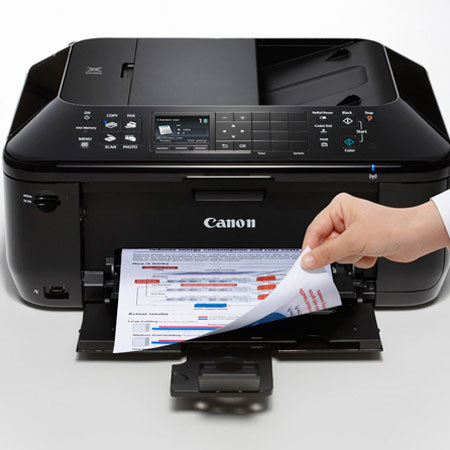
The Canon PIXMA Mx512 Wireless Inkjet Office All-in-One Printer, bring excellent quality, speed and ease of use to your home office all in the name of increased productivity. This begins with built-in Wi-Fi for printing and scanning virtually anywhere in your home from computers and compatible mobile devices. This also includes AirPrint, which lets you wirelessly print photos, emails, web pages, documents and more from compatible iPad, iPhone or iPod touch devices to a compatible Canon PIXMA Wireless All-in-One.
An integrated 30-sheet Auto Document Feeder, built-in Auto Duplex Printing, a Dual Function Panel and FastFront are just some of the features that can allow you to easily multi-task while your PIXMA Mx512 is at work. The 4800 x 1200 maximum color resolution and the FINE Cartridge System means superb business document printing and efficiency while built-in imaging technology ensures the integrity of originals are preserved with each copy and scan. Maintain security standards by utilizing features to prevent misdialed fax transmissions and keep scanned files password protected.
The Mx512 also allows you to turn your office into a photo lab and print beautiful, borderless photo lab quality photos up to 8.5" x 11" in size. Your photo printing options also include Full HD video while you can enjoy computer-less printing through compatible direct print options. The Mx512 delivers the business imaging quality and versatile solutions that can assist you in bringing your business to the next level. So, you can print business documents when you need to and photos when you want to.