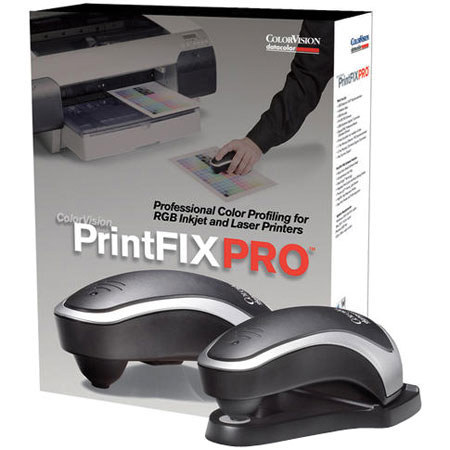
Datacolor PrintFIX PRO, Spectrocolorimeter 1005, PrintFix PRO Softwr Spyder2PRO Monitor Colorimeter & Calibration Software with Site License.
SKU: ICVPFP101
This item is no longer available.
Share:
Overview
Compare
Learn
Specs
Protection
Reviews about this item
Review Summary
2009-02-05T19:00:00
Rated 4 out of 5
Color correction that works
Much easier to use than the older version (small USB scanner) which was also limited in paper selection. I'm printing high-resolution digital photographs 13x19 on a Canon Pro9000 and the SypderPro and PrintFix Pro have finally made color correction achievable and affordable. While hand-select/scan hundreds of patches is very repetitive and it cannot fix the limits of the printer's color space and density, this is still a very reasonable method to get superior quality color.
CameraTrax
2009-01-23T19:00:00
Rated 1 out of 5
Buyer Beware!
Old version still being sold. No replies from Tech Support or Customer Service after 3 weeks of trying via Emails. No phone number supplied for contact, Company may well be out of business although their website appears to be active. Looks like my only recourse is going to be the FTC and BBB.
jonniv
2009-01-20T19:00:00
Rated 4 out of 5
Good Results, but Not Quite There
The monitor calibration worked well. The picture was visibly improved. I recently bought two new monitors and connected them to the same computer. I ran the calibration on both. The settings came out slightly different for both but that may be due to the monitors and slightly different positioning of each. The calibration does account for the ambient light in the room. In any case, I had to run the calibration twice on one of the monitors to get them to look exactly the same. As for the printer calibration, it's a tedious process but well worth it (took about 20 minutes to click through all those color patches). I bought this product to make my printed pictures match what I was seeing on the monitor. What I'm seeing is that the printed pictures are not nearly as bright as the picture on the monitor. The colors match but it's like the brightness has been turned way down on the printed version. I think I'll try re-entering the samples for the printer under different room lighting conditions and see if that makes a difference.
DSimpson01
2009-01-20T19:00:00
Rated 4 out of 5
Datacolor PrintFIX PRO, Suite
For the Photographer who wants his photo's to look as good ashe see it on his monitor,this is the way to go. You Check your monitor and make adjustment to your ICC and then check your pinterand make adjustto your pinter.This is the handest tool out there and the price is great. There is upgrade software to keep your equipment at the top of it game.Down to earth and easy.Great buy. Con:Package comes with Spyder2pro,instead of the Spyder3 pro
KenoGreen
2008-12-28T19:00:00
Rated 3 out of 5
It came highly recommended by pros
Not the easiest product too use, however prints do look a lot better after cal. It just takes a long time to go through the procedure. The help could be more specific pertains info vs file data.
JOE G.
2008-02-24T19:00:00
Rated 3 out of 5
Mixed Results
Spyder2Pro worked well. My only complaint was that the device sat right over the monitor display menu so it was difficult to see what I was doing. PrintFixPro did nothing for my Canon Pixma iP6600D, and actually made the print quality worse. However, in the process I did figure out how to use a canned profile, so all was not lost. If the product does not support Canon printers, the description should say so, and not leave it to user to figure out after spending the money
LUANA R.
2008-01-20T19:00:00
Rated 4 out of 5
Prints Match Monitor, Now
The SpyderPro monitor calibration works as well as Quick Gamma, but the latter is free. I might have more to say if I had an expensive monitor for my desktop, one having more adjustments, but mine gets the job done. On the LCD laptop screen, the card will not allow Spyder to write to the card (ATI Mobility Radeon, circa 2004 version), but Picture Window Pro can make use of the profile to produce an onscreen result acceptable for laptop use. The before-and-after viewing feature is a joke with both monitors. On the CRT, the before picture bears little resemblance to what the monitor actually displayed before calibration. On the LCD, the feature doesn't work, because of the aforementioned video card quirk.PrintFixPro is wonderful. My main problem was having no useful profiles for my old Epson printers (Stylus Color 1520 and 600), so getting prints to come close to the onscreen view was usually a frustrating -- and expensive -- ordeal. No more. Though the calibration process is a little tedious, the results are worth it. I use a LOT less ink and paper now to get the prints I want. Definitely worth the money, as I am sure the Spyder is as well, particularly for those with high-end monitors.In all, I'm very satisfied[...]!
Old G.
2007-11-15T19:00:00
Rated 5 out of 5
A must have calibration system
If you care about the quality of your printed output, then you need to use color managed work-flow. The Spyder2 colorimeter and PrintFix Pro spectrocolorimeter are essential for proper calibration. There is no other system available at this price point (to my knowledge) that will provide the color accuracy of the Printfix Pro Suite. The Spyder makes monitor calibration simple and relatively fast. The pro version is nice in that it balances the RGB channels so that the profile has a good starting point. The less adjustment a profile has to make, the better the color gamut and accuracy. I used to use a scanner based printer profiling system that got things close most of the time except for glossy papers. However, comparing print output with PrintFix Pro profiles there is a significant difference. My prints are very close to what I see during on-screen editing, and are virtual replicas of what I see on-screen when I soft proof. Finally I am getting proper reds (that was my main complaint before getting PrintFix Pro). It wasn't my printer, the problem was the scanner based profiles. There were some colors that I didn't even realize were missing until comparing prints. Skin colors are spot on and my portraiture prints are coming out with a very professional look. In fact, it's hard to believe that they came from a cheap inkjet printer. If you care about your image print quality, the only other low-cost alternative is to get custom made profiles (which should be as good as it gets considering how expensive their equipment is). Nonetheless, you will still need to calibrate your monitor, there is no way around this. So it makes sense to buy the suite instead of just the Spyder2 colorimeter, since the incremental cost is not that high (especially when there are rebates). The only negative I've found is that my 1005 spectrocolorimeter has a defective switch, which causes extra reads once in awhile. This turns out to be a non-issue because I've found that triggering reads with the PC keyboard works much better anyway. They could have just not put a switch on the thing. My suggestions for getting the best profiles with minimal fussing are as follows: 1) Print the 729 patch targets (requires 3 sheets of paper) and let them dry a few days, at least a full 24 hours, but longer is better. 2) When reading the patches, have modest room light (not bright) set so you can see the position of the spectrocolorimeter on the target. The body of the device tends to shade the targets, so a low light position helps. 3) Use a comfortable seating and table positioning so you can readily move the device across the target. Place a sheet or two of white paper under the target if the table is dark. 4) Use the keyboard's enter key to trigger the target read. It goes a lot faster and smoother if you are not trying to coordinate moving and pushing the button on the device with one hand.
GENE L.
2007-09-27T21:00:00
Rated 5 out of 5
Finally, Monitor colors matches prints!
Great Product. Finally, I my monitor matches my prints. Easy to use and a "must" for photographers that uses photoshop and color accuracy is necessary! I was able to set both my monitor and printer in less than an hour!
TOMMY C.
Datacolor PFP101 PrintFIX PRO,Spectrocolorimtr 1005 S/W Specifications
Related Articles & Videos
About Datacolor PFP101 PrintFIX PRO,Spectrocolorimtr 1005 S/W
• PrintFIX PRO lets any photographer or designer produce their own gallery quality prints. Combining ease-of-use, high-precision accuracy, and breakthrough affordability, PrintFIX PRO meets the accuracy and quality needs of the most discerning professionals. Featuring next generation spectro technology, PrintFIX PRO precisely profiles any RGB-driven inkjet, dye-sub, thermal, chemical, or laser printer with virtually any media. The PrintFIX PRO software wizard guides you through each step of the process including printer setup, media selection, and profile creation and editing. The software design is elegant, easy-to-use, and includes comprehensive help. ColorVision has set the standard again with PrintFIX PRO, giving creative professionals the ability to create their own gallery quality prints at a truly affordable price.
System Requirements:
• Windows 2000 or xP.
• Mac OS x10.3 or higher.
• Powered USB port.
• 1024 x 768 or larger screen.
Join VIP PRO
Earn 2X Points + Exclusive Perks!
Request a Callback
Chat one-on-one with an expert
Sell or Trade your Gear
Get started in 3 easy steps
What's in the box:
- Datacolor Spectrocolorimeter 1005
- Spyder2PRO Monitor Colorimeter
- PrintFIX PRO software
- Mini USB cable
- 1 Year Hardware Warranty
- Free Technical Support
- Free Software Updates.