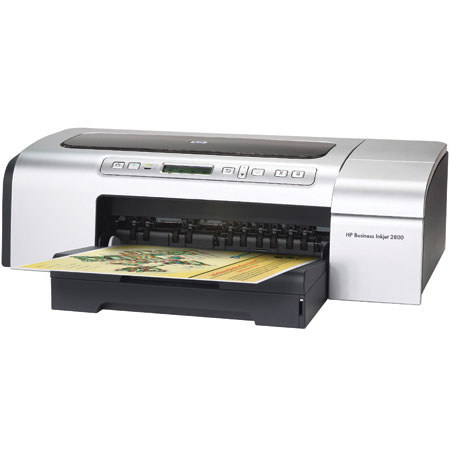

This item is no longer available.
Review Summary
2008-09-01T20:00:00
If you want to print pictures, buy another printer. I spent a week with support before I found out it just doesn't print skin tones worth a [expitive deleted] (all too pink). If you do photos, try a PhotoSmart printer. This is NOT a suitable replacement for the cp1700.
ex3031

2008-06-15T20:00:00
Excellant print quality and speed. Not letterhead friendly, will accept one or two sheets, then either it will jam in the back or spit out several sheets at one time before printing the next letterhead. Also not label friendly, labels come out crooked every time and doesn't line up within the label block. Uses alot of ink.
SueB318

2008-06-04T20:00:00
In 1999 I purchased my first ink-jet color printer for my home office. It was a 2500cm Hewlett packard Business Ink-Jet with 4 paper trays. It only printed oneside so you would have to flip the paper and make adjustments before printing the second side to register (back up perfectly). I had a Mac G3 and tons of other stuff which, unfortunately, I lost in a fire in 2003. However, for the 4 years I had it, I never had a problem...it cost over $2000 new. In 2005 I replaced all my losses. I purchased a 2800 Bus. Ink-Jet and was impressed with changes that made paper feeding and handling much better, aiding in registration. My new printer has three feeds: toptray, bottomtray and rear feed which acomodate any job - all the same features minus one paper tray for much less than 1/2 the price of my 2500cm. Unfortunately, after 2 years use without a problem I had a major paper jam which after I cleared would not clear on the printer, it continued to report a jam. At this point and after all else, I decided to replace ithe printer with another one just like it because it really is an excellent product. Hewlett Packard offered me an exchange and I got it in less than 20hrs.I jjust put in the same inkheads and cartridges from my old one and connected it to the same power and usb cables. I clicked on Printer Setup Utility, deleted my 2800 and made 2800-1, which also showed up, my default printer...and BAM! In less than 5 minutes from the time of arrival my new printer is up and running! I know if I hadn't been able to manage it, Hewlett Packard's excellent help & support staff would have solved my issues. I have a HP 5.1mp Photosmart digital camera, as well. It's like anything else, you take care of it, it takes care of you. It's a high tech sensitive piece of equipment...just be gentle. I don't own a duplex so I don't know how well they register on 2 sided copies. If it's not that great then I'm sure it's something that will improve in time. Otherwise, for a substantial diference in cost get the single sided printer and waste a couple of copies to adjust and set your 2nd side, it's what I do to get all my 2 sided prints (which are many) to register - on the money, just 2 passes through the printer instead of one. If it wasn't all that, I wouldn't have replaced it with another one just like the other one.
DrRamundoAntonioDaneko

2007-04-04T20:00:00
I am compareing the 2800 to a 2600. I'v used a 2600 for two years it could hold and print letter size and 11x17 paper.The 2800 does not hold two differant size papers unless you order a tray2 at a additional cost. After setting up the 2800 for my use we foundout that it could not printout my design drawings with out downloading a driver for the 2600. I feel that I am now printig with a 2600 in a 2800 box.On the plus side the control panel of the 2800 is much easier to use.The visable paper volume indicator is a great improvement and the whole unit takes up less space on my desk. I think that the kinks can be worked out with hp tech support but as you know time is money and I'v spent way to many hours and days trying to get right
pepper

2006-10-23T20:00:00
Well... I love the print quality. The print quality of a 19x13 is out of this world! I was just amazed at how sharp all the pictures were. I only have two problems with the printer. I have the duplexer, which I love, but the page comes out slightly crooked. You don't notice it unless there is a line or border on the page. The other problem is, Everything that comes out of the duplexer is lower on the page than if I don't use it. So all images and documents need to be brought up higher so it centers correctly when it prints. I would only recommend this printer to a friend if the duplexer problem was fixed.
Cindy

2006-10-23T20:00:00
this printer prints on paper that is 13 x 19 inches. the prints that are exactly 1/2 scale. that is 1/4 inch to the foot prints print out at 1/8. very clear and legible. i save a fortune by not printing large prints. the paper is an issue and i have to have it cut from a supplier and it still is cheaper than any paper i have seen elsewhere. the printer will print smaller paper though like 11 x 17 but the prints will not be in any scale you can use. i also use this printer to print photo quality prints and it works perfectly.
marvey

2006-10-22T20:00:00
the 2800 has some great features, but don't let those features throw you or make you overconfident. While it has speed, it will also waste paper. And, while it is a better printer, it has some major flaws. It gets jammed often, and because it is working so fast, one may have a real mess on his/her hands just about as quickly. It is rougher on print heads as well. The balance may be speed, but if you want to get the job done correctly, plan on babysitting the machine to keep an eye on quality (Printhead problems), and jamming and blank pieces of paper.
cdeauser

Do more for less with low cost of ownership, flexible features, & simple remote management software. Produce vibrant images & graphics up to 13x19" with up to 4800 dpi printing
Print your color office documents & marketing collateral in house: The HP Business Inkjet 2800 series printer is a low-cost business printing solution designed to print both color & black-only office documents quickly & affordably
The printing system features 4, individual, high-capacity print cartridges you save money by replacing only empty cartridges. You can enjoy the flexibility & convenience of producing high-quality marketing collateral in-house, which reduces costs, saves time, & gives you control over the entire process
Print enlarged or reduced documents with document-scaling technology. Choose HP resizing options before you print to scale print jobs from 25 to 400 percent with virtually no loss in print quality or resolution. Extra training & the purchase of special software is not required, saving you time & money
Support barcode printing from UNIx, SAP R/3, Oracle, Windows & other ERPs Turn this printer into a professional barcode printer with the optional Jetmobile Bar DIMM 3.1 solution, which enables quick & versatile barcode printing from UNIx, SAP R/3, Oracle, other ERPs, Mainframes (SCS), AS/400 (SCS), & Windows. With support for more than 60 barcode types, including 2D barcodes like PDF417, & built-in quality control, you can easily produce barcoded documents without investing in specialty barcode printers
The 2800D features IEEE 1284-compliant parallel and Full-Speed USB 2.0 ports and one open EIO slot for optional network connectivity
The remote management software included with the printer simplifies printer configuration & lets you easily manage a networked printer from any standard Web browser. In addition, the software includes job accounting, pages remaining, & diagnostics features to help you manage costs
Job accounting allows administrators to track & monitor each users' usage (for example, the type & number of pages printed & black & color ink usage). This information can be used by administrators to track printer deployment, workload, & the purchase of supplies
Pages remaining lets you see the estimated number of pages that can be printed with the remaining ink for full color, business color, or black text documents. You can also determine if the ink levels are sufficient to print your jobs. Diagnostics help you perform troubleshooting and maintenance tasks, such as testing the printer's media paths, aligning printheads, and cleaning printheads.
An Optional Automatic two-sided printing unit and 250-sheet tray 2 for a 400-sheet input capacity (not included) are available for this unit, as well as optional Networking capibilty.
Join VIP PRO
Earn 2X Points + Exclusive Perks!
Request a Callback
Chat one-on-one with an expert
Sell or Trade your Gear
Get started in 3 easy steps