This item is no longer available.
Review Summary
2011-08-06T20:00:00
I am completely satisfied with the performance of this laser printer. Set up was very easy using the CD that came with the printer. I also had internet access. Be sure to remove the orange hold down knob in tray 2 that holds the spring loaded paper holder down during transit.
Bru44

2011-04-17T20:00:00
Once up and running, this printer is rock solid, very fast and reliable. The only reasons I am giving it only 4 of 5 stars are really around the setup. First of all it's incredibly heavy, so be careful. Secondly, the CD they put in the box is a really old PCL6 driver from 2008, so naturally you tend to want to go to the web and download the newest one. Using the PCL6 (newest) driver, it printed the first item in the queue fine but then the 2nd or 3rd items would 'hang out' there for about 10 minutes before they finally printed. Here's the inside scoop: ignore the CD they give you and go to the web and install the "HP Universal Postscript Driver" -- and when you are setting it up, select "Dynamic Mode" -- then everything works perfect. How the heck would someone just know that? Well I want my 2 hours back, but if you are reading this, just do that and you will not waste your time and get frustrated. After you crack this code, it works like a charm.
Garg

2011-04-02T20:00:00
Photo quality and detail best we have seen. Smooth operaion on network with Windows and Macs. Great paper handling options and manual tray really works. Recommend this strongly to small business needing good marketing output.
Daveholland

2010-11-21T19:00:00
This printer does everything it says and produces great prints. The setup was simple and I would purchase this printer again.
Larry-RRF
2009-09-01T20:00:00
This is an excellent color printer that is perfect for regular office use. It warms up quickly and runs at high speed. You don't have to sit there and wait for your copies, as with slower color printers. The black ink, which is used most, prints by itself and does not deplete the color cartridges.
DBCPA

Accidents happen where life happens. Protect your favorite Adorama products and purchase a protection plan to stay covered from accidental damage, mechanical or electrical failure, and more.
If we can’t fix it, we’ll replace it at no additional cost.
Protect your product from drops, spills, and more.
Enjoy your gear without fear. We have you covered!
When regular use of your product over time results in mechanical or electrical failure.
We will never charge you a deductible after the purchase of a plan.
Our claims process is simple & easy and our customer service team is happy to help.
Adorama Protect powered by Extend is available for purchase to customers in the United States. Not available for purchase Internationally or in U.S. Territories.
Browse our FAQ
Up to 30 ppm
Up to 30 ppm
Up to 30 ppm
Up to 30 ppm
As fast as 11 sec
As fast as 11 sec
Up to 75,000 pages
1500 to 5000 pages
Up to 1200 x 600 dpi
HP ImageREt 3600
4 (1 each black, cyan, magenta, yellow)
2
3
Up to 350 sheets
Up to 350 sheets
Automatic (standard)
Letter, legal, 8.5 x 13 in, executive, envelopes (No. 10, Monarch (7 3/4))
Multipurpose tray: 3.87 x 5.83 to 8.5 x 14 in; 250-sheet input tray: 5.83 x 8.27 to 8.5 x 11.69 in
Paper (plain, light, bond, recycled, mid-weight, heavy, mid-weight glossy, heavy glossy, extra heavy, extra heavy glossy, cardstock, card glossy)
Color transparency, labels, letterhead, envelope, preprinted, prepunched, colored, rough, opaque film, user-defined
Sheetfed
384 MB
1024 MB
515 MHz
HP PCL 6, HP PCL 5c, HP postscript level 3 emulation, direct PDF printing v 1.4
1 embedded HP Jetdirect 10/100/1000 Base-TX Ethernet, USB 2.0
802.11b/g wireless LAN, other networking accessories
Windows Vista; Intel Pentium II or Celeron processor; Adobe Acrobat Reader 5; 512 MB RAM; 220 MB HD; Microsoft Internet Explorer 7; CD-ROM; USB, Windows 2000, XP, Server 2003, Server 2008; Intel Pentium II or Celeron processor; Adobe Acrobat Reader 5; 256 MB RAM; 220 MB HD; Microsoft Internet Explorer 6; CD-ROM; USB
Mac OS X v10.3, v10.4, v10.5; PowerPC G3, G4, G5 or Intel Core processor; 256 MB RAM; 160 MB HD; CD-ROM; USB
Yes
Windows 2000; Windows XP Professional; Windows Vista; Windows Server 2003; Windows Server 2008; Mac OS X v 10.3; Mac OS X v 10.4; Mac OS X v 10.5
59 to 80.6° F
Software for Microsoft Windows: Desktop SureSupply, HP Update. Macintosh:HP Postscript 3 driver software (v4.3.1) and HP Printer Utility for Mac OS X
20.2 x 19.3 x 14.1 in
32.4 x 29.1 x 14.1 in
72.5 lbs
HP 1 year next day on-site limited warranty


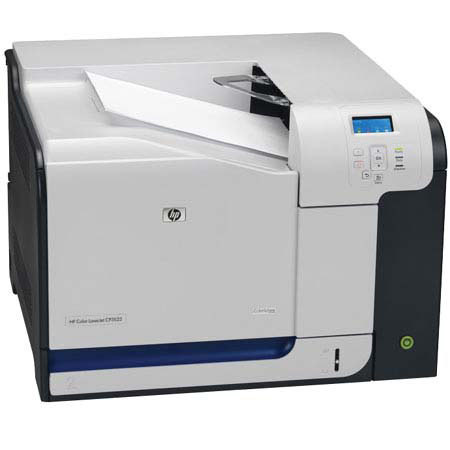
The Hewlett Packard - HP Color LaserJet CP3525DN Printer creates professional quality documents, brochures, newsletters and more all on your schedule from the comfort of your own office with the HP CC470A#ABA Color Laser Printer. You can easily produce eye-catching black and color documents with this high-performing, reliable printer for general and specialty print projects.
Highly rated toner cartridges give your prints clear and sharp looking pages. Original HP Color LaserJet print cartridges with built-in intelligence provide reliability and ease of use. Replace the four cartridges quickly and easily with convenient single door access. The HP Color LaserJet CP3525dn Color Laser Printer is an ideal selection for those who need a reliable, easy-to-use color printer to produce high quality business documents.
Join VIP PRO
Earn 2X Points + Exclusive Perks!
Request a Callback
Chat one-on-one with an expert
Sell or Trade your Gear
Get started in 3 easy steps