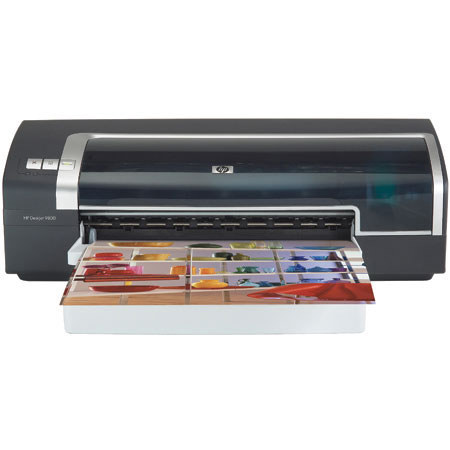
Hewlett-Packard Hewlett Packard - HP Deskjet 9800 Color Inkjet Printer, 6 Color 13" x 19", with IEEE 1284 Parallel & USB 2.0 Interface
SKU: IHPDJ9800
This item is no longer available.
Share:
Overview
Compare
Specs
Protection
About Hewlett-Packard C8165A
Professional print quality
Make a positive impression, every time you print. The printer delivers reliable, photo-quality color and laser-quality black. Enjoy the versatility of up to 4800-optimized dpi color and choose from standard 4-ink color or optional 6-ink color printing for richer photos.
Conveniently print images with or without borders.
Produce bordered and borderless images just like the pros, right in your own office.
Produce vivid prints with exceptional fade resistance.
Print high-quality photos that resist fading longer than traditionally processed photos with optional 6-ink color printing and HP Premium Plus Photo Papers.
HP Vivera Inks.
HP Vivera inks are engineered with superior ingredients, unique formulations, and exceptional purity to deliver excellent permanence characteristics and exceptional photo quality. You get lasting text, as well as brilliant color photos and business communications, even on plain paper.
Be flexible with up to 13 by 19 inch printing.
Use specialty or everyday paper from just 3 by 5 inches to 13 by 19 inches to create high-impact brochures, plans, or marketing materials. You will reduce your dependency on outsourcing, save money, and assume greater control over your own materials.
Choose the paper that suits your business needs.
Use the rear paper feed for your heaviest media this versatile performer handles paper up to 74 lb (280 g/m2)
Print at breakthrough speeds. Get everyday business documents, complex brochures, and presentations right when you need them with fast print speeds of up to 30 pages per minute (ppm) black and up to 20 ppm color.
Increase your printer's value and print more pages.
Save time and money with fewer replacements with high-volume HP Vivera black and tri-color ink cartridges.
Lasting performance.
Depend on the printer's 5,000 pages-per-month duty cycle tocover day-to-day use as well as periods of high productivity.
Finish important printing jobs.
HP's convenient, time-saving automatic ink-backup printing mode ensures that even if one print cartridge runs out of ink, your print job will be completed with the remaining color or black ink cartridge.
Eliminate guesswork with the automatic media sensor and ink status indicators.
Let the HP Deskjet 9800 series printer automatically select optimal settings using its media type sensor
Enjoy peace of mind with HP quality service and support.
HP's award-winning customer service and support backs its printers with easy-to-access phone support and online e-Support available 24 hours a day, 7 days a week at www.hp.com/support.
Hewlett-Packard C8165A Features
- High-performance printing
- Your work demands reliable, convenient printing that is fast and professional. The HP Deskjet 9800 series printer gives you the versatility you need to print photograph-quality material, while delivering the high print quality required for spreadsheets, presentations, and other wide-format printing jobs.
- Create posters, brochures with photos, full color presentations, technical drawings, and spreadsheets all with one HP printer.
- Print full color booklets and two-sided flyers with the easy-to-use two-sided printing unit ( standard only with the HP Deskjet 9800d printer ).
- The compact design fits well in small workspaces, increasing flexibility and productivity.
- Versatile paper handling for postcards to posters
- The printer's paper handling features make it easy to print the material you need. The input tray's design easily adjusts to accommodate media from 3 by 5 inches (76 by 127 mm) all the way up to 13 by 19 inches (330 by 482 mm).
- Vivid photos and professional-looking marketing material
- Print impressive photos with quality comparable to professional printing with the HP Deskjet 9800 series printer. Take advantage of photo-printing features and HP technology to create exceptional, vibrant photos and images, whether you're marketing your product, recording historic events, or preserving memories.
- HP photo-printing technology ensures natural looking detail, realistic skin tones, and the virtually grain-free appearance of traditional photos.
- 6-ink HP PhotoREt IV color layering provides advanced photographic reproduction,color accuracy and contrast, and image clarity
- Borderless, edge-to-edge printing options are available on papers up to 13 by 19inches. Borderless printing gives you a marketing edge by allowing you to createbrochures, flyers, and pamphlets that look professionally produced.
- Flexible supply options that are right for you
- HP specialty papers and HP print cartridges provide broad flexibility to fit allyour business needs.
- Create the business documents you need in a range of types and sizes. Choose from HP Premium Photo Papers, Two-sided Glossy Brochure Papers, (with 9800d) Banner Papers, Transparencies, Heavyweight Papers, and Everyday Bright White Papers in sizes ranging from 4 by 6 inch photo paper to 13 by 19 inch poster paper.
- The versatile HP Vivera ink system, equipped with HP black, color, color photo, and gray photo ink cartridges, utilizes HP Smart Printing technology to communicate with your printer, monitoring system performance and optimizing print quality.
- Specially formulated, patented inks in the HP ink system work together with sophisticated coating technology (on HP Premium Photo Papers) to produce bright,colorful photos that resist fading longer than traditionally processed photos.
- Receive the legendary HP quality and reliability you've come to trust when you combine the versatility and performance of an HP Deskjet 9800 series printer with a standard one-year warranty and phone support from HP Customer Care (upgraded support and service options are also available)