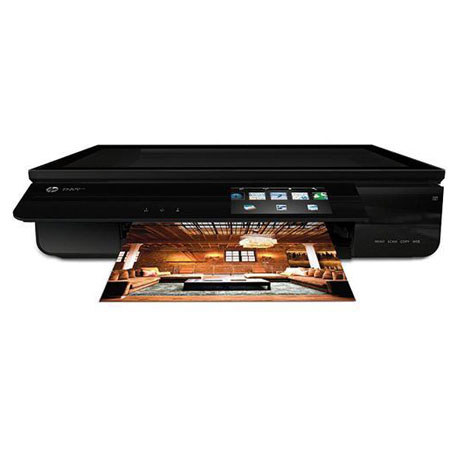
HP ENVY 120 Wireless e-All-in-One Inkjet Printer, 7ppm Black/4ppm Color, 1200 dpi, 80 Sheet Tray - Print, Scan, Copy
SKU: IHPE120
This item is no longer available.
Share:
Overview
Compare
Learn
Specs
Protection
Reviews about this item
Review Summary
2016-06-21T20:00:00
Rated 5 out of 5
the envy is a good rrinter
the envy 120 is a good printer for me and it is a happy rrinter
fishing
Originally posted at
2016-04-20T20:00:00
Rated 1 out of 5
Very pretty Lemon. Malfunctions all to often!
I bought the Envy 110... but it broke down too often and later when I wanted to repair it HP charged also the same price as a new print. I decided that this was HP's one and only lemon and upgraded to the 120... foolishly two... one for home and one for my office. Nice executive printer for my desk. Looks lovey but it to is a lemon. Scanner stops working all of the time. Plus... the us the #60 print cartridge which is an older model... in a very new printer... do now many stores are not stocking it... instead they all have the 61, 62 & 63 cartridges. Not happy with HP.
UnhappyDavid
Originally posted at
2014-08-22T20:00:00
Rated 5 out of 5
This Printer is easy to use.
This printer is easy to set up and use.. The features are good But there is no e-fax on it which I like and I use. I have two older models that I use and both have E-Fax. But it still a good printer.
Joyful20
Originally posted at
2014-07-28T20:00:00
Rated 1 out of 5
Looks cool, but that's it
Bought one, hooked it up and worked fine.... for 3 days. Then everything I scanned was a bunch of lines and wasted ink. Did the troubleshooting, ended up bringing it back for an even exchange on the same unit. This one lasted 2 days, and did the same thing. Would not scan or copy, just a bunch of colored lines. Needless to say did NOT try a 3rd one.....
Babs23
Originally posted at
2014-07-21T20:00:00
Rated 1 out of 5
Nothing but junk!
I can't believe that anyone would sell this product!! It's not worth bringing home. I had it six months and the scanner quit and today the front door broke off causing it to be impossible to use. I would never recommend this product.
geesh8
Originally posted at
2014-07-18T20:00:00
Rated 4 out of 5
Great Looking and Great Features
Granted I have had the printer for only several days, so I cannot address the issues some people might be having 6 months or so down the road. It takes a bit of time to set up properly, but with paying special attention to each step, everything is working. It was especially helpful to check out HP site (wireless printing) for help in addressing the firewall issues that I had. Their suggestions solved all my problems. The printer is SOOO sleek and stylish! I walk in my office now and wonder where did the printer go? The only reason it has 4 stars is printing is a bit slow. I don't have massive documents to print so it works great for personal use. Love the APPS also!
Steve58
Originally posted at
2014-06-23T20:00:00
Rated 1 out of 5
Artful piece of junk
This printer is so awesome, very stylish glass panel opens up and it prints fast and the scanner is fast, touch screen, wireless.. The first one lasted 6 months and the display on the front panel went out if you moved it 3/4 of the way open it worked. Then scanner printed nothing but a full page of ink lines. Did a reset and it actually fixed the scanner issue. So what the heck, it's under warranty, HP sent me a refurbished printer. This one lasted for 6 more months and the front panel stopped working all together, no lights, no touch. It still worked as a printer if you sent a print job from your PC. Then if you tried to scan from the PC it was back to a full dark page of nothing. I am so disappointed in the product I felt I had to write a review. If this printer worked as good as it looked HP would have had a hit!
chuggins2000
Originally posted at
2014-05-04T20:00:00
Rated 4 out of 5
Stylish Printer
I got this printer because I wanted something wireless and that I could print from my iphone, ipad, etc. Unfortunately, I had to send it back due to a defect with the output extender tray but HP customer service sent out a new one in no time flat and the replacement printer is working great. No issues with set-up, print quality is good. Although it's a heavy printer, I like the size and easy to read display.
Jolene39
Originally posted at
2014-04-16T20:00:00
Rated 1 out of 5
best looking worst performing...
Bought it as it is so good looking it does not need to be hidden. scanner/copier always trouble or simply not working. On 3rd unit and now the entire thing is not working. I still love the way it looks...
GHHnyeh
Originally posted at
2014-04-04T20:00:00
Rated 3 out of 5
Greater printer, but bad scanner
This is my 2nd HP Envy 120 e-All-In-One printer. I love the solid construction and printing capabilities. I does everything I need for a home office, however the scanner stopped functioning after only 14 months. The scanner started scanning all black pages or pages that were black with colored stripes. I found a remedy online, but it only worked a couple of times. I found that others also had the same problem. I bought another Envy 120 because I had already stockpiled many HP60XL print cartridges which I did not want to waste. Let's hope this printer/scanner lasts longer. If so, I will be satisfied with it.
SteveCT
Originally posted at
2014-03-10T20:00:00
Rated 5 out of 5
Help
I'm not a tecky and i bought this great product. Problem is, I can't figure out how to use a lot of the features. Help!!!!
Papa101
Originally posted at
2014-03-09T20:00:00
Rated 3 out of 5
Scanner issues ???
This was a great compact printer until the scanner bulb went out less than year in use. Printer isn't worth keeping after a major feature goes out? HP wasn't much help, mostly because they wanted disagree on when we purchased the printer from Staples for warranty purposes. HP serial # told HP the printer was 1-1/2 years old but our receipt from Staples clearly stated when purchased the printer less than a year.
willcox2014
Originally posted at
2014-02-06T19:00:00
Rated 5 out of 5
HP ENVY 120 e-All-in-One
Its hard to find equipment of any kind that will do several things well much less very good. This is a great printer that is very verstile!!! A Must Buy
Newry
Originally posted at
2014-01-24T19:00:00
Rated 5 out of 5
At last, a printer that just prints & copies!
This printer is very sleek, about the size of a dvd player. It just prints and makes copies. Which is just what I wanted. I did not need yet another fax or scanner. And the size of the do everythings are just enormous. Additionally I find that the more features you have the more potential problems you may have. It was simple to do the set up and to hook it up for wireless printing. It now sets on my desk while my computer goes all over the house. So far the range has been excellent no matter what floor I am on. As there are only three ink cartridges the cost is also less than my old printers which required 5 or more. I primarily do office copies in black and white so it was so wasteless to have a printer which made fabulous photo quality copies. I kept that printer, but put it in the closet and will get it out only when I need photo quality. I particularly like the touch screen control pad. It is very easy to use. Best of all it will show you how to do a task on the screen which is far easier than figuring out online instrucions.
kcasey75
Originally posted at
2014-01-22T19:00:00
Rated 2 out of 5
Nothing But Trouble (and an Ink Hog)!!
I bought this printer two months ago from Costco and have another month in which to return it... and likely will be doing just that. I read numerous reviews before purchasing this printer, and several people said they experienced frequent paper-jams. Ditto for me! Not only does the paper jam when printing with good quality ink jet paper, but I can not get it to print on ANY weight of cardstock! The specs say it will print up to 110 lb cardstock, which is why I bought this printer, but I can't even get it to print on 65 lb cardstock without a paper jam. The paper tray really seems to be "struggling" to move in and out (likely worn from so many paper jams). THIS IS ALSO A HUGE INK HOG! I probably print around 100 pages/month and in one month's time had already fed it over $70 in ink (and in two months time the cartridges are really to be changed again)!!! I am using HP high yield cartridges, not the standard cartridges or a "knock off"/recycled product. I am extremely disappointed with this purchase.
WausauSue
Originally posted at
2014-01-21T19:00:00
Rated 5 out of 5
Great printer!!
Perfect size, quiet, and a marked improvement over my previous Deskjet D110. Easy to set-up and wireless connectivity for three PCs/Macs accomplished without a problem. Highly recommend for any home requirement.
4bill
Originally posted at
2014-01-13T19:00:00
Rated 2 out of 5
Great features but not reliable.
I have had nothing but trouble trying to use the print and scan features of the printer. Either the printer failures to recognize the computer (MacBook Air) or the computer fails to recognize the printer. Both are set up to run wireless on the same network and each one works fine with my router. Customer service is great and is working with me to fix the problems but any fix has only worked for a short time. I've had to uninstall the software twice and reinstall and that does not solve the problems. When the two work together as they are supposed too, the scan and print features are very good, but they are not reliable. One time they work and the next time I try to use either feature I may get a failure to connect with each other. My son has the ENVY 110 and I can go to his house and use the ENVY 110 without any problems. That is the reason I was interested in the newer ENVY 120. So far, I have been very disappointed with the purchase and I will return the printer if I can't get these problems resolved.
Lion73
Originally posted at
2014-01-11T19:00:00
Rated 4 out of 5
Efficient piece of equipment
I have found the ENVY120 easy to use. I like the double sided printing option. The only down side is small quantity accommodated by the paper tray.
lar1z
Originally posted at
2013-12-31T19:00:00
Rated 2 out of 5
Not happy
I was so excited to get this state of the art printer to replace the multiple printer/scanner/copiers we had in our house. I was even more excited that it was wireless and we would finally be able to print regardless of the status of a host computer, and from any device. My excitement came quickly crashing down when I tried to print my husband's end of year business forms and discovered that this printer DOES NOT PRINT LEGAL size pages. Seriously HP????? I can print two sizes of Japanese envelopes with this printer but not an American size of paper?? I've been a HP brand loyal customer for 20 years and every printer I ever had always printed legal size. I bought this expensive printer at an online retailer and have already set it up, so returning it would be more of a hassle than I want to deal with. I'm hoping that the other nice features will redeem the fact that I will have to drag out the old printer every time I want to print legal size.
WhatAGal
Originally posted at
2013-12-25T19:00:00
Rated 1 out of 5
bought 2, both scanners failed after little use
Don't waste your money. I purchased two of these machines for my agency to use at off-site adoption events. Both machines sat in their boxes in a cabinet for a number of months before being used. Finally, one went to an off-site event and worked fine the first time. Two weeks later, we discovered that the copy/scan capability was not working. It produced solid black page or black and white lines on the page. Went through the troubleshooter to discover that the scan lights weren't working and the machine needed to be serviced. It had been used a total of 6 times. Service quote was triple what I paid for the machine. Took the second machine out of the box to use - the exact same problem, can't copy or scan - lights won't work. This second machine had been used a total of ZERO times (with the exception of one time when initially setting up the printer). Tried to contact HP and discovered we were three weeks passed the one year warranty on both machines. WASTE OF OUR MONEY and we are non-profit.
SPCA
Originally posted at
2013-11-20T19:00:00
Rated 5 out of 5
My Perfect Printer
I had been looking at this printer for some time now and normally it sells for 250.00 but when I saw it was on sale and also I could get an additional 30% off? Thats a 250.00 printer for only 162.36! Outstanding! It was easy to set up, and is wireless. A little slow but for 162.36!!! Oh yes.... Thank you HP.....
YBau
Originally posted at
2013-10-23T20:00:00
Rated 5 out of 5
Excellent product & price
I'm very pleased. Read and follow setup instructions carefully and setup is a breeze. Wireless printing very convenient in a multi-computer household. Printing pdf files are a bit slower than Word documents but manageable.
Frank2607
Originally posted at
2013-10-22T20:00:00
Rated 5 out of 5
Sleek Product with Great Wow Factor
Nicely designed, stylish product with robust feature set including automatic duplexing and touch screen front panel. Automatic WiFi setup was easy and flawless. Printing, scanning and copying functionality meet all my expectations. Buttonless design, compact size, retractable control panel, and retractable paper tray make this a very attractive unit that blends in well within a residential environment.
cecisme
Originally posted at
2013-10-17T20:00:00
Rated 5 out of 5
Love it
I really like the size and quality of this item. And the final product is very crisp and clear. One of the best printers I have ever owned. The only thing it lacks is FAX
fanci
Originally posted at
2013-10-17T20:00:00
Rated 5 out of 5
Great Printer
Love this printer, easy setup, sleek looking, works great and quiet Only thing I don't like is it does not hold a lot of paper and I add paper a lot, but I can get over this because the printer is fantastic
joyfulone
Originally posted at
2013-08-19T20:00:00
Rated 5 out of 5
This printer is high tec!
LET ME TELL YOU, IF YOU ARE LOOKING FOR A PRINTER THAT LOOKS GREAT AND CAN DO EVERYTHING YOU CAN THINK OF FOR THIS DAY AND AGE. THAN THIS IS THE PRINTER FOR YOU. TRUST ME YOU WILL NOT BE SORRY!!!!!!
HT21
Originally posted at
2013-08-07T20:00:00
Rated 1 out of 5
Horrible printer!
Honestly, this is probably the most confusing product I have used from HP. It's extremely difficult, especially when it comes to properly printing photos. I would NOT recommend this product if you want something simple! If you're tech savvy, then by all means have at it. If you want a printer that can just get the job done, this is definitely not it.
Kirstenash
Originally posted at
2013-08-04T20:00:00
Rated 1 out of 5
I Don't care for this printer..
I Wanted just a "plain, good working Printer" (all-in-one), like I have purchased in the past. THIS IS NOT IT !!! Perhaps if I were a twenty or thirty something person, this would appeal to me..BUT I'm nearly 70 and DO NOT LIKE or Care for "High Tech" stuff, and that's what this Is...THIS is the printer I Had to buy in order to still use the INK I had bought for my Other printer that I Loved..F-4400!! Now That was a Printer!! Unfortunately it "died", and I was told HP no Longer Made that one! More's the Pity!! That's the one I Want!! PLEASE GET IT BACK !!
k317
Originally posted at
2013-07-30T20:00:00
Rated 5 out of 5
Nice product
I love this new Envy 120 except for the advertising on the graphic screen!! I do not want the HP Connected apps and can not get them to delete!!
Amphibious66
Originally posted at
2013-07-29T20:00:00
Rated 5 out of 5
This is an awesome product!!!
For my printing needs at home, I don't really need the power of a laser printer. Yet I was a bit hesitant to buy an inkjet because my previous ones have been too slow and klunky. I took a chance and ordered the ENVY 120 e-All-in-One Printer. I simply love it. It is so quiet, looks so attractive, has so many features I had not imagined would be offered on an inkjet--duplex printing, speedy, quite, clean printouts, beautiful color photos. And the greatest thing is the way the paper is kept inside the printer like a tray inside a laser printer, so it doesn't stay outside and collect dust while it's not being used. And finaly, so FAST I can't believe it. This printer really exceeded my expectations!
JSABET
Originally posted at
HP 120 Specifications
Related Articles & Videos
About HP 120
The HP ENVY 120 Wireless e-All-in-One Printer's sleek design and versatility for premium printing in any room provides printing designed to fit your life. It adds elegance to any room with paper trays extending and retracting so your printer maintains its sleek style. Plus, avoid interrupting conversations, disrupting quiet time, or disturbing the house with this whisper-quiet printer and charge your iPhone from the easy-access front USB port optimized to power your device.
With the HP ENVY 120 scan, copy and access the web plus print lab-quality, fade-resistant photos perfect for framing. You can scan straight to your e-mail account and preview your scans with the convenient see-through lid. Tap and swipe to browse through a library of free apps, using the 4.33" color touchscreen and automatically print two-sided documents. You will even be able to save on supplies with high-capacity inks and HP Value Packs. The HP ENVY 120 also provides wireless printing and connectivity-on the go.
What's in the box:
- HP ENVY 120 Wireless e-All-in-One Printer
- HP 60 Black Ink Cartridge
- HP 60 Tri-Color Ink Cartridge
- Power Cord
- HP 1 Year Warranty