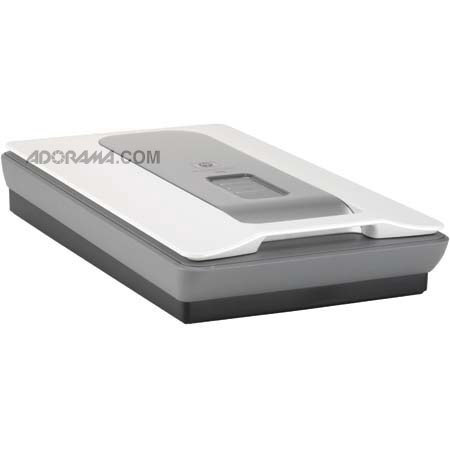
HP ScanJet G4010 Document Flatbed Scanner, 8.5" x 12.3", 4800-dpi, USB Interface, for Mac & Windows
SKU: IHPG4010
This item is no longer available.
Share:
Overview
Compare
Learn
Specs
Protection
Reviews about this item
Review Summary
2012-06-30T20:00:00
Rated 1 out of 5
Did not work
Have 3 - none of them worked
Dad1
Originally posted at
2012-06-12T20:00:00
Rated 5 out of 5
Very nice scanner for the price.
1. Very good quality 2. Very fast scanning 3. Very nice price
Mital
Originally posted at
2012-04-20T20:00:00
Rated 2 out of 5
Boy what a junk
1) Slow even with lamp always on but, let's not discuss about this. 2) Hard to scan a dark slide. You need to accept the dark (black!) little square G4010 gives you back and than manually work it out to make an acceptable image. 2.1) TAM is a cumbersome slide system: either you have the space to open the cover at 180 degrees, or when removing slides, either you put your fingers or your nails on the film or you touch and dirty the miirror and slides drops everywhere. 3) Use it as a photocopy machine and it works fine, but.... try to save in pdf a doc: it doesn't give you back an A4 doc, but a doc of a size corresponding to the G4010 full size screen!!! Which means you than need to manually cut away the exeeding stuff all around the doc!! 4) Has anyone ever succeded to get multiple pictures in one pass? Anyone can help on 3 and 4? Thank you very much. Should the above not being enough not to buy, ask me, I can give you more.
BoboKappa
Originally posted at
2012-03-21T20:00:00
Rated 1 out of 5
Worse scanner I ever owned!
I purchased this scanner over a year ago. I was told it was Windows 7 ready. NOT!! Had to call tech help, they talked me through installing a driver. I have had so many issues with this piece of junk. Last month I called tech help. He diagnosed my scanner, before I told him what was going on. I would assume they had received a number of calls about this piece of junk! He tried to sell me a new one, and wanted me to send this one back. I told him I would buy one local and junk this one myself. I would not recommend this scanner to anyone!
browneyes
Originally posted at
2012-03-14T20:00:00
Rated 5 out of 5
Yes
Finally a good picture scanner.
1213
Originally posted at
2012-02-12T19:00:00
Rated 1 out of 5
JUNK
PURCHASED MODEL G4010 TO REPLACE A MODEL G3110. THE OLD SCANNER WAS GREAT BUT WOULD NOT WORK WITH MY NEW PC. G4010 IS A PIECE OF JUNK ! TRIED TO GET HELP FROM PC TECH SUPPORT FOR THREE HOURS, JUST GOT TRANSFERED OR HUNG UP ON. NOW RETURING THE SCANNER AND THE PC. WHY WOULD I WANT TO SPEND $1000.00 FOR A THING THAT IS NO GOOD !!!!!!!
SIRJAMES44
Originally posted at
2011-08-27T20:00:00
Rated 1 out of 5
Not-so-Good
The G4010 Photo scanner is supposed to scan multiple photos. And, once in about every hundred attempts it does. I had a G4050 model prior to the 4010. The 4050 did multiple photos reliably. I wanted a slightly smaller sized machine so after the G4050 failed after 1 year and 11 months, I bought the G4010. The G series machine scan quality is good - reliability not so good. I am no longer a fan of the HP scanners due to my disappointing experience on two machines. Why won't the G4010 scan multiple photos?
scjake
Originally posted at
2011-08-02T20:00:00
Rated 3 out of 5
Works fine but I have questions
I have just completed scanning 698 pics and have lots more to go. My problem is that they are all in a file called "Scanner Input". How do I move them into other folders? I find the operation a bit clumsy especially keeping the pic in the corner and covering over the flat bed. I have never tried any other brand so I can not compare. The output is excellent so I have no complaints there. I just do not know how to manipulate the final products. HELP!!!!!!!!
HerbNYC
Originally posted at
2011-07-27T20:00:00
Rated 5 out of 5
Overall excellent
I prefer the HP scanners for their ease of set up, quality and quality of scanning, I have had 3 over the years that I wore out, each lasting 4+ years of hard use.
Chuck611
Originally posted at
2011-05-05T20:00:00
Rated 5 out of 5
All in one excellence
When you have been used to top of the line scanners, but are in a retirement community with no space for separate scanners and yet need to scan slides, photos and even 3D images, (i.e. flowers) this scanner does it all. It does everything I need for the Internet and even is fine for professional work. If you are a teacher this is a great buy!
Sonya
Originally posted at
2011-03-13T20:00:00
Rated 5 out of 5
Great scanner: One on each side of the ocean
I have a G4010 Scanner at my home in the US and love the quality of scanning and the flexibility of documents, slides, or negatives. I work overseas most of the time and needed a new scanner. It took some time to make arrangments to complete a purchase here, but I chose this scanner over other available scanners because of my very satisfactory experience in the past. This is a good personal or business-duty scanner.
LarryCS
Originally posted at
2011-03-03T19:00:00
Rated 1 out of 5
Sorry I bought it
I bought the scanjet G4010 at the same time as a new HP windows 7 computer. But the scanjet does not support windows 7. Hp support managed to get it to work. However, it no longer works, and HP won't try to fix it without charging for it. Not worth it! It's a hardly used dead horse, waste of money.
Camper
Originally posted at
2010-10-07T20:00:00
Rated 2 out of 5
G4010 software problems
I've been a user of Scanjet flatbed scanners for more than 10 years and they have generally functioned quite well. Using them is divided into the hardware and the software components. The hardware components in general do quite well while the supporting software part has been variable. At present I'm using the G4010 scanner which has lots of capabilities. I first installed in on my older Dell Dim4400 PC and it works well to this day. I've had a number of problems with installing the software on my Dell Inspiron530. It started out ok but there was a defect with the hard drive that required me to exchange that drive. The new drive had the Windows XP OS already loaded and I then reloaded all of my applications and files. However it was very difficult to load my software from the CD this time. In fact I have not been able to load it to this date and operate the scanner on the newer Dell so I only use it on the slower, older Dell. I've tried to get some support help but the HP tech, in my opinion, was not not interested and gave me a brush off. I feel that with a technical problem like this, I should not have to pay extra $$ for them to help me install their software. In fact, it appears they have about 3 different versions for the same scanner on the HP website, which does not help the client. As a result, my rating for the hardware is very good but for the software is not so hot.
olduserofScanjets
Originally posted at
2010-09-03T20:00:00
Rated 5 out of 5
Nice Scanner
The G4010 makes good quality copies of documents and color images. It even can copy newspaper text and make it readable. I scanned some 35mm negatives and got reasonable results but it takes time if you choose one of the higher dpi settings (in fact I canceled the 4800 dpi scan after 1.5 hours...it was about 80% complete). That might be an issue with my computer. I have an Intel i7 processor with 12GB memory running Windows 7. For the price, this a great scanner if you want a single sheet feed flatbed scanner.
waynej
Originally posted at
2010-02-05T19:00:00
Rated 2 out of 5
yancey112
Have had this since 8/17/2008 - seemed to work fine until 9/1/2009 - then I had so much trouble!!! On line help did some good but I still had many problems. Installed Windows 7 10/24/2009 and then the fun began. Called and also looked on line for drivers - Nothing. HP people said there were no drivers for this scanner to run on "7". So here I am - thousands of old negatives to scan and no scanner - out $149.00. Don't buy this if you have "7".
yancey112
Originally posted at
2010-01-29T19:00:00
Rated 1 out of 5
Lack of Windows 7 support
I bought this initially to work with aPC Windows XP. The install didn't work smoothly but as I had a new desktop on order I didn't bother to complete the install. Now the new desktop run Windows 7 and I have been very dissapointed to find that the G4010 is not supported on Windows 7 yet
Hadd
Originally posted at
2009-12-24T19:00:00
Rated 1 out of 5
Replacement
My Scanjet 5470c failed and was replaced by this Scanjet G4010. Pros: 4 button feature. Cons: Slow, bulky, noisy, goes thru a series of programs to do a scan and view. Does have a preview feature but not readily accessible. Cannot work directly with scan. Prints in landscape even when document is selected. Very disappointed, unit is going back to store.
Deuce22
Originally posted at
2009-11-21T19:00:00
Rated 4 out of 5
Not a bad machine
I've owned this unit since I upgraded to MS Windows Vista (shortly after it was released - my old scanner didn't work with Vista - arghhhh!) and have had good operation since I installed it. Scanned negatives well and few problem with photos (I've been converting about 38 years of photos to digital over the past year or so). Note: Occasionally (rarely - maybe one or two of a hundred) I've had to redo a pic because of a color variation (a shadow image in blue), but other than that, no complaints. I plan on upgrading when I find something faster. But for now, I'm happy with this unit.
justjohnk
Originally posted at
2009-10-24T20:00:00
Rated 1 out of 5
Intially good
I reviewed many products and reviews before buying the HP G4010 Scanner. It appeared to be the best product for the features and cost. Initially it did not work well with VISTA, but that was more an issue with VISTA. I liked the quality and features of the scanning. Unfortunately it quit working about 10 months after buying it, the slide mechanism quit working. At this point, I don't know if other products are as poor in quality, but HP will not on my list for a replacement product.
DeanB
Originally posted at
2009-03-02T19:00:00
Rated 2 out of 5
Had some trouble.....
When purchased, box said ready for WinVista. Had to wait for it to be written and available. Would only do basic functions until then. Had to download large software file. Works well for awhile and then things start to go wrong. Fails at times, to copy multiple photos in one scan. Software, HP Solution Center, would ask to be installed and warn no disk available. After much manipulation it would then load and work. Just uninstalled entire software for scanner and re-isntalled with disc ordered for $10 from HP. I also get a cross hatch or dithered pattern when copying some photos. I was able to copy most of my slides with generally good results. The software has a lot of trouble recognizing slide image borders. The scanner also "hangs" at times. I'll see if in the next few weeks, the software starts getting "buggy" again.
ken10
Originally posted at
2009-02-17T19:00:00
Rated 2 out of 5
G4010
I HAVE BEEN A COMPUTER JOCKEY SINCE THE EARLY 1980s. THIS IS THE BIGGEST PIECE OF JUNK I HAVE ENCOUNTERED. IT TAKES FOREVER TO SCAN A DOCUMENT AND NO MATTER HOW MANY COPIES I TRY TO PRINT, I ONLY GET ONE. FOR EVERY COPY I WANT I HAVE TO SCAN THE DOCUMENT. MY RECOMMENDATION IS TO AVOID THIS SCANNER.
VONDY
Originally posted at
2008-12-03T19:00:00
Rated 1 out of 5
A Dog
I find most of the The HP Scanjet G4010 features to be so cumbersome that I do almost all of my photo editing in photoshop. There is a consistent blue fog around the edges of the glass bed, with a bright area in the center, so the actual scan area is way less than the 8.5x11 inch dimensions. Its a bear to clear this mess up in Photoshop. Also, sometimes the scanner arbitrarily flips my image to the left and off the scanbed entirely. Its very frustrating. This is the second HP Scanner I've owned and I would never buy another.
KateM1234
Originally posted at
2008-10-26T20:00:00
Rated 1 out of 5
Scanner Lid Is Flawed
The lid of my scanner has a center strip for negatives. The strip has HP images on it. For a document scan, not a negative scan, the HP images on the strip show up in some of my scans. Can I get a lid without the center strip? Or something to cover up the center strip? Answer you have to put a sheet of white paper overtop of your scan to cover up the center strip HP images. I would not buy this product because of this design flaw.
TeddyKaye
Originally posted at
2008-02-03T19:00:00
Rated 3 out of 5
HP Scanjet G4010
I had the G4010 installed in my PC and it worked superbly. I now have a Mac, the latest version, and I cannot install the G4010, having used all the advice in Troubleshooting not withstanding. I would recommend the G4010 to my friends who have PCs, but not to those with a Mac.
Pointman
Originally posted at
2008-01-04T19:00:00
Rated 2 out of 5
Poor transparecy images
I had to replace my scanjet 5300C because HP did not support a vista driver. The scanjet 4010G was little improvement scanning transparencies because the focus was so poor loss of detail was evident and essential use of focusing software only ruins the tones of shade and colour.
Bushy
Originally posted at
2007-12-31T19:00:00
Rated 1 out of 5
I want *.pdf format
I bought this because I wanted to be able to scan into *.pdf format It appears that WINDOWS VISTA users do not get that capability. On the box and the Staples website, I saw no warning that this could not be done.
WantsPDFFformat
Originally posted at
2007-10-24T20:00:00
Rated 4 out of 5
Being a very early adapter is dangerous
I received the G4010 on the 23rd after ordering it the previous Friday. I didn't read the reviews here before ordering but when I did, I noticed the complaints about operating under Vista. I went ahead and downloaded the software and drivers in anticipaiton of the problems noted by others (DSL broadband). When the scanner arrived, I quickly set it up and tested it. No problems were encountered, but the 2 CDs had the updated drivers, at least as best as I can tell. I'm a little confused by having two programs with the same name, HP Photosmart Essential and HP Photosmart Essential 2.0 (auto updated to 2.5 yesterday). Also I'm a bit frustrated by having no seperate manual on the IRIS OCR. I've always been satisfied with HP products athough they are a bit pricey direct. Support has been good over the years. BTW, I don't give 5 stars since that indicates perfection. 4 stars is the highest rating I'm going to give on a 1-5 scale
KentinMusicCity
Originally posted at
2007-10-17T20:00:00
Rated 4 out of 5
Scanjet G4010 Photo Scanner
I am satisfied with the functionality of this scanner. Although the product info and the packaging labelling stated that the scanner is Vista certified, the HP Scanning Software 8.2 that wasincluded with the scanner is not comp[atible with Windows Vista. Free download of Vista compatible software and driver file HP_Vista_SF_Ph2A.exe was secured from HP website. Novices may not go further than the incompatibilty notice displayed when software loading is attempted. The HP Photosmart Essential software is too basic. A somewhat sofisticated photo editing software was anticipated for this PHOTO SCANNER.
Geeber
Originally posted at
2007-08-04T20:00:00
Rated 1 out of 5
Scanjet G4010
I just received this scanner and tried to set it up. The only problem was the CD that was included with the poduct didn't work. Have to go the HP website to download the software and drivers. This is a problem if you have a dial-up connection which would take about 24 hours to load. They don't have a CD available so you can download it directly.
jsk1215
Originally posted at
2007-05-25T20:00:00
Rated 1 out of 5
Compatibility Issues
The Scanjet G4010 has extremely limited functionality when used with a computer running MS Vista Ultimate. Film and negative copying functions will not work. Scanning to PDF documents will not work. OCR document copy features will not work. Accompanying software will not load. Support website only has very limited functionality program and drivers to provide. No approximate time is given for software/driver full product functionality availability.
d1b2
Originally posted at
HP Scanjet G4010 Document Flatbed Scanner, Mac/Windows Specifications
Related Articles & Videos
About HP Scanjet G4010 Document Flatbed Scanner, Mac/Windows
Getting superior color accuracy and high-definition images is easy with 4800 x 9600 dpi and 6-color, 96-bit scanning. The Scanjet G4010 Photo Scanner is ready to deliver, whether you're restoring old photos, converting slides to digital photos, or copying documents.
Automatically remove red eye and enhance detail in dark photos with HP's Real Life technologies. Remove dust and scratches from photos, slides, and negatives with the included software. You can preserve documents digitally with clear, archival quality scans of important documents.
Join VIP PRO
Earn 2X Points + Exclusive Perks!
Request a Callback
Chat one-on-one with an expert
Sell or Trade your Gear
Get started in 3 easy steps
What's in the box:
- HP Scanjet G4010 Photo Scanner
- USB Cable
- Power Supply Adapter/Power Cord(s)
- CDs (Include Software and User's Guide)
- Setup and Support Guide
- I.R.I.S. Registration Flyer
- HP 90 Day Warranty